SSOGEN / Learn / Oracle MCP Servers: What Exists and Who the Actions Belong To
Integration
Oracle MCP Servers: What Exists and Who the Actions Belong To
Oracle publishes several MCP servers. They differ in how each signs in and in whose name the database records when an AI agent acts.
An Oracle MCP server is a program that exposes Oracle data or operations as tools an AI agent can call over the Model Context Protocol.
As of 2026-10-11, Oracle documents servers for Oracle AI Database in four forms (SQLcl, Autonomous AI Database, OCI Database Tools and ORDS), plus OCI service servers and Oracle Integration.
Their sign-in models differ, and so does the fact that matters most for ERP data: whose name the database records when the agent acts.
If the term is new, start with what an MCP server is.
What Oracle publishes today
Oracle’s own MCP servers page (read 2026-10-11) sorts the database options into three deployment models:
- SQLcl. For local workflows.
- OCI Database Tools MCP server. For managed deployments.
- ORDS. A built-in endpoint for streaming HTTPS.
It also lists a MySQL server that Oracle calls a proof of concept, not meant for production, and a set of OCI service servers (Cloud Guard, Compute, Identity, Logging and others).
The page names no server for E-Business Suite, PeopleSoft or JD Edwards. For Fusion Applications, Oracle’s documentation goes the other direction.
In AI Agent Studio you add an MCP tool that connects an agent to an external MCP server. You pick a transport and a credential type for that server’s own sign-in.
Oracle also documents Oracle Integration as an MCP server:
- One server per project. Each project becomes one server.
- Discoverable tools. Only integrations registered as agentic AI tools are discoverable.
- Security. OAuth 2.0 with a confidential client holding the ServiceInvoker role.
Oracle MCP options compared
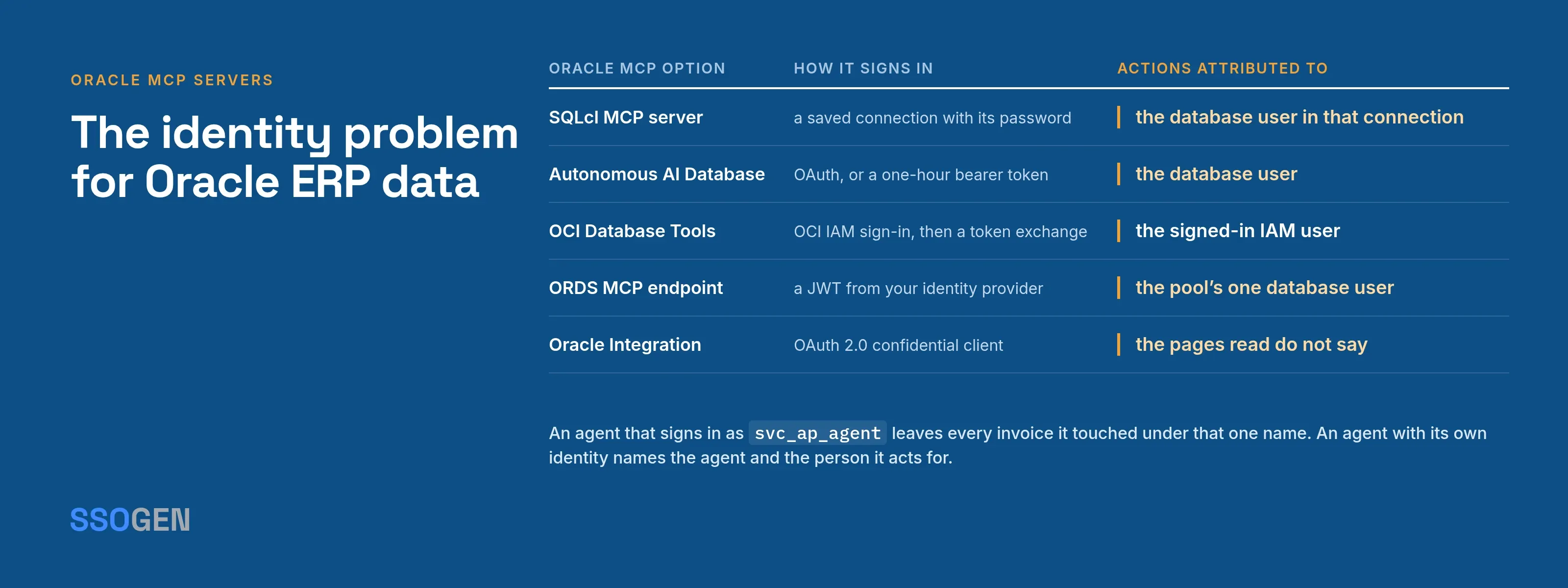
The table records what each Oracle document says, read 2026-10-11. The last column is the point of the page: the identity that ends up in the database or audit log.
| Oracle MCP option | What it exposes | How it signs in (as documented) | Actions attributed to |
|---|---|---|---|
| SQLcl MCP server | SQL, PL/SQL and SQLcl commands against saved connections | A named connection saved in ~/.dbtools with its password stored (-savepwd) |
The database user in that saved connection |
| Autonomous AI Database MCP server | Select AI Agent tools such as list schemas, list objects, object details, read-only SQL | OAuth, or a bearer token requested with a database username and password, valid 1 hour | The database user; Oracle’s concepts page adds audit by username and tool name and a context for row-level policies |
| OCI Database Tools MCP server | Built-in tools plus custom SQL and PL/SQL tools | OAuth 2.0 through OCI IAM sign-in, a short-lived token, then a scoped, time-bound database token exchanged on the user’s behalf | The signed-in IAM user, carried to the database as a globally identified user |
| ORDS MCP endpoint | Discover databases, inspect schema, run SQL and PL/SQL | A bearer JWT from your own identity provider, checked against a configured issuer, audience and keys | The database user of the connection pool |
| Oracle Integration MCP server | Integrations registered as tools, one server per project | OAuth 2.0, confidential client, ServiceInvoker role | The pages read do not say |
Two rows show the split. The ORDS configuration guide says the user chosen for an MCP database pool “will be the user used to execute all MCP Tool requests”.
A scope or a role on the token decides who gets into the pool, while the database sees one account.
The OCI Database Tools server goes the other way. Its authorization page describes a token exchange so the server acts in the user’s context without sharing a password.
Its auditing page records the principal name from the token on each InvokeMcpServer event.
What Oracle’s documents say about permissions
The risk. Oracle is blunt about it. The ORDS MCP guide warns that giving a large language model database access can expose sensitive data if it holds excessive privileges.
The advice. It recommends least-privilege accounts, a sanitized read-only replica where possible, and regular review of the SQL executed.
ORDS review aids. To help with that review, ORDS sets the session module to the model name and the action to the tool name. It writes every interaction to a DBTOOLS$MCP_LOG table and tags generated SQL with a comment.
Autonomous AI Database. Oracle’s guidance suggests a two-schema layout and row-level policies bound to the user context.
The limit. These controls are strong inside the database, and they all start from a database account. None of them is an agent registry with an owner, an expiry and a kill switch.
The identity problem for Oracle ERP data
Say you point an agent at an Oracle ERP through any of the shared-account patterns above, or through an integration user in the application itself. The agent signs in as svc_ap_agent.
Every invoice it reads, every purchase order it touches and every approval it triggers is recorded under that name. Six months later the audit trail says “the integration account did it” and nothing more.
The usual consequences:
- No owner. The account belongs to whoever created it, often someone who has left.
- A long-lived secret. A saved password or a static key works until someone rotates it, from anywhere it has been copied.
- One blast radius. To let one agent approve invoices, you grant the account that right. Every other agent sharing the account gets it too.
- No stop button. Disabling the account stops every agent on it, so teams hesitate.
An agent with its own identity fixes each point. The agent:
- Registered. It has named owners and an expiry date.
- Own key. It holds a key it never shares.
- Short credential. It gets a credential that lasts minutes.
- Listed tools. It can use only the tools you listed for it.
When it acts for a person, the person’s consent is part of the record. For the general pattern, see MCP authentication and AI agent identity.
How SSOGEN handles this for Oracle EBS
Identity and checks. SSOGEN gives each agent that works with Oracle EBS its own identity and checks every tool call it makes.
Setup. The setup is in our guide, MCP server authorization for Oracle EBS agents, and it works beside any Oracle server above.
Your MCP server. Your MCP server for EBS, written by your team or a vendor, connects to EBS with its own service account in EBS and accepts connections only from the SSOGEN Gateway.
MCP Gateway. The MCP Gateway sits in front of it and decides each tool call.
The agent. The agent is registered with owners and a key. It gets a token that lives about four minutes and is bound to its key.
Scopes. It can call only the tools named in the scopes it was granted. A tool in no scope gets a 403. Sensitive scopes, such as approving an invoice, need a person’s approval each time.
Attribution. Attribution is built in. Your MCP server receives no token; it receives verified headers naming the caller: the agent and, when the agent acts for someone, the person.
Limits. The MCP server maps that person to an EBS user. SSOGEN decides which tools an agent may call, and the server and the EBS account set limits on amounts and records.
Audit and control. Each decision goes in the audit log. Revoking one delegation, suspending one agent or removing one tool leaves every other agent untouched.
DPoP. Every request carries proof that the agent holds its key (DPoP), so the agent’s MCP client must support DPoP.
The user interface. To protect the EBS user interface as well, see Oracle EBS SSO.
A short checklist before an agent touches Oracle data
- Which database or application account will the data source see? If it is one shared account, write down every agent that will use it.
- Does the sign-in carry the person or only the account? OCI Database Tools documents user-context access; the other database options above run as a database user.
- Can you list the exact tools the agent may call, and refuse the rest?
- Does the credential expire in minutes or in months?
- Who owns the agent, and what is the one action that stops it?
- Where will the record of each call live, and can it name the agent?
Questions people ask
What is an Oracle MCP server?
Does Oracle have an MCP server for E-Business Suite?
How does the SQLcl MCP server sign in?
~/.dbtools store and that the password must be saved with the -savepwd flag for an MCP client to use it. The agent then acts as that saved connection’s database user.Is it safe to let an AI agent query Oracle data?
Where to go next
- Tool checks. The MCP Gateway page shows how tool calls are checked.
- Registration model. AI agent identity covers it.
- The owner’s decision. AI agent access to Oracle EBS sets out the controls to require before an agent goes live.
- Exact screens. The EBS setup guide has them.
- More guides. More guides like this live in Learn.
Sources, all read 2026-10-11: Oracle MCP Servers; Use MCP Server, Autonomous AI Database; MCP Server Concepts; SQLcl, Preparing Your Environment; Database Tools, Authorization and Authentication; Database Tools, Auditing; ORDS 26.2, Configuring MCP; ORDS 26.2, Using MCP; Oracle Integration, FAQs for Projects as MCP Servers; Fusion AI Agent Studio, Add MCP Tool.
About this page. SSOGEN Corporation prepared it from Oracle’s public documentation, last read on 2026-10-11. Products change, so check Oracle’s own pages before you decide.
Oracle, Oracle AI Database, SQLcl, OCI, Oracle E-Business Suite, PeopleSoft, JD Edwards, Oracle Fusion Applications, Oracle Integration and MySQL are trademarks of their owner. SSOGEN is an Oracle partner, but Oracle has not reviewed or endorsed this page.