SSOGEN / Hyperion SSO: Sign-In Options With SSOGEN
SSOGEN
Hyperion SSO: Sign-In Options With SSOGEN
The Web Agent in the web server in front of Hyperion signs people in under your policy, with MFA, and passes the user name Hyperion reads.
Hyperion SSO with SSOGEN gives Oracle Hyperion users one sign-in with MFA, and the application code does not change. The sign-in runs in the web server in front of Hyperion:
- People open the Hyperion address.
- The SSOGEN Web Agent sends them to SSOGEN to sign in under your policy.
- The agent passes their user name to the application.
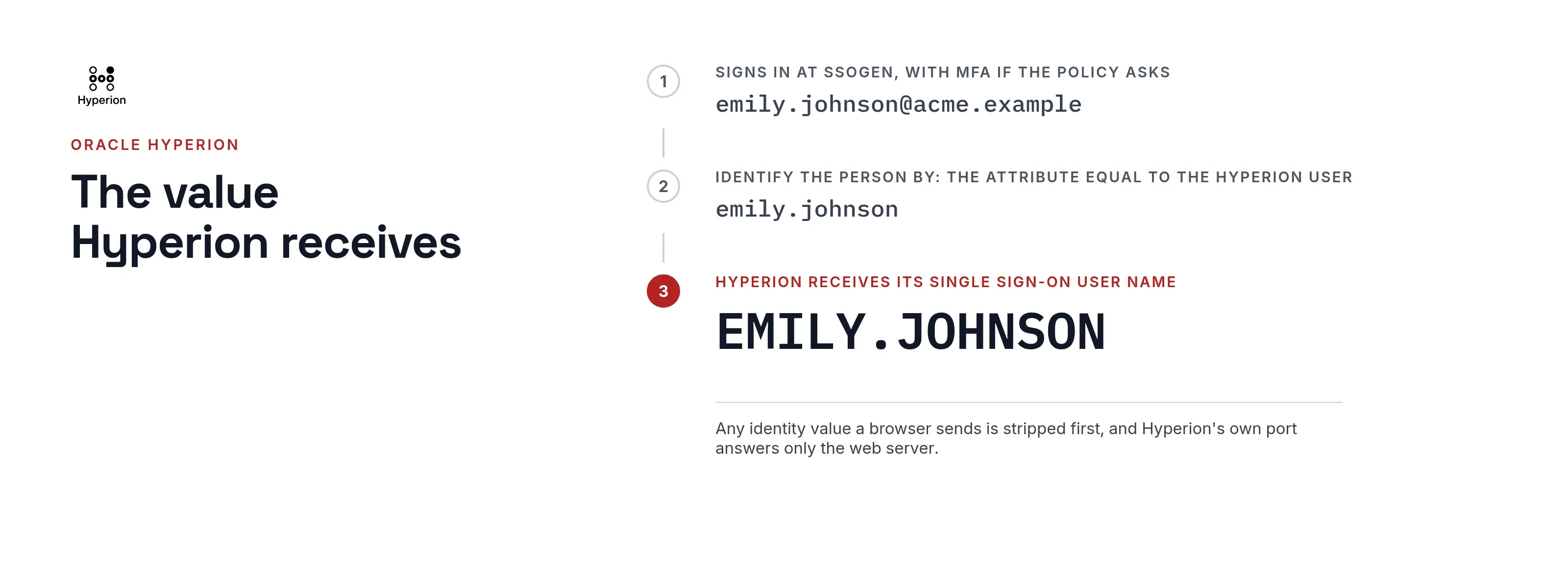
By default the agent sets the single sign-on user name Hyperion reads. Hyperion receives its login name in the form it expects.
The value Hyperion receives
The Web Agent sets these values on each protected request, always replacing anything a browser sent:
| What the agent sends | Value |
|---|---|
| The Hyperion single sign-on user name | The application user, in upper case |
| The standard user names | The same user, for anything else that reads it |
| The email | The email address, when known |
Under Identify the person by in the console, choose the attribute that equals the person’s Hyperion user name. The agent sends that value as the user.
The application’s Test tab lists the exact names and values for a person. The on-premise application guide covers the full setup.
Where Hyperion SSO can be set up
| Your Hyperion setup | Route |
|---|---|
| Served through Apache or Oracle HTTP Server that you control | SSOGEN Web Agent in that server |
| Behind a network where nothing can be installed beside it | App Proxy on the SSOGEN Gateway |
| An application or component that offers a SAML or OpenID Connect setting | A SAML or OpenID Connect application in SSOGEN |
The guide to choosing how to connect an application explains the order in which to decide.
Keep Hyperion behind the web server
The agent and the application communicate through request values, so the application must accept those values only from the web server:
- Restrict the application’s own port to the web server.
- Use a trusted network or TLS between them.
- Configure Hyperion itself to trust the value, using Oracle’s documentation for your release.
The agent strips any identity value a browser sends.
Policy, MFA and sign-out
If Hyperion is one of several Oracle applications you protect, they share one SSOGEN sign-in and keep separate policies.
- Policy. You attach the sign-in policy to the Hyperion application in SSOGEN.
- MFA. MFA and step-up rules apply without any change to Hyperion.
- Sign-out. A link to
/ssogen/logoutends the application session and, by default, the SSOGEN session too.
Questions people ask
Which identity providers work?
SSOGEN is a complete identity provider on its own. It also works with Microsoft Entra ID, Okta, Ping Identity, Keycloak or any other SAML provider you already use.
Is the same approach used for other Oracle products?
Yes. See Oracle EBS SSO, PeopleSoft SSO and JD Edwards SSO.
Where to go next
SSOGEN has put single sign-on in front of Oracle applications since 2016.
- Read the Web Agent page.
- Then read the on-premise guide.