SSOGEN / SSO Tools: Free SSO and Identity Tools in Your Browser
Free tool
SSO Tools: Free SSO and Identity Tools in Your Browser
Every tool is free, needs no sign-up and runs in the page, so a SAMLResponse or token you paste never leaves your computer.
When a single sign-on login fails, the cause is usually one value in a message you cannot see: a SAML response, a token, a metadata file, a key set or a one-time code. These SSO tools show you that value.
They are all free, need no account and run in the page. Nothing you paste goes over the network. SSOGEN built them for engineers who debug identity problems, whether or not they use SSOGEN.
Every free tool
| Tool | What it does | What you paste in |
|---|---|---|
| SAML tracer and decoder | Decodes a SAML message and checks audience, destination, expiry, status and signature facts | A SAMLResponse or SAMLRequest copied from the Network tab |
| SAML request builder | Builds a SAML AuthnRequest or LogoutRequest as XML, an HTTP-Redirect URL and a POST value, with checks | Your entity ID, the identity provider’s URL and the assertion consumer service URL |
| JWT generator and encoder | Builds and signs a JWT with HS, RS, PS or ES algorithms, then checks the claims and verifies its own signature | Header, claims and a secret or a test key |
| JWK generator | Makes RSA, EC, Ed25519 or oct keys as a JWK, a public key set and PEM, with the RFC 7638 thumbprint | Key type, size and use |
| HMAC generator | Computes or verifies an HMAC with SHA-256, SHA-384, SHA-512 or SHA-1, including webhook signatures | A key and a message |
| SCIM tester | Builds SCIM 2.0 requests as curl, fetch or raw HTTP and checks a SCIM response against RFC 7643 and 7644 | A base URL and token, or a SCIM response |
| Self-signed certificate generator | Makes a self-signed X.509 certificate and private key with subject alternative names, key usage and a signature self-check | Names, validity and key type |
| SAML metadata checker | Reads entity ID, endpoints and certificates, and flags expired certificates, http endpoints and weak keys | A metadata XML file or its text |
| SAML metadata generator | Builds service provider or identity provider metadata XML to download | Entity ID, URLs and an optional public certificate |
| JWT decoder | Shows header and claims in plain words, flags faults, and verifies a signature, and decrypts an encrypted token (JWE) with a test key | A token, plus a public key or JWKS to verify |
| JWKS inspector | Lists keys with kid and thumbprint, checks rotation, and says which key verifies a token | A JWKS, a JWK or a PEM public key |
| TOTP generator | Produces the 6-digit code for a Base32 setup key and shows the calculation | A Base32 secret (use a test one) |
| CSR decoder | Checks a certificate signing request before you send it: names, key size, signature and a hostname test | A PEM CSR |
| Windows logon event decoder | Explains event IDs 4625, 4624, 4648, 4672, 4740, 4768, 4769, 4771 and 4776: logon type, status codes and what to check next | The text or XML of an event from the Security log |
| Account lockout event decoder | Reads a 4740 lockout and points to the computer that sent the bad password | The text or XML of a 4740 event |
| Kerberos pre-authentication failure decoder | Explains a 4771 failure code and the likely fix | The text or XML of a 4771 event |
| NTLM credential validation decoder | Explains a 4776 error code and where the NTLM attempt came from | The text or XML of a 4776 event |
| Kerberos ticket request decoder | Reads a 4768 result code, ticket options, encryption type and pre-authentication type | The text or XML of a 4768 event |
| Successful logon decoder | Reads a 4624 event: logon type, authentication package, NTLM version and key length, elevated token | The text or XML of a 4624 event |
| Kerberos service ticket decoder | Reads a 4769 failure code, ticket encryption type and the service the ticket was for | The text or XML of a 4769 event |
| Special privileges decoder | Lists the privileges assigned to a new logon and what each allows | The text or XML of a 4672 event |
| Explicit credentials decoder | Reads a 4648 event: who used whose credentials, for which server and from which process | The text or XML of a 4648 event |
| Certificate decoder | Reads an X.509 certificate field by field with fingerprints, expiry and chain order | A PEM certificate or chain |
| HAR file analyzer | Redacts a browser network capture and shows the sign-in steps, redirects and errors in it | A HAR file from your browser’s Network tab |
| AADSTS50020 reader | Reads an AADSTS50020 error: which account, identity provider and tenant, and what to check | The error text from the sign-in page |
| AADSTS50105 reader | Reads an AADSTS50105 error: the user and the application, and where to assign access | The error text from the sign-in page |
| AADSTS90072 reader | Reads an AADSTS90072 error: the external account that cannot meet the tenant’s MFA requirement | The error text from the sign-in page |
| AADSTS700016 reader | Reads an AADSTS700016 error: the application ID and tenant it was looked up in | The error text from the sign-in page |
| Redirect URI checker for AADSTS50011 | Compares the redirect URI an app sent with the ones registered and shows the first difference | The authorization URL and the registered redirect URIs |
| SPN checker and setspn builder | Validates service principal names, spots duplicates and builds setspn commands | An SPN or setspn output |
| Random string generator | Makes random strings from your browser’s secure random source and shows the entropy | Length and character set |
| API key generator | Makes API keys and client secrets, with the SHA-256 to store | Format and length |
| Password entropy calculator | Estimates strength, flags common patterns and compares with NIST guidance | A password you are willing to test, or a length and character set |
| CSR generator | Makes a key pair and a certificate signing request with subject alternative names, checks its own signature | The names and key type you want |
| PKCE generator | Makes a code verifier and its S256 challenge and fills in sample authorization and token requests | Nothing, or your own verifier |
| klist reader | Explains each Kerberos ticket from klist output: encryption, flags, times and expiry | The text that klist prints |
| Security key tester | Makes a test credential and shows the key’s flags, model ID, transports and a checked signature | Your security key, or your device PIN or fingerprint |
| DPoP proof checker | Runs a resource server’s checks on a DPoP proof, including the key binding to the access token | A DPoP proof and, optionally, the access token |
| AI agent permission builder | Drafts least-privilege scopes, which ones need a person’s approval, and the registration settings | The tools your agent calls |
Three learning tools live inside explainers:
- Passkey check on what is a passkey: one button reports whether your browser and device support passkeys. It creates nothing and sends nothing.
- Live TOTP code on what is an authenticator app: watch a code get calculated, step by step.
- Quiz on authentication vs authorization: eight scenarios, each with feedback.
Which tool when
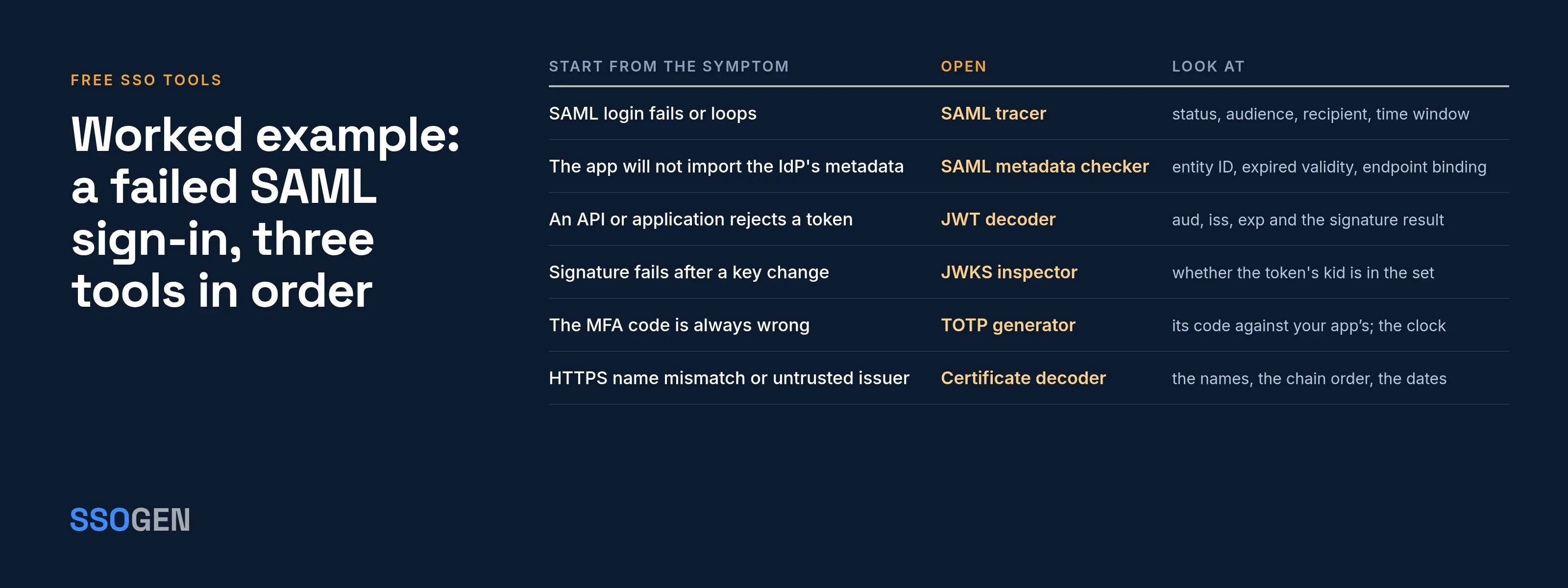
Start from the symptom, not the protocol.
| Symptom | Start with | What to look for |
|---|---|---|
| SAML login fails or loops | SAML tracer | Status code, audience, destination, recipient, time window |
| The application will not import the identity provider’s metadata | SAML metadata checker | Missing entity ID, expired validity, wrong endpoint binding |
| You need metadata for an application that has none | SAML metadata generator | A file the other side can import |
| An API or application rejects a token | JWT decoder | aud, iss, exp, and the signature result |
| An unrecognized-kid error, or a signature fails after a key change | JWKS inspector | Whether the token’s kid is in the published set |
| The MFA code is always wrong | TOTP generator | Compare its code with your app’s; check the clock and the secret |
| HTTPS shows a name mismatch or an untrusted issuer | Certificate decoder | Check the names (SAN), the chain order and the dates |
| An agent’s token is accepted from the wrong caller | DPoP proof checker | Check the key binding and the method and URL |
Worked example: a failed SAML sign-in, three tools in order
Acme Corp connects the application https://app.acme.example to its identity provider. Sign-in ends on an error page that says only “Invalid assertion”.
- Check the metadata first. The administrator pastes the identity provider’s metadata into the metadata checker. It reports that the signing certificate expired nine days ago. The application was set up with an old copy of the metadata, so it trusts a certificate nobody uses now. The new certificate is in the current file.
- Import the fresh file, then trace the sign-in. Sign-in still fails. The administrator opens DevTools, reloads, copies the
SAMLResponsefrom the POST to the assertion consumer service, and pastes it into the SAML tracer. Status: Success. The audience, however, readshttps://app.acme.example/samland the application expectshttps://app.acme.example. The audience restriction doesn’t match. - Send the right entity ID. The identity provider must issue assertions for the entity ID the application registered. The administrator builds a clean service provider file with the metadata generator, using exactly
https://app.acme.example, and the identity provider imports it. The next sign-in works.
Three tools, three faults, each visible in seconds: a stale certificate, a mismatched audience, then a clean file. Without the decoded view, all three look like “Invalid assertion”.
How these tools protect you
Every tool runs as JavaScript in the page. Decoding, certificate parsing, signature checks and the TOTP math all happen on your computer.
You can check this yourself. Open your browser’s developer tools, choose the Network tab, paste something into any tool and press its button. No request carries your input. You can even turn off your network connection. The tools still work.
Running locally doesn’t make the content harmless. Wherever you paste, these stay true:
- A SAML response carries a signed assertion with a person’s identity and attributes. Until it expires, anyone who has it may be able to replay it. Don’t paste a production one on a shared screen or into a ticket.
- A JWT is a bearer credential. Whoever holds a live token can use it until it expires.
- A TOTP secret lets someone make every future code for that account.
- Metadata and public keys are meant to be public, but they show your endpoints and entity IDs.
Free app: the SSOGEN Authenticator
The SSOGEN Authenticator is a free app for iPhone and Android. See the SSOGEN Authenticator page.
- Standard TOTP codes. It keeps standard TOTP codes, and with SSOGEN it also approves sign-ins by number.
- Works with any service. It works with any service that supports time-based codes, and you do not need SSOGEN single sign-on to use it.
- A safer home for a secret. It is a safer home for a TOTP secret than a web page.
Where to go next
- The reasoning behind each tool. The Learn section explains SAML, OpenID Connect and the types of MFA.
- Configuration steps in SSOGEN. Open the documentation.