SSOGEN / Magic link login: a one-time link instead of a password
SSOGEN
Magic link login: a one-time link instead of a password
People type their address and get a one-time link and code by email. One use, a short expiry, the same browser, and your MFA policy still applies.
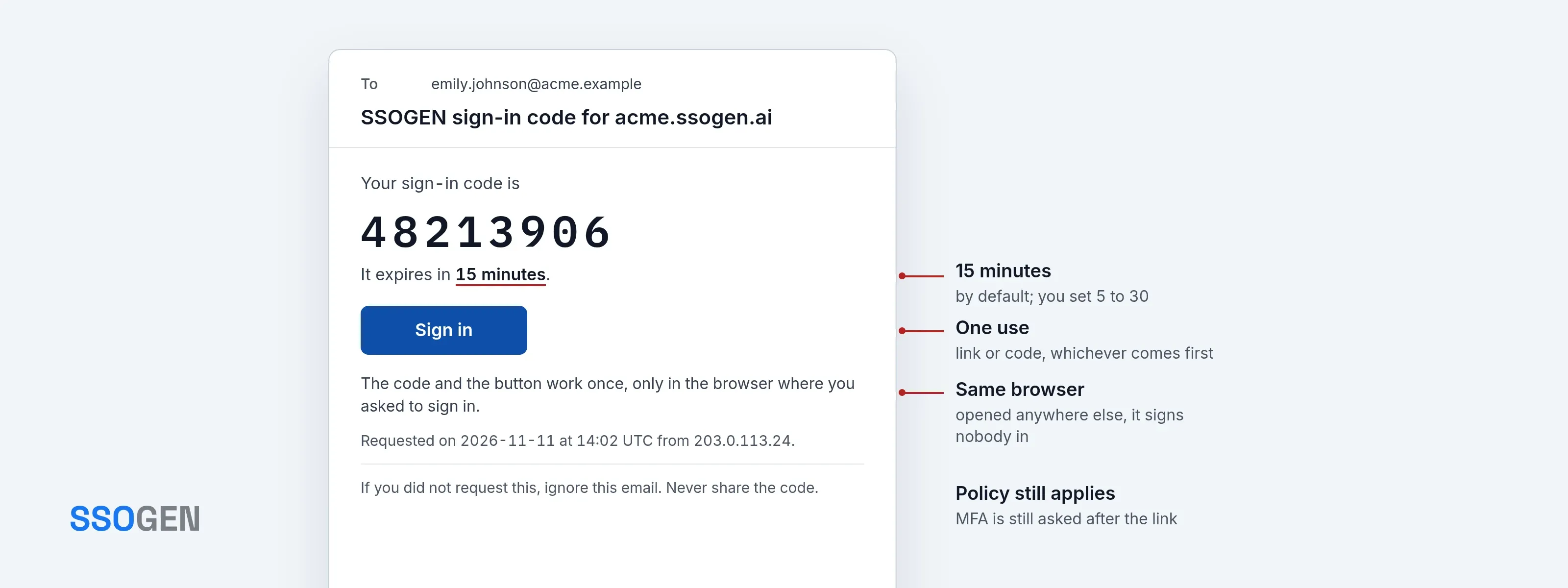
Magic link login replaces the password with a one-time link. A person types their username or email address on the sign-in page and chooses Email me a sign-in link. SSOGEN sends one email with a link and an eight-digit code. They open the link in the same browser, press Continue, and they are in. No password was typed, so none can be forgotten, reused or phished. Many sites call this magic link login.
It suits people who sign in rarely: customers, partners, contractors, seasonal staff. They never need to keep a password for you, and you never need to reset one.
A typical case is a supplier invited once. An administrator invites John Doe of Globex; he sets up his account from the invitation email. Afterwards, the supplier portal’s policy offers him a sign-in link each time he needs to upload an invoice.
When you turn it on
Sign-in links are a switch on an authentication policy, under first factors, named Emailed sign-in link. It stays off until you turn it on. A policy is assigned to applications, so the switch works per application: one application can offer links while another asks for a password or a passkey. A policy that accepts only passkeys leaves the switch off.
- Any account with an email address, when the policy allows it. A local account, a person synced from a directory and a person created by an identity provider are treated alike. The policy decides, not the account type.
- The Admin Console never offers it. The console policy refuses the switch.
- Mail has to work. The link goes out through your mail server. The policy screen warns you when no mail server is set up or recent emails have not been delivered.
How it is protected
| Protection | What it does |
|---|---|
| One use | The link and the code share one ticket. Whichever is used first ends it. |
| Short life | Fifteen minutes by default. You set it between 5 and 30 minutes in the security settings. |
| Same browser | The link signs in only in the browser that asked for it. Opened anywhere else, it signs nobody in and uses nothing up, and the page says to go back to the browser that asked. |
| Code limit | Five wrong codes fail the ticket. |
| Resend limit | Three emails per request, at least 30 seconds apart. A new email replaces the earlier link and code. |
| Request limits | Limits per network, and per name from one network (five requests in 15 minutes). A name that does not exist is limited the same way as one that does. |
| No hints | The page answers the same for every name, real or not. A stranger learns nothing about who has an account. |
| Stored safely | Only hashes of the link and the code are kept. Nothing usable sits in the database. |
What the audit trail records
Every step is written to the audit trail, without the address, the link or the code:
email_link.sent, with whether it was the first email or a resend, and whether the mail server accepted it.email_link.refused, with the reason: no such account, account not usable, no email address, not offered by the policy, rate limited, mail unavailable.email_link.used, with whether the link or the code signed the person in.email_link.rejected, for a wrong code, a fifth wrong code, or a live link opened in another browser.email_link.code_limit_reached.
The session that follows is recorded as an emailed-link sign-in, so reports show it apart from passwords.
With MFA, passkeys and policy
The link replaces the password. It does not replace your other requirements.
- MFA still applies. A person with an authenticator or a phone is asked for it after the link. When the policy requires a second factor, the link replaces only the password.
- An email code is never the second factor after a link. The code would go to the mailbox that already answered, so SSOGEN removes it from the choices.
- No shortcuts. A remembered browser does not skip the second step after a link.
- A hold after an invitation. For 24 hours after a person accepts an invitation or resets a password, an emailed code cannot stand in for a second step. You set the hold in the security settings. The first sign-in offers SSOGEN Authenticator, an authenticator app or a passkey instead, so a stolen mailbox alone cannot add a second step.
- Strength still counts. A link by itself is as strong as the mailbox, and the policy editor says so in plain words. Where an application needs more, set the second factor to Required, or ask for a passkey.
- Mix freely. A policy can offer the link next to a passkey, phone approval and identity providers. People choose what suits them, and the policy lists what is allowed.
Related: MFA and push approval, passwordless sign-in with passkeys, single sign-on.
Common questions
Does the person need an account first?
Yes, an account with an email address on it. Accounts come from the directory, an identity provider, SCIM, a CSV file, the console, an invitation or self sign-up. See directory sync and SCIM and customer identity.
What if they open the link on their phone but asked on their laptop?
The link does nothing there. They type the eight-digit code on the laptop, or open the link on the laptop.
Can I shorten the life of the link?
Yes. Set the time in the security settings, from 5 to 30 minutes.
Does it work in the hosted and the self-hosted product?
Yes, both. See self-hosted or hosted. Settings are in the documentation.