SSOGEN / Apache SSO Module: SSOGEN Web Agent for Apache and OHS
SSOGEN
Apache SSO Module: SSOGEN Web Agent for Apache and OHS
The Web Agent runs inside Apache or Oracle HTTP Server in front of EBS, PeopleSoft, JD Edwards and custom apps, one directive per location.
- Runs in
- Apache 2.4, Apache 2.2 and Oracle HTTP Server
- Modes
- SSOGEN, standalone SAML, standalone OpenID Connect
- Protects
- Oracle E-Business Suite, PeopleSoft, JD Edwards and your own web apps
- Application changes
- None
Why your oldest systems have the weakest sign-in
The SSOGEN Web Agent is an Apache SSO module for the systems that matter most and change least. Oracle E-Business Suite, PeopleSoft, JD Edwards and in-house web apps predate SAML and OpenID Connect. Many still run behind Apache or Oracle HTTP Server (OHS).
The vendors’ own single sign-on products are heavy, tied to specific releases, or end of life. Rewriting the application is not an option, which leaves these systems on passwords and without MFA.
Single sign-on for Oracle EBS and web apps through Apache or OHS
- Sign-in in front of the application. The Web Agent runs inside the web server you already operate and signs users in. It passes their identity to the application in the form the application expects.
- Identity in the format the application reads. Request headers and environment variables, including the user names Oracle applications look for.
- One module for old and new servers. The same source builds for current and older Apache and for Oracle HTTP Server. One approach covers a mixed estate.
- Any standards-based provider. The standalone modes work with providers such as Microsoft Entra ID or Keycloak. Every attribute passes through by name.
- MFA and policy included. In SSOGEN mode, the same assignment, authentication policy and step-up rules apply as everywhere else in SSOGEN.
- Spoof-proof headers. Only the agent sets the identity headers the application trusts, and they always carry the user the agent computed. A browser cannot supply its own copy.
- Complete sign-out. The application’s own logout ends the agent session. One sign-out path can also end the SSOGEN, OpenID provider or SAML session.
- Built on the server where it runs. A build kit compiles the module on your server against its own libraries. The start-up log names the build and each protected site.
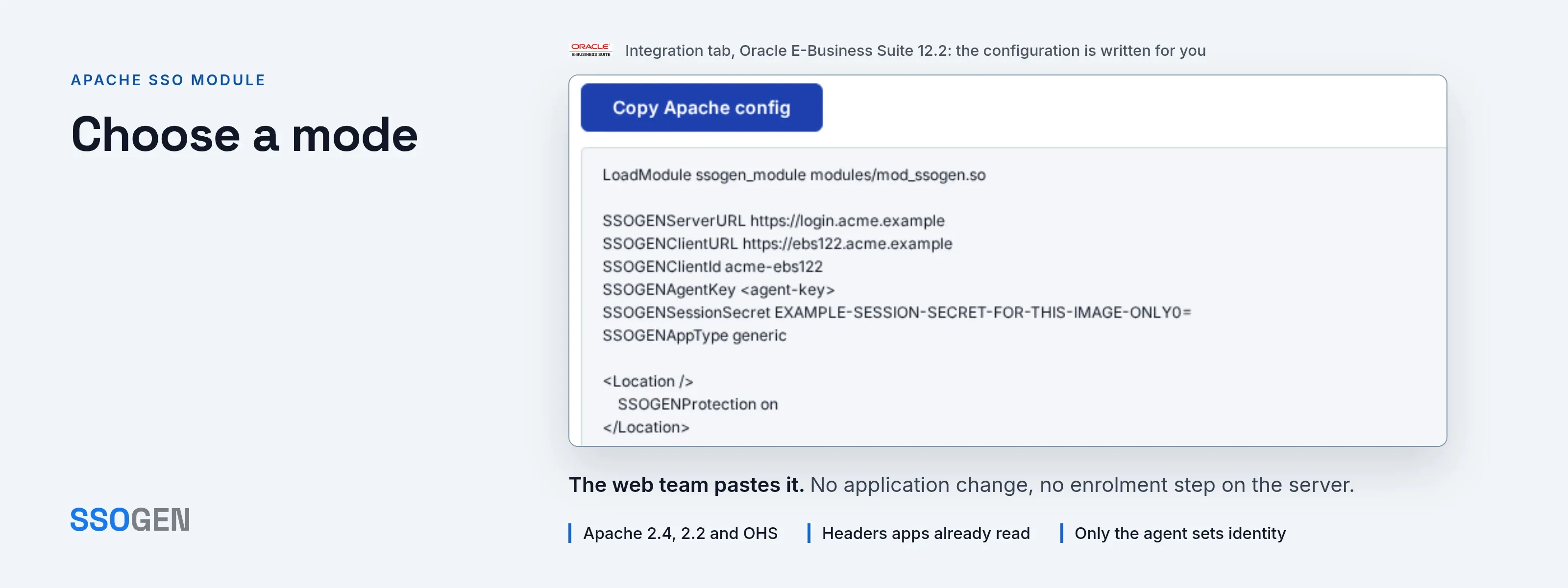
Choose a mode
One module runs in three modes. Choose by who signs the person in.
| SSOGEN mode | Standalone SAML | Standalone OIDC | |
|---|---|---|---|
| Who signs the person in | SSOGEN, with its MFA and authentication policy. Users in an LDAP directory sign in through SSOGEN. | Your SAML identity provider, for example Microsoft Entra ID or Keycloak. | Your OpenID Connect provider. |
| Configuration | The agent receives its configuration from SSOGEN and exchanges the sign-in for a signed application session. | HTTP-Redirect AuthnRequest, HTTP-POST response. Signed Response or Assertion, encrypted assertions, IdP metadata from a file or URL, optional signed requests. | Discovery, authorization code with PKCE, nonce and ID token validation. preferred_username is the default user claim and is configurable. |
| License | No license key. | A license key from SSOGEN; the module starts in this mode only with a valid key. | A license key from SSOGEN; the module starts in this mode only with a valid key. |
How the agent, its modes and the Apache directives fit together
| Area | Behavior |
|---|---|
| Platforms | Apache and Oracle HTTP Server from one source. |
| Directives | Set SSOGENProtection off|optional|on per location (AuthType SSOGEN also works). Protected pages redirect to sign-in, or return 401 for API-style paths. Deep links survive sign-in, including the query string. |
| Oracle applications | By default the agent converts the user name to upper case. It sends the legacy headers Oracle applications expect: the PeopleSoft, JD Edwards, Hyperion and Siebel single sign-on user headers, plus the legacy GUID and Oracle single sign-on headers. |
| Other applications | One setting passes the user name through unchanged, in the headers applications written for other access products already read. |
| Sessions | A signed, HttpOnly, Secure session cookie with configurable maximum and idle lifetimes. |
| Networking | Outbound HTTP proxy support and a private CA file for internal providers. |
| Installation | You build the module on your server from the build kit. The kit produces the module, its checksum and a build-info file that records the versions it was built against. |
Where teams deploy the Web Agent
- Oracle applications. Oracle E-Business Suite, PeopleSoft and JD Edwards behind Entra ID, Okta or any SAML or OIDC provider, with MFA and no change to the application.
- Intranet applications. Custom intranet applications that trust a header today, now protected with spoof-proof headers.
- Staged migration. A staged migration from an older Oracle or vendor SSO product to your current provider.
- Contractor access. Contractor access to one ERP module under a stricter policy than the rest.
What it looks like in the Admin Console
1 2 3 4
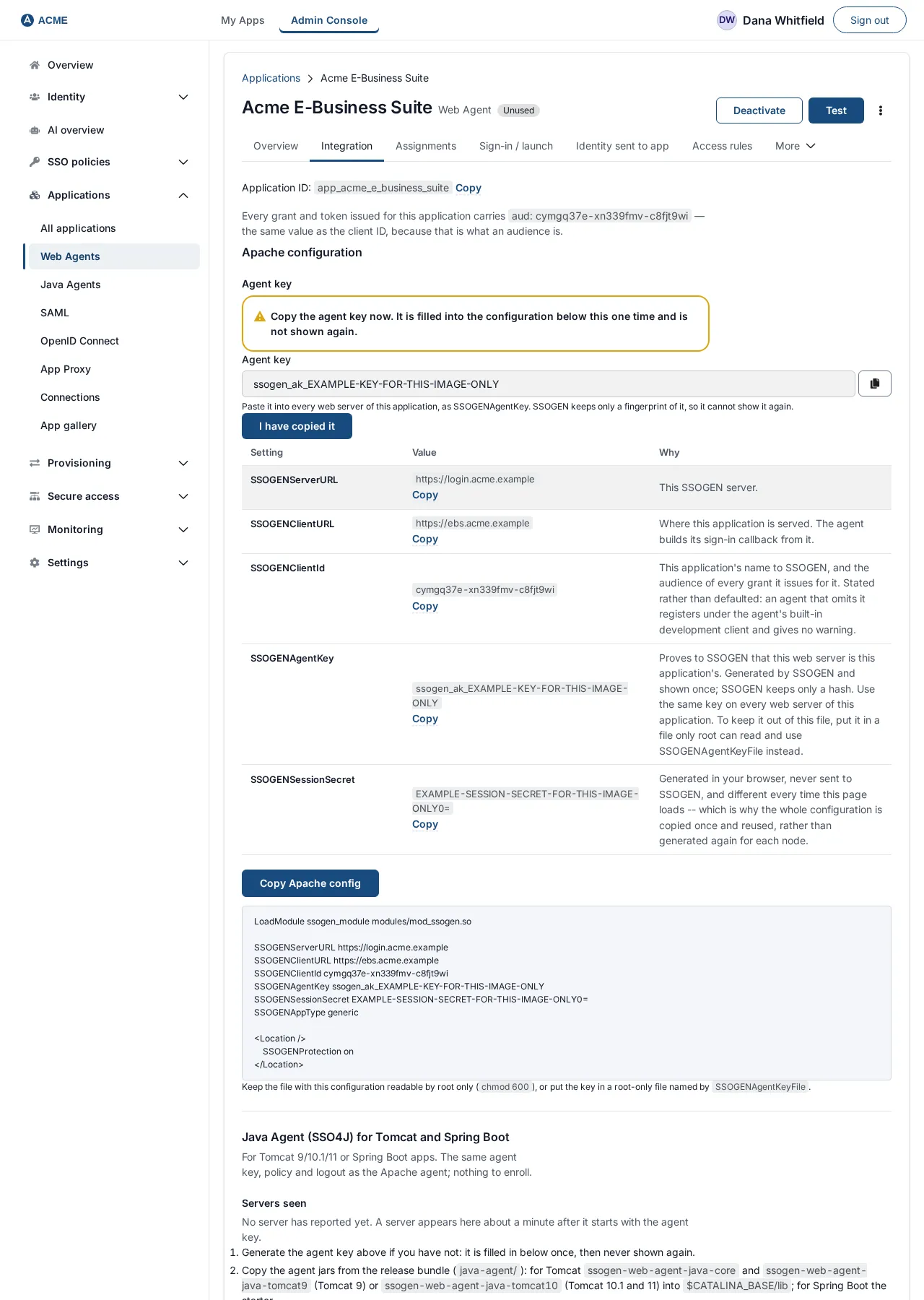
The Apache configuration on the Integration tab. Everything the web server needs is generated from what is registered in SSOGEN.
- Integration tab. Every grant and token issued for this application carries an
audvalue, the same as the client ID. - Settings.
SSOGENServerURL,SSOGENClientURL,SSOGENClientIdandSSOGENSessionSecret, each with its value and why. There is no file to create; the session secret is generated in the browser and never sent to SSOGEN. - Copy Apache Config. Copies the complete configuration, optionally with
SSOGENPublicKey. - The generated configuration to paste on the host that serves the application.
Where to go next
- Set it up. See the Apache SSO configuration guide.
- Follow the full path. See the Oracle EBS single sign-on page.
- Cover other applications. See single sign-on software for every other application.
- No module possible. For an application that cannot host a module, use the SSOGEN Gateway.