SSOGEN / Oracle EBS SSO (Single Sign-On) Options and Setup Guide
Integration
Oracle EBS SSO (Single Sign-On) Options and Setup Guide
Run one tool on the EBS web tier and SSOGEN installs the Web Agent, deploys Oracle's own AccessGate and sets the EBS profile options.
What you get
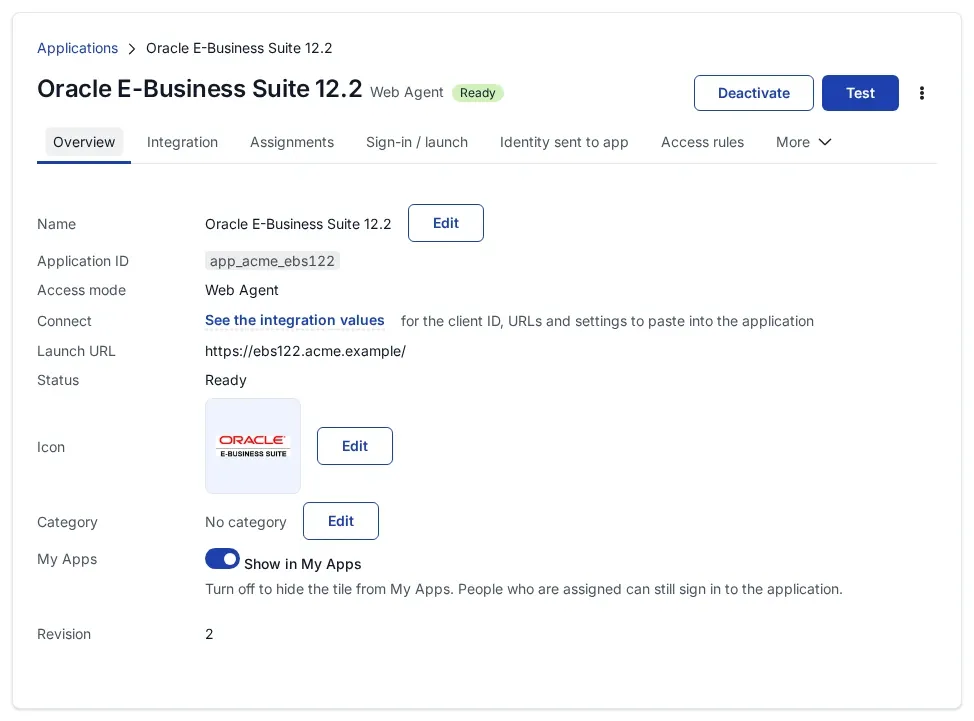
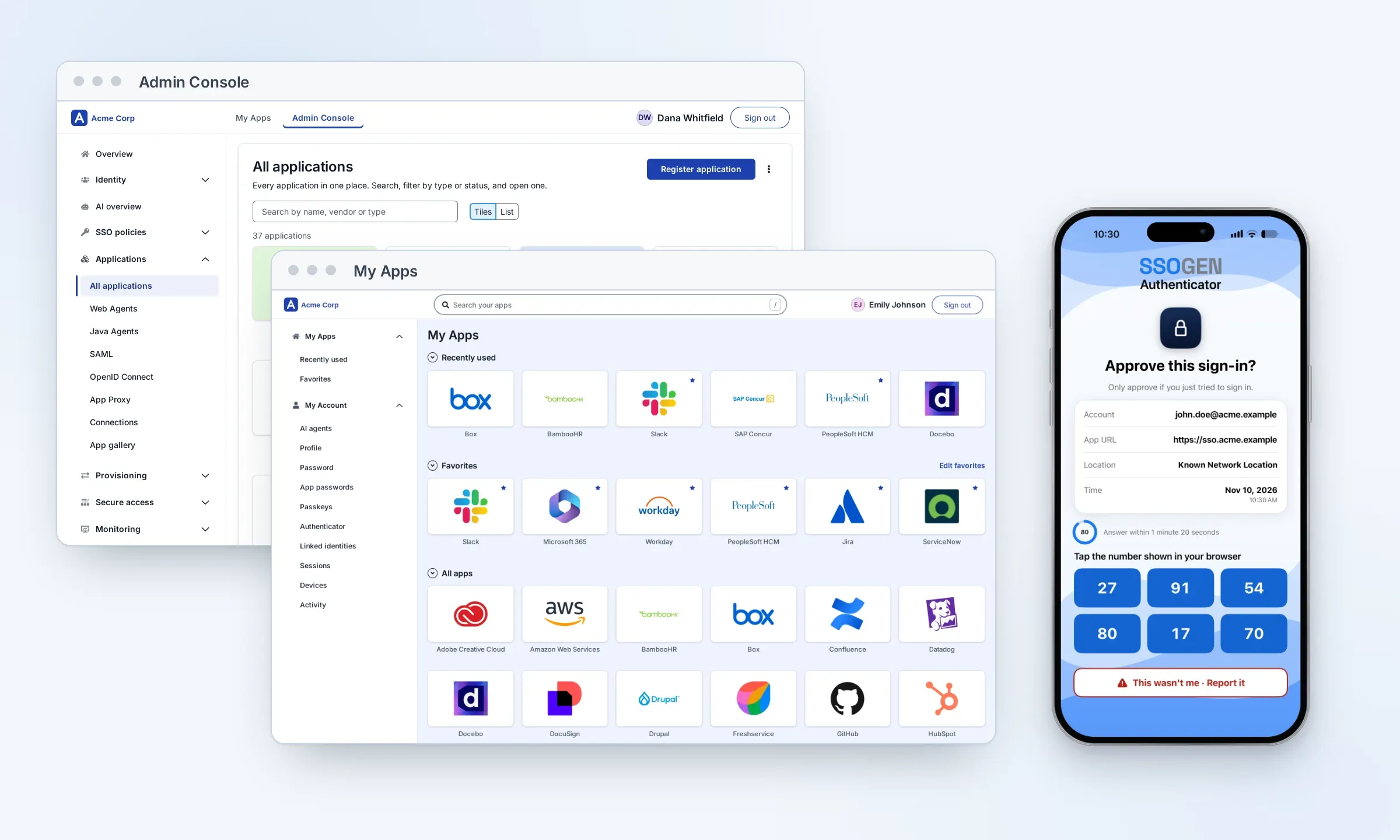
People open the usual E-Business Suite address, sign in once through SSOGEN (or straight through your SAML or OpenID Connect provider), and land in EBS as their own EBS user with their own responsibilities, without typing an EBS password. The SSOGEN Web Agent runs in the Oracle HTTP Server of the EBS web tier and protects the sign-in pages of the EBS AccessGate application; every other EBS page works as before. Administrators keep the local EBS login page.
What is Oracle EBS SSO?
Oracle EBS SSO is an authentication setup that lets people sign in with a single sign-on login, an LDAP login or their Active Directory password instead of the EBS local password. EBS hands the authentication to a sign-in service, which checks the person and sends them back; EBS then creates its own session.
Without SSO, E-Business Suite checks the user name and password against its own FND_USER table. That is EBS local authentication. Most organizations now want people to use their company credentials instead, so “Oracle EBS SSO” simply means single sign-on configured in EBS 12.2, R12.1 or 11i.
Oracle’s traditional choices were Oracle 10g Single Sign-On (OSSO 10g) up to EBS R12.1, then Oracle Access Manager (OAM) with Oracle Internet Directory (OID). EBS 12.2 no longer supports OSSO 10g. It needs OAM, a cloud service such as Oracle Identity Cloud Service (IDCS), or a product like SSOGEN.
Why Oracle EBS SSO matters
- People do not have to remember a separate password for E-Business Suite.
- People sign in with their company account, so weak local EBS passwords such as
Welcome123drop out of everyday sign-in. - Switching off a person’s company account stops their new sign-ins to EBS. Auditors ask for this.
- A password alone is not enough today. Multi-factor sign-in is applied once, at the company sign-in, and covers EBS.
- The company password policy, including periodic change, applies to EBS.
- One sign-in opens every application, so people sign in less often.
- Fewer EBS password-reset calls reach the help desk and the EBS support team.
- SOX and HIPAA audits ask how EBS access is granted and removed. Single sign-on answers both, on EBS 11i, R12 and 12.2.
- People do not need to remember application addresses: they start from My Apps.
An alternative to Oracle Access Manager and IDCS
A traditional single sign-on project for EBS means installing and tuning a directory and an access manager before the first person signs in. With SSOGEN you run one tool on each EBS web node and finish one setting in EBS.
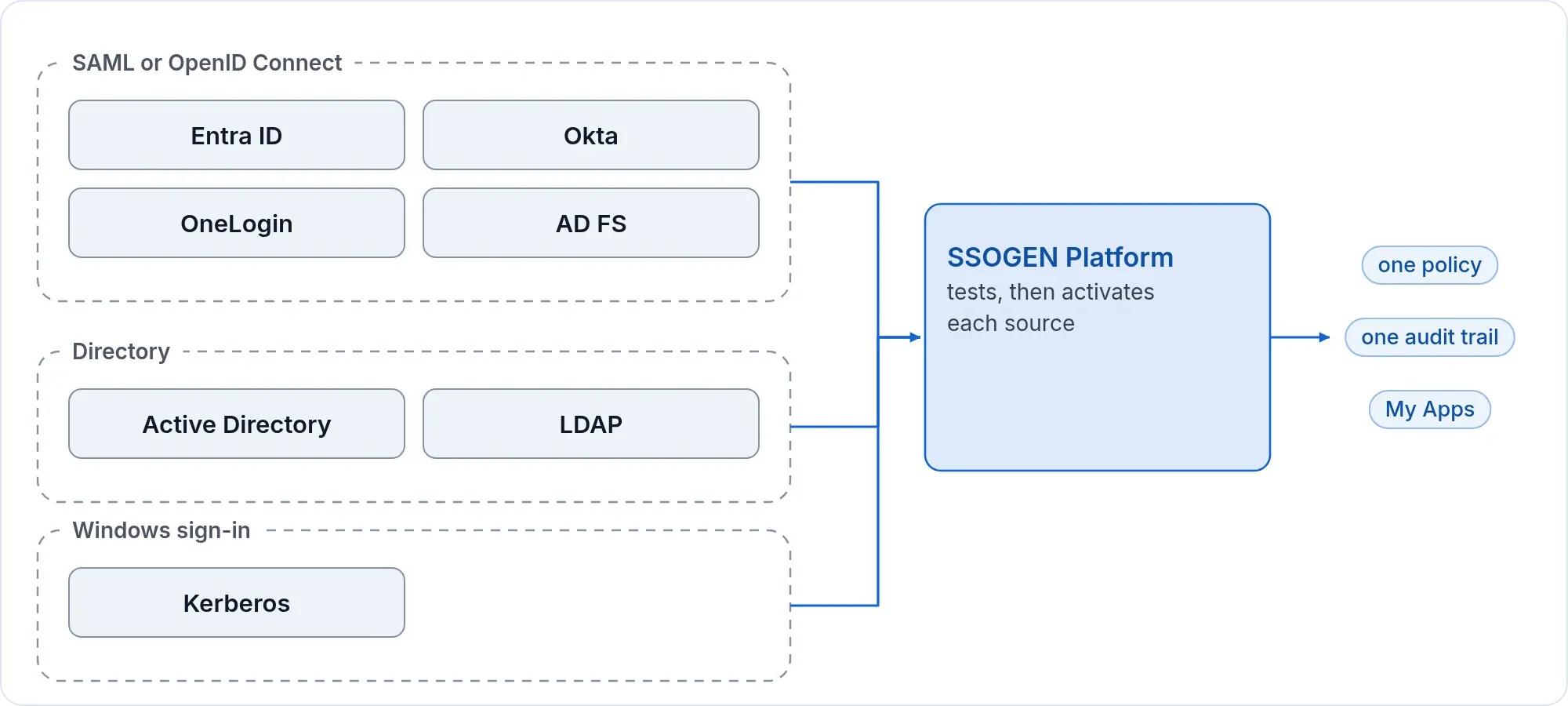
SSOGEN signs people in directly against Active Directory or another LDAP directory, or hands the sign-in to the identity provider you already run, such as Microsoft Entra ID, Okta, OneLogin, AD FS or PingFederate. Multi-factor sign-in through the SSOGEN Authenticator is part of the product.
What sets SSOGEN apart
- Oracle Validated Integration. Oracle validated SSOGEN’s single sign-on integration with E-Business Suite 12.2 and publishes the datasheet.
- Oracle’s own AccessGate. The tool deploys the AccessGate application that ships with EBS (
fndauth.warfromFND_TOP). No separate asserter, no OAM, no OID. - One tool, one pass.
./ssogen reginstalls the Web Agent, writes its configuration, adds one marked block tohttpd.confand sets the EBS profile options. Every file it changes is backed up first, and--checkshows what would change without changing anything. - No users copied to a cloud. Unlike IDCS, which needs EBS users synchronized to Oracle Cloud, SSOGEN needs no copy of your EBS users anywhere. The match is the user name.
- The local login stays.
SYSADMINand other accounts without a company login keep signing in at the local login page. - Three ways to connect. Through your SSOGEN tenant, straight to a SAML 2.0 provider, or straight to an OpenID Connect provider. Same tool, one option.
- Policy in one place. In SSOGEN mode, who may open EBS, multi-factor rules and sign-in policy are set in the SSOGEN console and apply to EBS like every other application.
- No separate charge for the tool. The integration tool and the Web Agent come with SSOGEN.
Oracle Validated Integration
SSOGEN’s single sign-on integration with Oracle E-Business Suite 12.2 is an Oracle Validated Integration. Oracle validated it in 2022 and publishes the Oracle Validated Integration datasheet (PDF).
Oracle’s program confirms that a partner’s integration with an on-premises Oracle application “is functionally sound and performs as designed”. The validated integration uses Oracle’s own AccessGate and the standard EBS single sign-on profile options.
Sources: Oracle Validated Integration datasheet for SSOGEN and Oracle E-Business Suite, read 2026-11-15.
Sign-in options: directories
SSOGEN checks the password against your directory at every sign-in, in real time, with no sync of users or passwords. It works with Active Directory and any LDAP directory reachable over LDAPS or StartTLS. Add multi-factor sign-in for critical environments.
On domain-joined Windows computers people can open EBS with no password at all, using Kerberos (integrated Windows sign-in): they sign in to Windows and EBS opens.
Set up the directory in SSOGEN once: Active Directory and LDAP and Kerberos Windows sign-in. Every application, EBS included, then uses it. The EBS side is the same for every source, see Sign-in sources for EBS.
Sign-in options: delegate to your identity provider
If people already sign in at an identity provider, SSOGEN passes the sign-in to it and EBS follows. That covers Okta, OneLogin, Microsoft Entra ID (Azure AD), AD FS, PingFederate and any SAML 2.0 or OpenID Connect provider, for EBS 12.2. SSOGEN can add multi-factor sign-in on top of the delegated one.
There are two ways to connect, and the tool does both:
- Through SSOGEN (
-mode=ssogen). EBS signs in through your SSOGEN tenant. SSOGEN signs the person in at the provider you set up there and applies its own policy. - Straight to the provider (
-mode=samlor-mode=oidc). The web tier talks to the provider itself; SSOGEN is not in the path. See Direct SAML or OIDC sign-in.
Sign-in sources for EBS
Each page below says what to set on the provider’s side for EBS and which value goes where.
| Sign-in source | Page |
|---|---|
| Microsoft AD FS | EBS with AD FS |
| Microsoft Entra ID (Azure AD) | EBS with Entra ID |
| Okta | EBS with Okta |
| PingFederate | EBS with PingFederate |
| Any SAML 2.0 provider | EBS with a SAML provider |
| Multi-factor and RADIUS | EBS with multi-factor sign-in |
| Kerberos, Windows sign-in | EBS with Kerberos |
| CA SiteMinder | EBS with SiteMinder |
| IBM Tivoli Access Manager | EBS with Tivoli |
| Shibboleth | EBS with Shibboleth |
| Active Directory and other LDAP directories | EBS with LDAP |
How to configure Oracle EBS SSO
Six steps take EBS from its local login to single sign-on. The first two apply to some systems only, steps 3 and 4 are the tool, and 5 and 6 are on the provider’s side.
- Apply the EBS AccessGate patches, if EBS is older than 12.2.4.
- Clean up an earlier SSO registration, if the system had one:
./ssogen cleanup. - Deploy the AccessGate:
./ssogen deployag. - Configure SSO in EBS:
./ssogen reg. - Register EBS at the sign-in source: in SSOGEN mode in the SSOGEN console, at a SAML or OpenID Connect provider with the values
regprints (Sign-in sources for EBS). - Finish in EBS and restart: give the provider’s metadata to the web tier if you connect straight to it, then start Oracle HTTP Server or restart the EBS services.
What you need
- Shell access to each EBS 12.2 web node as the EBS application owner (
applmgr), with the RUN file system environment sourced, and no online patching cycle active (adop -status). - The APPS password. The tool asks for it without echo.
- The package
ssogen-ebs122-<version>-<date>.zipfrom SSOGEN. - For
ssogenmode: the application registered in SSOGEN with the EBS address as the Client URL, and its client ID and agent key. - A maintenance window: the tool stops Oracle HTTP Server, and EBS services are restarted at the end.
Before you start: patches and clean up
Patches. If this is the first time SSO is enabled on EBS and EBS is older than 12.2.4, apply these Oracle patches first. Make sure the file system clone is complete and no online patching cycle is active.
| Patch | Number | Note |
|---|---|---|
| R12.2 EBS patch | 20735848 | |
| EBS AccessGate | 24008856 | Oracle Support note 2202932.1 names the latest AccessGate patch |
In EBS 12.2 the AccessGate (fndauth.war) is part of the WebLogic domain and runs on oaea_server1.
Clean up. If EBS was registered with another SSO before (Oracle Access Manager, OSSO, OID or OUD), or with a different SSOGEN setup, clean up first. See what it will do:
./ssogen cleanup --check./ssogen cleanupcleanup removes the SSOGEN lines from httpd.conf, runs txkrun.pl -script=SetSSOReg -removereferences=yes and clears fnd_user.user_guid for every user. The old values are saved to a file first. Every person is linked to EBS again at the next sign-in.
Step 1: run the SSOGEN tool
On the web node, after checking the package:
./ssogen deployag./ssogen reg --check -mode=ssogen -platform_url=https://acme.ssogen.ai -client_id=<client ID> -agent_key_file=$HOME/ebs-agent-key.txt./ssogen reg -mode=ssogen -platform_url=https://acme.ssogen.ai -client_id=<client ID> -agent_key_file=$HOME/ebs-agent-key.txtdeployagdeploys the EBS AccessGate application on theoaea_server1managed server. On a second web tier add-eagservername=oaea_server2; the number matches theoacore_servernumber on that node.- If
deployagfails, run./ssogen undeployagto remove the earlier deployment, then./ssogen deployagagain. This can be needed after a clone. reginstalls the Web Agent, writes its configuration, adds one marked block tohttpd.confand sets the EBS single sign-on profile options. It ends with the Redirect URI to register in SSOGEN,https://<EBS address>/ssogen/callback, and numbered next steps.- If a value is missing,
regwrites the configuration, says ACTION REQUIRED, and leaves the web server and the profile options alone. Give the value and run the same command again. - Run
regon every web node. When the ssogen folder is shared, the second node reuses the same configuration. If it is not shared, copy it to the other file system as the next steps say. - Run
regagain after each clone.
Step 2: finish the setting in EBS
The tool sets the profile options at site level for you:
| Profile option | Value |
|---|---|
Applications SSO Type (APPS_SSO) |
SSWA w/SSO |
APPS_AUTH_AGENT |
https://<EBS address>/accessgate |
Applications SSO Login Types (APPS_SSO_LOCAL_LOGIN) |
Both |
Applications SSO Auto Link User (APPS_SSO_AUTO_LINK_USER) |
Yes |
Applications SSO Allow Multiple Accounts (APPS_SSO_ALLOW_MULTIPLE_ACCOUNTS) |
No |
APPS_SSO_LDAP_SYNC |
No |
FND_OVERRIDE_SSO_LANG |
Enabled |
What is left for you in EBS:
- User names. Every person needs an EBS user whose user name equals the signed-in identity the agent passes on. The agent sends it in capitals, so
jdoearrives asJDOE. It never cuts off a domain part. EBS links the SSO account to the EBS user the first time the person signs in. - Local login. Login Types is set to Both at site level, so people can still use the EBS password. Keep it that way at user level for accounts that must always have a local way in, such as
SYSADMIN, and narrow it for everyone else when you are ready. - Restart. Start Oracle HTTP Server again (
adapcctl.sh start) or restart all EBS services, as the tool’s last line says.
Step 3: sign in and check
- In a private browser window open
https://<EBS address>/OA_HTML/AppsLogin. You are sent to sign in. - Sign in as a person who has an EBS user. You land on the EBS home page with that user’s responsibilities.
- Open
https://<EBS address>/OA_HTML/AppsLocalLogin.jspand sign in asSYSADMINwith the EBS password. The local login still works.
Several web nodes, and an external web tier
Run deployag and reg on every web node. A load-balanced pair of web tiers runs deployag with -eagservername=oaea_server1 on the first node and -eagservername=oaea_server2 on the second.
For an external web tier in a DMZ, such as iSupplier, run dmzreg instead of reg on that node. It protects the whole site, sets the profile options at server-node level and uses its own configuration, ebs-dmz. dmzdereg takes it out again. See also iSupplier in a DMZ.
To take SSOGEN out of EBS, ./ssogen dereg removes the SSOGEN block from httpd.conf and resets APPS_SSO to SSWA. The configuration, keys and module stay where they are.
Sign-out
deployag sets the EBS logout to the Web Agent’s sign-out address, so Logout in EBS ends the agent’s session. For shared computers, see sign-out.
Direct SAML or OIDC sign-in
The same tool connects the EBS web tier straight to a SAML 2.0 or OpenID Connect (OAuth 2.0) provider, such as Microsoft Entra ID, Okta or AD FS, without SSOGEN in between. Both modes need a license key from SSOGEN.
SAML. Ask the identity provider administrator for the metadata XML file and save it as ebs-internal-idp.xml in the ssogen folder of the web tier, then run:
./ssogen reg -mode=saml -ssogen_license=<license key>Give the identity provider the two values reg prints: the Identifier (Entity ID), which is the EBS address, and the Reply URL, https://<EBS address>/ssogen/acs. The identity provider sends the EBS user name as the NameID. If you ran reg before you had the metadata, the configuration holds two commented example lines; remove the # from the one you use (the file, or the metadata URL) and restart. -custom_logout_url=https://... sets where people go after sign-out.
OpenID Connect. Register a web client at the provider with the Redirect URI https://<EBS address>/ssogen/oidc/callback, then:
SSOGEN_OIDC_SECRET=<client secret> ./ssogen reg -mode=oidc -ssogen_license=<license key> -client_id=<client ID>Add the provider’s discovery address to the configuration as SSOGENOidcProviderMetadataURL and run reg again. If the provider sends an email address as the user name, have it send the short EBS user name in another claim and name that claim with SSOGENOidcUserClaim.
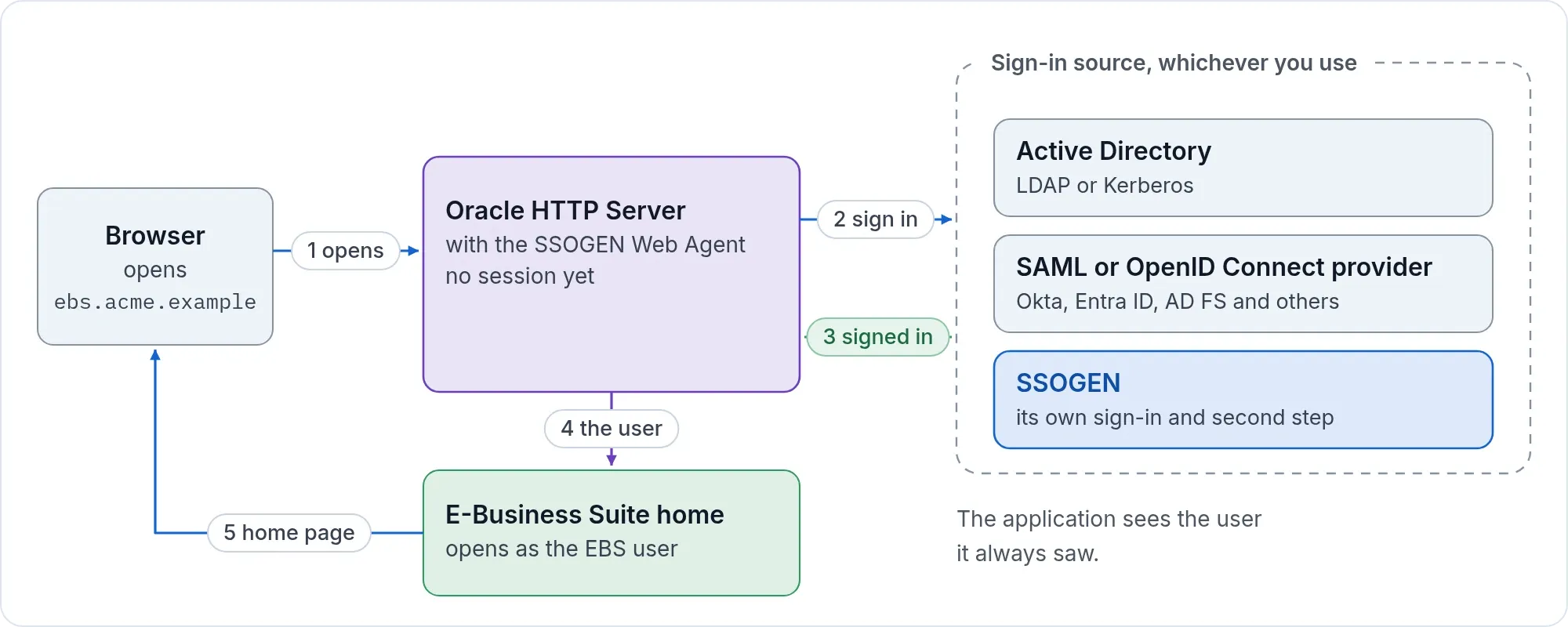
Oracle EBS SSO login flow
When the setup is done, a sign-in goes like this:
- The person opens the EBS address in the browser.
- EBS sends the browser to its sign-in page, which the SSOGEN Web Agent protects. The Web Agent redirects the browser to the sign-in source: SSOGEN, or your SAML or OpenID Connect provider.
- The sign-in source signs the person in: it asks for the user name and password, applies multi-factor sign-in, or uses the Windows (Kerberos) login, as it is set up.
- The sign-in source sends the browser back to EBS with a signed answer that names the person: the SAML response at
/ssogen/acs, or the authorization code at/ssogen/callbackor/ssogen/oidc/callback. - The Web Agent checks the answer and starts its own session.
- The Web Agent hands the user name to the EBS AccessGate, which creates the EBS session.
- EBS finds the person’s responsibilities.
- The person lands on the EBS home page.
Oracle EBS SSO login trace
To see it yourself, record a sign-in in the browser’s network panel, or with the SAML Tracer add-on when you use SAML. The values below are examples.
https://ebs.acme.exampleis the EBS address andhttps://login.idp.exampleis the sign-in source.- The first request after
/OA_HTML/AppsLoginis a redirect to the sign-in source. With SAML it carries aSAMLRequest. This is where EBS asks the question. - The second is the answer: a POST back to EBS at
/ssogen/acscarrying theSAMLResponse, with the signature and the NameID. With OpenID Connect it is a redirect to the callback address with a code. - After that you see the AccessGate set the EBS cookies, then the EBS home page.
- With SAML there is no third party between EBS and the sign-in source, and the web server does not talk to the sign-in source directly: the browser carries both messages. With OpenID Connect and with SSOGEN mode the web server makes one request of its own to the provider or to SSOGEN to exchange the code.
Oracle EBS SSO profile options
These are the profile options that matter for EBS 12.2 single sign-on. The tool sets the first seven in Step 2; the rest are left as Oracle installed them.
| Item | Value |
|---|---|
| EBS release | 12.2.x |
| EBS sign-in address (SSO) | https://ebs.acme.example/OA_HTML/AppsLogin |
| Local login (back door) | https://ebs.acme.example/OA_HTML/AppsLocalLogin.jsp |
Application Authenticate Agent (APPS_AUTH_AGENT) |
https://ebs.acme.example/accessgate |
Applications SSO Type (APPS_SSO) |
SSWA w/SSO (stored as SSWA_SSO) |
Applications SSO Auto Link User (APPS_SSO_AUTO_LINK_USER) |
Yes |
Applications SSO Allow Multiple Accounts (APPS_SSO_ALLOW_MULTIPLE_ACCOUNTS) |
No |
Application SSO LDAP Synchronization (APPS_SSO_LDAP_SYNC) |
No |
Applications Override SSO Server Language (FND_OVERRIDE_SSO_LANG) |
Enabled |
Applications SSO Login Types (APPS_SSO_LOCAL_LOGIN) |
Both |
Applications SSO User Creation and Updation Allowed (APPS_SSO_USER_CREATE_UPDATE) |
Oracle’s value, not changed by the tool |
Applications SSO Linking Source of Truth (APPS_SSO_LINK_TRUTH_SRC) |
Oracle’s value, not changed by the tool |
Application Framework Agent (APPS_FRAMEWORK_AGENT) |
Your EBS address, not changed by the tool |
Oracle EBS SSO troubleshooting and fixes
ORA-20001: Unable to call fnd_ldap_wrapper.create_user because Oracle Internet Directory is not registered correctly
The Application SSO LDAP Synchronization profile (APPS_SSO_LDAP_SYNC) affects how users are created. Set it to No at site level; reg does that. Check the other profile options against the table above, and make sure the system was not registered with another SSO before, such as Oracle Access Manager, Oracle SSO or OID/OUD. If it was, run ./ssogen cleanup first (see Before you start).
Unable to link account: this E-Business Suite user account is marked as a local account
After sign-in, EBS shows this page:
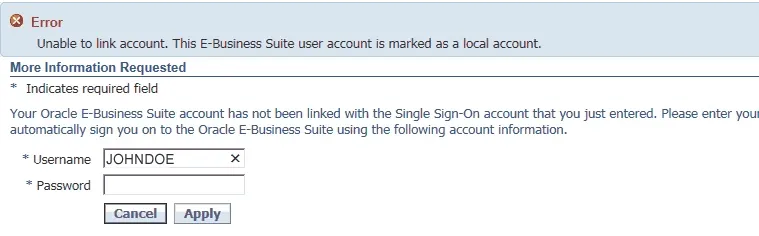
The cause is Applications SSO Login Types (APPS_SSO_LOCAL_LOGIN) set to Local for that user. For SSO to work the profile must be Both or SSO. It is normally Both at site level and not set at user level.
Local is used temporarily to reset an EBS local password in the FND_USER table. After the password is reset, remove the user-level value of the profile.
Your Oracle E-Business Suite account has not been linked with the Single Sign-On account
EBS shows this auto-link page when it cannot find the user by the GUID sent by the sign-in source. Either EBS was registered with another SSO earlier, so FND_USER holds an old GUID, or the person linked their account to another user by typing a different user name and password on this page.
Unlink the user by setting the GUID to null. EBS auto-link then writes the right GUID at the next sign-in:
SQL> select user_name,end_date,user_guid from fnd_user where user_name='JDOE';
USER_NAME  END_DATE  USER_GUIDJDOE                 B31318AC7A93622BC050A3C0250108F2
SQL> update fnd_user set user_guid = null where user_name = 'JDOE';1 row updated.
SQL> commit;Commit complete.
Ask the person to sign in again. The GUID is filled in with a new value:
SQL> select user_name,end_date,user_guid from fnd_user where user_name='JDOE';
USER_NAME  END_DATE  USER_GUIDJDOE                 B34C930A342BBE63D140A8C046014980
To unlink everyone at once, ./ssogen cleanup does it for every user and saves the old values.
Verify the SSO profile options
Run this as APPS to list the site-level values of the options that matter:
select fpot.user_profile_option_name, fpov.profile_option_value, fpov.last_update_date, fu.user_namefrom apps.fnd_profile_options fpo, apps.fnd_profile_options_tl fpot, apps.fnd_profile_option_values fpov, apps.fnd_user fuwhere fpo.profile_option_id = fpov.profile_option_idand fpov.level_id = 10001and fpov.last_updated_by = fu.user_idand fpo.profile_option_name = fpot.profile_option_nameand fpot.language = 'US'and fpo.profile_option_name in ( 'APPS_FRAMEWORK_AGENT', 'APPS_AUTH_AGENT', 'APPS_SSO', 'APPS_SSO_LOCAL_LOGIN', 'APPS_SSO_AUTO_LINK_USER', 'APPS_SSO_ALLOW_MULTIPLE_ACCOUNTS', 'APPS_SSO_USER_CREATE_UPDATE', 'APPS_SSO_LDAP_SYNC', 'APPS_SSO_LINK_TRUTH_SRC', 'FND_OVERRIDE_SSO_LANG')order by 1;The output should match:
| Profile option | Value |
|---|---|
| Application Authenticate Agent | https://ebs.acme.example/accessgate |
| Application Framework Agent | https://ebs.acme.example |
| Application SSO LDAP Synchronization | N |
| Applications Override SSO Server Language | ENABLED |
| Applications SSO Allow Multiple Accounts | N |
| Applications SSO Auto Link User | Y |
| Applications SSO Linking Source of Truth | OID (Oracle’s value) |
| Applications SSO Login Types | BOTH |
| Applications SSO Type | SSWA_SSO |
| Applications SSO User Creation and Updation Allowed | Y (Oracle’s value) |
Check the EBS user: end date, GUID and user-level profile options
Look at the user:
select user_name, end_date, user_guid from fnd_user where user_name = '&EBS_SSO_USER_NAME';An end-dated user cannot sign in, SSO or not. When in doubt, clear the GUID so it is set again at the next sign-in:
update fnd_user set user_guid = null where user_name = '&EBS_SSO_USER_NAME';Then look at the user-level profile options for anything suspicious, such as a Login Types of Local:
select fpot.user_profile_option_name, fpov.profile_option_value, fpov.last_update_date, fu1.user_namefrom apps.fnd_profile_options fpo, apps.fnd_profile_options_tl fpot, apps.fnd_profile_option_values fpov, apps.fnd_user fu, apps.fnd_user fu1where fpo.profile_option_id = fpov.profile_option_idand fpov.level_id = 10004and fpov.level_value = fu.user_idand fpov.last_updated_by = fu1.user_idand fpo.profile_option_name = fpot.profile_option_nameand fpot.language = 'US'and fu.user_name = '&EBS_SSO_USER_NAME'order by 1;AccessGate troubleshooting
- Check the AccessGate version at
https://ebs.acme.example/accessgate/style/EbusinessAccessGate.class. - If the AccessGate misbehaves, see Oracle Support note 2202932.1 for the latest AccessGate patch.
- To log the AccessGate, create a logging configuration, point the AccessGate at it and restart
oaea_server1(or the server you use):
cat <<EOC > /tmp/oaealoghandlers=java.util.logging.FileHandler.level= ALLjava.util.logging.FileHandler.pattern = /tmp/fndauth%u.logjava.util.logging.FileHandler.limit = 10000000java.util.logging.FileHandler.count = 1java.util.logging.FileHandler.level = FINEjava.util.logging.FileHandler.formatter = java.util.logging.SimpleFormatteroracle.apps.fnd.ext.common.level=FINEoracle.apps.fnd.ext.common.server.level=FINEEOC
cat <<EOC2 >> $INST_TOP/appl/admin/oaea_wls.propertiesLOG_CONFIG_FILE=/tmp/oaealogEOC2
For more, see Oracle’s note How To Collect E-Business Suite 12.2 AccessGate LogFiles (Doc ID 1683163.1). Remove the setting when you are done.
HTTP 400 Bad Request after enabling SSO
SSO adds cookies, so EBS R12.1 and R12.2 can answer HTTP 400 when Apache’s request limits are reached. Set the limits in the context file ($CONTEXT_FILE), run AutoConfig and restart all services.
R12.2:
<limitrequestfieldsize oa_var="s_limitrequestfieldsize">16384</limitrequestfieldsize><limitrequestfields oa_var="s_limitrequestfields">128</limitrequestfields><limitrequestbody oa_var="s_limitrequestbody">0</limitrequestbody><limitrequestline oa_var="s_limitrequestline">16384</limitrequestline>R12.1:
<limitrequestfieldsize oa_var="s_limitrequestfieldsize">8190</limitrequestfieldsize><limitrequestfields oa_var="s_limitrequestfields">64</limitrequestfields><limitrequestbody oa_var="s_limitrequestbody">0</limitrequestbody><limitrequestline oa_var="s_limitrequestline">8190</limitrequestline>Related Oracle notes:
- EBS requests fail with “Size of a request header field exceeds server limit” [ID 1370626.1]
- Lengthy Configurator URL: CZ Does Not Launch [ID 1374444.1]
- Url Causes Http 400 Error [ID 1374260.1]
EBS R12 timeouts
Check these variables in $CONTEXT_FILE:
s_sesstimeouts_oc4j_sesstimeouts_forms_times_ohstimeout
And these EBS profile options:
- ICX: Session Timeout
- ICX: Limit connect
- ICX: Limit time
Oracle notes:
- R12: Forms Timeout More Than 2 Hrs Is Not Working After R12 Upgrade [ID 734077.1]
- How to Change User Session Timeout in e-Business Suite R12 [ID 1067115.1]
- User Sessions Get Timed Out Before Idle Time Parameter Values Are Reached [ID 1306678.1]
- Self-Service Pages Are Failing After Changing the s_oc4j_sesstimeout [ID 780612.1]
- How AutoConfig sets ICX: Session Timeout [ID 307149.1]
- 11i/R12 How to Debug “Transaction Context Is Lost” or “You are trying to access a page that is no longer active” [ID 456906.1]
- Random error “Your login session has expired” when using Load Balancing [ID 387306.1]
Load balancer redirects to the wrong address
For the load balancer address to work, these context variables must be right:
s_webentryhosts_webentrydomains_active_webports_webentryurlprotocols_url_protocols_local_url_protocols_login_pages_enable_sslterminators_external_url
To see them:
egrep 's_web|s_active_webport|s_login_page|s_enable_sslterminator|s_url_protocol|s_local_url_protocol|s_login|s_external_url' $CONTEXT_FILESSL terminated at the load balancer: redirects go to http or the wrong port
When the load balancer ends SSL, EBS needs these values (the host is an example):
s_webentryhost=ebss_webentrydomain=acme.examples_webentryurlprotocol=httpss_active_webport=443s_enable_sslterminator=with the leading#removeds_login_page=https://ebs.acme.example:443/OA_HTML/AppsLogins_external_url=https://ebs.acme.example:443
Run AutoConfig and restart after the change. The Client URL in SSOGEN and the Redirect URI must use the address people type, the load balancer’s, not the node’s.
HTTP 500 after sign-in
The AccessGate log shows:
<Error> <ServletContext-/ebsauth_acme> <BEA-000000> <Context initialization failedjava.lang.NoClassDefFoundError: oracle/ias/cache/ObjectNotFoundException at oracle.apps.fnd.ext.sso.FndSsoConfigListener.contextInitialized(Unknown Source) ...Caused By: java.lang.ClassNotFoundException: oracle.ias.cache.ObjectNotFoundException at weblogic.utils.classloaders.GenericClassLoader.findLocalClass(GenericClassLoader.java:297) at java.lang.ClassLoader.loadClass(ClassLoader.java:425)Cause. The AccessGate WebLogic domain was created without JRF (Java Required Files). The oracle/ias/cache classes are in the JRF jar files.
Fix. Recreate the WebLogic domain with JRF included.
Oracle iSupplier in a DMZ: sign-in does not work
Make sure the DMZ is set up as Oracle documents in Oracle E-Business Suite R12 Configuration in a DMZ (Doc ID 380490.1), then:
-
Run
txkChangeProfH.sqlwith theSERVRESPargument from$FND_TOP/patch/115/sql, as that note describes. -
Set the profile Node Trust Level to External at the DMZ node level.
-
Check the values in the DMZ context file and run AutoConfig:
s_webentryhost=dmzs_webentrydomain=acme.examples_webentryurlprotocol=httpss_active_webport=443s_enable_sslterminator=with the#removed, if SSL ends at the load balancers_login_page=https://dmz.acme.example:443/OA_HTML/AppsLogins_external_url=https://dmz.acme.example:443
-
Check the profile options of the products you use:
- Oracle iSupplier: POS: External URL, POS: Internal URL
- Oracle Sourcing Supplier: PON: External Applications Framework Agent, PON: External login URL
- Oracle iProcurement: Self Registered Employee Default Responsibility, Self Registered New User Default Responsibility
-
Check the hierarchy type of these profile options.
txkChangeProfH.sql SERVRESPfrom the first step sets it:
| User profile name | Internal name |
|---|---|
| Applications Web Agent | APPS_WEB_AGENT |
| Applications Servlet Agent | APPS_SERVLET_AGENT |
| Applications JSP Agent | APPS_JSP_AGENT |
| Applications Framework Agent | APPS_FRAMEWORK_AGENT |
| ICX: Forms Launcher | ICX_FORMS_LAUNCHER |
| ICX: Oracle Discoverer Launcher | ICX_DISCOVERER_LAUNCHER |
| ICX: Oracle Discoverer Viewer Launcher | ICX_DISCOVERER_VIEWER_LAUNCHER |
| Applications Help Web Agent | HELP_WEB_AGENT |
| Applications Portal | APPS_PORTAL |
| BOM: Configurator URL of UI Manager | CZ_UIMGR_URL |
| QP: Pricing Engine URL | QP_PRICING_ENGINE_URL |
| TCF:HOST | TCF:HOST |
On the DMZ node use ./ssogen dmzreg, not reg.
OAEA error after the 12.2.6 upgrade: URL Validation Failed
The browser shows URL Validation Failed at /OA_HTML/jsp/fnd/fnderror.jsp?text=Exception+while+updating+user+session. The AccessGate log has:
oracle.apps.fnd.ext.sso.FndSsoException: Exception while updating user session. at oracle.apps.fnd.ext.sso.FndSsoFilter.doFilter(Unknown Source)Caused by: java.lang.IllegalArgumentException: Illegal empty string argument at oracle.apps.fnd.util.PreCondition.assertNotNull(PreCondition.java:109)Cause 1. EBS was upgraded to 12.2.6 without the latest AccessGate patch. Apply patch 24008856, then undeploy and deploy the AccessGate:
./ssogen undeployag./ssogen deployagCause 2. A 12.1 SSO registration was not cleaned up before the upgrade to 12.2. Run ./ssogen cleanup, or $FND_TOP/bin/txkrun.pl -script=SetSSOReg -removereferences=yes (cleanup runs it for you), then register again with reg.
Applications SSO Login Types (APPS_SSO_LOCAL_LOGIN): local login fails for some users
After SSO is on, /OA_HTML/AppsLogin uses SSO and /OA_HTML/AppsLocalLogin.jsp is the back door for accounts without a company login, such as SYSADMIN. If some of those cannot sign in at the back door, Applications SSO Login Types is set to SSO.
- Local allows only local logins, at
/OA_HTML/AppsLocalLogin.jsp. - SSO allows only SSO logins, at
/OA_HTML/AppsLogin. - Both allows both.
Set it to Both or Local for the user (for example SYSADMIN), or at site level. The tool sets Both at site level.
The password field in the FND User form is greyed out
You cannot set an EBS local password after enabling SSO. EBS passwords live in the FND_USER table. The cause is Applications SSO Login Types set to SSO. Set it to Both or Local, at user level or site level, to set an EBS password. Both at site level is the setting we recommend: it allows local logins and password changes.
Errors from the tool
| What you see | What to do |
|---|---|
EBS Environment is not sourced |
Source the RUN file system environment and run the command again (exit code 2). |
| ACTION REQUIRED at the end | A value is missing (agent key, client ID, or the identity provider line). Add it as the message says and run reg again. |
| Oracle HTTP Server does not start after a SAML setup | The configuration names a metadata file that is not there. Save the file, or put the # back on that line. |
| Sign-in works, EBS does not know the user | The signed-in identity does not equal an EBS user name. Change Identify the person by in SSOGEN, or the NameID at the identity provider. |
Sign-in ends with a 403 and invalid_grant in the log |
The Redirect URI in SSOGEN is not exactly https://<EBS address>/ssogen/callback. |
| Exit code 5 | A database step failed, for example the profile options. Check the APPS password and the database connection, then run the command again. |
| Exit code 6 | The Web Agent module could not be selected or its checksum failed. Download the package again and check it against its .sha256 file. |
| Exit code 7 or 9 | A file operation failed (7), or another step such as the deployment or txkrun.pl failed (9). Run ./ssogen info and send its output to SSOGEN support. |
./ssogen info changes nothing and needs no password. It prints a summary of the web server it found, for support.
More about Oracle EBS SSO
- EBS 12.1 single sign-on
- PeopleSoft single sign-on
- JD Edwards single sign-on
- Oracle HTTP Server and Apache single sign-on
- All Oracle ERP applications
- Access to the old EBS as a read-only archive after the move to Fusion
- The sign-in sources for EBS in the table above
The same Web Agent protects PeopleSoft, JD Edwards and any application behind Oracle HTTP Server or Apache. To see the setup on your own system, ask SSOGEN for a conversation.
Oracle EBS SSO FAQs
How does EBS SSO work?
Once SSO is on, EBS hands the authentication to the sign-in service, which signs the person in and sends the browser back. EBS recognizes that sign-in and creates its own EBS session (the ICX and FND sessions). The SSOGEN Web Agent sits on the EBS web server in Oracle HTTP Server and enforces the sign-in.
Does Oracle EBS support SAML?
Not by itself. EBS has no SAML sign-in out of the box. To use SAML with EBS you need a component in front of it: Oracle Access Manager, IDCS, or SSOGEN. With SSOGEN the Web Agent speaks SAML 2.0 (and OpenID Connect) to the provider and gives EBS what it understands.
Do I need the EBS Asserter?
No. The EBS Asserter is for Oracle Identity Cloud Service. SSOGEN uses the AccessGate that comes with EBS (fndauth.war in FND_TOP).
What is the Oracle E-Business Suite AccessGate?
The AccessGate is the fndauth.war application in FND_TOP. It manages the EBS session while a person signs in. In EBS 12.2 it is part of the WebLogic domain and runs on oaea_server1.
Do I need OAM and OID?
No. SSOGEN needs no Oracle Access Manager, Oracle Internet Directory or Oracle Identity Cloud Service.
Does it work with EBS 12.1 or 11i?
This page covers 12.2. EBS 12.1 has its own tool and page: EBS 12.1 single sign-on.
Does it work with EBS on premises or in the cloud?
Yes. The tool runs on the EBS web tier, wherever it is: on premises, or in Oracle Cloud, AWS, Google Cloud or Azure.
Do I need to sync users to the cloud?
No. IDCS needs EBS users synchronized to Oracle Cloud; SSOGEN does not. The person is matched to an EBS user by user name, at sign-in.
Is SSOGEN a cloud service?
You choose. SSOGEN can be hosted for you or installed on your own servers. The Web Agent always runs on your EBS web tier. In saml and oidc modes nothing else is needed: the web tier talks straight to your identity provider and no SSOGEN service is in the path.
Can SYSADMIN and other accounts still use the local login?
Yes. Accounts without a company login, such as SYSADMIN, sign in at https://<EBS address>/OA_HTML/AppsLocalLogin.jsp. The tool sets Login Types to Both at site level so the EBS password still works.
How does a password reset work?
The company password is kept in the central directory or identity provider, so it is reset there. EBS local passwords are set in EBS as before, for the accounts that keep one.
What does it cost?
Price is a short conversation. Bring the number of people, the number of applications, and whether you want SSOGEN hosted or on your own servers. The integration tool and the Web Agent have no separate charge.