SSOGEN / Oracle EBS SAML single sign-on with any SAML 2.0 identity provider
Integration
Oracle EBS SAML single sign-on with any SAML 2.0 identity provider
Oracle EBS does not speak SAML, so SSOGEN registers as a service provider at your identity provider and EBS takes its sign-in from SSOGEN.
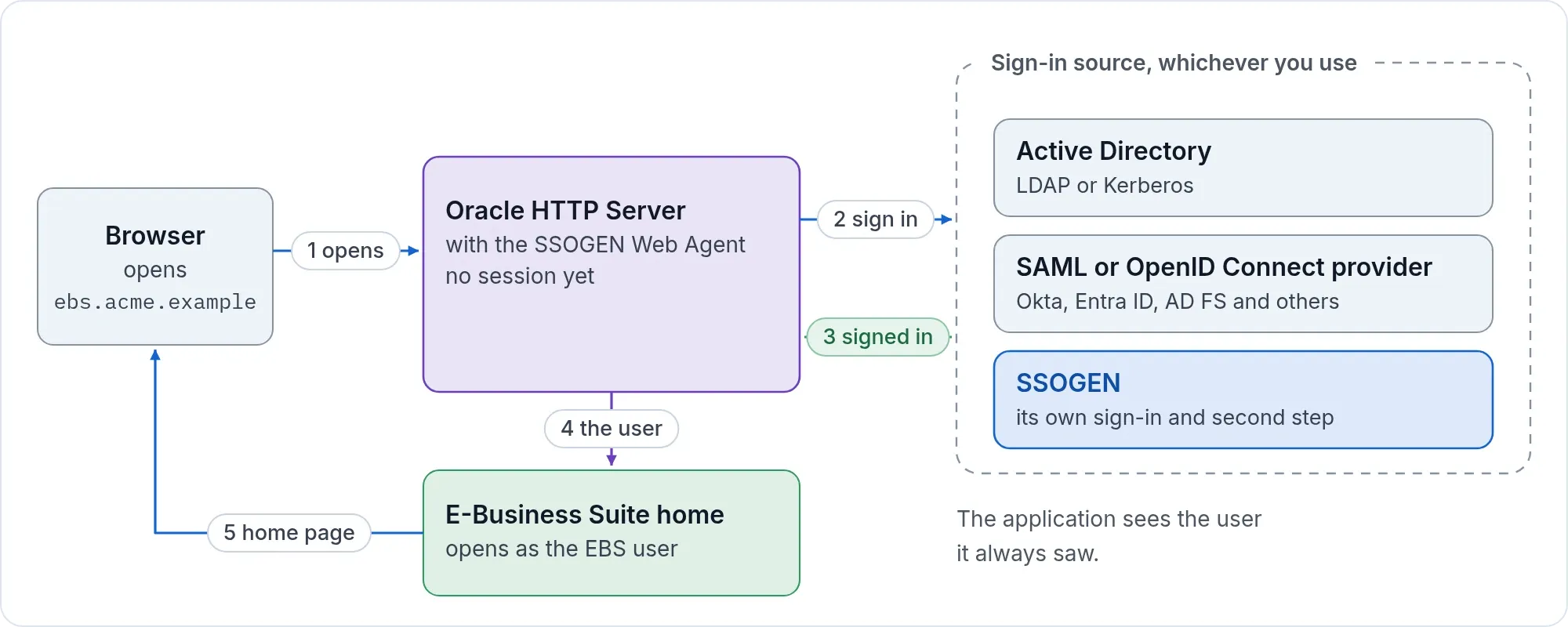
SSOGEN works with SAML 2.0 Web Browser SSO. No Oracle Access Manager, Oracle Internet Directory or Oracle Unified Directory is needed, and the same provider serves PeopleSoft and JD Edwards. For named products see Microsoft Entra ID, AD FS, Okta, PingFederate and PingOne and Shibboleth.
What the provider must send
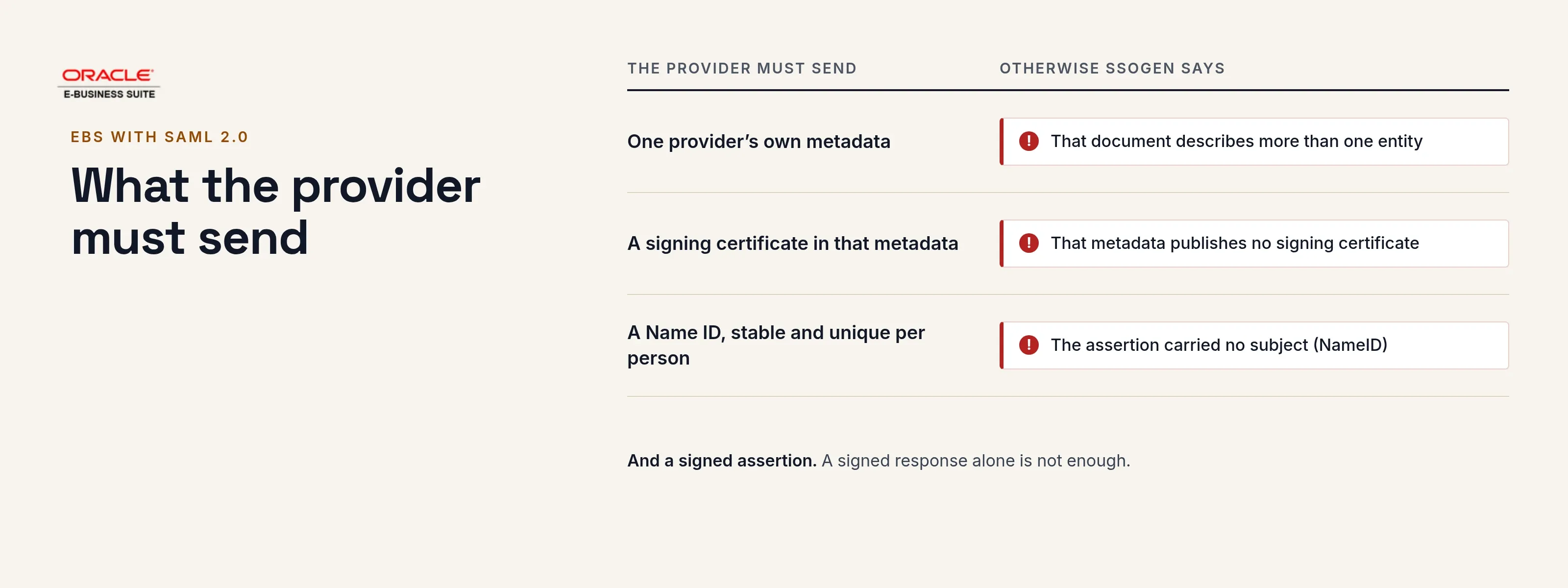
- A signed assertion. A signed response alone is not enough.
- A single sign-on endpoint for the HTTP-Redirect binding in its metadata.
- A Name ID that is stable and unique per person.
- The email address as an attribute (
mailoremail), and the name if you want it on the account. - For the direct path below, the assertion must also carry a bearer subject confirmation whose
Recipientequals the ACS URL, an audience equal to the entity ID, and a validity of at most 24 hours; every assertion is accepted once.
SAML 2.0 is what the product speaks. A provider that offers only SAML 1.x needs a SAML 2.0 front.
What you need
- An administrator of the provider, and its metadata (an
https://address or the XML file, describing one provider). - Oracle E-Business Suite 12.2 or 12.1, and the SSOGEN integration tool for it.
- An SSOGEN tenant,
https://acme.ssogen.ai, or a license key for the direct path.
Path A: through SSOGEN
At the provider
| The provider asks for | Value |
|---|---|
| Entity ID, audience | https://acme.ssogen.ai/saml/sp/partner |
| ACS URL, binding HTTP-POST | https://acme.ssogen.ai/saml/sp/partner/acs |
| SP metadata, if imported | https://acme.ssogen.ai/saml/sp/partner/metadata |
In SSOGEN
Give SSOGEN the provider’s metadata, map the attribute names, then create, validate, test, try and activate; allow the provider in the policy that covers EBS. A federation-wide metadata file listing many providers is refused: use the one provider’s own metadata. The screens are on Any SAML identity provider and Add a SAML identity provider in SSOGEN.
On the EBS side
- Register EBS in SSOGEN as a Web Agent application with the Client URL
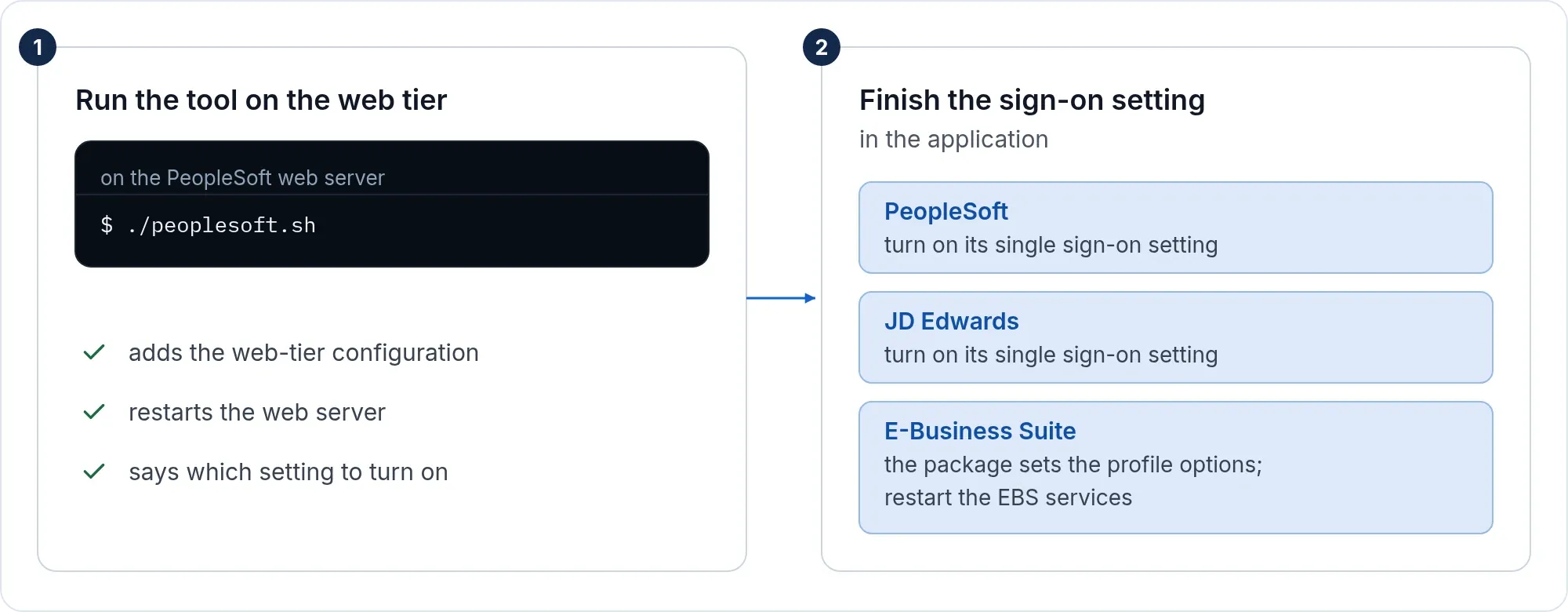
https://ebs.acme.example, and set Identify the person by to the value that equals the EBS user name. The agent sends it in capitals and never cuts off a domain part. - Run the tool and finish the setting in EBS as on the Oracle EBS single sign-on page.
- Create the EBS users. Keep
https://ebs.acme.example/OA_HTML/AppsLocalLogin.jspforSYSADMIN.
Path B: straight to the provider, no SSOGEN in between
With a license key from SSOGEN the tool connects the EBS web tier to the provider directly (-mode=saml). The provider needs:
| The provider asks for | Value |
|---|---|
| Entity ID | https://ebs.acme.example (change it with -entity_id) |
| ACS URL | https://ebs.acme.example/ssogen/acs |
| Name ID | The EBS user name. To read another attribute, set SSOGENSamlUserAttribute |
| Single logout URL | https://ebs.acme.example/ssogen/saml/slo |
Save the metadata as ebs-internal-idp.xml in the ssogen folder, or set SSOGENSamlIdpMetadataURL. Some providers need to import the service provider’s metadata or require signed requests: run the tool with -generate_saml_sp, which writes a key, a certificate and an -sp.xml file and prints where it is. The steps are on the EBS page.
If it does not work
| Symptom | What to do |
|---|---|
| “That document describes more than one entity” | The metadata is a federation aggregate. Use the provider’s own. |
| “That metadata publishes no signing certificate” | Get metadata that includes the signing certificate. |
| “The assertion carried no subject (NameID)” | The provider sends no Name ID. Configure one. |
| Oracle HTTP Server does not start after a direct SAML setup | The configuration names a metadata file that is not there. Save it, or put the # back on that line. |
| Sign-in works, EBS does not know the user | The name sent is not an EBS user name. Change Identify the person by or the Name ID. |