SSOGEN / Learn / MFA Types: The Factor Categories and the Methods You Can Deploy
Learn
MFA Types: The Factor Categories and the Methods You Can Deploy
MFA has three factor categories, know, have and are, and its methods, from authenticator codes to passkeys and text messages, differ widely in phishing resistance.
Updated
MFA types can be classified in two ways:
- By factor category: something you know (a password or PIN), something you have (a phone or a security key) or something you are (a fingerprint or face).
- By method: the methods in daily use are authenticator-app codes, passkeys, security keys, recovery codes, and codes sent by email or text.
Multi-factor authentication combines factors from two different categories. Two passwords are the same factor used twice.
The deciding property is phishing resistance: whether an attacker on a fake sign-in page can collect what the user enters and replay it. That property separates the methods more than the categories do.
What are the three factor categories?
| Category | Examples | Weakness |
|---|---|---|
| Knowledge | Password, PIN | Can be guessed, reused, phished |
| Possession | Phone with an app, security key, a printed code list | Can be lost or stolen |
| Inherence | Fingerprint, face | Cannot be changed if leaked; used on a device, not sent as a secret |
In practice, a biometric opens a device or releases a key stored on that device.
NIST SP 800-63B-4 (section 3.2.3) allows biometrics only as part of a multi-factor authenticator with a physical authenticator, so a face scan alone is never a sign-in.
Which MFA methods exist, and how strong is each?
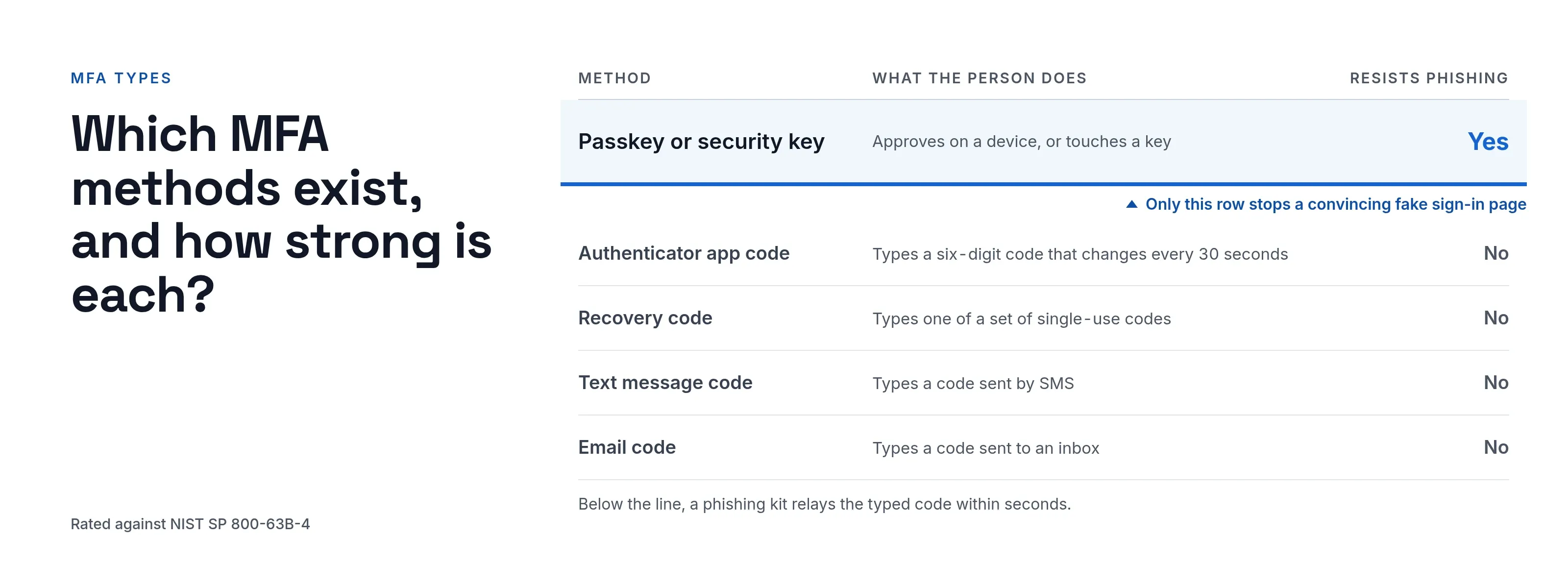
The table rates each method on phishing resistance and on NIST’s position. NIST defines its authenticator types in section 3.1 and phishing resistance in section 3.2.5.
| Method | What the person does | Phishing resistant | Notes from NIST SP 800-63B-4 |
|---|---|---|---|
| Passkey or security key (WebAuthn/FIDO2) | Approves on a device they open with, or touches a key | Yes | The sign-in response is bound to the real site’s name, so a fake site gets nothing usable. Synced passkeys are not allowed at the highest assurance level (AAL3). |
| Authenticator app code (TOTP) | Types a six-digit code that changes every 30 seconds | No | A one-time password. Strong against guessing and password reuse, but a phished code can be replayed within seconds. |
| Recovery code | Types one of a set of single-use codes | No | A look-up secret. Meant for a lost phone, kept offline. |
| Text message code | Types a code sent by SMS | No | Restricted (section 3.1.3.3): alternatives must be offered. Exposed to SIM swap and interception. |
| Email code | Types a code sent to an inbox | No | NIST says email SHALL NOT be used for out-of-band authentication (section 3.1.3.1). |
Only the first row stops a convincing fake sign-in page. Every method below it fails once a user is tricked into typing the code, which is exactly how real-time phishing kits operate.
Codes still have value: they stop attacks that rely on a stolen password alone.
What are passkeys and security keys?
Both use public-key cryptography:
- The device holds a private key that never leaves it, and the site holds the public key.
- Each sign-in signs a fresh challenge that includes the site’s name.
- A passkey is stored on a phone or computer and approved with a fingerprint, face or PIN. A security key is separate hardware that the user plugs in or taps.
The web standard is WebAuthn; FIDO2 is WebAuthn plus the protocol for external keys. The user types nothing that can be replayed, which is why this is the one method in the table that resists phishing by design.
What are recovery codes for?
Recovery codes are a fallback, not a daily method.
- Lost phone. When the phone with the authenticator app is lost, a single-use code lets the user sign in and enroll a new one.
- Single use. Each code works once.
- Offline storage. Store the set offline and protect it like a password, because whoever holds it can pass the second step.
Which MFA type should you choose?
| Situation | Reasonable choice |
|---|---|
| Staff reach finance, HR or admin tools | Passkey or security key where devices allow, authenticator app otherwise |
| Everyone else | Authenticator app, with recovery codes |
| Contractors with no company device | Authenticator app on a personal phone |
| Someone has no smartphone | Text code as a fallback, marked as weaker |
| Fallback of last resort | Email code, only if no other route exists |
Two principles drive most of the decision:
- Match strength to the application. Require a strong method for the applications that matter instead of the same effort everywhere. This is the idea behind step-up authentication.
- Plan enrollment and recovery before enforcement. A policy that demands a second factor from users who have none only locks them out.
What to check in your own setup
- Is a phishing-resistant method offered, and is it required for administrators?
- Are email and text codes off, or at least ranked below app codes?
- Can a person add a new factor without proving they already hold one? Attackers use that gap to take over accounts.
- Are people told when a factor is added or removed?
- Is there a lockout after repeated wrong codes, and does it also apply to the second step?
What does SSOGEN offer?
An administrator turns on MFA methods per policy, as set out in SSOGEN’s multi-factor authentication guide:
- authenticator app codes (the default)
- passkeys
- recovery codes
- text message codes and email codes, which stay off unless a policy lists them; the policy screen labels them “weaker” and “weakest”
Beyond the methods themselves:
- Admin Console. The policy that governs it never accepts email or text codes.
- Admin mode. Administrators also confirm a code from their authenticator app to enter it, and it lapses after 15 minutes unused by default.
- Enrollment. Users enroll in My Account, and the SSOGEN Authenticator mobile app generates six-digit codes that work offline.
The product overview is on the MFA software page.
Questions people ask
Is 2FA the same as MFA?
Two-factor authentication is MFA with exactly two factors. MFA means two or more.
Can you still get hacked with 2FA?
Yes. Phishing kits relay typed codes in real time, and attackers can persuade help desks to reset factors. Phishing-resistant methods and guarded recovery close most of that gap.
Why shouldn’t you use SMS for 2FA?
An attacker can move the phone number to another SIM, and text messages can be intercepted. NIST restricts the method and requires that alternatives be offered.
What is safer than 2FA with a code?
A passkey or security key, because its signed response can’t be replayed on another site.
Where to go next
To request a stronger factor only when it is needed, see step-up authentication, or return to the Learn hub.
Push bombing targets plain push approval; see MFA fatigue attacks. Every method has a known bypass, covered in how attackers bypass MFA.
AiTM phishing kits such as Evilginx can relay typed codes, and text codes fail when the number is moved; see SIM swapping. Biometric error rates and NIST’s limits are in biometric authentication.
Sources, all read 2026-10-09: NIST SP 800-63B-4, W3C Web Authentication Level 3.