SSOGEN / Learn / LDAP vs Active Directory: What Each One Is and How They Fit Together
Learn
LDAP vs Active Directory: What Each One Is and How They Fit Together
LDAP is the protocol for searching and signing in to a directory, and Active Directory is Microsoft's directory service that you happen to reach over LDAP.
Updated
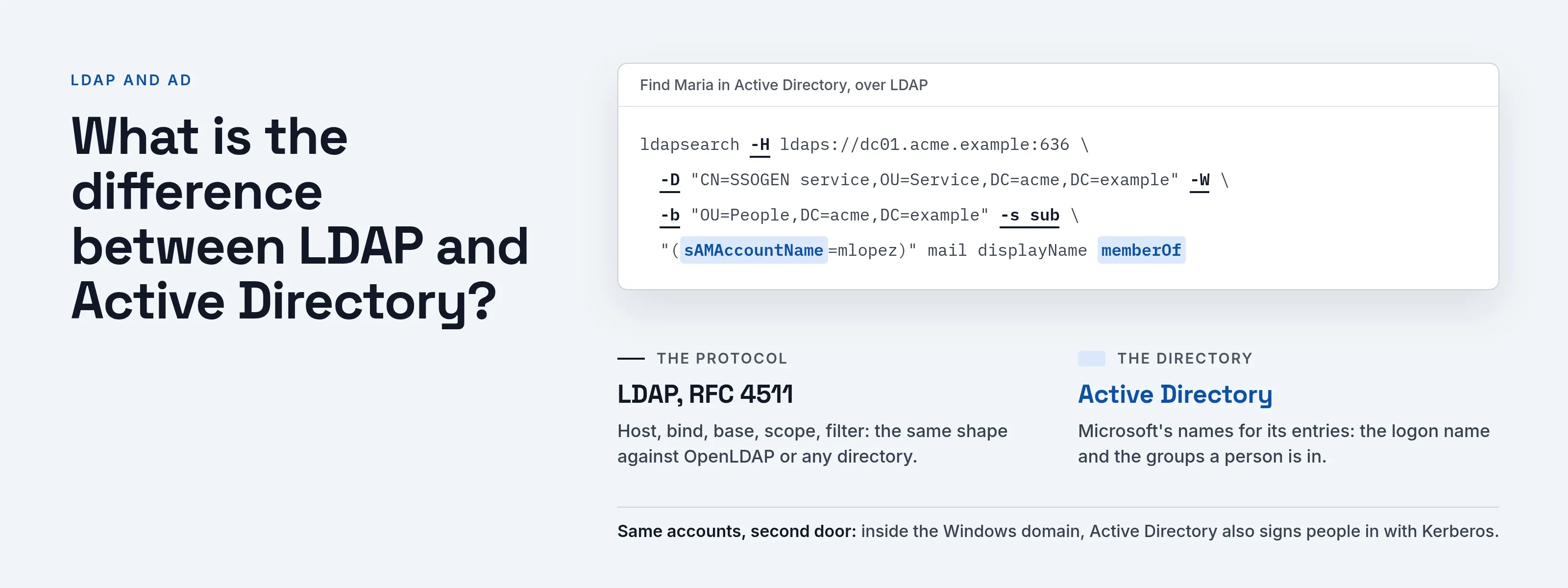
LDAP vs Active Directory compares two different kinds of thing. LDAP, the Lightweight Directory Access Protocol, is a set of rules a program follows to search a directory and sign in to it. Active Directory is Microsoft’s directory service: the database of users, computers and groups that a Windows domain runs on.
You can reach Active Directory over LDAP, and it also uses Kerberos for sign-in inside the domain. OpenLDAP is a different product that speaks LDAP too.
Asking which one to pick is like asking whether to pick HTTP or a particular web server: one is the protocol, the other is a product that speaks it.
Is LDAP the same thing as Active Directory?
No. The two meet in daily work, so the names blur, but “LDAP” names only the protocol used to talk to a directory.
- Why the names blur. A developer says “connect to LDAP,” and the server they connect to is a domain controller. “LDAP” ends up meaning “the directory.”
- What the protocol defines. RFC 4511 describes the operations a client sends to a server (read 2026-10-08).
- Bind and Search. Bind exchanges authentication information, and Search looks entries up.
- What it leaves out. It says nothing about a company’s users, a Windows domain, group policy or any product.
- Where the entries live. Those belong to whatever directory sits behind the protocol.
- What Active Directory is. Microsoft Learn describes Active Directory Domain Services as structured, hierarchical storage for objects such as users, computers, printers and services (read 2026-10-08).
- How LDAP relates. Microsoft lists the Lightweight Directory Access Protocol API among the ways applications reach that data. LDAP is therefore one way into Active Directory, not Active Directory itself.
What is the difference between LDAP and Active Directory?
| LDAP | Active Directory | |
|---|---|---|
| What it is | A protocol, an open standard (RFC 4511) | A directory service from Microsoft that stores the entries |
| What it does | Defines how a client binds, searches and changes entries | Holds users, groups and computers, and runs on domain controllers |
| Who implements it | Many products, including OpenLDAP | One product |
| Sign-in | A Bind request with a name and credentials | LDAP bind, and Kerberos inside the Windows domain |
| Where you configure it | In the client and the server that speak it | On the domain controllers |
In short, LDAP is how a client asks, and Active Directory is one server that answers.
Where does Kerberos fit in?
Active Directory also serves Kerberos. According to Microsoft’s Kerberos overview, the Key Distribution Center on each domain controller uses the domain’s Active Directory Domain Services database as its account database (read 2026-10-08).
Two sign-in paths therefore check the same account:
- Kerberos. A domain-joined computer signs a person in through Kerberos and receives a ticket.
- LDAP bind. A web application or script that asks for a password and checks it against the directory uses an LDAP bind.
For the ticket side, read what is Kerberos.
What about OpenLDAP and other LDAP servers?
OpenLDAP is the best-known open source directory server. It speaks the same protocol as Active Directory, but its entries look different.
- slapd. The OpenLDAP documentation introduces
slapdas an LDAP directory server that runs on many platforms (OpenLDAP Administrator’s Guide, read 2026-10-08). - OpenLDAP entries. A person is often an
inetOrgPersonfound byuid.inetOrgPersonis defined in RFC 2798. - Active Directory logon names.
sAMAccountNameis a logon name for older Windows clients, anduserPrincipalNameis the logon name most Windows users type. - Group membership. In Active Directory it shows up on the user as
memberOf(Microsoft Learn, user naming attributes, read 2026-10-09). - One program, both servers. A program written against the protocol works with both, provided it is configured with the right attribute names for each.
What does an application need to connect to LDAP or Active Directory?
Five settings, whichever directory sits behind them:
-
A host and port. Microsoft’s firewall reference for Active Directory lists LDAP on port 389, LDAP over SSL on 636, and the Global Catalog on 3268 (3269 with SSL) (read 2026-10-08).
The Global Catalog holds a partial replica of every naming context, so it can find an object by a few common attributes without knowing which domain holds it (Microsoft Learn, Global Catalog, read 2026-10-09).
This helps when a person could be in any domain of the forest.
-
A secure channel. LDAPS wraps the whole connection in TLS from the first byte, normally on 636. StartTLS begins on 389 and upgrades before anything secret is sent.
A password sent over plain LDAP is exposed to anyone on the path.
RFC 4513 calls disclosure of the password by a simple bind an inherent security risk and says clear-text password methods should not be on by default unless TLS protects the session (read 2026-10-09).
The RFC standardizes StartTLS. LDAPS on 636 is the older approach, and Microsoft’s port list still includes it.
-
A bind. RFC 4511, section 4.2, says the Bind operation exists to exchange authentication information between client and server (read 2026-10-08).
Applications usually bind first as a read-only service account to find the person, then bind as the person to test the password.
-
A base DN. The base object of a Search is the entry the search starts from.
The scope says whether to look at that entry, its direct children or the whole subtree below it (RFC 4511, Search request, read 2026-10-08).
An example for Acme Corp is
OU=People,DC=acme,DC=example. -
A filter. The Search filter states what must be true for an entry to match. An application normally filters on one attribute, such as a user name equal to what the person typed.
Here are the same pieces as a command, with placeholder values only:
ldapsearch -H ldaps://dc01.acme.example:636 \ -D "CN=SSOGEN service,OU=Service,DC=acme,DC=example" -W \ -b "OU=People,DC=acme,DC=example" -s sub \ "(sAMAccountName=mlopez)" mail displayName memberOfHow to read it:
- Host and bind.
-His the host and port, and-Dis the bind name. - Base and scope.
-bis the base DN, and-s subis the subtree scope. - Filter and attributes. The quoted text is the filter; the words after it are the attributes to return.
Common mistakes
| Symptom | Likely cause |
|---|---|
| Certificate error on LDAPS | The certificate does not name the host you typed, or your company’s certificate authority is not trusted by the client |
| Bind fails with a correct password | The bind name is in a form the client does not accept; a full DN is the safest form |
| Search returns nothing | The base DN is too narrow or wrong, or the filter uses an attribute the directory does not have |
| Search returns two people | The username attribute is not unique under the base DN |
| Works on 389, fails on 636 | The domain controller has no server certificate yet |
How SSOGEN connects to Active Directory and LDAP
SSOGEN uses the same five settings to connect to the directory your organization already runs, whether that is Active Directory or an LDAP server such as OpenLDAP.
- Existing passwords. Users sign in to SSOGEN with their existing directory password, which SSOGEN does not copy.
- Two binds. SSOGEN binds as a read-only service account to find the person, then binds as the person to check the password.
- Always encrypted. The connection to an LDAP directory uses LDAPS (usually port 636) or StartTLS (usually 389), your choice.
- Connection step. In the Admin Console wizard, under Identity, then Directories, it takes a Directory URI and a User base DN.
- Credentials step. It takes a Bind DN, which must be typed as a full DN.
- Username attribute. On Active Directory it is
userPrincipalNameorsAMAccountName, depending on what people type. - One match. A sign-in needs exactly one matching entry, so point the base DN at people only.
- Directory Connector. When SSOGEN can’t reach a domain controller directly, this feature of SSOGEN Gateway runs beside the directory inside your network. It answers a short list of typed questions and opens no inbound path.
The setup steps are in Connect Active Directory or LDAP and the Directory Connector guide. The product pages are LDAP SSO and Active Directory connector.
Questions people ask
What does LDAP stand for?
LDAP stands for Lightweight Directory Access Protocol. It’s the standard way for a program to search a directory and sign in to it, defined in RFC 4511. The name says “access protocol” because it describes how to ask a directory for data, not where the data lives.
What is Active Directory in simple terms?
Active Directory Domain Services is Microsoft’s directory: a structured store of the users, computers, printers and services on a Windows network, plus the sign-in and access control around them. Microsoft calls it a directory service that makes that data available to authorized users and administrators (read 2026-10-09).
What is the difference between LDAP and LDAPS?
LDAP is the protocol. LDAPS is LDAP carried inside TLS, normally on port 636, while plain LDAP uses 389. The requests are the same; only the connection is encrypted. StartTLS is the standardized alternative: it starts on 389 and upgrades the same connection to TLS before a password is sent.
What is the difference between LDAP and Kerberos?
LDAP looks up and checks entries in a directory. Kerberos issues tickets so a person doesn’t send a password to each service. In a Windows domain, both read the same Active Directory accounts. See what is Kerberos for the ticket flow.
Is Active Directory an LDAP server?
It answers LDAP requests, so applications can use it as one. It is also the directory and the Kerberos account database for a Windows domain.
Can I use LDAP without Active Directory?
Yes. OpenLDAP and other directory servers speak LDAP with no Windows domain involved.
Which port does Active Directory use for LDAP?
Port 389 for LDAP, 636 for LDAP over SSL, and 3268 and 3269 for the Global Catalog, per Microsoft’s firewall reference above.
Is LDAP single sign-on?
No. An LDAP bind checks a password at each application that does one. Single sign-on is a layer on top, covered in LDAP SSO and what is SSO.
Where to go next
- Authentication method. Read LDAP as an authentication method.
- Active Directory sign-in. See how Active Directory sign-in works with SSOGEN.
- Kerberos. Learn about Kerberos.
- Ports. For what each port does and how to test and fix LDAPS failures, see LDAP and LDAPS ports.
- Tokens. To sign people in to web apps with tokens instead of directory queries, see what AD FS does.
Sources, all read 2026-10-08: RFC 4511, RFC 4513, Microsoft Learn firewall reference for Active Directory.