SSOGEN / LDAP SSO: Single Sign-On Backed by LDAP or Active Directory
SSOGEN
LDAP SSO: Single Sign-On Backed by LDAP or Active Directory
People sign in once with the directory password they already have, and every application receives a signed result instead of asking again.
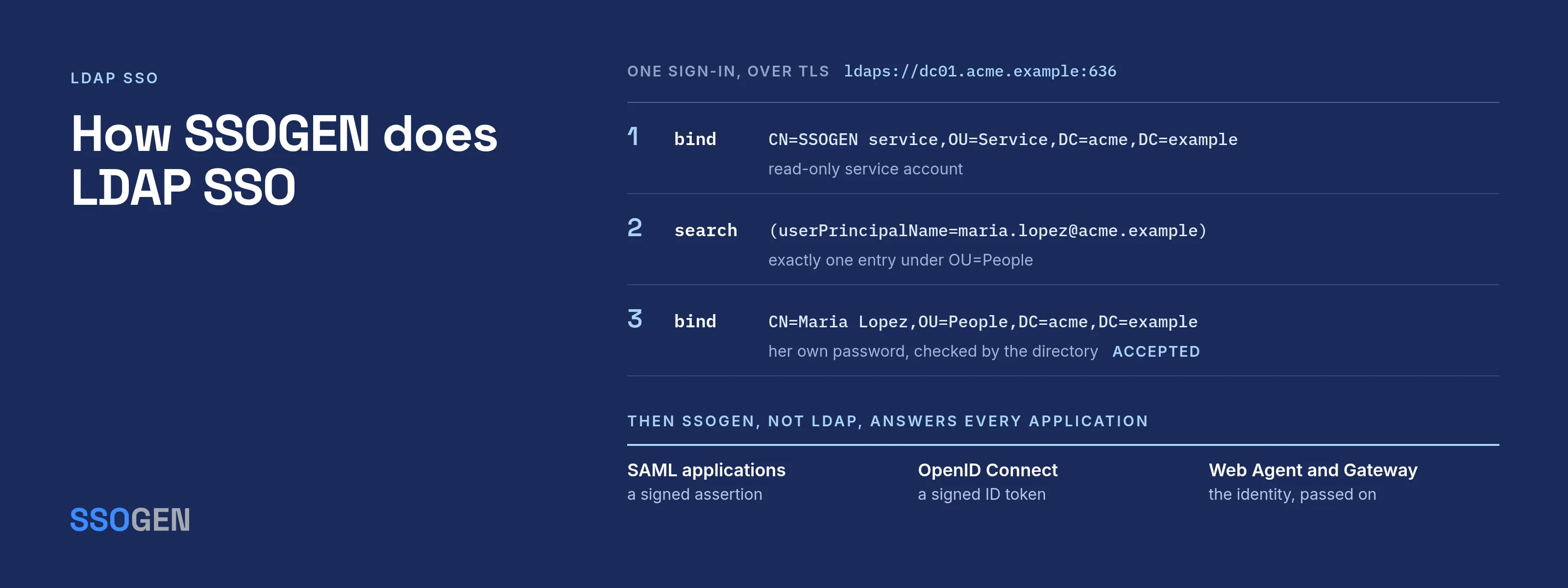
LDAP SSO combines two jobs. LDAP (or Active Directory speaking LDAP) stores accounts and checks passwords. Single sign-on starts once the password is right: the user gets one session, and each application receives a signed statement of who the user is.
An application that binds to LDAP on its own is not doing single sign-on. It asks for the same password again at every application.
LDAP authentication and SSO are different jobs
| LDAP authentication | Single sign-on | |
|---|---|---|
| What it answers | “Is this password right for this entry?” | “Who is this person, and may they open this application?” |
| How often the user types a password | At every application that binds to LDAP | Once per session |
| What the application receives | A yes or no from a bind | A signed assertion or token (SAML, OpenID Connect) or an identity passed by an agent |
| Where multi-factor and policy live | Nowhere, unless each application builds it | In one place, applied per application |
LDAP’s side of the job is a bind. RFC 4513, section 5.1 defines the name/password bind, and section 5.1.3 states that it is not suitable without confidentiality protection.
Section 5.1.2 covers the unauthenticated bind: a name with an empty password. It becomes a risk when a client lets an empty password through (read 2026-10-08).
Always use TLS, and make sure every component that binds for your users rejects empty passwords.
The right design keeps the directory as the source of truth for people and passwords. One service then checks the password, applies policy and issues the sign-in.
How SSOGEN does LDAP SSO
SSOGEN connects to Active Directory or any LDAP server, and people sign in with the directory password they already have. SSOGEN does not copy passwords; every sign-in is checked against the directory.
- A read-only service account finds the person in the directory.
- SSOGEN binds as that person to test the password.
- The person receives a SSOGEN session.
Every application behind SSOGEN uses that session with the same MFA and policy rules: SAML, OpenID Connect, the Web Agent or the Gateway.
The connection wizard sets these requirements:
- The connection is always encrypted. No plain LDAP option exists. Pick LDAPS (usually port 636) or StartTLS (usually 389). If the directory does not upgrade the connection, SSOGEN stops.
- The certificate must name the host you type. For a certificate issued to
dc01.acme.example, enterldaps://dc01.acme.example:636, not an IP address. Add a company certificate authority once under Settings → Certificates. - Enter the bind account as a full distinguished name, such as
CN=SSOGEN service,OU=Service,DC=acme,DC=example. The field rejectsACME\svc-ssogenand the user principal name form. - One username must match exactly one entry under the user base DN. Point the base at people only.
- Pick the username attribute people actually type. On Active Directory, that is
userPrincipalName(maria.lopez@acme.example) orsAMAccountName(mlopez).
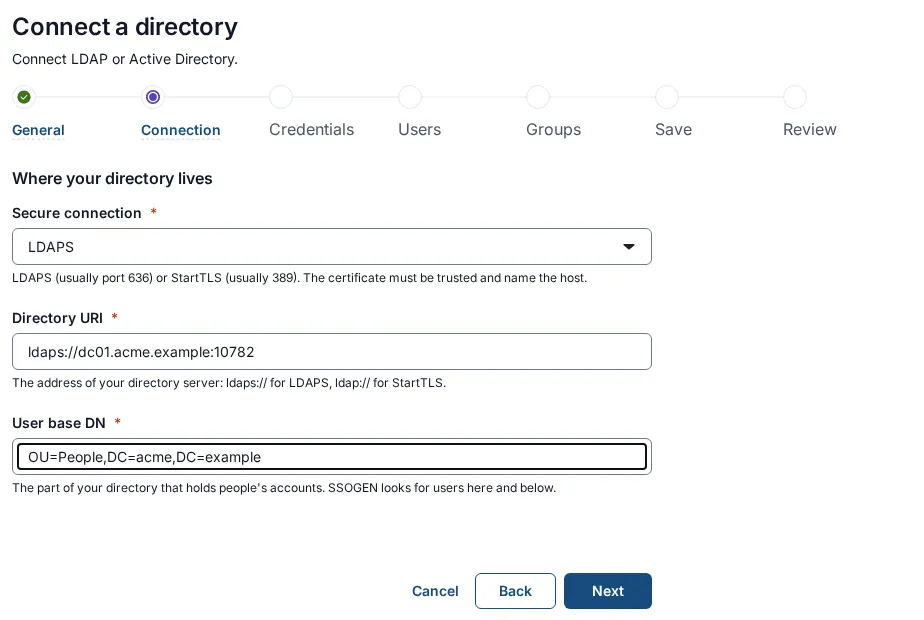
The wizard has seven steps: General, Connection, Credentials, User mapping, Group mapping, Test (which saves a draft) and Review and activate.
Groups come from memberOf. On OpenLDAP without the memberof overlay, they come from a Group base DN search on member. Group names can hold letters, digits, spaces, dots, underscores and hyphens, so a group named Finance (EU) is skipped.
Keeping people in step with the directory
SSOGEN creates or refreshes an account at each sign-in. An Import users run reads the whole directory.
- The first import never disables anyone. It reports how many people it saw, so a wrong base DN is caught before everyone looks like a leaver.
- Later runs have a safety limit. A run halts and changes nobody’s access if it would switch off more than the larger of 5 people and 10 percent of the directory’s active people.
- Password changes need no sync. SSOGEN never stores the passwords.
Details are in the directory sync guide.
When the directory sits behind a firewall
A domain controller inside your network does not need to be reachable from SSOGEN. The Directory Connector, a feature of the SSOGEN Gateway, runs next to the directory and answers a fixed list of typed questions for SSOGEN:
- connect and sign in
- find a user
- read attributes
- account status
- group membership
- only if separately allowed, whether a password is right
The connector cannot run a free-form LDAP search. It always checks the directory’s certificate against a certificate authority you provide, and a Gateway group facing the internet gets no directory access. See the Directory Connector page and its setup guide.
Questions people ask
Can LDAP be used for SSO?
LDAP covers half of it: it verifies passwords. A single sign-on layer such as SSOGEN issues the session and the assertion to each application.
Are LDAP and SSO the same?
No. LDAP is a protocol for reading a directory and binding to it. SSO means signing in once for every application.
Is LDAP outdated?
No. SSOGEN uses LDAP to read and bind to Active Directory and OpenLDAP, always encrypted. Adding a cloud identity provider is a separate choice you can make later.
Where to go next
- Start here. LDAP as an authentication method.
- Connect. Follow the Active Directory and LDAP connection guide.
- Compare. To compare the two directory terms, read LDAP vs Active Directory.
- Ports. For port choices, read LDAPS port 636 and the other LDAP ports.
Sources, all read 2026-10-09: RFC 4513, LDAP authentication methods and security mechanisms.