LDAP proxy: connect a directory through the Directory Connector
The Directory Connector is a feature of the gateway. It lets SSOGEN ask your corporate directory (Active Directory or another LDAP server) questions when SSOGEN itself cannot reach that directory: the directory sits inside your network, and SSOGEN does not.
Sign-in does not use the Directory Connector yet: people in a directory that only a Gateway can reach cannot sign in with its password. Today the Directory Connector tests a connection to the directory through the Gateway.
This guide takes the fictional company Acme Corp from “I have a domain controller” to a saved, tested connection. It uses SSOGEN at https://sso.acme.example, an SSOGEN Gateway instance edge_acme_dc1_01 in the gateway group eg_acme_dc1, and the domain controller dc1.acme.example for the domain acme.example.
Terms used here
- Directory: your user database, for example Active Directory (AD).
- LDAPS: LDAP over TLS (usually port 636). The Directory Connector always uses it; there is no unencrypted option.
- Bind account (or service account): the directory account the gateway signs in with. Its full name is the bind DN (distinguished name).
- Base DN: the place in the directory tree where users live, for example
DC=acme,DC=example. - Gateway group: a name for the gateway instances that share configuration. See Install and enroll an SSOGEN Gateway.
secret://reference: a name that stands for a secret kept in a file on the gateway host. The password itself never goes into the console.
What the Directory Connector can and cannot do
Section titled “What the Directory Connector can and cannot do”- It runs a fixed list of typed questions: can the gateway connect and sign in, find this user, what groups is this user in, is the account enabled, and (only if you allow it) is this password right for this user. It cannot run arbitrary LDAP searches for SSOGEN or anyone else.
- It verifies the directory’s certificate against a certificate authority you give it. There is no “skip verification”.
- It reads only a short list of attributes. When a connection has no mapping of its own (the console does not set one), the gateway returns
mailanddisplayName, readsmemberOffor groups, and treats an account as disabled when theuserAccountControlattribute has the value 2 bit set. It keeps answers in a short-lived cache and limits how many groups it resolves and how deep it follows nesting. - SSOGEN’s configuration format can also carry a per-connection mapping (separate user and group base DNs, an attribute allow-list of up to 64 names, the group membership style
memberOf,groupMemberorposixMemberUid, a nesting depth of 0 to 16, a group limit of 1 to 5000, the account-status attribute and bit, and a cache lifetime of 0 to 3600 seconds, where 0 means no cache). The Admin Console has no fields for it, so connections you save there use the defaults above. Ask your SSOGEN contact if you need a different mapping. - A gateway group in the dmz zone (an Internet-facing App Proxy) is never given directory reach. Use a separate internal gateway group.
1. What you need first
Section titled “1. What you need first”| What | Example |
|---|---|
| A Linux server for the gateway inside your network, able to reach the directory | gw01.acme.example (see Install and enroll an SSOGEN Gateway) |
| The directory’s host name and LDAPS port | dc1.acme.example, port 636 |
| A read-only service account in the directory | CN=svc-ssogen-ro,OU=Service Accounts,DC=acme,DC=example |
| That account’s password | kept in a password manager |
| The certificate authority that issued the directory’s certificate, as a PEM file | acme-ad-ca.pem |
| The base DN where your users live | DC=acme,DC=example |
| A super administrator in the Admin Console | Maria Lopez |
Only a super administrator can save or test directory connections.
2. Prepare the directory (outside SSOGEN)
Section titled “2. Prepare the directory (outside SSOGEN)”These steps happen in Active Directory and on a Windows machine. Adapt the names to your domain. If you use a non-Microsoft LDAP server, create the equivalent read-only account in its own tool.
2.1 Create a read-only service account
Section titled “2.1 Create a read-only service account”On a domain controller, in PowerShell as a domain administrator:
New-ADUser -Name "svc-ssogen-ro" ` -SamAccountName "svc-ssogen-ro" ` -UserPrincipalName "svc-ssogen-ro@acme.example" ` -Path "OU=Service Accounts,DC=acme,DC=example" ` -AccountPassword (Read-Host -AsSecureString "Password") ` -Enabled $true ` -PasswordNeverExpires $true ` -CannotChangePassword $trueGive it no group memberships beyond the default Domain Users. An ordinary domain account can read the attributes the connector asks for. Do not make it a domain administrator.
2.2 Export the certificate authority
Section titled “2.2 Export the certificate authority”The gateway must trust the certificate your domain controller presents on LDAPS. If your domain uses an internal certificate authority (CA):
- On the CA server, open Certification Authority, right-click the CA name, Properties, General, View Certificate, Details, Copy to File, choose Base-64 encoded X.509 (.CER), and save it as
acme-ad-ca.cer. Or from a command prompt on the CA server:certutil -ca.cert acme-ad-ca.cer. - If there is a chain (a root and an issuing CA), export each and combine them in one PEM file, root last.
- Copy the file to the gateway host and check it:
openssl x509 -in acme-ad-ca.pem -noout -subject -issuer -datesYou can also see what the domain controller presents:
openssl s_client -connect dc1.acme.example:636 -showcerts </dev/nullThe certificate must be valid for the host name you will type in the console (dc1.acme.example).
2.3 Check the account from the gateway host
Section titled “2.3 Check the account from the gateway host”Before involving SSOGEN, prove the gateway host can do what the connector will do. Install the LDAP client tools (openldap-clients) and run:
LDAPTLS_CACERT=/etc/ssogen-edge/trust/acme-ad-ca.pem \ldapsearch -H ldaps://dc1.acme.example:636 \ -D "CN=svc-ssogen-ro,OU=Service Accounts,DC=acme,DC=example" -W \ -b "DC=acme,DC=example" "(sAMAccountName=mlopez)" \ mail displayName userAccountControl memberOfEnter the service account’s password when asked. You should see Maria Lopez’s entry with her mail, displayName, userAccountControl and memberOf lines. If this fails, the connector will fail the same way: fix it here first. Typical messages:
ldapsearch says |
Usually means |
|---|---|
Can't contact LDAP server |
Host, port or firewall; the gateway host cannot reach the domain controller on TCP 636. |
TLS: hostname does not match CN in peer certificate |
The certificate does not name dc1.acme.example. Use the name it does carry. |
unable to get local issuer certificate or certificate verify failed |
The CA file is wrong or incomplete. |
Invalid credentials (49) |
Wrong bind DN or password. |
| No entry returned | Wrong base DN, or the person is not under it. |
3. Enroll the gateway for the Directory Connector
Section titled “3. Enroll the gateway for the Directory Connector”The gateway that runs the connector must be enrolled with the Directory Connector feature. Three places must all agree: the gateway’s local file, the identity SSOGEN gives it at enrollment, and SSOGEN’s configuration. A feature runs only when all three agree.
-
Install the gateway on the host as in Install and enroll an SSOGEN Gateway, with these differences in
/etc/ssogen-edge/edge.yaml:edge:instanceId: edge_acme_dc1_01groupId: eg_acme_dc1realmId: 3f2b1c9e-7a64-4d1e-9b8a-5c0d2e4f6a71platformOrigin: https://sso.acme.exampletransportProfile: mtlsnetworkZone: internalmodes:gateway: falsedirectoryBridge: truedirectoryApi:listen: 198.51.100.40:9444pki:certificate: /etc/ssogen-edge/pki/edge.crtprivateKey: /etc/ssogen-edge/pki/edge.keytrustBundle: /etc/ssogen-edge/pki/gateway-trust-bundle.pemconfigBundle: /var/lib/ssogen-edge/config/current.ssogenbundlestateDirectory: /var/lib/ssogen-edgeeventSpool: /var/spool/ssogen-edge/eventsField What it means for the connector modes.directoryBridge: trueThis instance may run the connector. At least one mode must be on. networkZoneinternaloridentity. A single feature indmzis allowed by the gateway, but SSOGEN refuses to give a gateway group in thedmzzone any directory connection. If you combine features on one instance,networkZoneis required, anddmzwith the App Proxy plus any other feature is refused.directoryApi.listenThe exact IP address and port the gateway listens on for SSOGEN’s directory requests, for example 198.51.100.40:9444. A host name is refused. If you leave it out, the gateway does not listen at all and nothing can use the connector. It is only accepted together withmodes.directoryBridge: true. -
Open the firewall so SSOGEN can reach
198.51.100.40:9444(TCP) from SSOGEN. SSOGEN and the gateway authenticate each other with certificates on this connection; the gateway accepts directory requests only from SSOGEN’s own directory identity. -
Get a token for the Directory Connector. On Secure access, Gateways, under Enrollment tokens, type the gateway group, choose Directory Connector under What this Gateway will do, and select Issue token. SSOGEN refuses an enrollment that asks for a role the token did not grant.
-
Enroll with the token (
--enroll-token-file), start the service and check the gateways screen as in the install guide. Remember to give the service the trust bundle and the secret directory options (next step).
4. Put the CA and the bind password on the gateway
Section titled “4. Put the CA and the bind password on the gateway”The gateway reads two things from files on its own host.
The directory CA. Pass the PEM file you exported in step 2.2 with the program option --directory-trust-bundle. Every directory certificate must chain to it. Without it the Directory Connector is turned off (the gateways screen says so).
The bind password. In the console you type a reference such as secret://ldap/bind-password. The gateway turns that into a file name under its secret directory (the --secret-directory option):
| Reference | File on the gateway |
|---|---|
secret://ldap/bind-password |
/etc/ssogen-edge/secrets/ldap/bind-password |
Create it so that only the gateway’s service account can read it:
sudo install -d -m 0700 -o ssogen-edge -g ssogen-edge /etc/ssogen-edge/secrets /etc/ssogen-edge/secrets/ldapsudo -u ssogen-edge sh -c 'umask 077; printf "%s" "THE-SERVICE-ACCOUNT-PASSWORD" > /etc/ssogen-edge/secrets/ldap/bind-password'Add the options to the service, as in the install guide (sudo systemctl edit ssogen-edge):
[Service]ExecStart=ExecStart=/usr/lib/ssogen-edge/ssogen-edge --config /etc/ssogen-edge/edge.yaml \ --secret-directory /etc/ssogen-edge/secrets \ --directory-trust-bundle /etc/ssogen-edge/trust/acme-ad-ca.pemIf the App Proxy also runs on this instance, keep its options too. Then sudo systemctl daemon-reload && sudo systemctl restart ssogen-edge.
5. Tell SSOGEN where the gateway listens
Section titled “5. Tell SSOGEN where the gateway listens”SSOGEN calls the gateway, not the other way round, so SSOGEN must know the public address of the gateway’s directoryApi.listen listener for the gateway group. You set it in the Admin Console, after you load the group in step 6.2: Secure access, Directory Connector, choose the gateway group and select Load. The section Gateway address for the Directory Connector appears above Connections.
- Type the address in Address, for example
https://gw01.acme.example:9444/edge/directory/execute. It must be anhttpsaddress ending in/edge/directory/execute, with no user name, query or fragment, and it must be the gateway’s public address: private and reserved addresses are refused. The gateway must hold a certificate of your organization with the Directory Connector granted. - Select Save address. The line above it then reads “Now: ” (before: “Not set for this group.”). Remove address deletes it.
Only a super administrator can change it. Until it is set, the Test button answers “The Directory Connector is not set up for this gateway group on SSOGEN, so there is nothing to test through.” (see Troubleshooting).
6. Add the connection in the Admin Console
Section titled “6. Add the connection in the Admin Console”Sign in to the Admin Console at https://sso.acme.example/admin/ as a super administrator.
-
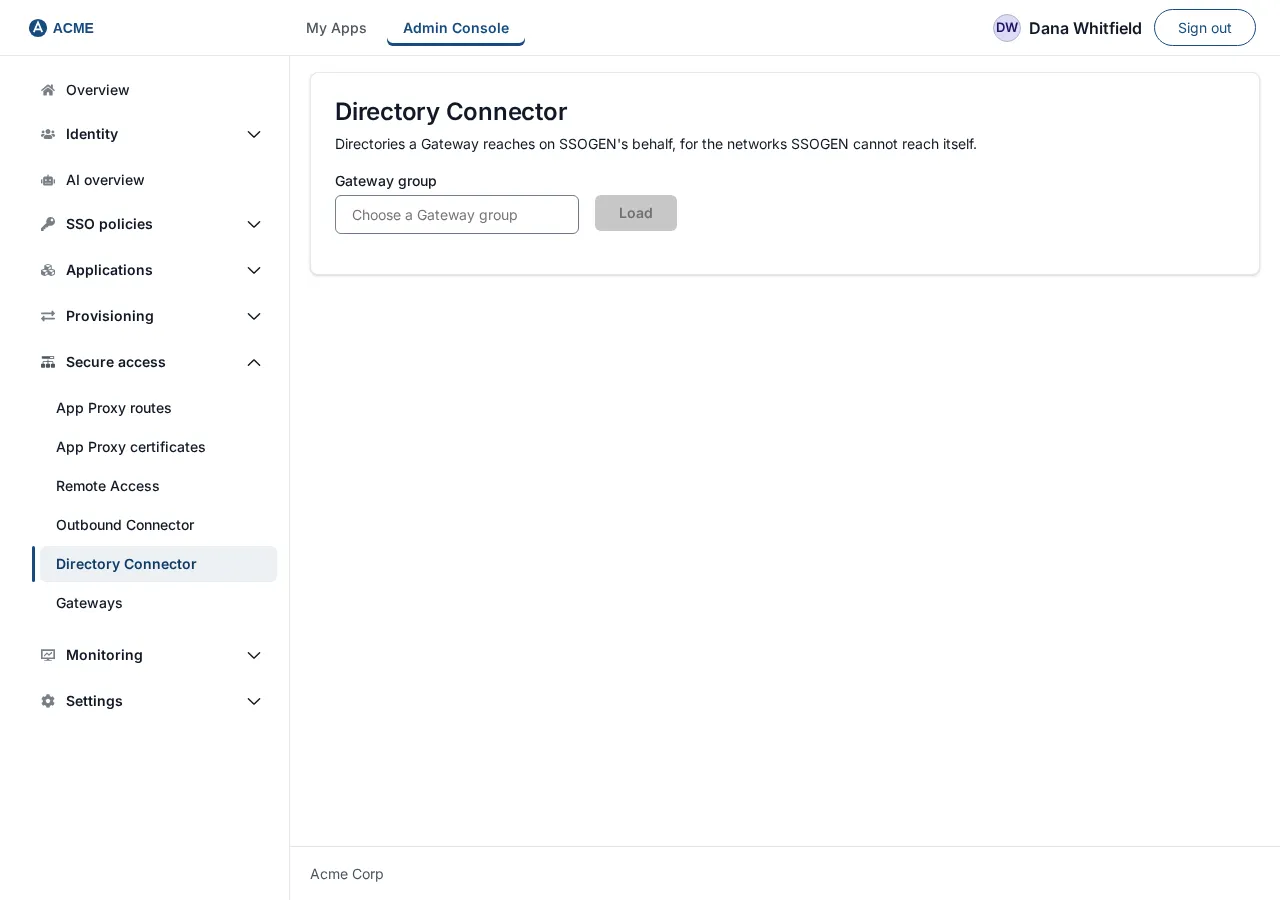
Open Secure access, then Directory Connector. The page title is Directory Connector; the line under it says “Directories a gateway reaches on this SSOGEN’s behalf, for the networks this SSOGEN cannot reach itself.”
-
In Gateway group, choose
eg_acme_dc1(the list shows each group and how many gateways it has, or type a new name), then select Load. The screen shows Connections: a table with the columns Connection, Host, Base DN and Password checks, and a Remove button on each row. A group with no connections shows “None for this group yet.” and “Save the first connection with the form below.”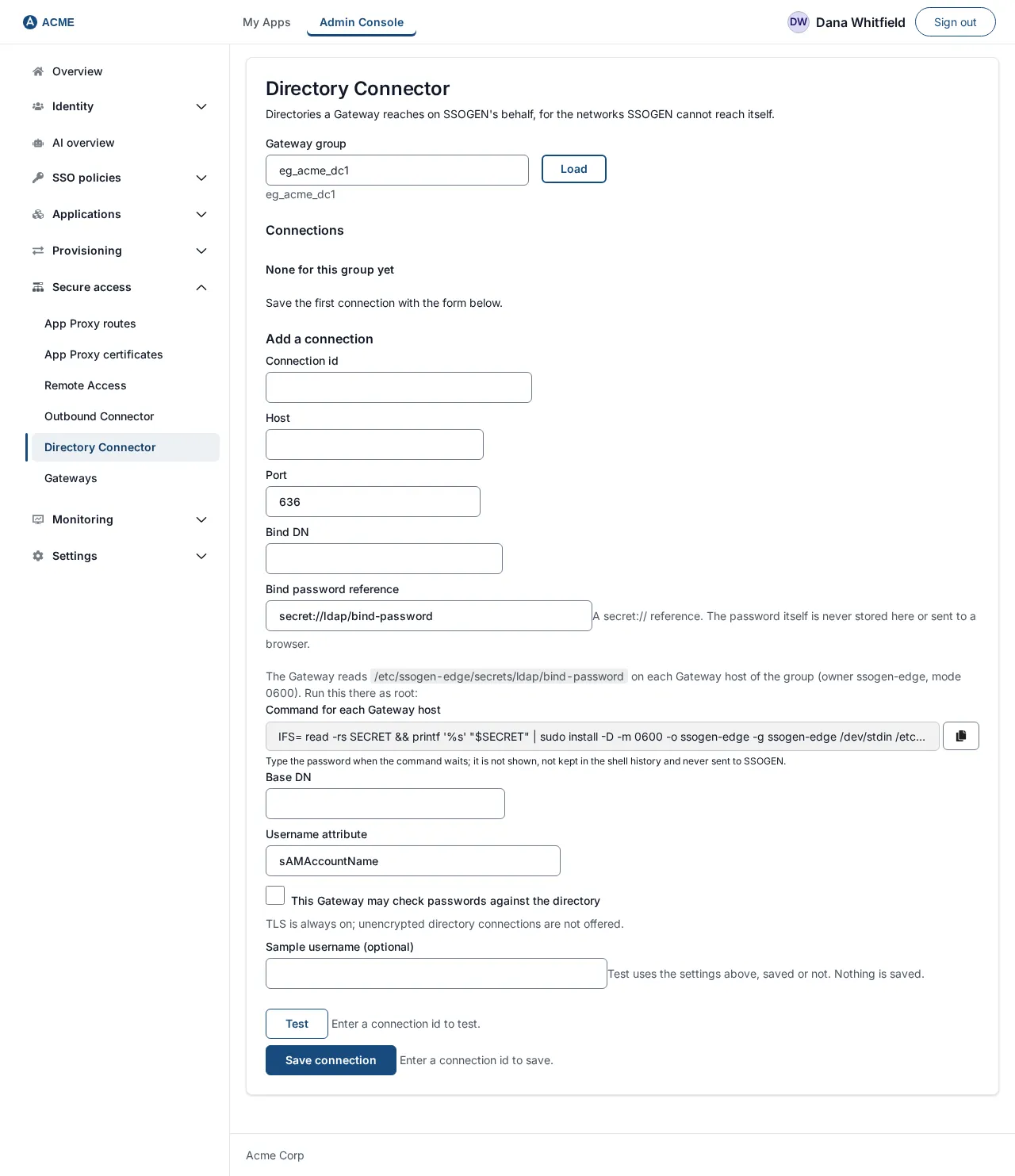
-
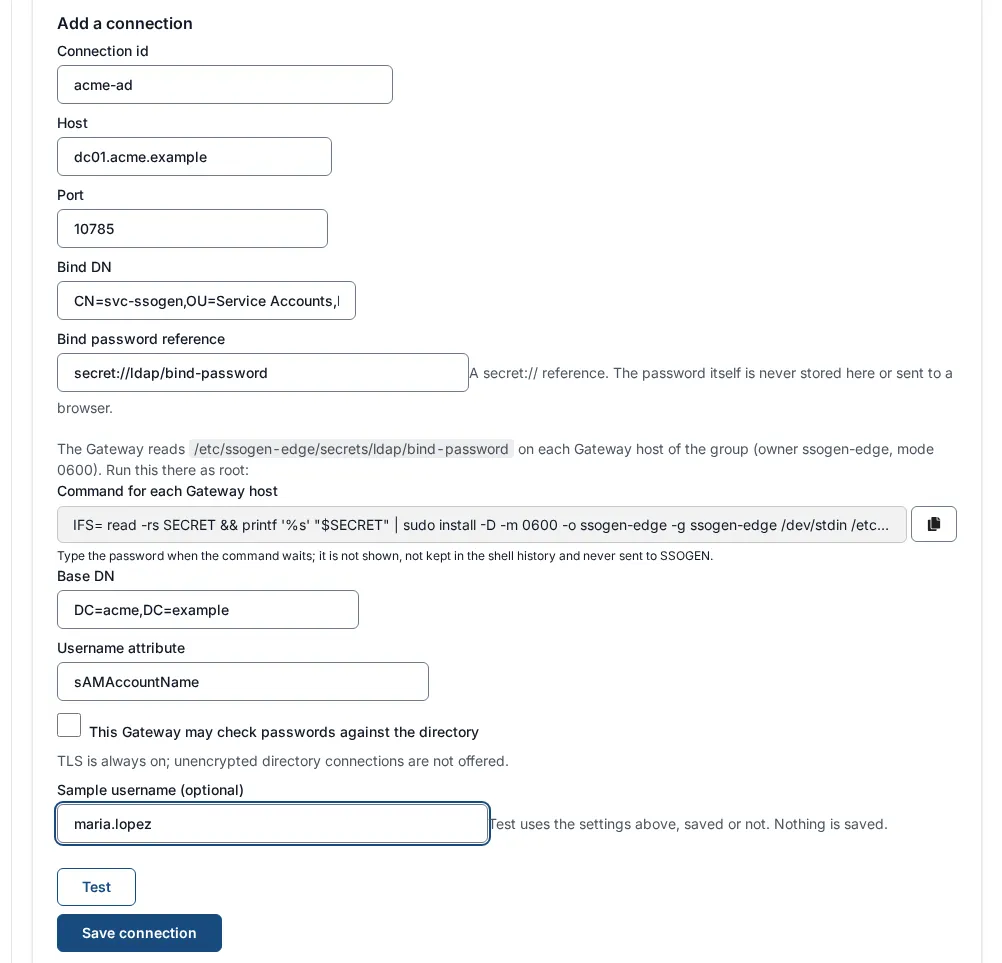
Under Add a connection, fill in the fields:
Field Example What it is Connection id acme-adA name for this connection. Starts with a letter or digit, then letters, digits, dot, dash or underscore (up to 128). Host dc1.acme.exampleThe directory’s host name. It is checked against the certificate. Port 636The LDAPS port (1 to 65535). The form starts at 636. Bind DN CN=svc-ssogen-ro,OU=Service Accounts,DC=acme,DC=exampleThe service account’s full name. Bind password reference secret://ldap/bind-passwordA secret://reference to the file you created. The help text reads “A secret:// reference. The password itself is never stored here or sent to a browser.”Base DN DC=acme,DC=exampleWhere users are searched. Username attribute sAMAccountNameThe directory attribute that holds the sign-in name ( uidon many non-Microsoft servers). The form starts atsAMAccountName.This gateway may check passwords against the directory unticked Allows the gateway to answer password checks. Sign-in does not send any through the gateway yet, so it has no effect on sign-in; the screen says so under the box. Under the fields the screen states “TLS is always on. A directory connection that is not encrypted carries a bind password across the customer network in clear, so it is not offered as a choice.”
-
Before you save, test (next step). To save, select Save connection. The button is grayed out, with a reason beside it, until the required fields are filled: “Enter a connection id to save.”, “Enter the directory host to save.”, “Enter the bind DN to save.”, “Enter the bind password reference to save.”, “Enter the base DN to save.”
-
A green Saved. appears and the connection joins the table. Saving publishes it to the gateway group at once; the gateway picks it up on its next check (by default within five minutes).
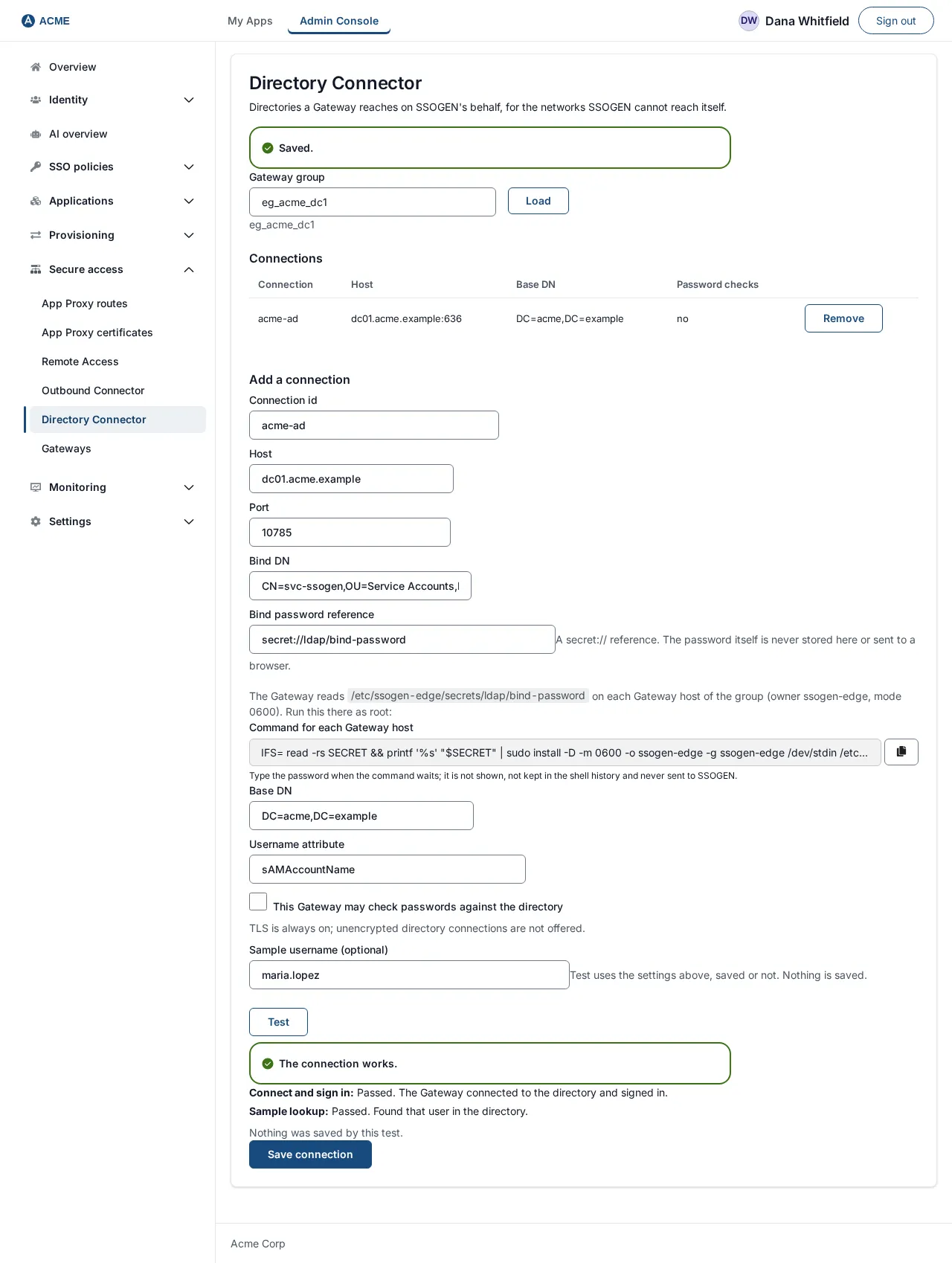
To remove a connection select Remove on its row; it is removed and published immediately, with no confirmation question.
If saving is refused
Section titled “If saving is refused”The console explains what is wrong in plain words:
| Message | What to do |
|---|---|
| A directory connection must use TLS. | There is no unencrypted option. This appears only if something other than the console sent the request. |
| The bind password must be a secret:// reference, not the password itself. | Type the reference (secret://ldap/bind-password), never the password. |
| The directory host must be a hostname, such as dc1.corp.example. | Remove any ldaps://, port or path from the host. |
| The port must be a number from 1 to 65535. | |
| A connection id starts with a letter or digit and uses only letters, digits, dot, dash and underscore. | |
| The username attribute must be an attribute name, such as sAMAccountName or uid. | |
| This gateway group is Internet-facing, and an Internet-facing gateway is not given directory reach. | The group is in the dmz zone. Use a separate internal gateway group. |
| The directory connections changed since you opened them. They have been reloaded; make the change again. | Someone else saved first. Your screen has reloaded; repeat your change. |
| Those directory connections could not be read. / Those directory connections could not be saved. | SSOGEN could not be reached or answered with a fault. Try again; if it persists, ask your SSOGEN contact. |
7. Test before saving
Section titled “7. Test before saving”The Test button asks the gateway to sign in to the directory with the settings currently in the form, saved or not, and optionally to look one person up. Nothing is saved or changed by a test.
- Fill in the form as in step 6.3.
- Optionally type a Sample username (for example
mlopez). It must be a name the directory knows under the Username attribute. - Select Test. The button reads Testing… while it runs. It is grayed out, with a reason, until a gateway group is chosen and the required fields are filled (“Enter a gateway group to test.”, “Enter the bind DN to test.” and so on).

A passing test shows a green The connection works. and these steps:
- Connect and sign in: Passed. The gateway connected to the directory and signed in.
- Sample lookup: Passed. Found that user in the directory. (only if you gave a username)
and always the line “Nothing was saved by this test.”

A failing test shows a red The connection test did not pass. with the step that failed:
| Step and message | What it means and what to do |
|---|---|
| Connect and sign in: Failed. The directory refused the service account. Check the bind DN and that the stored password for the reference is current. | The gateway reached the directory but the sign-in was refused. Check the bind DN and the contents of the password file (no trailing line break). |
| Connect and sign in: Failed. The gateway could not connect to the directory and sign in. It may be unreachable, not yet given this connection, or the bind failed. | Network, certificate or trust problem, or the gateway has not got the connection. Repeat the checks in step 2.3 from the gateway host and check --directory-trust-bundle and the secret file. For a saved connection, the gateway may not have collected it yet; wait for its next check. |
| Connect and sign in: Failed. This gateway group is Internet-facing (dmz zone), so it is never given directory reach. Test from an internal gateway group. | Use an internal group. |
| Connect and sign in: Failed. The Directory Connector is not set up for this gateway group on SSOGEN, so there is nothing to test through. | SSOGEN has no address for this group’s directory listener (step 5). |
| Connect and sign in: Failed. Update the gateway to test before saving: every running gateway in this group must be up to date. Or save and publish the connection, then test it. | At least one running gateway in the group is too old (or none is running). Update it, or save the connection first and test the saved one. |
| Connect and sign in: Failed. That connection is not in this group’s saved connections. Save it first, or test it with its settings. | You tested a saved connection that does not exist in the group. |
| Sample lookup: Failed. No user with that name was found under the base DN. Check the base DN and the username attribute. | The sign-in worked; the person is not where you said. |
| Sample lookup: Failed. The lookup could not be completed. | The lookup failed for another reason; try again and check the gateway’s events. |
If some running gateways in the group are too old the result also shows a yellow notice telling you to update them. The test still ran.
Other messages near the Test button:
- “Too many tests in a minute. Wait a minute, then test again.” Each test makes the directory count a bind against the service account, so tests are rate limited.
- “These settings cannot be tested: …” followed by one of the save messages above. Fix the field.
- “The connection could not be tested.” SSOGEN could not be reached.
Each test is recorded in the audit log (who, which group and connection, whether the settings were saved, and the outcome). The sample username, the password reference and the bind DN are not recorded.
8. Check it worked
Section titled “8. Check it worked”- On Secure access, Gateways, the instance’s Modes column lists
directoryBridge, and Config reads “Running revision N” with N equal to the group’s published revision. - The Config column does not show “Not in effect: directory connection acme-ad (…)” or “Turned off: Directory Connector (…)”. See Troubleshooting for each reason.
- On the gateway host:
ssogen-edge-diagnostics --config /etc/ssogen-edge/edge.yaml --readinesslists adirectory.connectionscheck that passes. - A Test on the saved connection (no changes in the form) passes both steps.
Troubleshooting
Section titled “Troubleshooting”| What you see | Cause and fix |
|---|---|
| Turned off: Directory Connector with Directory Connector trust bundle is missing or not usable on the gateway host | --directory-trust-bundle is missing, unreadable or not a PEM certificate file. |
| Not in effect: directory connection acme-ad (bind secret is not on the gateway) | The file for the secret:// reference does not exist under the secret directory. Check the path in step 4. |
| … (bind secret is readable by other users or too large on the gateway) | Fix the file permissions to owner-only (chmod 600) and keep it under 1 MiB. |
| … (bind secret needs a secret directory on the gateway, and it has none) | Add --secret-directory to the service. |
| … (bind secret is not a valid secret reference) | The reference does not start with secret:// or has unusual characters; allowed are letters, digits, dot, underscore, slash and dash. |
| Test says the gateway could not connect | Run the ldapsearch check from step 2.3 on the gateway host. |
| A person is “not found” in the test | The Base DN is too narrow, or Username attribute is wrong (sAMAccountName in AD, often uid elsewhere). |
| Nothing listens on the directory port | directoryApi.listen is missing from edge.yaml, or modes.directoryBridge is false. |