SSOGEN / SSOGEN Corporation / Identity Security at SSOGEN: What the Product Does to Protect Sign-In
SSOGEN
Identity Security at SSOGEN: What the Product Does to Protect Sign-In
Secrets are encrypted and never shown again, credentials are short-lived, the audit log shows tampering, and access is refused when SSOGEN cannot establish a fact.
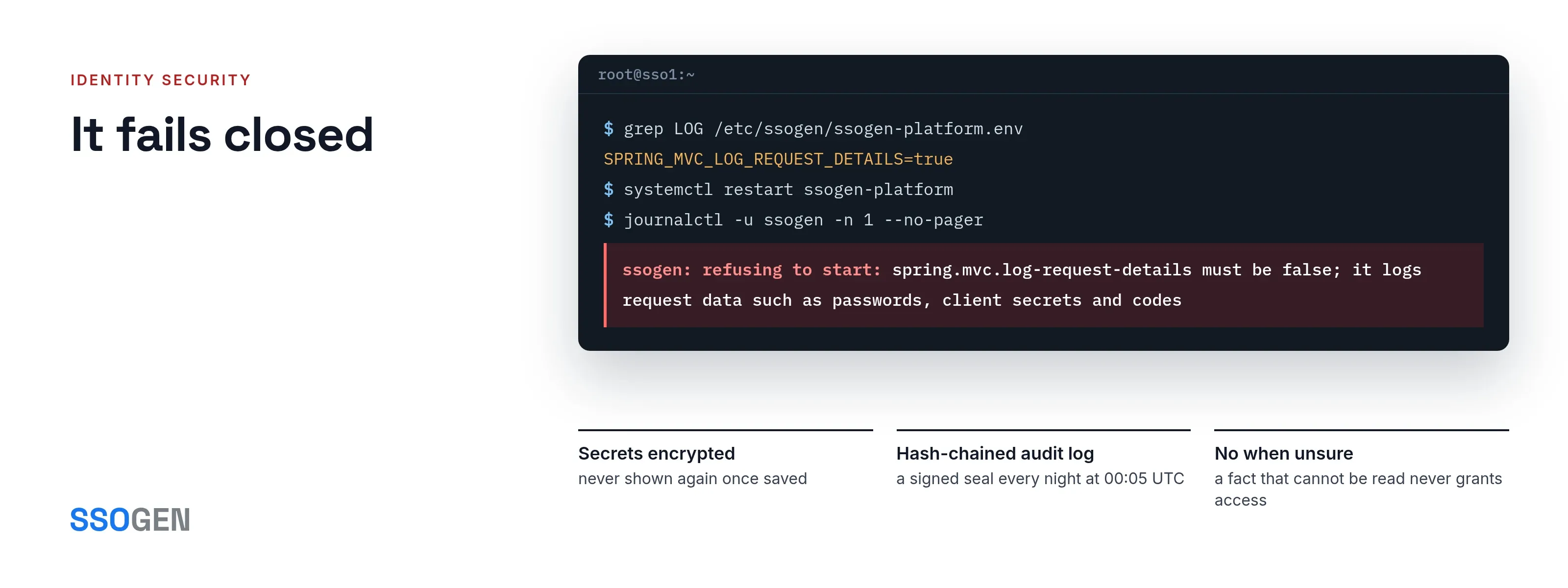
Identity security is built into SSOGEN. This page lists what the product does to protect sign-in.
Each item names the behavior, the setting that governs it and where the details are, and you can check every item on a running system.
The page describes the product. It is not a certification.
Secrets are encrypted and never shown again
SSOGEN signs in to other systems for you: a directory service account, a mail server, an application’s provisioning token. Those passwords and tokens are secrets.
SSOGEN encrypts them before saving, and they take effect without a restart. No secret is shown again after you save it.
- Owned by the object. Forms for directories, identity providers, SMTP and provisioning store their secret as owned by that object. Deleting the object deletes the secret.
- References. A form can also take a reference such as
secret://stored/…instead of the value, so the value never travels with it. - One key. One key encrypts every stored secret, and it is held outside the database.
- Kept apart from backups. A database restored without its key holds secrets nobody can read, so the key is kept apart from backups.
- Environment variables. References to environment variables are off by default. SSOGEN’s own variables never resolve, whatever you list.
Rotation takes two people:
- An operator sets the previous and new keys and restarts once.
- An administrator selects Re-encrypt under the current key, and the page reports how many secrets moved.
Logs never carry passwords, codes or tokens
When people troubleshoot, they raise the log level. In many applications that writes passwords and one-time codes to the file.
In SSOGEN, the parts that handle web requests, mail and database values stay at INFO or above, whatever you set. SSOGEN checks this at start.
If something would write secrets to the log, it refuses to start. The message begins ssogen: refusing to start:. It does not run unprotected.
| Refused at start | Why |
|---|---|
| Detailed logging for a part that handles secrets | It could write passwords, tokens or codes. |
spring.mvc.log-request-details set to true |
It logs request data such as passwords and client secrets. |
spring.mvc.log-resolved-exception set to true |
It logs request data on rejected requests. |
| An access-log pattern that records the query string or session id | One-time codes and reset links sit in the address. |
A setting that cannot be read as true or false counts as true, so a typo also stops the start.
An audit log that shows if it was changed
SSOGEN records sign-ins, refusals, console changes, and directory and provisioning events. Each record shows when, from where, who, what and the result.
- A hash chain. Each event carries a fingerprint that depends on the one before it. Change an old event and the chain breaks, and the integrity badge says so.
- A nightly seal. Every night at 00:05 UTC SSOGEN seals a signed checkpoint.
- Provable removal. You can archive old events only by cutting the chain at a sealed checkpoint, so even removal is provable.
- Clean details. Details never contain secrets, tokens or cookies. Only a super administrator and a security audit reader can see them.
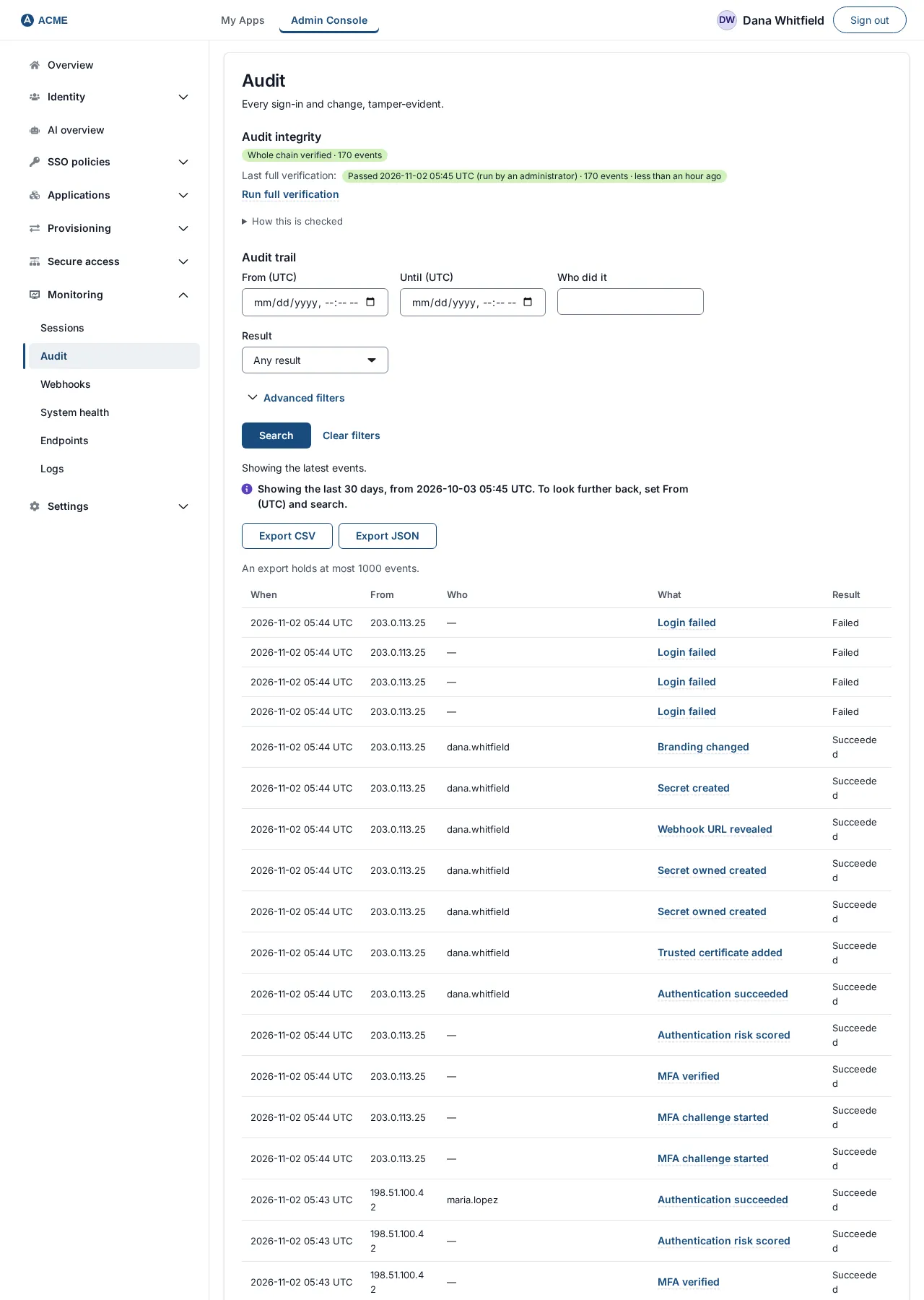
The Audit page with the integrity status and the daily checkpoint.
It fails closed
When SSOGEN cannot establish a fact, the answer is no.
- Group membership. If a rule depends on someone’s group membership and the membership cannot be read, access is not granted.
- Gateway. A Gateway that cannot reach its controller refuses protected routes.
- Configuration bundles. A signed configuration bundle that fails verification is refused whole, and the last good revision keeps running.
- Deterministic decisions. Access decisions are deterministic, made by rules you write. AI is never an input.
Credentials are short-lived
| Credential | Default lifetime |
|---|---|
| AI agent token | Minutes, bound to the agent’s own key |
| Admin mode | 15 minutes idle, 60 minutes total |
| Password reset link | 15 minutes |
| Emailed or texted sign-in code | 5 minutes |
| Account change confirmation in My Account | 300 seconds |
| Invitation link | 7 days, one use (1 to 30 days) |
| Sign-up code | 15 minutes |
| Sign-up link | 24 hours |
| Sign-up approval window | 14 days |
| Sign-up challenge | 5 minutes, one use |
Where the product allows a choice, you set the lifetimes under Settings, Security.
MFA, limits and recovery
SSOGEN offers authenticator apps, passkeys and recovery codes. Text and email codes are available where a policy allows them.
- Lockout. By default, ten failed second-step codes lock the second step for 15 minutes.
- Rate limit. Each client gets 20 password attempts a minute.
- Admin mode. Administrators need an authenticator code to enter admin mode.
- Notice. When someone adds or removes a sign-in method, SSOGEN emails them.
- Sign-up limits. Sign-up emails are capped per address (3 a day), per email domain (100 an hour) and per organization (300 an hour). One network may use at most 60 of those 300, so one source cannot use up sign-up for everybody else.
- Applications only. People who sign up themselves get access to applications, never administrative power. A sign-up group cannot approve Remote Access or hold an administrative role. See customer identity.
See multi-factor authentication and MFA software.
Settings the console cannot change
Some trust decisions are server settings on purpose, so an administrator cannot turn the console against your network. They are:
- the load balancer addresses whose forwarded client address is believed
- the canonical public address
- which environment variables a secret reference may read
- whether webhooks may call private addresses
- the keys for secrets and for audit checkpoints
The operator security notes list each one with its default.
Questions people ask
Can an administrator read a stored secret?
No. Secrets are encrypted before storage and never displayed again. An administrator replaces a secret rather than reading it.
Can someone delete an audit event to hide an action?
Not without breaking the chain. You can only remove events by exporting a segment and cutting the chain at a signed checkpoint, and that cut is itself recorded.
Does raising the log level expose passwords?
No. Request, mail and database logging stay at INFO or above. SSOGEN refuses to start if outside configuration would undo that.
Where to go next
- Audit log. Read how to verify and export the audit log.
- Secrets. Read how secrets are stored and rotated.
- Settings. Read the security settings.
- Sign-in record. It is described on the SSO audit log page.
For the wider picture of how SSOGEN is built and run, read Why SSOGEN.