SCIM endpoint: inbound provisioning from HR
Inbound provisioning means another system pushes people and groups into SSOGEN instead of an administrator typing them in. SSOGEN offers a SCIM endpoint for this. The standard it follows is SCIM 2.0 (System for Cross-domain Identity Management), a plain web interface that HR systems and identity providers already know how to call. When a new hire is added in your HR system, they appear in SSOGEN. When their name changes, SSOGEN is updated. When they leave, their account is switched off.
This guide covers creating the access token in the console, the address and requests the other system uses, how to read the people it creates, what deprovisioning does, the errors you can see, and a worked example for Acme Corp.
What you need
Section titled “What you need”- A signed-in administrator with the role above.
- An HR system or identity provider that can act as a SCIM 2.0 client: it must be able to call a SCIM base URL with a bearer token. Not every HR product can; check its documentation for “SCIM provisioning” or “outbound SCIM”.
- The address of your SSOGEN installation as people reach it (in this guide,
https://sso.acme.example).
1. Open the Inbound provisioning page
Section titled “1. Open the Inbound provisioning page”- Sign in to the Admin Console.
- In the left menu open Provisioning and choose Inbound. The page title is Inbound provisioning: “Let another system manage people here over SCIM.” (If you cannot see Provisioning, your role cannot read the directory.)
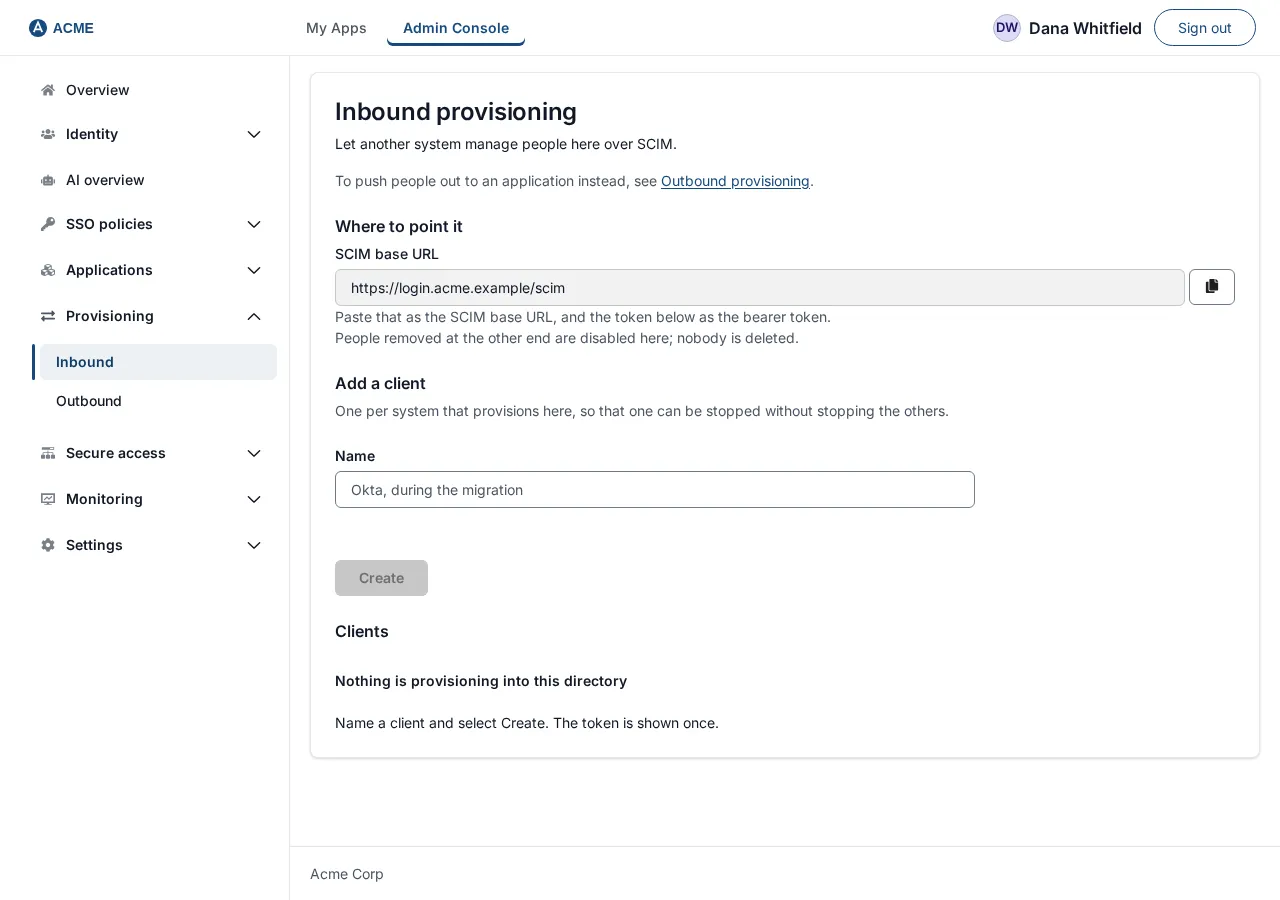
The page has three sections:
| Section | What it shows |
|---|---|
| Where to point it | The SCIM base URL to give to the other system, with a copy button. |
| Add a client | A Name field and a Create button, under the text “One per system that provisions here, so that one can be stopped without stopping the others.” |
| Clients | One row per client, or Nothing is provisioning into this directory (“Name a client and select Create. The token is shown once.”) when there are none. |
A client is one system that provisions into SSOGEN, with its own token. Create one client per system, so you can stop one without stopping the others.
2. Copy the SCIM base URL
Section titled “2. Copy the SCIM base URL”Under Where to point it, the SCIM base URL field shows the address, for example:
https://sso.acme.example/scimClick the copy button beside the field (its label is Copy SCIM base URL). The address always uses your installation’s own public address. It has no version number in it: always /scim.
If the field shows Loading the address… and never fills in, the console could not work out your installation’s public address; ask whoever installed SSOGEN to check it.
3. Create a client and its token
Section titled “3. Create a client and its token”- Under Add a client, type a Name. Use something that says which system it is, for example
Acme HR (Workday). The name can be up to 128 characters. - Choose Create. The button stays disabled until you have typed a name.
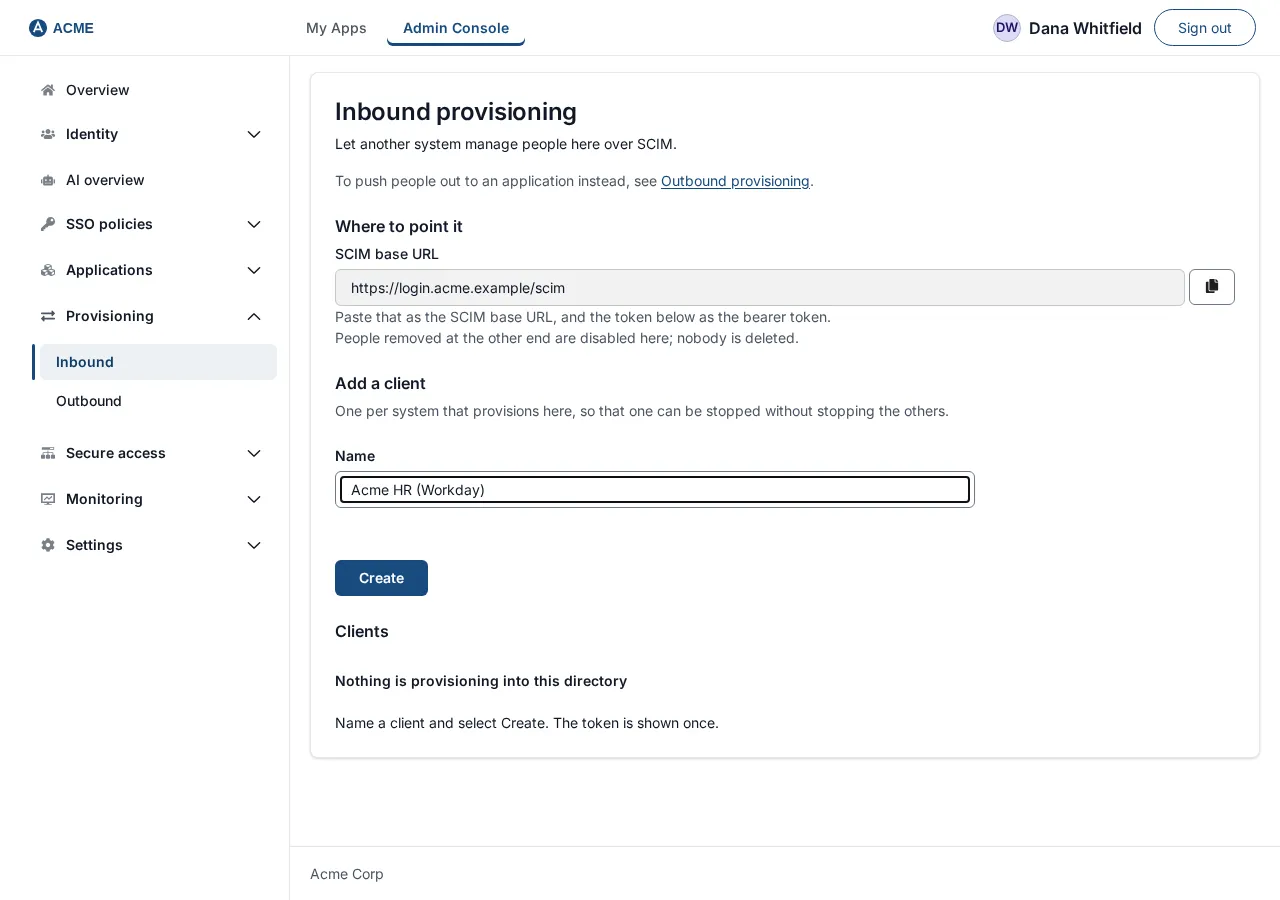
After a moment the page shows:
- a green message: “Acme HR (Workday)” can now provision into this directory.
- a Token field with a copy button, holding a long value that starts with
ssogen_scim_; - a yellow warning: Copy this now; it cannot be shown again. If lost, create another client and revoke this one.
- a button I have copied it.
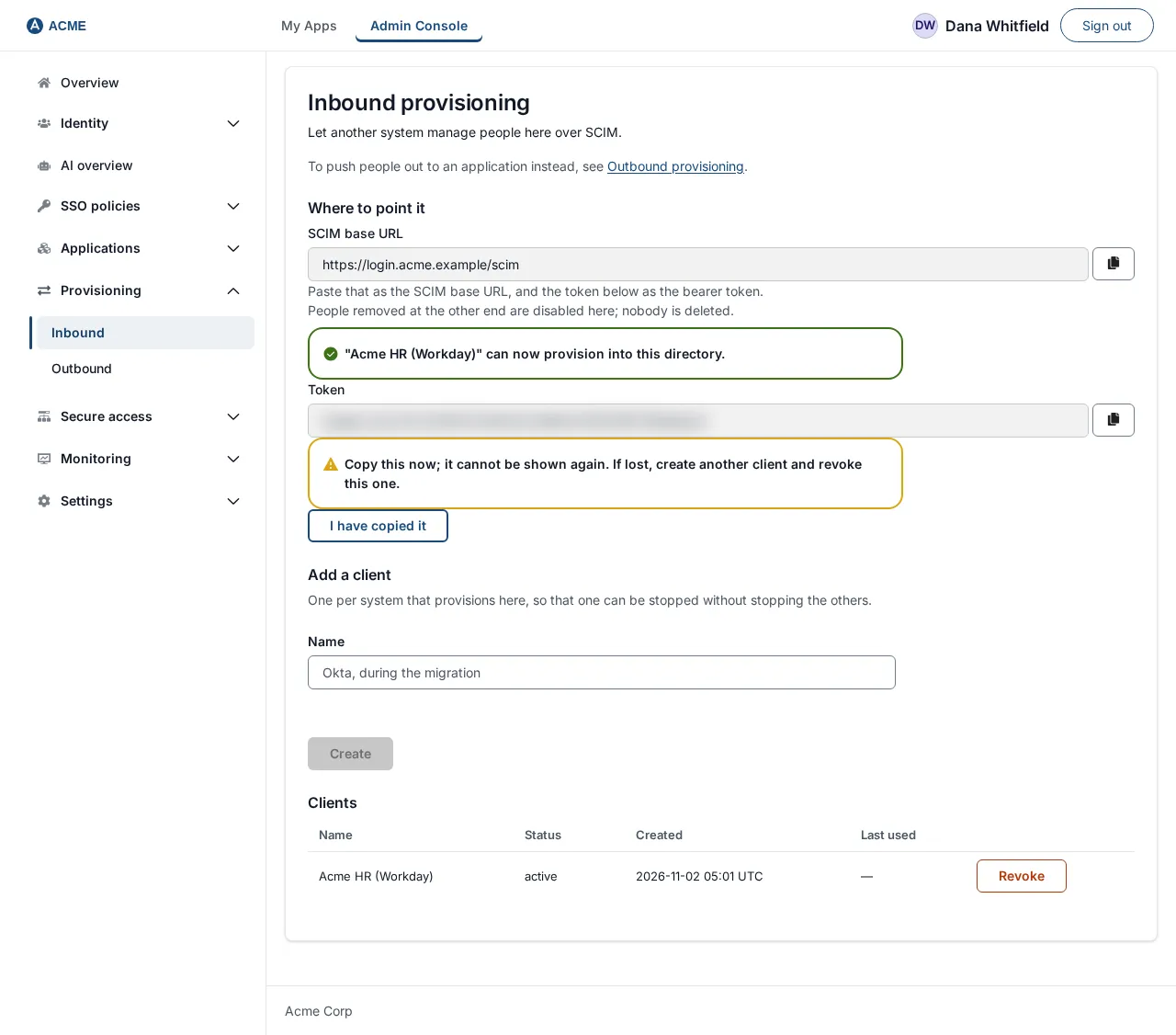
- Copy the token into the other system’s configuration (or a password manager) now.
- Choose I have copied it. The token disappears and cannot be displayed again.
If you close the page before copying it, nothing is lost except the token: create another client and revoke the first (see Rotate or revoke a token).
4. Read the Clients list
Section titled “4. Read the Clients list”After creating the client, the Clients table shows:
| Column | Meaning |
|---|---|
| Name | The name you typed. |
| Status | active while the token works, revoked after you revoke it. |
| Created | When the client was created (UTC). |
| Last used | When the other system last presented the token. A dash (—) means it has never been used. |
| (actions) | A Revoke button on active clients. |

Last used is the column to read before you revoke anything: a time from today means a live integration that will stop.
Rotate or revoke a token
Section titled “Rotate or revoke a token”There is no “regenerate” button, and a token cannot be edited. To rotate (replace) a token:
- Create a new client with a name such as
Acme HR (Workday) 2026-11. Copy its token. - Put the new token into the other system and confirm it works (the new client’s Last used shows a time).
- On the old client’s row, choose Revoke.
To revoke a token:
- On the client’s row choose Revoke. A dialog asks Revoke Acme HR (Workday)? and says: “The token stops working now and cannot be restored. The client fails without notice.”
- Choose Revoke to confirm, or Cancel to keep it.
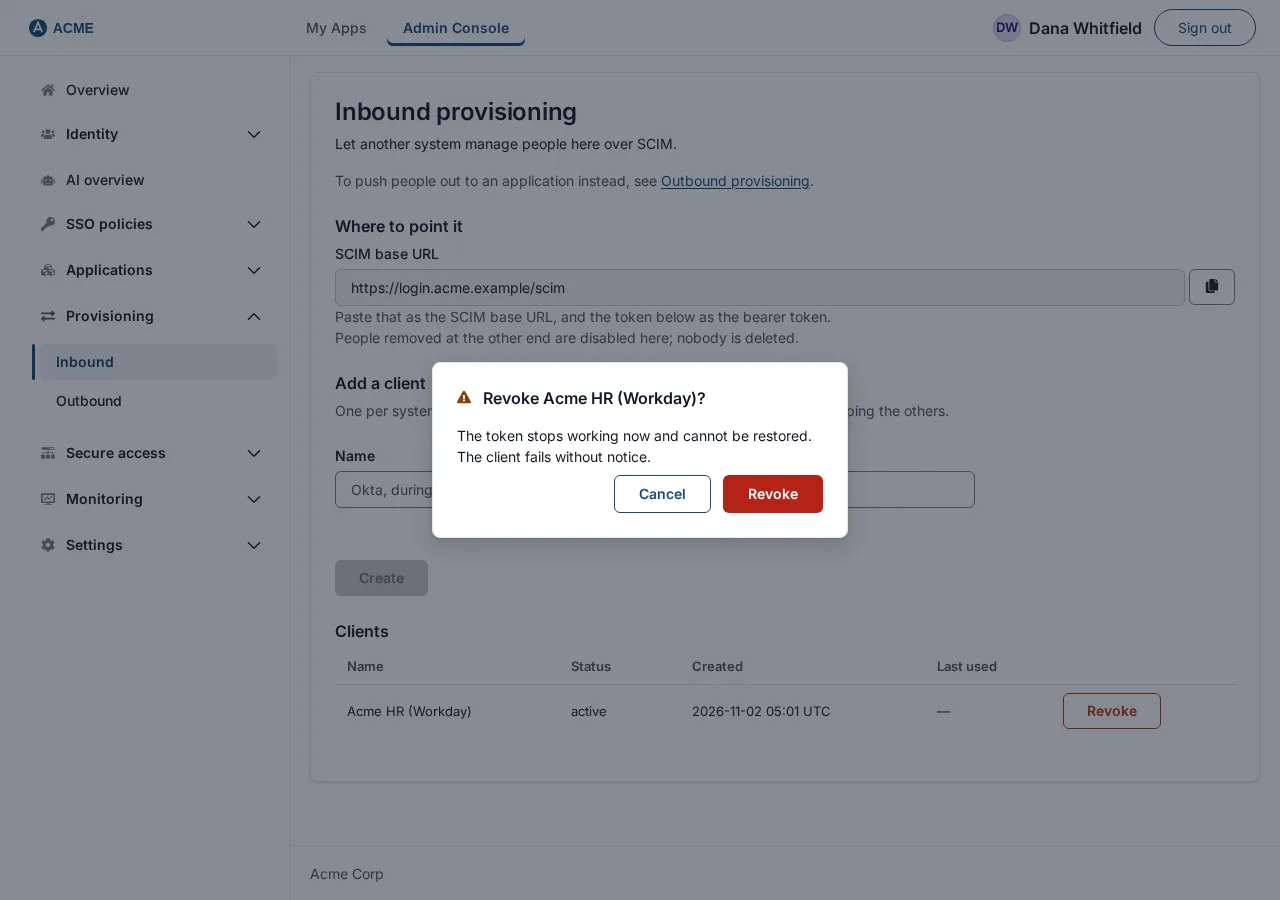
The row’s Status changes to revoked and the Revoke button goes away. The other system’s next request is refused with 401 (see Errors you can see). People already created stay as they are.
What the other system calls
Section titled “What the other system calls”All addresses are relative to the base URL, for example https://sso.acme.example/scim.
| Method and path | What it does |
|---|---|
GET /ServiceProviderConfig, GET /ResourceTypes, GET /Schemas, GET /Schemas/{id} |
Tell the client what SSOGEN supports. Many clients call these when you save their configuration. |
GET /Users, GET /Users/{id} |
List or read people. |
POST /Users |
Create a person. |
PUT /Users/{id} |
Replace a person’s details. |
PATCH /Users/{id} |
Change some details, including active. |
DELETE /Users/{id} |
Archive a person. |
GET /Groups, GET /Groups/{id} |
List or read groups. |
POST /Groups |
Create a group, optionally with members. |
PUT /Groups/{id} |
Set the group’s members to exactly the list sent. |
PATCH /Groups/{id} |
Add, replace or remove members. |
DELETE /Groups/{id} |
Delete a group. |
Every request carries the header Authorization: Bearer <token>. Requests with a body use the content type application/scim+json (application/json is also accepted). Answers are application/scim+json.
SSOGEN states plainly what it does not support: bulk operations, sorting, entity tags and password changes (ServiceProviderConfig reports each as unsupported). PATCH and filtering are supported. A page of results is at most 200 people.
Attributes SSOGEN stores
Section titled “Attributes SSOGEN stores”User
| Attribute | Notes |
|---|---|
userName |
Required. The person’s sign-in name; must be unique. |
externalId |
Optional. Your HR system’s own identifier for the person; must be unique if sent. |
name.givenName, name.familyName |
Optional. |
displayName |
Optional. |
emails |
Optional. The primary address (or the first one) is stored as the person’s email. |
active |
Optional. Defaults to true on create. |
Any other attribute you send (for example department or title) is accepted and ignored: SSOGEN does not store it, and does not offer it for mapping.
SCIM never carries a password. A person created by SCIM has no password from SCIM. See How provisioned people sign in.
Group: displayName (required, unique), externalId (optional), members (each member is the SSOGEN id of a person).
Filters
Section titled “Filters”GET /Users and GET /Groups accept filter=<attribute> eq "<value>", and nothing else. The operator must be eq, the value must be in double quotes, and the filter can be at most 512 characters. Attribute names are not case-sensitive.
| Resource | Attributes you can filter on |
|---|---|
| Users | userName, externalId, emails.value, displayName |
| Groups | displayName, externalId |
A filtered read answers with a list of zero or one resource. This is the check an HR system makes before it creates someone.
Without a filter, GET /Users returns every person in SSOGEN, not only those this client created. Use startIndex (starting at 1) and count (default 100, at most 200) to page.
PATCH operations
Section titled “PATCH operations”PATCH carries an Operations array of up to 200 operations. Each has op (add, replace or remove, in any letter case), an optional path and a value. With no path, the value is an object of attributes to change.
| Path | Effect on a user |
|---|---|
active |
true or false (or the text "True" / "False"). A remove counts as false. |
displayName |
Set or clear. |
name.givenName, name.familyName |
Set or clear. |
emails or emails.value |
Set or clear the email. |
Other paths are ignored, so a stray attribute never stops a deactivation from working. On a group, only members is acted on:
addadds the listed people;replacemakes the list exactly the group’s members;removewith the pathmembers[value eq "<id>"]removes that one person.
A remove with no path is refused. Only [value eq "..."] is accepted as a filter inside a path.
Example requests
Section titled “Example requests”The examples use $TOKEN for the token and https://sso.acme.example/scim as the base. Ids shown (3f1c0b2e-…) are examples; your own are returned by SSOGEN.
Create a person
Section titled “Create a person”curl -s -X POST https://sso.acme.example/scim/Users \ -H "Authorization: Bearer $TOKEN" \ -H "Content-Type: application/scim+json" \ -d '{ "schemas": ["urn:ietf:params:scim:schemas:core:2.0:User"], "userName": "maria.lopez", "externalId": "E-10442", "name": { "givenName": "Maria", "familyName": "Lopez" }, "displayName": "Maria Lopez", "emails": [ { "value": "maria.lopez@acme.example", "type": "work", "primary": true } ], "active": true }'Answer: 201 Created, a Location header, and the person as stored, including the id to use from now on:
{ "schemas": ["urn:ietf:params:scim:schemas:core:2.0:User"], "id": "3f1c0b2e-1111-4a5b-9c3d-000000000001", "externalId": "E-10442", "userName": "maria.lopez", "name": { "givenName": "Maria", "familyName": "Lopez", "formatted": "Maria Lopez" }, "displayName": "Maria Lopez", "emails": [ { "value": "maria.lopez@acme.example", "type": "work", "primary": true } ], "active": true, "meta": { "resourceType": "User", "location": "/scim/Users/3f1c0b2e-1111-4a5b-9c3d-000000000001" }}(meta also carries created, lastModified and version.) Sending the same userName or externalId again answers 409 (see Errors you can see).
Look a person up first
Section titled “Look a person up first”curl -s -G https://sso.acme.example/scim/Users \ -H "Authorization: Bearer $TOKEN" \ --data-urlencode 'filter=userName eq "maria.lopez"'The answer is a list with totalResults of 1 (found) or 0 (not found).
Update a person
Section titled “Update a person”Change only what changed, with PATCH:
curl -s -X PATCH https://sso.acme.example/scim/Users/3f1c0b2e-1111-4a5b-9c3d-000000000001 \ -H "Authorization: Bearer $TOKEN" \ -H "Content-Type: application/scim+json" \ -d '{ "schemas": ["urn:ietf:params:scim:api:messages:2.0:PatchOp"], "Operations": [ { "op": "replace", "path": "name.familyName", "value": "Lopez-Ortiz" }, { "op": "replace", "path": "displayName", "value": "Maria Lopez-Ortiz" } ] }'Answer: 200 OK with the updated person. A PUT to the same address replaces displayName, name, emails and active with what you send. A PUT cannot change userName or externalId, and a PUT that omits active means active: true.
Deactivate a person
Section titled “Deactivate a person”curl -s -X PATCH https://sso.acme.example/scim/Users/3f1c0b2e-1111-4a5b-9c3d-000000000001 \ -H "Authorization: Bearer $TOKEN" \ -H "Content-Type: application/scim+json" \ -d '{ "schemas": ["urn:ietf:params:scim:api:messages:2.0:PatchOp"], "Operations": [ { "op": "replace", "path": "active", "value": false } ] }'Answer: 200 OK with "active": false. To switch the person back on, send true.
Create a group with members
Section titled “Create a group with members”curl -s -X POST https://sso.acme.example/scim/Groups \ -H "Authorization: Bearer $TOKEN" \ -H "Content-Type: application/scim+json" \ -d '{ "schemas": ["urn:ietf:params:scim:schemas:core:2.0:Group"], "displayName": "Finance", "externalId": "DEPT-FIN", "members": [ { "value": "3f1c0b2e-1111-4a5b-9c3d-000000000001" } ] }'Answer: 201 Created with the group, its id and its members. A member value that is not an id SSOGEN issued is dropped without an error, so check the members in the answer.
Add or remove one member later:
# addcurl -s -X PATCH https://sso.acme.example/scim/Groups/<group-id> \  -H "Authorization: Bearer $TOKEN" -H "Content-Type: application/scim+json" \  -d '{"schemas":["urn:ietf:params:scim:api:messages:2.0:PatchOp"],       "Operations":[{"op":"add","path":"members","value":[{"value":"<user-id>"}]}]}'
# removecurl -s -X PATCH https://sso.acme.example/scim/Groups/<group-id> \  -H "Authorization: Bearer $TOKEN" -H "Content-Type: application/scim+json" \  -d '{"schemas":["urn:ietf:params:scim:api:messages:2.0:PatchOp"],       "Operations":[{"op":"remove","path":"members[value eq \"<user-id>\"]"}]}'
How provisioned people appear in SSOGEN
Section titled “How provisioned people appear in SSOGEN”Open Identity → Users. A person created over SCIM is listed like any other, with the Source column reading Provisioned from client name, for example Provisioned from Acme HR (Workday). A person created by hand reads Created here.
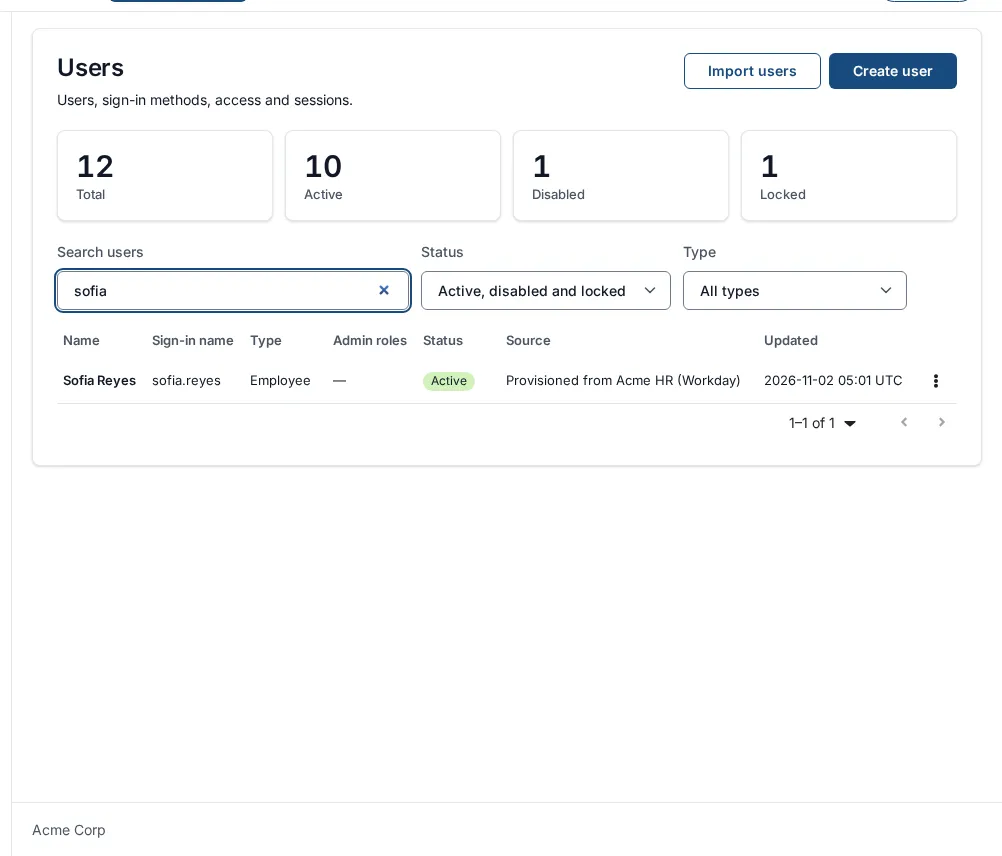
If the client’s name cannot be found, the source reads Provisioned over SCIM. Groups created over SCIM are ordinary groups and appear under Identity → Groups.
A SCIM-created person is a normal account. Assign them applications, add them to groups, and manage them in the console as usual.
If a person belongs to a directory you connected (Active Directory or LDAP), that directory owns their name and email, and a SCIM change to those is refused with a mutability error (see Errors you can see). Changing active still works.
How provisioned people sign in
Section titled “How provisioned people sign in”SCIM does not carry a password, and SSOGEN does not accept one over SCIM. A new SCIM person therefore has no password from SCIM. An administrator can set one (open the person in Identity → Users, then choose Set password), or the person can sign in through an external identity provider you have configured. SSOGEN sends no automatic invitation or password-setup message to new SCIM people.
Deprovisioning: what happens when someone leaves
Section titled “Deprovisioning: what happens when someone leaves”| What the other system sends | What SSOGEN does |
|---|---|
PATCH with active set to false (the usual way, used by Okta, Microsoft Entra ID and most HR systems) |
The account is disabled. They cannot sign in with any method. Nothing is deleted, and active: true switches them back on. |
PUT with "active": false |
Same: disabled. |
DELETE /Users/{id} |
The account is archived: it leaves the Users list, every session ends, they can no longer sign in, and their history stays in the audit trail. An administrator can restore it. It is never erased. The answer is 204 No Content. |
DELETE /Groups/{id} |
The group is deleted. |
A person that is already archived is not brought back to disabled by a later active: false.
Administrators are protected. A SCIM client holds no administrator role, so it cannot change an account that holds one unless that client created it, and even then it cannot change its user name or email (where sign-in codes and reset links go). A group change that would add or remove such an administrator is refused too (403 “This change would add or remove an SSOGEN administrator this client did not provision. A Super Admin changes their groups in the SSOGEN console.”). It also cannot deactivate or delete the last administrator who can still sign in to the Admin Console. Nothing is changed in either case, and the refusal is recorded in the audit log. See Admin Console sign-in and lockout protection.
Each create, update, deactivation and token event is written to the audit trail, with the client that did it.
Errors you can see
Section titled “Errors you can see”Answers use the standard SCIM error shape: schemas, optional scimType, detail and status (as text).
| Status | scimType |
detail (text you will see) |
Meaning and fix |
|---|---|---|---|
401 |
A valid provisioning token is required. | Missing, wrong or revoked token. The answer also carries WWW-Authenticate: Bearer realm="SSOGEN SCIM". Check the header is Authorization: Bearer <token>, and the client is not revoked. |
|
400 |
invalidFilter |
e.g. only the eq operator is supported, not “co”; filter on “department” is not supported; this directory filters on userName, externalId, emails.value and displayName | Use attribute eq "value" on a supported attribute. |
400 |
invalidSyntax |
No body.; a PATCH must carry a non-empty Operations array; unknown op: …; a remove operation must name a path | Fix the request body. |
400 |
invalidValue |
userName is required; displayName is required | Send the missing required attribute. |
400 |
mutability |
This user’s name and email are managed by the directory … and are read-only here. Send only active to change the account’s status. | The person belongs to a connected directory. Change active only, or change the name in that directory. |
403 |
This account holds an SSOGEN administrator role and was not provisioned by this client. A Super Admin changes it in the SSOGEN console.; This account holds an SSOGEN administrator role. A SCIM client may end it or rename it, but not change its user name or email; a Super Admin does that in the SSOGEN console. | The account is an administrator’s. Change it in the console as a Super admin. | |
409 |
Nobody else could sign in to the SSOGEN admin console under its sign-in policy, so this account was not deactivated. A Super Admin gives another account that can sign in to the console the Super Admin role first. Nothing was changed. | The account is the last administrator the Admin Console admits. Give another account the Super Admin role first. | |
404 |
No such user.; No such group.; No such schema. | The id does not exist in SSOGEN (also returned when the id is not one SSOGEN issued). Look the person up by filter. | |
409 |
uniqueness |
a user with that userName already exists; a user with that externalId already exists; a group with that displayName already exists | The person or group is already there. Look them up with a filter and update them instead of creating. |
Errors on the console page itself:
| Message | Meaning |
|---|---|
| The provisioning clients could not be loaded. | The list could not be read. Reload; if it persists, check you are still signed in. |
| That client could not be created. | The create failed, for example an empty or over-long name. |
| That client could not be revoked. | The revoke failed, for example it was already revoked. |
What to configure in an HR system
Section titled “What to configure in an HR system”The exact screens differ by product, and SSOGEN cannot check them for you, so use the product’s own documentation for where each field lives. The values to supply are the same everywhere:
| The HR system asks for | Give it |
|---|---|
| SCIM base URL, tenant URL or connector URL | https://sso.acme.example/scim |
| Authentication type | Bearer token (sometimes called “OAuth bearer token” or “API token”) |
| Token | The ssogen_scim_… value from step 3 |
| Unique identifier for matching | userName |
| Employee id attribute | externalId |
| Attributes to send | userName, name.givenName, name.familyName, displayName, emails (work, primary), active |
| Group push | Optional. Group displayName and members (the SSOGEN ids it received when it created each person) |
| Deprovisioning | Set active = false on leaving (the most common setting), unless you want accounts archived, in which case use delete |
Whether a specific HR product (for example Workday or BambooHR) can act as a SCIM client directly, or needs an intermediary, depends on the product and your license. Check with the vendor.
Worked example: Acme Corp
Section titled “Worked example: Acme Corp”Acme Corp (acme.example) hires Maria Lopez on 1 November. Its HR system will provision her into SSOGEN, and switch her off when she leaves.
- A Directory admin opens Provisioning → Inbound, types the name
Acme HR (Workday)and chooses Create. - They copy the token, paste it into the HR system’s SCIM settings along with
https://sso.acme.example/scim, and choose I have copied it. - On Monday the HR system runs: it asks
GET /Users?filter=userName eq "maria.lopez", getstotalResults: 0, and sendsPOST /Usersas in the example. SSOGEN answers201. - An administrator opens Identity → Users and sees Maria Lopez with Source Provisioned from Acme HR (Workday). In Provisioning → Inbound the client’s Last used now shows today’s time.
- The HR system adds Maria to its
Financedepartment. It sendsPOST /Groups(first time) orPATCH /Groups/{id}with anaddonmembers. Maria appears in Identity → Groups → Finance, and any application assigned to that group is available to her. - An administrator sets Maria’s password (Set password) or she signs in through the company’s identity provider.
- Months later Maria leaves. HR sends
PATCHwithactive: false. In Identity → Users her account is disabled, and she cannot sign in. Her history remains in the audit trail.
Troubleshooting
Section titled “Troubleshooting”| Symptom | Likely cause and fix |
|---|---|
| The HR system’s “test connection” fails with 401 | Wrong token, extra spaces or quotes around it, or the client was revoked. Create a new client. |
| It fails and Last used stays a dash | The request never reached SSOGEN: wrong base URL, firewall or TLS. Test with curl -i -H "Authorization: Bearer $TOKEN" https://sso.acme.example/scim/ServiceProviderConfig, which should answer 200. |
| Every create returns 409 | The people already exist (for example you created them by hand). Have the HR system match on userName first. |
| The HR system shows success but the person can still sign in | It may not be sending active: false. Check its leaver action, and the person’s status in Identity → Users. |
| People appear but not in the group | Group members must be SSOGEN ids, as returned when each person was created. Unknown ids are skipped silently. |
A name change is refused with mutability |
The person belongs to a connected directory (AD/LDAP), which owns their name and email. Change it there. |
| A department or title never arrives | SSOGEN stores only the attributes listed above and ignores the rest. |
| You lost the token | It cannot be shown again. Create a new client and revoke the old one. |
Not covered
Section titled “Not covered”- Vendor-specific screens for Workday, BambooHR or other HR systems: follow the vendor’s own documentation for its SCIM client.
- Filling custom profile attributes over SCIM: not offered; only the attributes listed above are stored.
- Automatic welcome or password-setup messages to people provisioned over SCIM: none are sent; an administrator can set a password or the person can use an external identity provider.
Related guides
Section titled “Related guides”Send accounts on to applications with outbound provisioning, import from a directory with Active Directory sync, or see user provisioning software.