Reverse proxy authentication: publish an internal app through the App Proxy
This guide takes an internal web application that nobody can reach from the internet and makes it available to your employees through the App Proxy feature of the gateway. The application does not change and does not need an agent installed beside it. People sign in to SSOGEN once, and the App Proxy passes their identity to the application.
The running example is the fictional company Acme Corp (domain acme.example). Acme’s finance team runs an application called Acme Finance on two servers inside the office network, and wants employees to open it at https://finance.internal.acme.example.
Terms used here
- App Proxy: the part of an SSOGEN Gateway that sits in front of your applications. It receives the browser’s request, checks that the person is signed in to SSOGEN and allowed in, then passes the request to your application.
- Back-end server (also “back end”): a server that really runs the application, for example
https://fin-app1.acme.example. - Route: the rule that connects a hostname and a path to an application and its back-end servers.
- Hostname: the name people type, such as
finance.internal.acme.example. A route can have several hostnames. - Listener: an address and port on the gateway that accepts connections. A listener is either direct (browsers connect to it) or behind a load balancer (only your load balancer connects to it). Every listener is also either internal (people reach it from inside your network) or external (from the internet).
- Host header: the name the browser asked for, which a proxy sends on to the application. The App Proxy can send the application its own internal name instead, and rewrite the answers back to the public name (section 6).
- Reach through: whether the App Proxy connects to the back-end servers directly or through an Outbound Connector in a private network (section 6).
- Gateway group: one or more gateways that share the same configuration. See Install and enroll an SSOGEN Gateway.
- Sign-in policy (an authentication policy): the named rules that decide how strongly a person must prove who they are. Policies are managed under SSO policies, Policies.
- Network zone: a named list of address ranges, for example “corporate” for your office networks. Policy rules can say “from inside” or “from outside” a zone.
1. What you are building and what you need
Section titled “1. What you are building and what you need”The result for Acme:
| Piece | Value used in this guide |
|---|---|
| Application name in SSOGEN | Acme Finance |
| Internal hostname | finance.internal.acme.example |
| External hostname (optional, section 7) | finance.acme.example |
| Gateway group and server | eg_acme_hq, instance edge_acme_hq_01 (see the install guide) |
| Back-end servers | https://fin-app1.acme.example and https://fin-app2.acme.example |
| Route ID | route_acme_finance |
| Internal listener | name internal, address 192.0.2.10, port 9443 (people see port 443) |
Before you start you need:
- An SSOGEN Gateway that is enrolled and shows online on Secure access, Gateways (see Install and enroll an SSOGEN Gateway). Every instance in the group must run a current gateway: if one is too old, the hostnames and certificates are held back and the gateways screen says “this gateway is too old, so the group’s hostnames are held back until every gateway of the group is upgraded”.
- The role super administrator. Only a super administrator can save App Proxy routes, certificates, listeners and hostnames; any other administrator gets “You are not allowed to … Only a super administrator can.”
- At least one person or group to give access to (section 11).
- Two sign-in policies if you want a weaker policy inside your network (section 8).
2. Prepare outside SSOGEN
Section titled “2. Prepare outside SSOGEN”2.1 Choose where the gateway listens
Section titled “2.1 Choose where the gateway listens”The gateway service cannot listen on a port below 1024. The default listener (set at install) uses an unprivileged port. Pick a port above 1024 for the internal listener you add in section 5, here 9443, and let your firewall or load balancer present it to people as 443. The people see https://finance.internal.acme.example with no port.
Open that port on the gateway’s host firewall. On Enterprise Linux:
sudo firewall-cmd --permanent --add-port=9443/tcpsudo firewall-cmd --reload2.2 Create the DNS name
Section titled “2.2 Create the DNS name”Create a DNS record for the internal name that points at the address people will connect to: the gateway (or the virtual address of your load balancer). In Acme’s internal DNS:
finance.internal.acme.example. IN A 192.0.2.10Check from an office computer:
nslookup finance.internal.acme.example2.3 Get a TLS certificate for the hostname
Section titled “2.3 Get a TLS certificate for the hostname”The App Proxy presents a certificate to browsers. Get one for finance.internal.acme.example from your own certificate authority or a public one. A certificate can cover several names (including a wildcard such as *.internal.acme.example); the console checks that it covers each hostname you attach to it.
SSOGEN accepts a certificate that meets these rules, and refuses anything else with the message shown in section 4:
- The chain is in PEM text, with the server certificate first and then each issuer, up to a CA certificate.
- The private key is in PKCS#8 PEM format (the first line is
BEGIN PRIVATE KEY), without a passphrase. - The key is RSA of 2048 bits or more, or ECDSA P-256 or P-384.
- The certificate is a server certificate (not a CA) valid for TLS servers, and does not expire within the next 24 hours.
A sample way to create a key and certificate request, run on a secure computer:
openssl req -new -newkey rsa:2048 -nodes \ -keyout finance.key -out finance.csr \ -subj "/CN=finance.internal.acme.example" \ -addext "subjectAltName=DNS:finance.internal.acme.example"Send finance.csr to your certificate authority. When you get the certificate back, join the files so the server certificate is first:
cat finance.crt issuing-ca.crt > finance-chain.pemIf your key is in an older format (BEGIN RSA PRIVATE KEY) or has a passphrase (BEGIN ENCRYPTED PRIVATE KEY), convert it. This asks for the passphrase once and writes a key without one:
openssl pkcs8 -topk8 -nocrypt -in old-finance.key -out finance.keyCheck the files before you upload them. The two hashes must be identical, which proves the key belongs to the certificate:
openssl x509 -in finance-chain.pem -noout -subject -dates -ext subjectAltNameopenssl x509 -in finance-chain.pem -noout -pubkey | openssl sha256openssl pkey -in finance.key -pubout | openssl sha2562.4 Make the gateway trust your application’s certificate
Section titled “2.4 Make the gateway trust your application’s certificate”The App Proxy always checks the certificate and host name of your back-end servers. If the servers’ certificates come from your own authority, put that authority’s certificate (PEM, one or more certificates) in a file on the gateway, where the gateway reads it. In the console you will refer to it by a name such as secret://trust/acme-internal-ca. The gateway looks that name up as a file under the secret directory you gave it at install (--secret-directory, see Install and enroll an SSOGEN Gateway):
sudo install -d -m 0700 -o ssogen-edge -g ssogen-edge /etc/ssogen-edge/secrets/trustsudo install -m 0600 -o ssogen-edge -g ssogen-edge acme-internal-ca.pem \ /etc/ssogen-edge/secrets/trust/acme-internal-caThe file must be readable only by its owner and at most 1 MiB, or the gateway will not use it. If your back ends use certificates from a public authority, you do not need this file: you choose Trusted by a public CA in section 6 instead.
Copy the file to every gateway in the group.
2.5 Check that the gateway can reach the application
Section titled “2.5 Check that the gateway can reach the application”From the gateway:
curl --cacert /etc/ssogen-edge/secrets/trust/acme-internal-ca -I https://fin-app1.acme.example/You should get an HTTP status line back (any status that shows the application answered), not a certificate or connection error.
3. Register the App Proxy application
Section titled “3. Register the App Proxy application”The application is the thing people see on My Apps and are assigned to. Registering it does not publish anything yet.
-
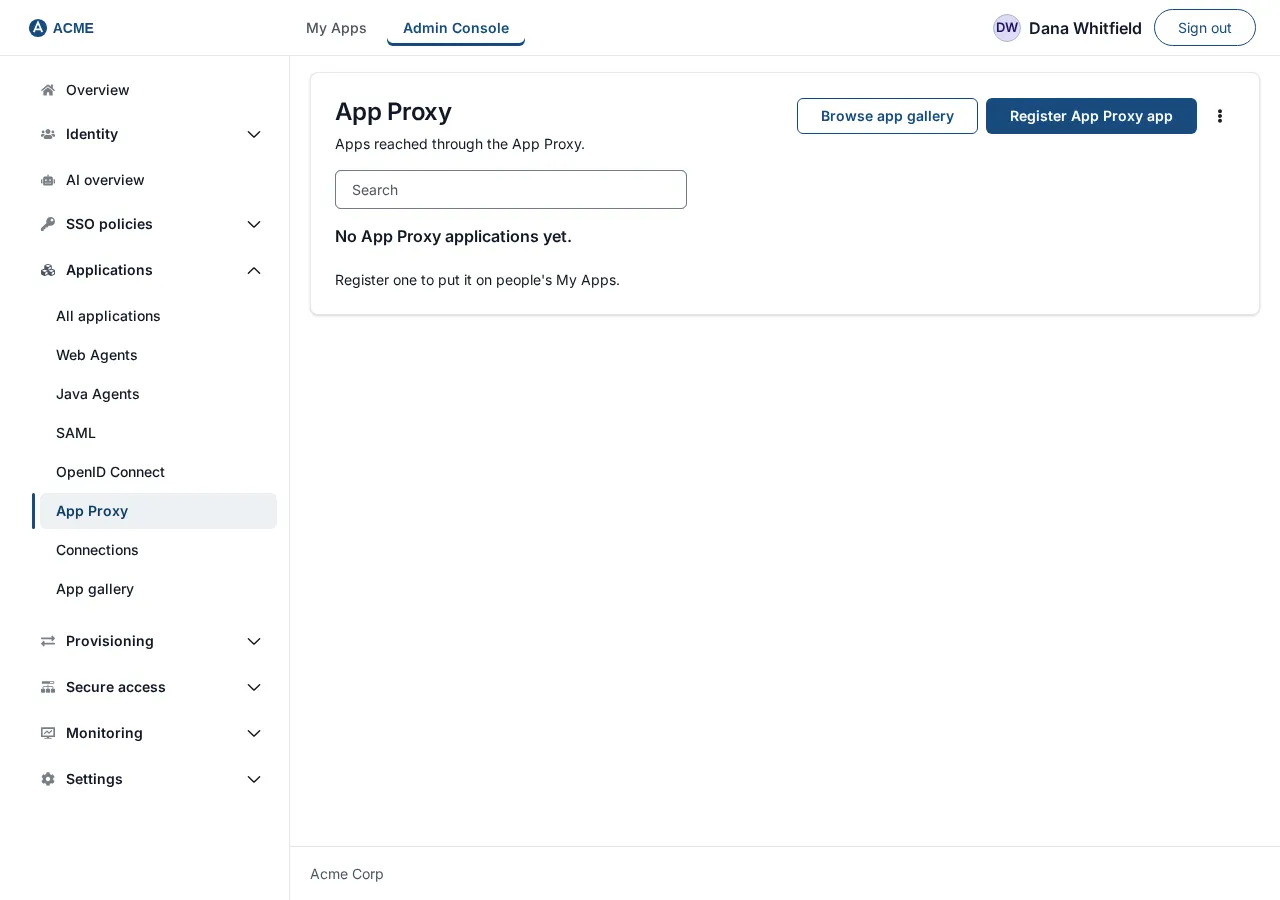
Open Applications, then App Proxy. The button at the top right reads Register App Proxy app. Select it.
-
The wizard Register application opens. Its steps are General, Access mode, Connection, Sign-in policy, Identity sent to app, Launch, Test and Review and activate. Nothing is saved until you press Next on Launch.
-
General. Fill in:
Field Example Notes Name Acme FinanceThe name people see on My Apps. Slug acme-financeFilled in from the name. Lower-case letters, numbers and single hyphens: otherwise “Use lowercase letters, numbers and single hyphens.” Application ID app_acme_financeFilled in from the name. It appears in links and audit records and cannot be changed later. Category CustomOptional label. My Apps icon the default icon Optional picture for the tile. 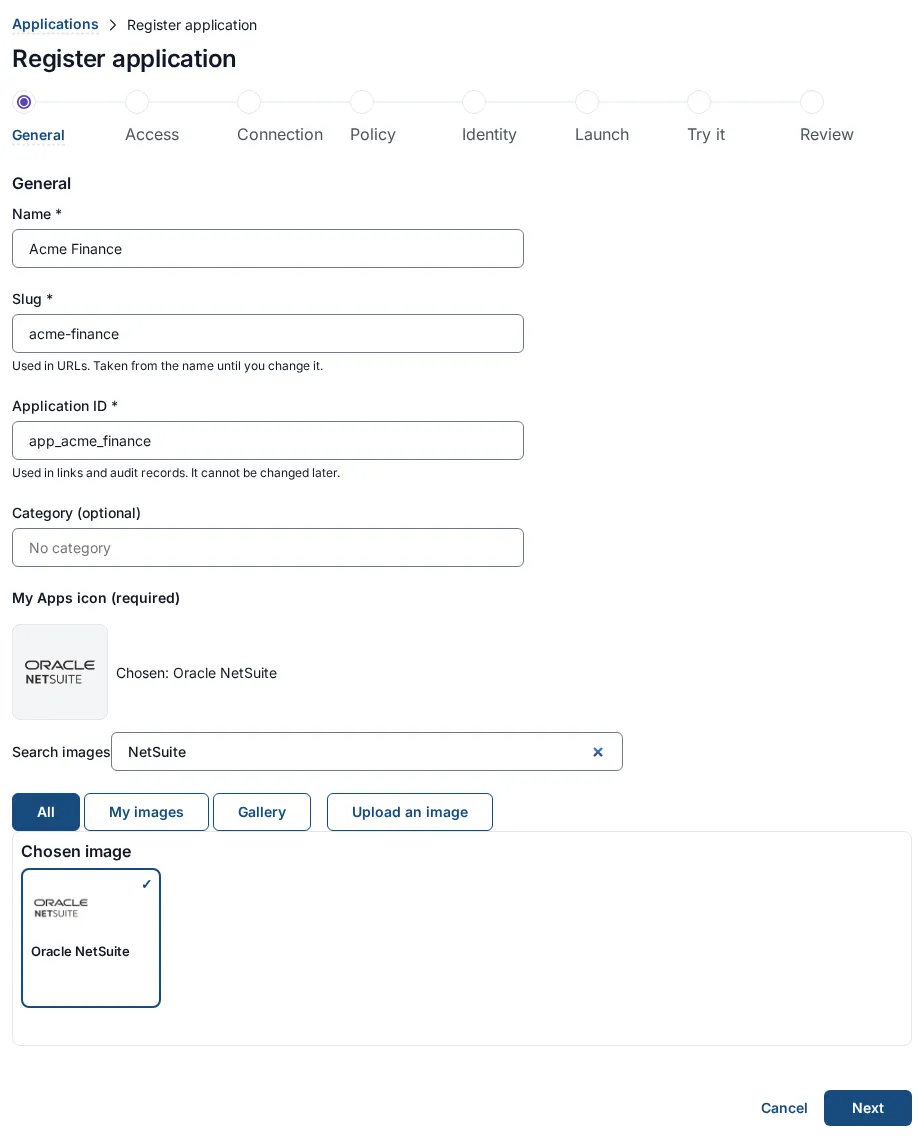
-
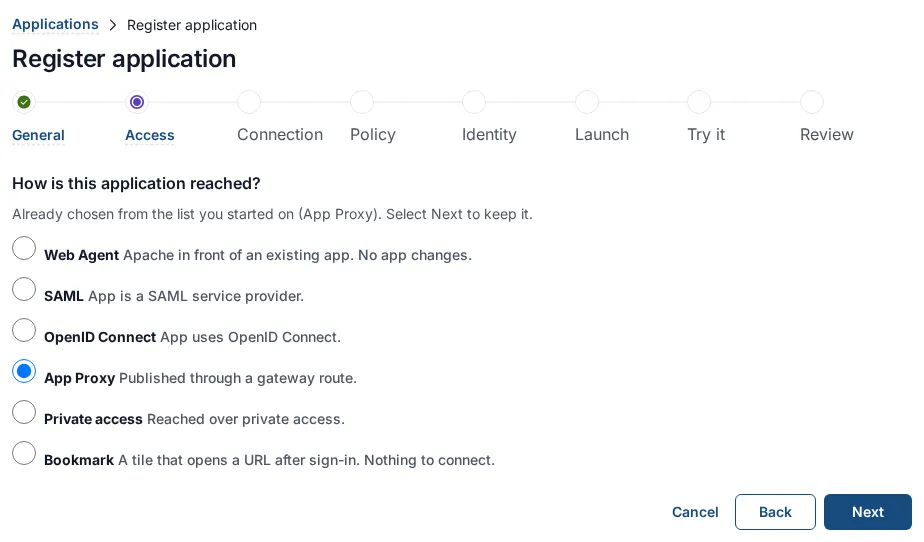
Access mode. Choose App Proxy: “Published through an App Proxy route. The edge carries the identity, so nothing runs beside the application.” (If you started from the App Proxy list this may already be selected.)
-
Connection. Two fields, and both are required: “An App Proxy application needs both a route and an edge.”
Field Example What to type Route ID route_acme_financeThe ID you will give the route in section 6. It must be identical. Gateway ID edge_acme_hq_01The instanceIdof the gateway that serves this application, from its configuration file.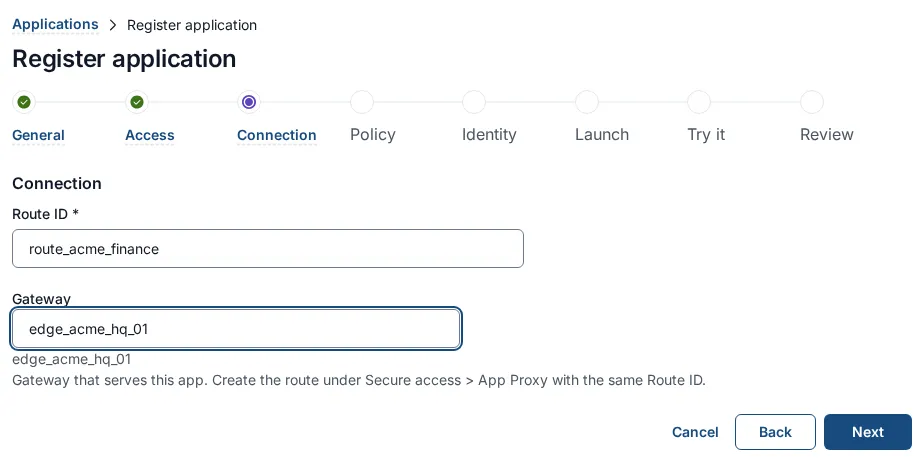
-
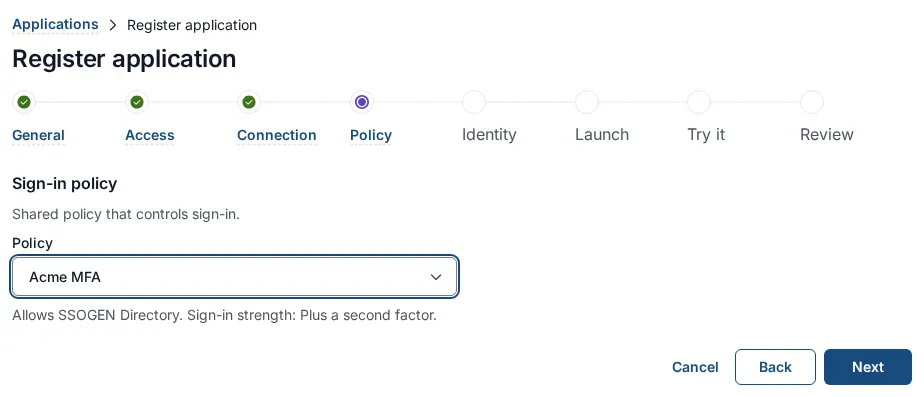
Sign-in policy. Choose the policy that applies to the application. A choice of Use the default policy is offered only if the realm has a default policy. For Acme choose Acme MFA (a policy whose strength is Plus a second factor). This is the policy for the external hostname and the baseline for the application; section 8 shows how to give the internal hostname a different one.
-
Identity sent to app. Leave the defaults. The App Proxy passes the signed-in person’s identity to your application; the browser cannot supply it. The application’s Test tab lists exactly what your application receives, for your developers. Extra attributes you add on this step are not sent through an App Proxy route.
-
Launch. Type the Launch URL (https):
https://finance.internal.acme.example/. The My Apps sends people to the hostname you mark for the My Apps in section 7 with the path and query of this URL, so the host name here only needs to be a validhttps://address. Without a launch URL the application is listed as Incomplete and cannot be launched. Select Next. The application is saved now, but not active.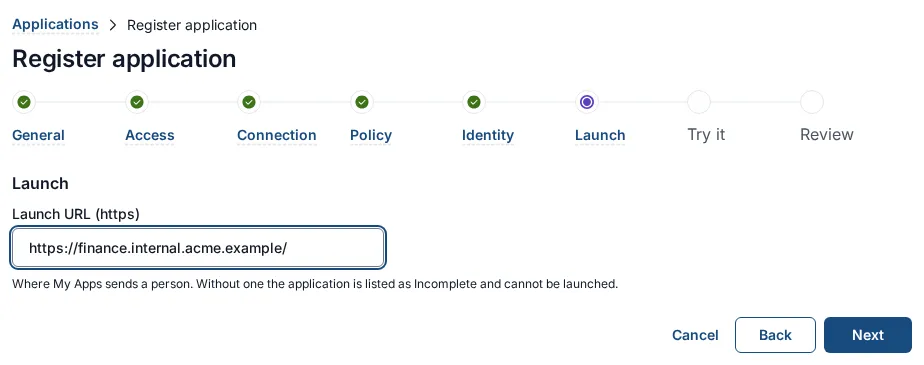
-
Test. The panel asks “Pick a person to see whether they would get in and what Acme Finance would be told.” Nobody is signed in and nothing is sent. Choose a Person, leave Signs in through and Signed in with at their defaults, and select Run test. You can skip this now: you cannot expect a pass until a person is assigned (section 11) and the route exists. Select Next.
-
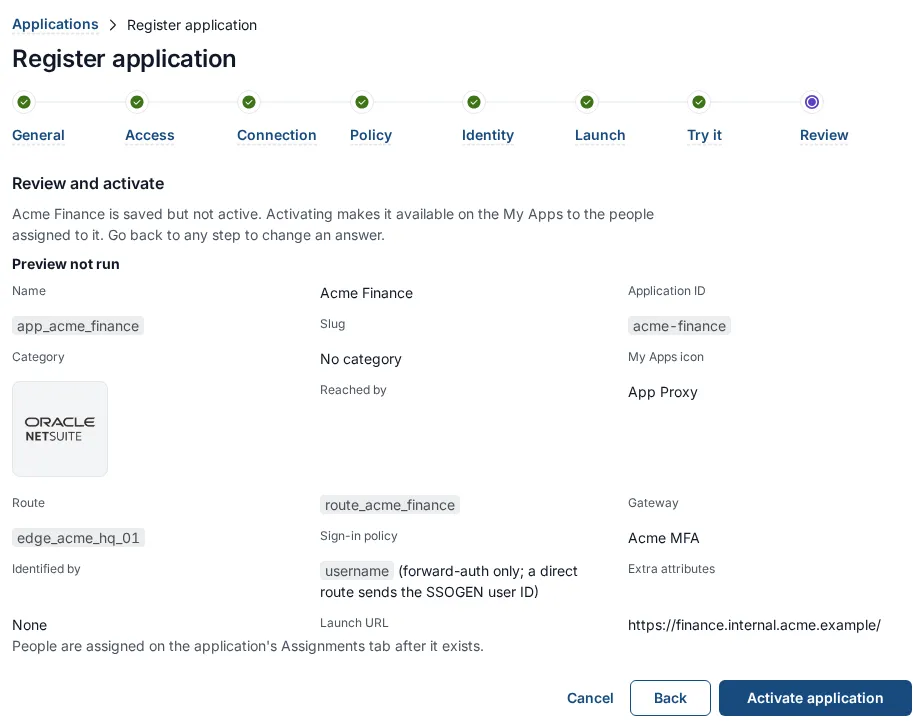
Review and activate. Read the summary: Reached by shows App Proxy, with the Route and Gateway you typed. Select Activate application. Activating makes the application available to the people assigned to it, but nobody can open it until the route, the hostname and the certificate exist.
4. Upload the certificate
Section titled “4. Upload the certificate”-
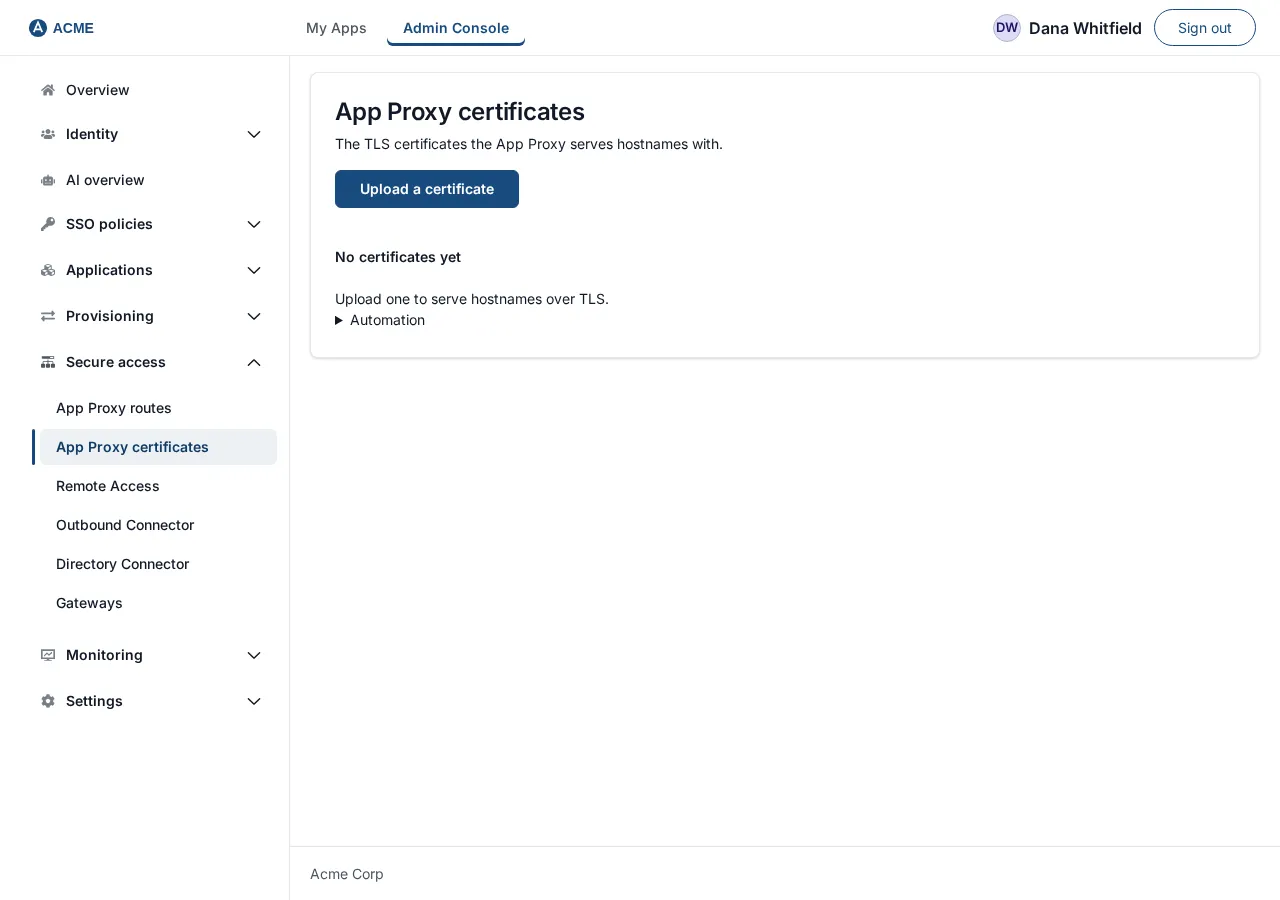
Open Secure access, then App Proxy certificates. The page title is App Proxy certificates: “The TLS certificates the App Proxy serves hostnames with.” A new realm shows “No certificates yet. Upload one to serve hostnames over TLS.”
-
Select Upload a certificate. If this button is grayed with “Needs a secret encryption key.”, SSOGEN has no secret encryption key yet (see the Secrets page under Settings): certificate keys cannot be stored until one exists.
-
Fill in the form Upload a certificate:
Field Example Notes Name Finance internal 2026A name people will recognize (up to 128 characters). Required. Certificate chain (PEM) contents of finance-chain.pemPaste the text, or select Or choose a file ( .pem,.crt,.cer,.txt; up to about 70 KB).Private key (PKCS#8 PEM) contents of finance.key“Without a passphrase. It is stored encrypted and never shown again.” 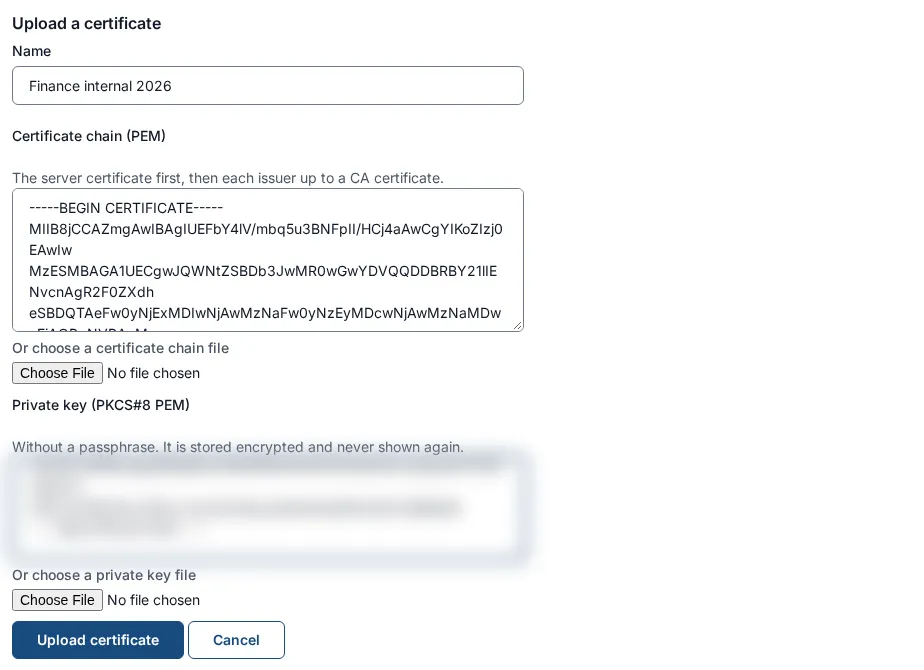
-
Select Upload certificate. On success the page says “Certificate “Finance internal 2026” uploaded.” and the table lists it.
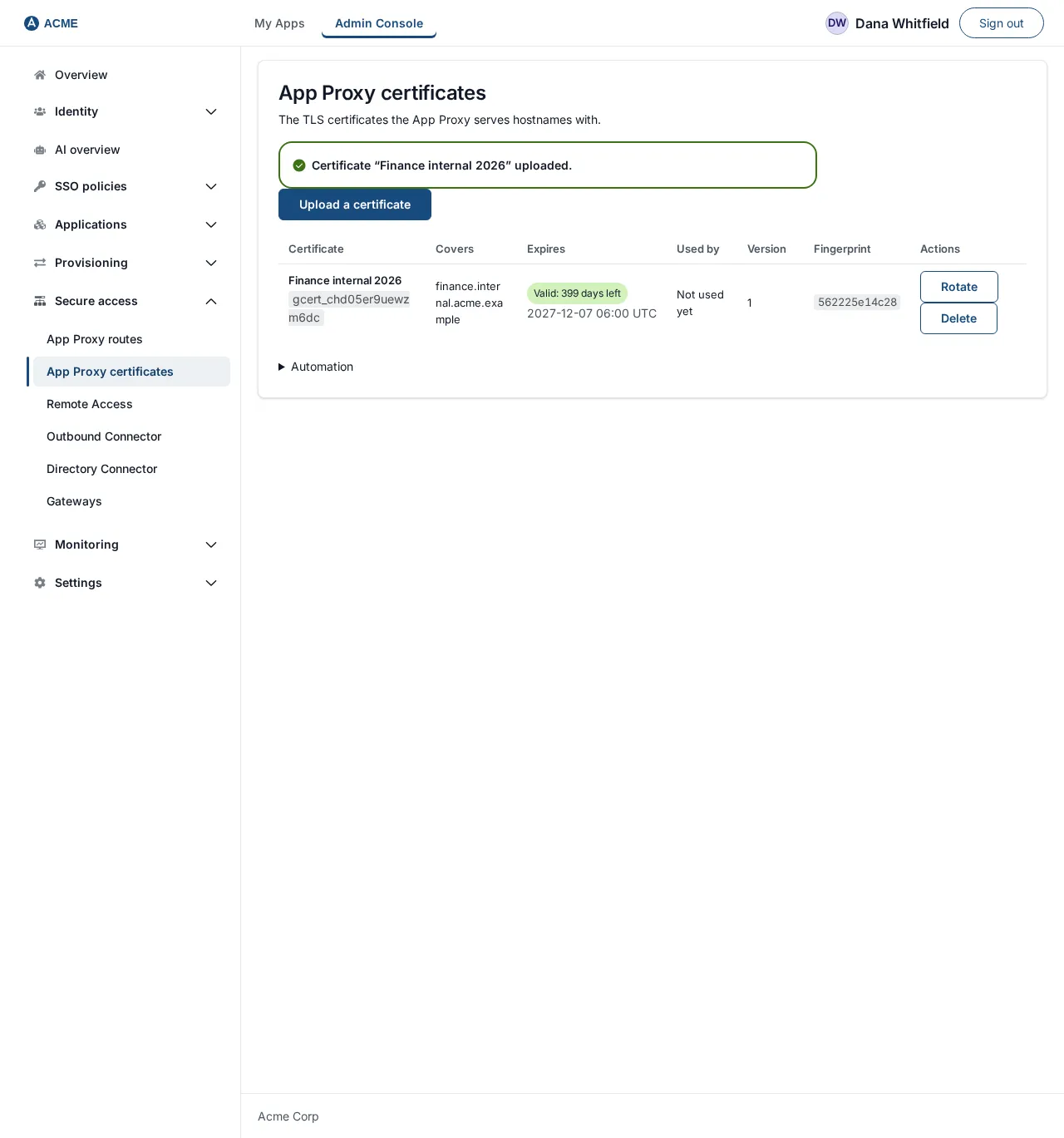
The table columns:
| Column | Meaning |
|---|---|
| Certificate | Your name for it and its ID (gcert_…). Keep the ID: a certificate tool needs it in section 10. |
| Covers | The names in the certificate. |
| Expires | Valid, or Expires soon: N days left (30 days or fewer), Expires very soon (7 days or fewer) or Expired, with the date. A banner above the table lists any certificate that is not valid and says “Rotate them before they expire, or their hostnames stop working.” |
| Used by | The hostnames and listeners that use it, or “Not used yet”. |
| Version | Goes up by one at each rotation. |
| Fingerprint | The first characters of the chain’s SHA-256 fingerprint. |
| Actions | Rotate and Delete. |
If the upload is refused, nothing is stored and the page says one of these:
| Message | What to do |
|---|---|
| The certificate chain or the key is not valid PEM. The key must be PKCS#8 (BEGIN PRIVATE KEY header). | Convert the key (section 2.3). |
| The private key does not belong to the first certificate in the chain. | Put the server certificate first and use its own key. Compare the two hashes in section 2.3. |
| The key is not supported. Use RSA of 2048 bits or more, or ECDSA P-256 or P-384. | Create a new key. |
| The certificate has expired or expires within 24 hours. | Get a new certificate. |
| The first certificate is not a server certificate (it is a CA, or it cannot be used for TLS servers). | The server certificate must be first in the file and carry the TLS server purpose. |
| The chain must be the server certificate first, then each issuer up to a CA certificate. | Add the issuing CA certificate(s) after the server certificate. |
| This looks like a private key, not a certificate chain. or This looks like a certificate, not a private key. | The two boxes are swapped. |
| The key is passphrase-protected. Remove the passphrase first (openssl pkcs8 -nocrypt). | Convert the key (section 2.3). |
To delete a certificate, select Delete, then confirm Delete certificate. A certificate that a hostname or listener still uses cannot be deleted: “A hostname or listener still uses this certificate. Move them to another certificate first.”
5. Add an internal listener
Section titled “5. Add an internal listener”The gateway group’s default listener is the address set at install. It counts as External. People who reach an internal hostname must come in through a separate listener that is not reachable from the internet, so you add one.
-
Open Secure access, then Gateways. Scroll to the heading of your gateway group (
eg_acme_hq). Below its Remote access origin field is Listeners: “Where this group accepts connections. A direct listener is reached by browsers; a load-balancer listener only by your load balancer, which must present a client certificate.” The table shows the default listener as Default (install) with Set at install in the Actions column.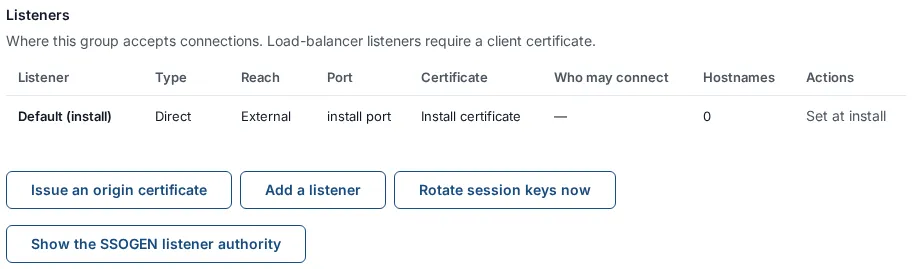
-
Select Add a listener. The form New listener opens:
Field Example Notes Name internalLower-case letters, digits and hyphens, starting with a letter, up to 32 characters; not default.Who connects Browsers connect directly The alternative, Only a load balancer connects, is section 9. Who can reach the hostnames on it Internal (from inside your network) The other choice is External (from the internet). “An internal and an external hostname never share a listener.” Bind address (optional) 192.0.2.10An IP address on the gateway. Empty means the address the gateway was installed with. Use the internal address so the port is not reachable from outside. Port the gateway listens on 94431 to 65535, but the packaged service cannot use ports below 1024. The form starts with 443 filled in: replace it. Public port (optional) 443The port people see in the address if your firewall or load balancer maps it. Empty means 443. Default certificate (optional) (empty) Served when a browser asks for a name that has no hostname on this listener. Without one, that handshake fails. 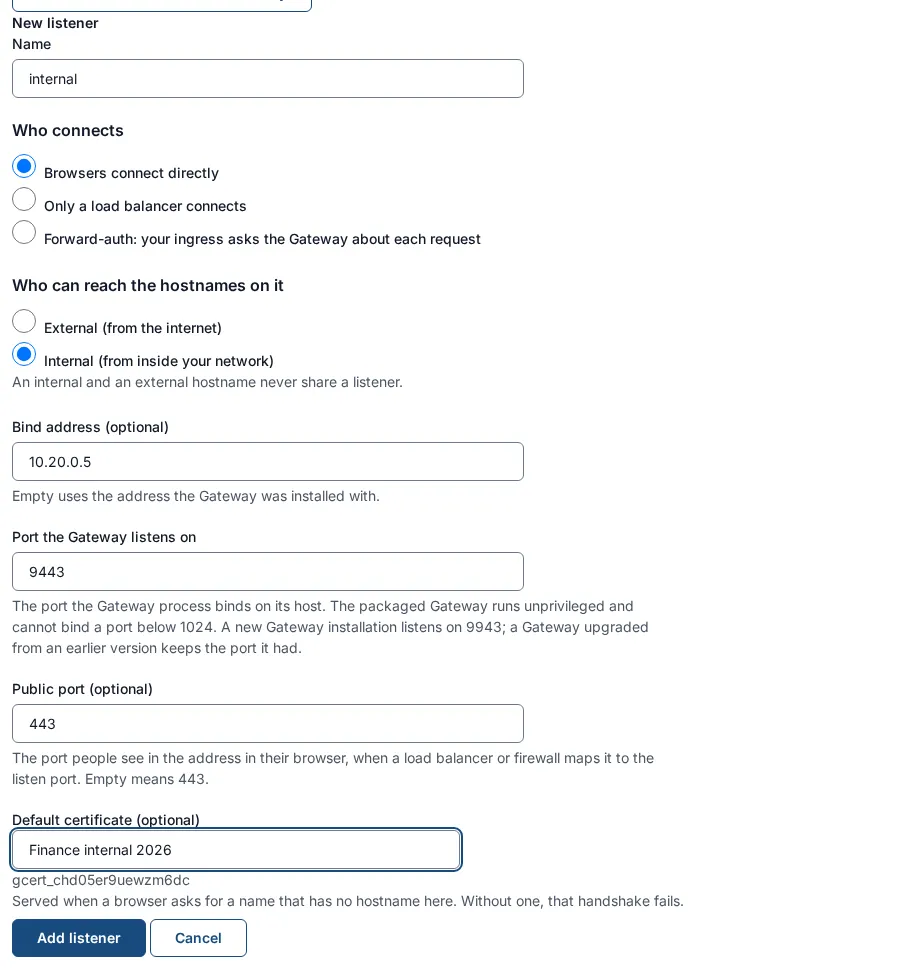
-
Select Add listener. If something is wrong the form lists the problems, for example “Another listener of this group already uses that address and port.” or the page says “Another listener of this gateway group uses that address and port.”
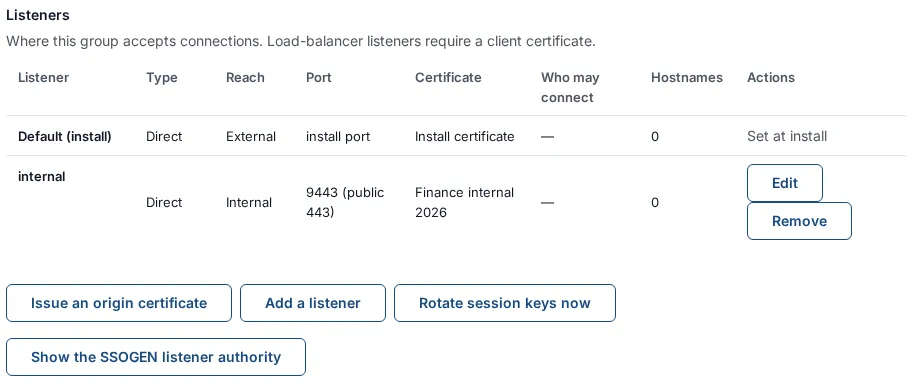
The gateway starts listening when it applies the next configuration. If the address is not on the gateway host, or the port is already in use, the gateways screen later says “the App Proxy listen address is in use on the gateway host” (section 13).
To remove a listener select Remove, then Remove listener. A listener that hostnames still use cannot be removed: “Hostnames still use this listener. Move or remove them first.”
6. Create the route
Section titled “6. Create the route”The route says which application a hostname leads to and which back-end servers answer.
-
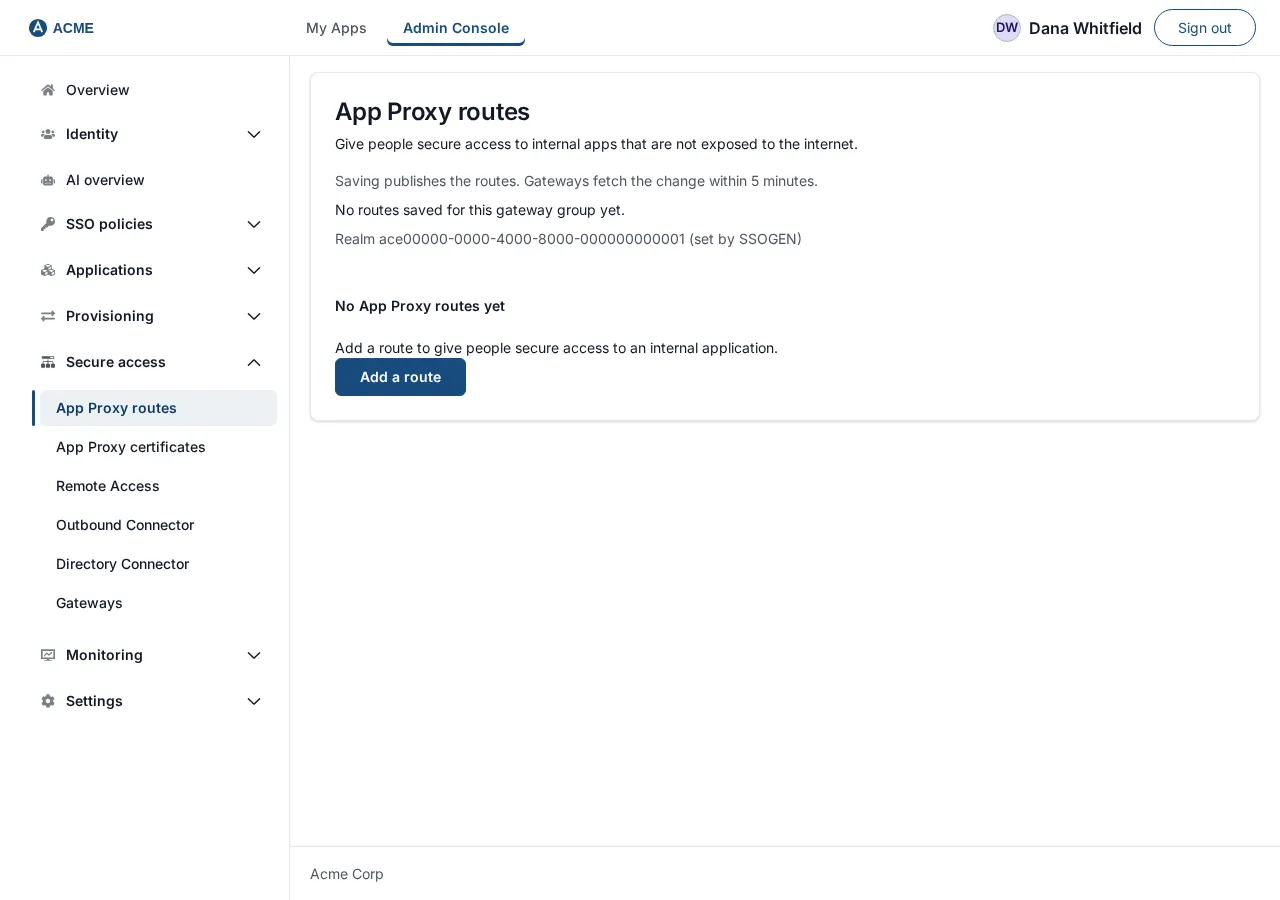
Open Secure access, then App Proxy routes. The page says “Give people secure access to internal apps that are not exposed to the internet.” and “Saving publishes these routes to the gateway. Enrolled gateways fetch the signed bundle on their next poll, by default within five minutes.”
-
Select Add a route. The form New route opens. It is one page with these sections.
Application
Field Example Notes Gateway group eg_acme_hqChoose from the list, or type a group name and choose Use “…”. Gateway node (membership) edge_acme_hq_01The gateway that serves the route. Saving records that this server belongs to the group, which is how the application’s Gateway ID (section 3) finds the group. Choose it the first time you publish for this server. Without that record, the person who selects the tile gets “The gateway for this application is not available.” Application Acme FinanceThe App Proxy application from section 3. Route ID route_acme_financeSuggested from the application name ( route_plus the name with underscores). Must be the same ID you typed in the wizard.Public host: First hostname, for example
finance.internal.acme.example. Fully qualified, lower case, no scheme, port or path. It becomes the route’s first hostname. After the route exists, all hostnames are managed in the Hostnames section (section 7).Back-end servers
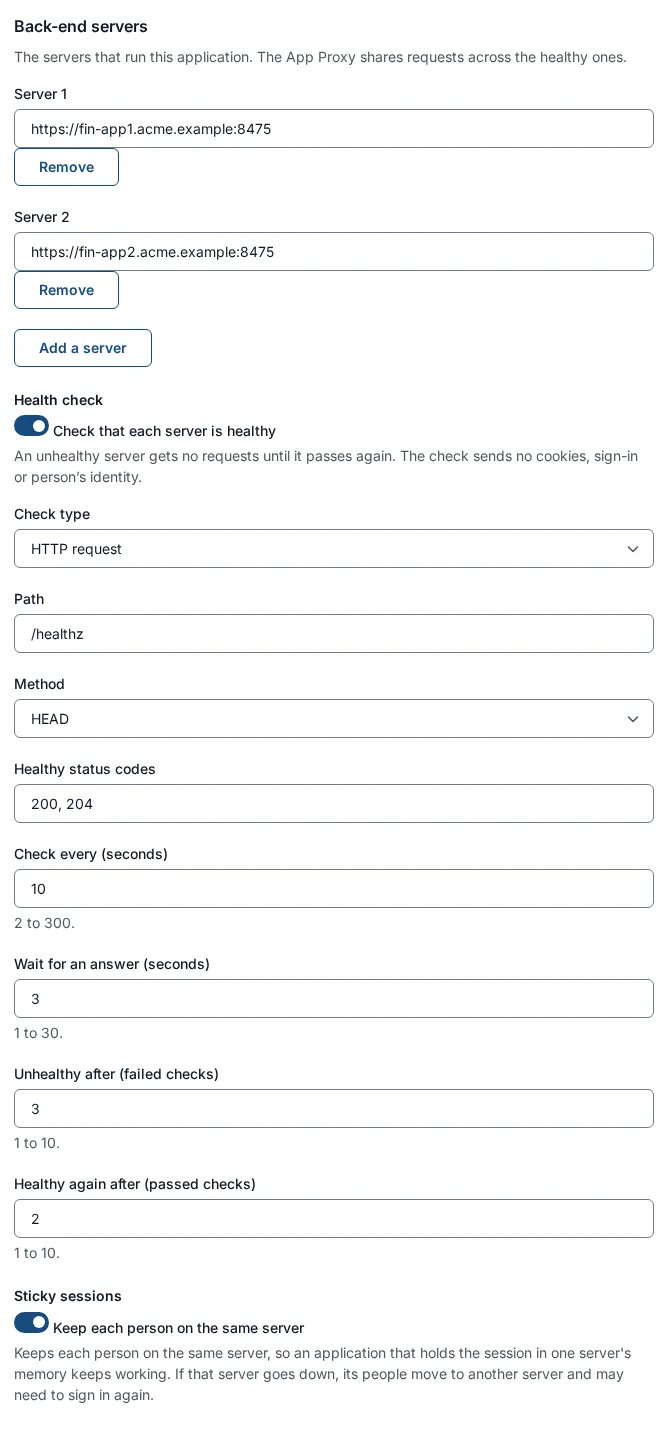
Field Example Notes Server 1 https://fin-app1.acme.exampleMust start with https://. No user name or password in the address. “Servers must use https://.”Add a server Server 2 https://fin-app2.acme.exampleUp to 32 servers. The App Proxy shares requests across the healthy servers. Each Remove needs at least one server left. A duplicate gives “This server is already in the list.” Health check: switch Check that each server is healthy on. “An unhealthy server gets no requests until it passes again. The check sends no cookies, sign-in or person’s identity.”
Field Example Notes Check type HTTP request Or Connection only, which just opens a connection. Path /healthzMust start with /.Method HEAD Or GET. Healthy status codes 200, 204Three-digit codes, no repeats. Check every (seconds) 102 to 300. Wait for an answer (seconds) 31 to 30. Unhealthy after (failed checks) 31 to 10. Healthy again after (passed checks) 21 to 10. Those values are the defaults when you switch the check on. If no server is healthy the App Proxy answers with an error instead of sending people to a server that is down.
Sticky sessions: Keep each person on the same server. “Keeps each person on the same server, so an application that holds the session in one server’s memory keeps working. If that server goes down, its people move to another server and may need to sign in again.” Switch it on only for an application that keeps its session in one server’s memory. It needs two or more servers: “Sticky sessions need two or more servers to choose between.” The App Proxy sets a cookie named
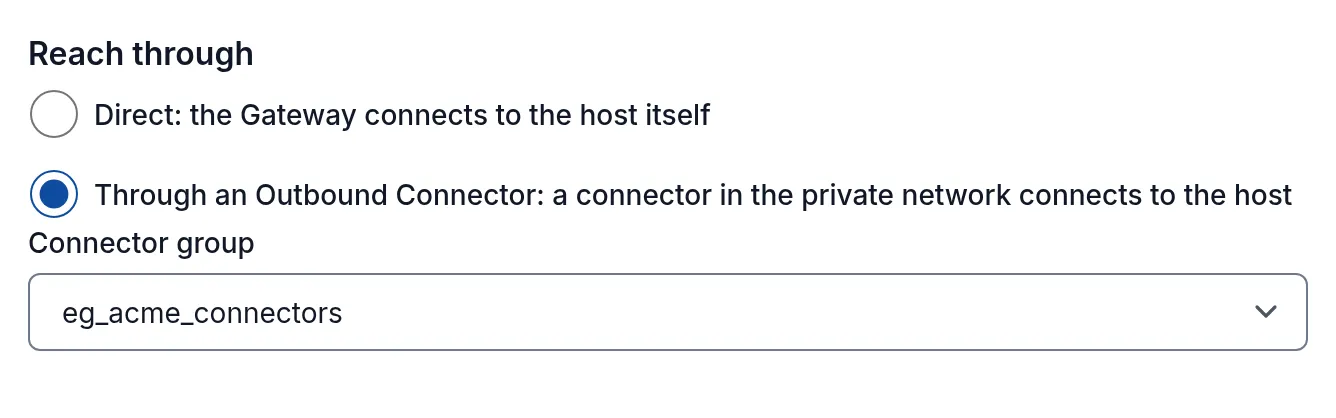
ssogen-affinityin the browser for this, which is not a sign-in credential and is passed on to the application.Reach through (App Proxy 4.3.0 and later): how the App Proxy connects to the back-end servers.
Choice When Field Direct: the Gateway connects to the host itself The gateway can open a connection to each server. The default. none Through an Outbound Connector: a connector in the private network connects to the host The servers are in a network the gateway cannot reach, for example a factory or a branch office. Connector group, chosen from the groups this gateway group admits The server addresses you typed under Back-end servers are then dialled by the connector, inside the private network, and the TLS checks of the TLS section still apply end to end. If the list is empty, the form says “This Gateway group admits no connector group yet. Add one under Gateways, Connector addresses.” Set the connector up first: Outbound Connector for private networks. Every gateway in the group must run version 4.3.0 or later; until then the route is not sent to the group.
Host header: what the application receives as the name it was asked for, and what happens to the names in its answers.
Choice What the application receives What the App Proxy does with the answer Internal: send the back-end server’s own name (the default for a new route) The first back-end server’s own host name, such as fin-app1.acme.example(with its port unless that is 443). Many applications need this to work.“Links, redirects and cookies in the answers are rewritten to the public name.” The headers Location,Content-LocationandRefreshand the domain of everySet-Cookieare changed from the internal name to the public one.External: send the public name unchanged The public name, finance.internal.acme.example.Nothing is rewritten. “Use this when the application already expects the public name.” A route saved before 4.3.0 keeps External, so an upgrade changes nothing an application sees. When you choose Internal, two more settings appear:
Field What it does Internal cookie domain (optional) Example fin-app1.acme.example. A cookie set for this domain becomes a cookie for the public host only; a cookie for any other domain is dropped. Empty means the first server’s host name.Rewrite links in response bodies Tick the content types whose body should also be rewritten: text/html,text/css,application/javascript,application/json. Absolute links to the internal name are replaced, in answers up to 8 MiB and within 30 seconds. Links that JavaScript builds while the page runs are not rewritten.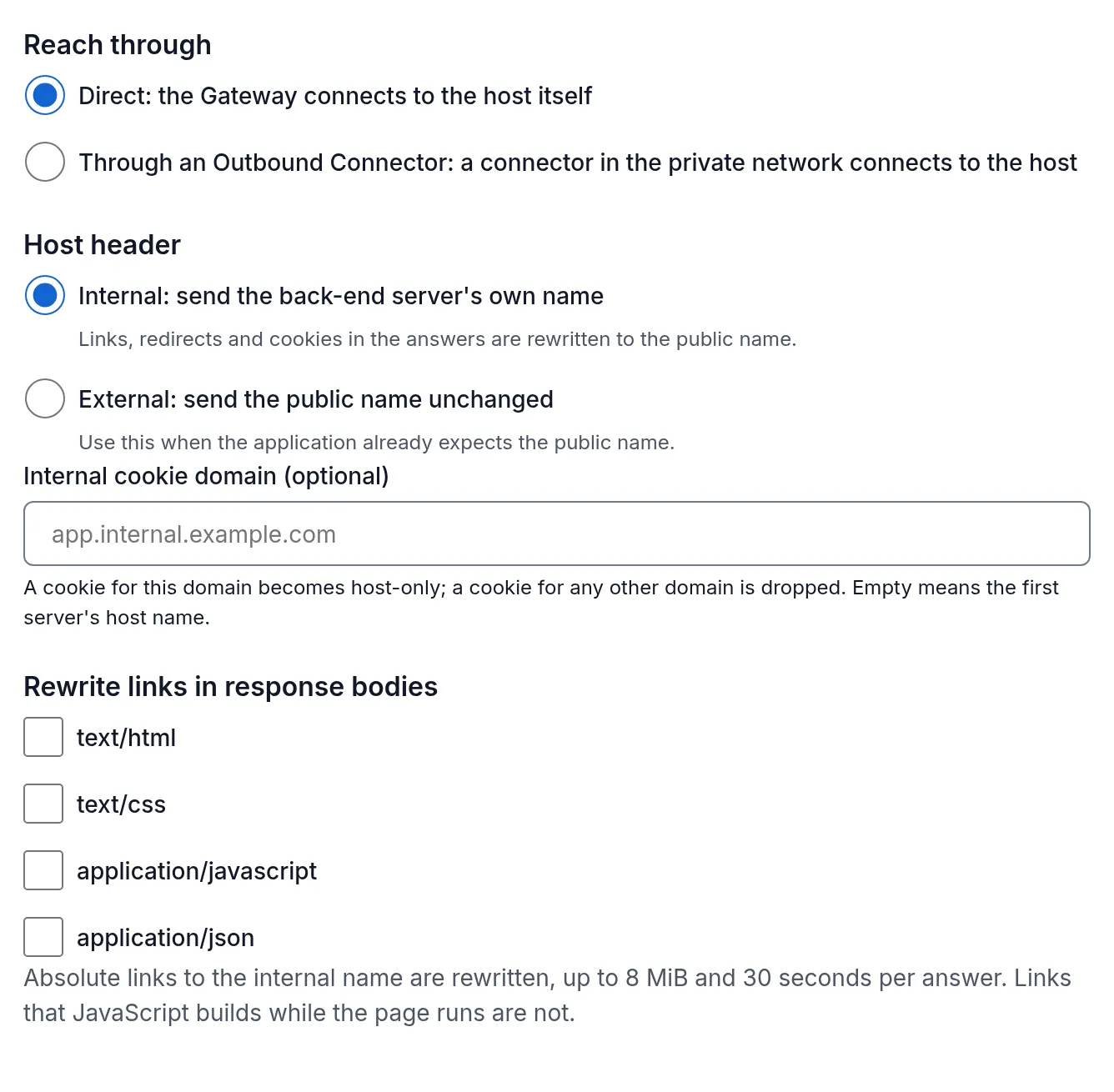
Leave the body rewriting off unless a page shows internal links; it makes the App Proxy read each answer of those types. A forward-auth route has neither setting (see Forward auth behind nginx, Traefik or Envoy).
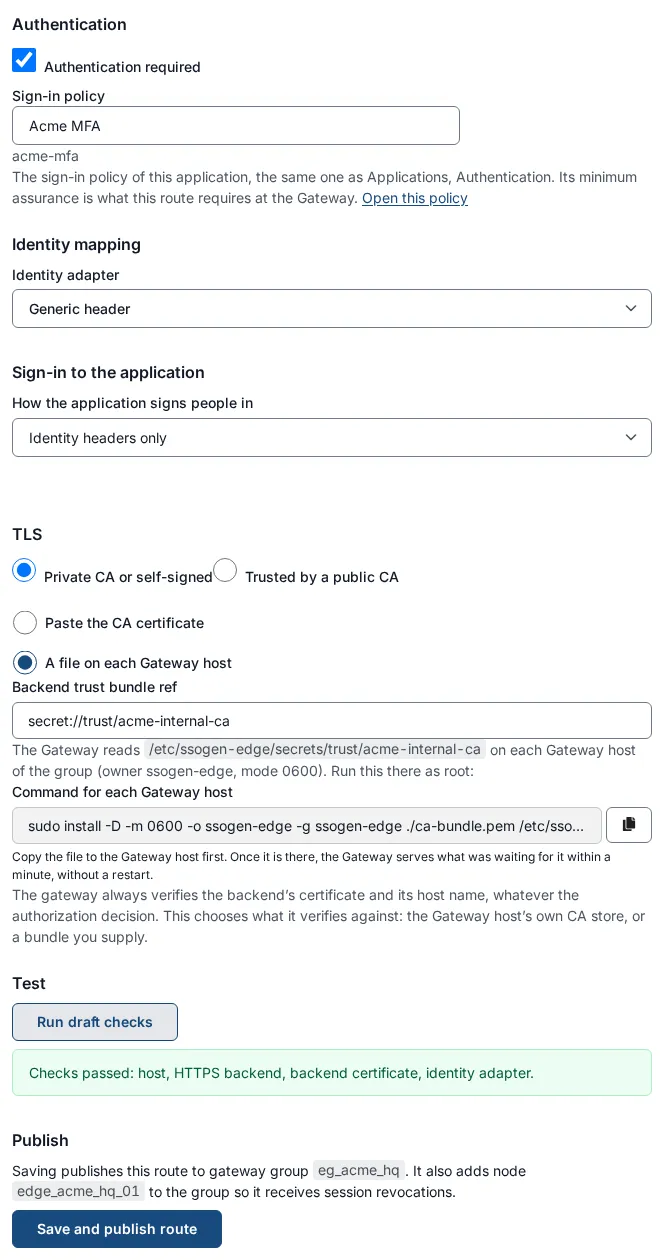
Authentication: Authentication required (leave ticked) and Sign-in policy, which shows the policy of the application (
Acme MFA). “Its minimum assurance is what this route requires at the gateway.” Changing it here changes the application’s policy.Identity mapping: Identity adapter Generic header (the default).
Sign-in to the application: how the App Proxy signs the person in to the application itself. Leave it at Identity headers only unless the application has its own login form or uses Kerberos: see Form fill and Kerberos sign-in.
TLS: how the App Proxy verifies the back-end servers. It always verifies the certificate and the host name; you choose what it verifies against.
Choice When Field Private CA or self-signed The servers use certificates from your own authority Backend trust bundle ref: secret://trust/acme-internal-ca. Must start withsecret://, else “TLS trust bundle must be a secret:// reference.”Trusted by a public CA The servers use a public authority’s certificates none. The gateway host’s own list of authorities is used. Test: select Run draft checks. The list shows what is missing, or “Checks passed: fully qualified host, HTTPS backend, verified backend certificate, identity adapter.” This looks only at what you typed. It does not contact anything.
Advanced (Envoy / path matching): Path prefixes (comma-separated), default
/. Use this when only some paths of the hostname belong to this route, for example/finance, /reports.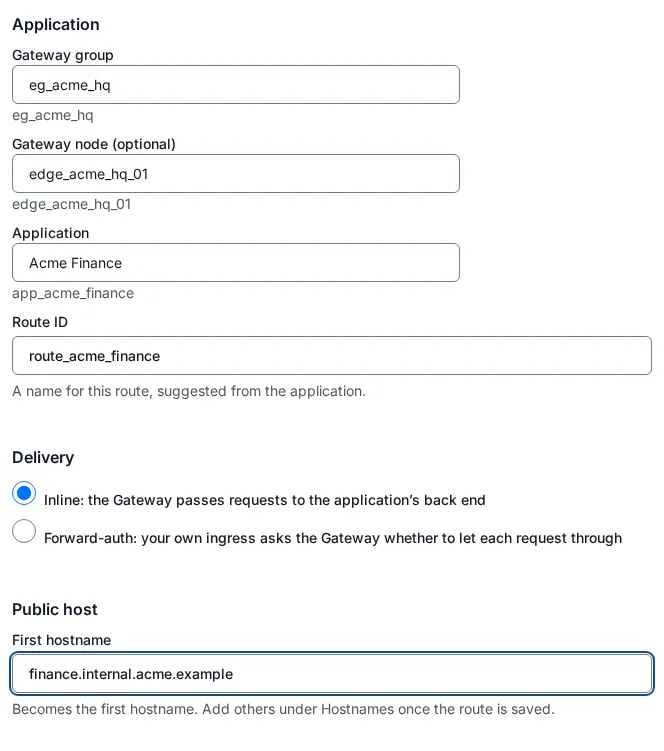
-
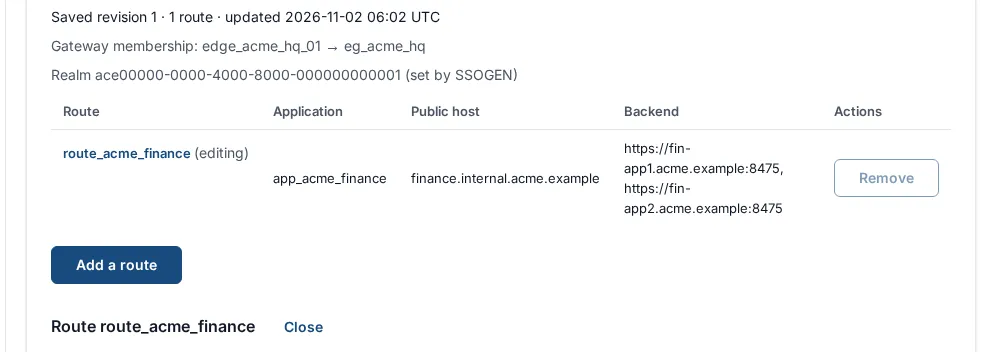
Select Save App Proxy route draft (under Activate). The text above it says what saving does: it saves the route set and maps the gateway node to the group. There is no separate publish button. The form header changes to Route route_acme_finance.
If saving fails you may see:
Message Meaning Fix the back-end servers marked below before saving. A server address or health setting is invalid. Read the messages under each field. A route that signs people in to the application must require authentication. You chose Form login or Kerberos but un-ticked Authentication required. A route with the ID … already exists. Choose a different route ID, or open that route from the list to change it. Use a different ID or open the existing route. The routes changed since you opened them. They have been reloaded; make the change again. Someone else saved at the same time. That host name is the one people use to reach SSOGEN itself, so an application cannot be published on it. Choose a different host name for this route. A route’s host cannot be SSOGEN’s own address. App Proxy route draft rejected. The backend must use HTTPS with a verified certificate, and the host must be fully qualified. Every other refusal shows this one message: check the fields above. The route list now shows your route with Route, Application, Public host and Backend columns, and a line Saved revision N · 1 route above it.
7. Add the hostnames
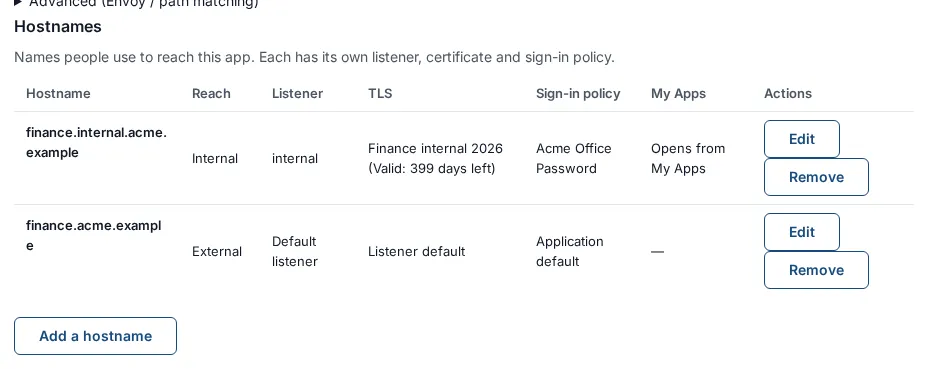
Section titled “7. Add the hostnames”When the route is saved, the route form shows a Hostnames section below it: “The names people use to reach this application. Each is served on a listener with a certificate that covers it, and can follow its own sign-in policy.” Its table has the columns Hostname, Reach (Internal or External), Listener, TLS, Sign-in policy, My Apps and Actions. The hostname you typed in section 6 is the first row, on the Default listener, which is External. Move it to the internal listener:
-
In the row for
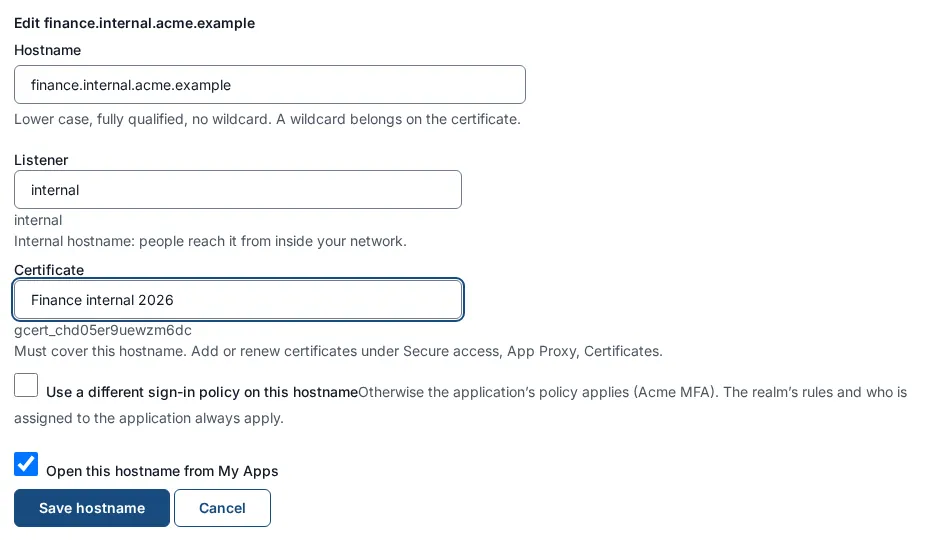
finance.internal.acme.exampleselect Edit. The form is titled Edit finance.internal.acme.example. -
Set:
Field Value Notes Hostname finance.internal.acme.example“Lower case, fully qualified, no wildcard. A wildcard belongs on the certificate.” Listener internalThe choices show Internal · direct · port 9443. Under the box a line says “Internal hostname: people reach it from inside your network.” Certificate Finance internal 2026Must cover the hostname. If it does not: “The certificate “…” does not cover finance.internal.acme.example. It covers …” Add or renew certificates under Secure access, App Proxy certificates. (If the listener is behind a load balancer the box is replaced by a note: “the load balancer terminates browser TLS; this listener presents its own origin certificate to the load balancer, so this hostname needs no certificate.”) Use a different sign-in policy on this hostname off for now Section 8. Off means the application’s policy applies. Open this hostname from the My Apps on The tile on My Apps opens this hostname. Only one hostname of a route can have this on: “Another hostname of this route already opens from the My Apps.” If none is marked, the My Apps opens the first external hostname. -
Select Save hostname. The gateway picks it up on its next poll (by default within five minutes).
To make the application available from outside as well, for employees at home, select Add a hostname and add finance.acme.example on the Default listener (external) with a certificate that covers it, and leave the My Apps box ticked on whichever name people should land on. Both names lead to the same application and the same back-end servers.
Other messages you may meet when saving a hostname:
| Message | Meaning |
|---|---|
| This hostname is already in the list. / That hostname is already used in this gateway group. | Names are unique in a gateway group. |
| An internal and an external hostname cannot share a listener. | Put each on a listener with the matching reach. |
| A hostname on a direct listener needs a certificate that covers it. | Choose a Certificate. |
| Enter a fully qualified name such as expenses.example.com, without a scheme, port or path. | Fix the name. |
| Use lower case. / A hostname cannot contain a wildcard. Wildcards belong on the certificate. | Fix the name. |
To remove a hostname select Remove then Remove hostname: “People can no longer reach this application at this hostname. Their sessions on it end. The route and its other hostnames are not affected.”
8. A sign-in policy per hostname
Section titled “8. A sign-in policy per hostname”By default every hostname follows the application’s policy (Acme MFA: a second factor is required). Inside your office you may want a lighter policy, for example password only. A hostname can have its own.
A hostname does not prove where a person is. Only the policy itself can keep the weaker sign-in inside your network. So SSOGEN refuses to save a hostname whose policy is weaker than the policy of an External hostname of the same route, unless the weaker policy denies any sign-in from outside your network zones. You make that true with a first rule in the weaker policy.
8.1 Define your network zones (the person who runs SSOGEN)
Section titled “8.1 Define your network zones (the person who runs SSOGEN)”A network zone is a name for address ranges. Policy rules refer to zones by name, and a person’s network address is matched against them when they sign in. Open SSO policies > Network zones, select Add zone, give it a name such as corporate and your office address ranges, and confirm. The full steps are in Network zones.
An address that matches no zone is treated as being in the zone called unknown, so a rule “is on none of corporate” holds for it. If you define no zones, a built-in default corporate zone covers loopback and the common private address ranges, which is almost certainly wider than your office: add your own.
8.2 Create the weaker policy
Section titled “8.2 Create the weaker policy”-
Open SSO policies, Policies, then create a policy (the wizard steps are Starting point, Providers, Requirements, Conditions, Name, Review). For Acme: under Requirements, Required strength is Password or single sign-on; under Name, the name is
Acme Office Password. -
On the Conditions step (or later, on the policy’s page, the Edit button beside its conditions), select Add rule and build the rule that comes first:
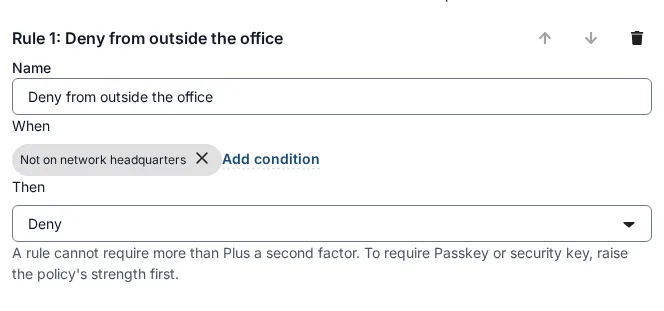
Part Choose Name Deny from outside the officeWhen → Add condition type Network, mode is on none of, the zone corporateThen Deny “The first rule that matches decides. Rules are checked from the top.” This rule must be Rule 1. A rule that only mentions a zone, in the wrong place, is not enough, because SSOGEN judges the policy by what its rules decide for a sign-in from outside every zone.
-
Finish the wizard.
8.3 Give the internal hostname the weaker policy
Section titled “8.3 Give the internal hostname the weaker policy”-
Back on Secure access, App Proxy routes, open
route_acme_financeand edit the hostnamefinance.internal.acme.example(section 7). -
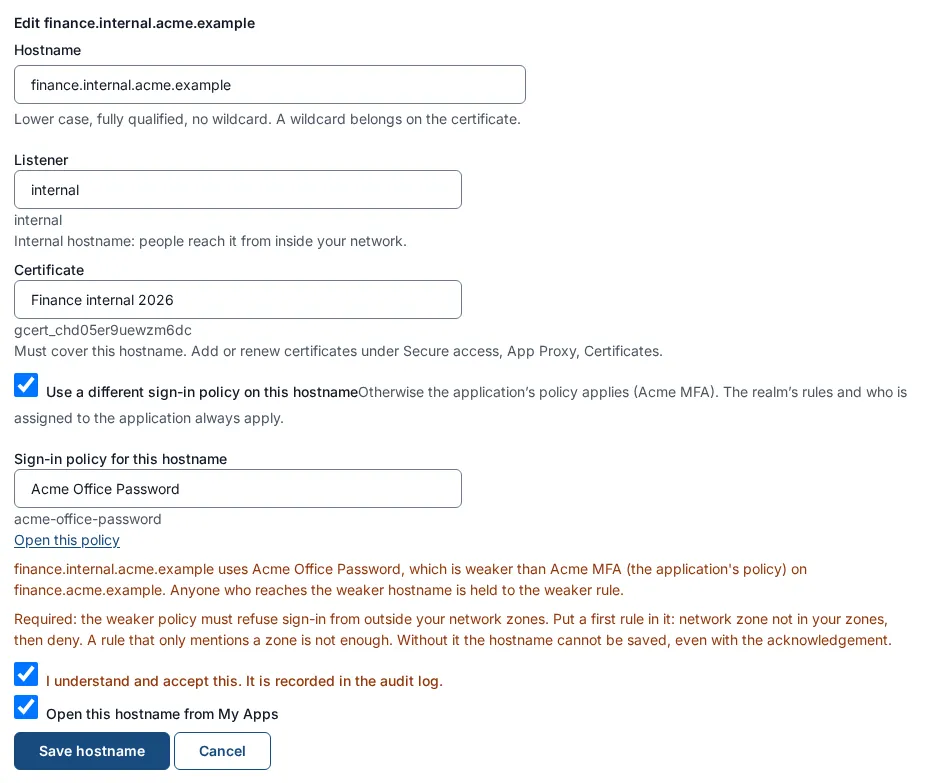
Tick Use a different sign-in policy on this hostname. “Otherwise the application’s policy applies (Acme MFA). The realm’s rules and who is assigned to the application always apply.”
-
In Sign-in policy for this hostname choose
Acme Office Password. Open this policy links to it. -
Because the policy is weaker than the external hostname’s, a warning appears: “finance.internal.acme.example uses Acme Office Password, which is weaker than Acme MFA (the application’s policy) on finance.acme.example. Anyone who reaches the weaker hostname is held to the weaker rule.” with the rule: “Required: the weaker policy must refuse sign-in from outside your network zones. Put a first rule in it: network zone not in your zones, then deny. A rule that only mentions a zone is not enough. Without it the hostname cannot be saved, even with the acknowledgement.”
-
Tick I understand and accept this. It is recorded in the audit log. Until you do, Save hostname stays disabled with “Tick the acknowledgement above to save.”
-
Select Save hostname.
If the policy does not deny sign-in from outside your zones the save is refused and nothing changes: “finance.internal.acme.example uses Acme Office Password, which is weaker than Acme MFA (the application’s policy) on finance.acme.example and does not deny sign-in from outside your network zones. Either put a first rule in Acme Office Password that denies sign-in from outside your network zones, or choose a policy as strong as Acme MFA for finance.internal.acme.example. Nothing was saved.”
The same protection works the other way round. If you later change a policy or an assignment so that an App Proxy hostname would sign people in more weakly from outside your zones, that change is refused: “Nothing was saved: an App Proxy hostname this affects would then let people sign in from outside your network zones more weakly than its route’s external hostname. Keep a first rule that denies sign-in from outside your network zones in that hostname’s policy, or change the hostname’s policy on the App Proxy screen first.”
9. Behind your load balancer with mutual TLS
Section titled “9. Behind your load balancer with mutual TLS”If a load balancer sits in front of one or more gateways (for a shared address, for several servers, or to present port 443), use a load-balancer listener. It accepts connections only from your load balancer, which must prove who it is with a client certificate (mutual TLS), and it is the only place the gateway believes the X-Forwarded-For header that tells it the person’s real address.
Do not use the install option --trusted-proxy-hops for this. It does not authenticate the proxy.
9.1 Prepare the two certificates
Section titled “9.1 Prepare the two certificates”| Certificate | Presented by | Checked by | Where it goes |
|---|---|---|---|
| Origin certificate | The gateway listener, to your load balancer | The load balancer | Upload it under App Proxy certificates like any certificate (section 4). It must be valid for the name your load balancer checks. |
| Load balancer client certificate | Your load balancer, to the gateway | The gateway | You give the gateway the certificate authority that issued it and the identity it must carry. The private key stays on the load balancer. |
The client certificate must carry a subject alternative name that you list exactly on the listener (a DNS name such as lb01.acme.example, or a URI such as spiffe://acme.example/lb). A wildcard certificate for *.acme.example does not match lb01.acme.example, and an authority alone is never enough.
9.2 Add the listener
Section titled “9.2 Add the listener”-
Secure access, Gateways, your group, Listeners, Add a listener.
-
Fill in:
Field Example Notes Name lbWho connects Only a load balancer connects Who can reach the hostnames on it External (from the internet) or Internal As for any listener. Bind address (optional) 192.0.2.10Port the gateway listens on 9444Above 1023. Public port (optional) 443The port people see, which the load balancer presents. Origin certificate Finance origin 2026Required: “Choose the origin certificate this listener presents to the load balancer.” Certificate authority of the load balancer (PEM) the CA certificate(s) Paste, or choose a .pem,.crtor.cerfile. Up to 8 certificates. They are not shown again after saving, so provide them whenever you save.Identities the load balancer’s certificate must carry DNS name lb01.acme.exampleAt least one. Add an identity for more. A URI must start with a scheme such as spiffe://.Public key pins (optional) 64 hexadecimal characters per line The SHA-256 of the load balancer certificate’s public key. When set, only that key is accepted. Trusted hops 1How many proxies sit in front of the gateway, 1 to 4. The load balancer is one. The person’s address is read from X-Forwarded-Forthis many hops back.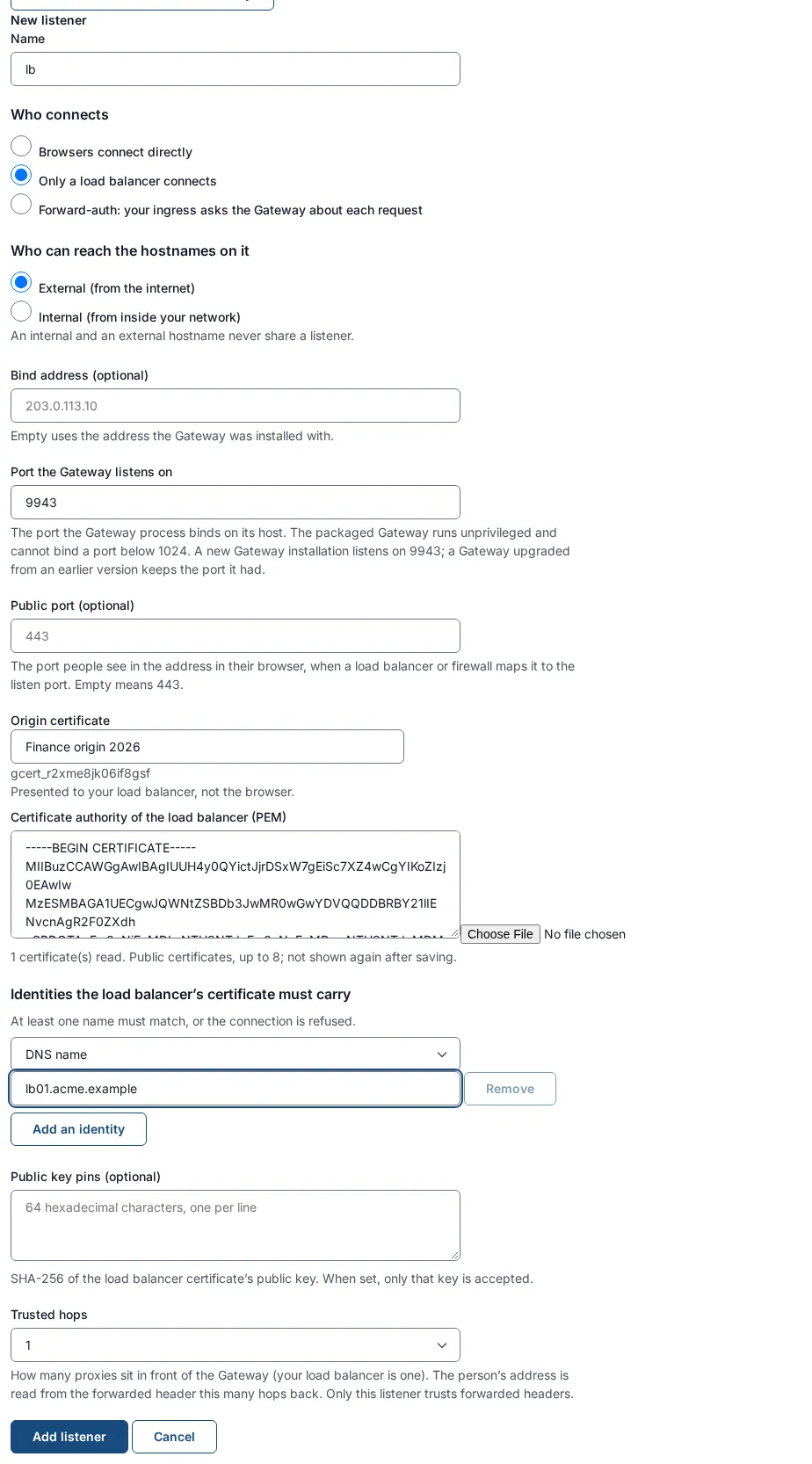
-
Select Add listener. The table shows it as Behind a load balancer, with a summary such as 1 identity pin, 0 key pins, 1 trusted hop.
-
Attach hostnames to the
lblistener as in section 7. A hostname on a load-balancer listener needs no certificate of its own.
To get the SHA-256 of your load balancer certificate’s public key (optional pin):
openssl x509 -in lb-client.crt -noout -pubkey \ | openssl pkey -pubin -outform der | openssl dgst -sha256 -hex9.3 Configure the load balancer (outside SSOGEN)
Section titled “9.3 Configure the load balancer (outside SSOGEN)”The gateway speaks HTTP/1.1 only to browsers and load balancers, even if they offer HTTP/2. A sample for HAProxy that terminates browser TLS, presents a client certificate to the gateway, verifies the gateway’s origin certificate, adds the client’s address and checks the gateway:
frontend fe_apps    bind :443 ssl crt /etc/haproxy/certs/apps.pem    default_backend be_gateway
backend be_gateway    option forwardfor    http-request set-header X-Forwarded-Proto https    balance roundrobin    # Keep each browser on the same gateway (section 9.4)    cookie GATEWAY insert indirect nocache secure httponly    server gw01 gw01.acme.example:9444 ssl crt /etc/haproxy/pki/lb-client.pem \        ca-file /etc/haproxy/pki/gateway-origin-ca.pem verify required \        verifyhost gateway.acme.example check check-ssl inter 10s cookie gw01    server gw02 gw02.acme.example:9444 ssl crt /etc/haproxy/pki/lb-client.pem \        ca-file /etc/haproxy/pki/gateway-origin-ca.pem verify required \        verifyhost gateway.acme.example check check-ssl inter 10s cookie gw02
Here lb-client.pem holds the load balancer’s client certificate and key, gateway-origin-ca.pem the authority that issued the gateway’s origin certificate, and the origin certificate covers gateway.acme.example. Other load balancers have the same settings under other names: a TLS client certificate for the connection to the servers, verification of the server certificate, an X-Forwarded-For header, and persistence. Allow only the load balancer’s address to reach the gateway port: the listener refuses any connection without the client certificate anyway.
9.4 Keep each person on the same gateway
Section titled “9.4 Keep each person on the same gateway”An SSOGEN Gateway keeps its sign-in state and sessions itself and does not share them with other gateways. If you run more than one gateway, set your load balancer’s persistence (the sample uses a cookie) so each browser keeps going to the same gateway. This is separate from the Sticky sessions switch of section 6, which keeps a person on the same application server. An App Proxy session ends after 30 minutes without use or 12 hours in all, unless signed configuration states other limits; the console has no setting for them.
9.5 Health checks
Section titled “9.5 Health checks”There are two kinds, and they check different things:
- The App Proxy checks your application servers: the Health check of the route (section 6).
- Your load balancer checks the gateway: the sample uses
check check-ssl, which opens a TLS connection with the load balancer’s client certificate. The App Proxy has no dedicated health address. For a deeper check on the gateway itself use the gateway’s own health addresses/livezand/readyzon its administration listener (see Install and enroll an SSOGEN Gateway), which listens only on the server itself unless you change--admin-addressand--admin-allow-non-loopback.
10. Rotate certificates by hand or from a certificate tool
Section titled “10. Rotate certificates by hand or from a certificate tool”A certificate expires. Replace it before the date, because after it hostnames on that certificate stop working. The gateways and the table warn you from 30 days before.
10.1 By hand
Section titled “10.1 By hand”-
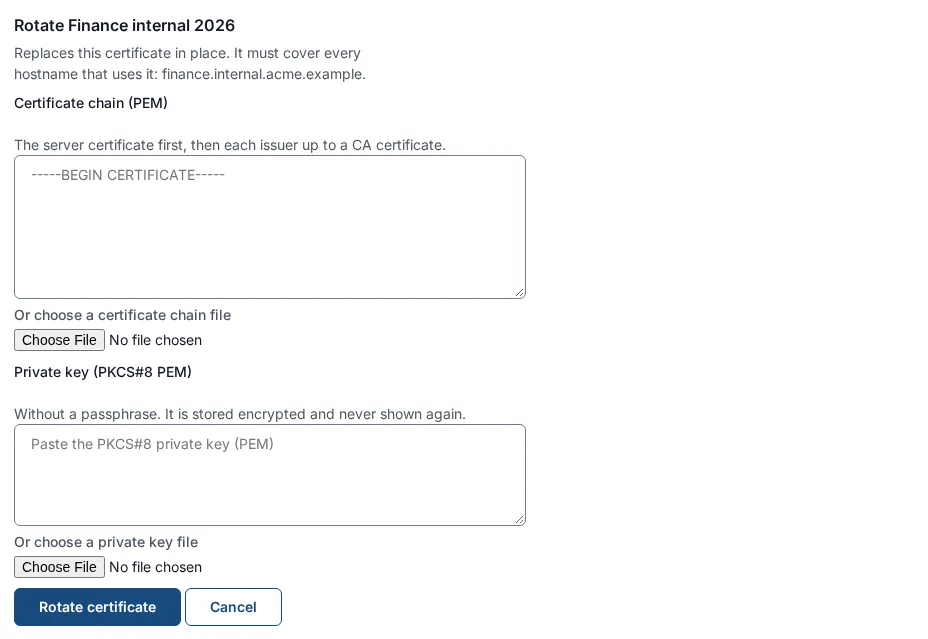
Secure access, App Proxy certificates. In the row select Rotate. The form is titled Rotate Finance internal 2026: “The new certificate replaces this one in place. It must cover every hostname that uses this one: finance.internal.acme.example.”
-
Paste or choose the new Certificate chain (PEM) and Private key (PKCS#8 PEM) and select Rotate certificate.
-
The page says “Certificate “Finance internal 2026” rotated to version 2. Gateways pick it up on their next check.” If the new certificate leaves out a name that is in use you get “The new certificate does not cover a hostname that uses this one.” and nothing changes.
-
On Secure access, Gateways, the column App Proxy certificates served shows each instance’s version: “Finance internal 2026: version 2 (current)”, or in a warning color “serving version 1, published version 2” until the gateway has picked it up. Existing connections finish on the old certificate and new connections get the new one.
SSOGEN also writes audit entries as a certificate approaches its end (at 30, 14, 7 and 1 days) and, when a mail server is set up and the switch App Proxy certificate and tunnel alerts is on (Settings, SMTP), emails every super administrator at the same points. Watch the banner on this screen as well.
10.2 Automatically from a certificate tool
Section titled “10.2 Automatically from a certificate tool”A certificate lifecycle manager (for example your own script or a commercial tool) can push each renewal without anyone using the console. It uses an automation client: a service identity with permission to replace App Proxy certificates and nothing else.
Only a super administrator can create it. The permission is called gateway-certificates. If another administrator tries to register a client that names it, the registration is refused (HTTP 403). The tool can replace an existing certificate only: it can never create one, and it cannot read keys back.
Step 1: register the automation client (super administrator).
-
Open Applications, then OpenID Connect, and select Register service. The wizard Register service application has the steps Details, Access, Authentication and Review.
-
Details:
Field Example Name Acme certificate managerSlug acme-certificate-managerApplication ID app_acme_certificate_managerClient ID acme-certificate-manager(lower-case letters, numbers and single hyphens, not a UUID; it becomes the identity of the tokens and is retired for good if the application is deleted) -
Access:
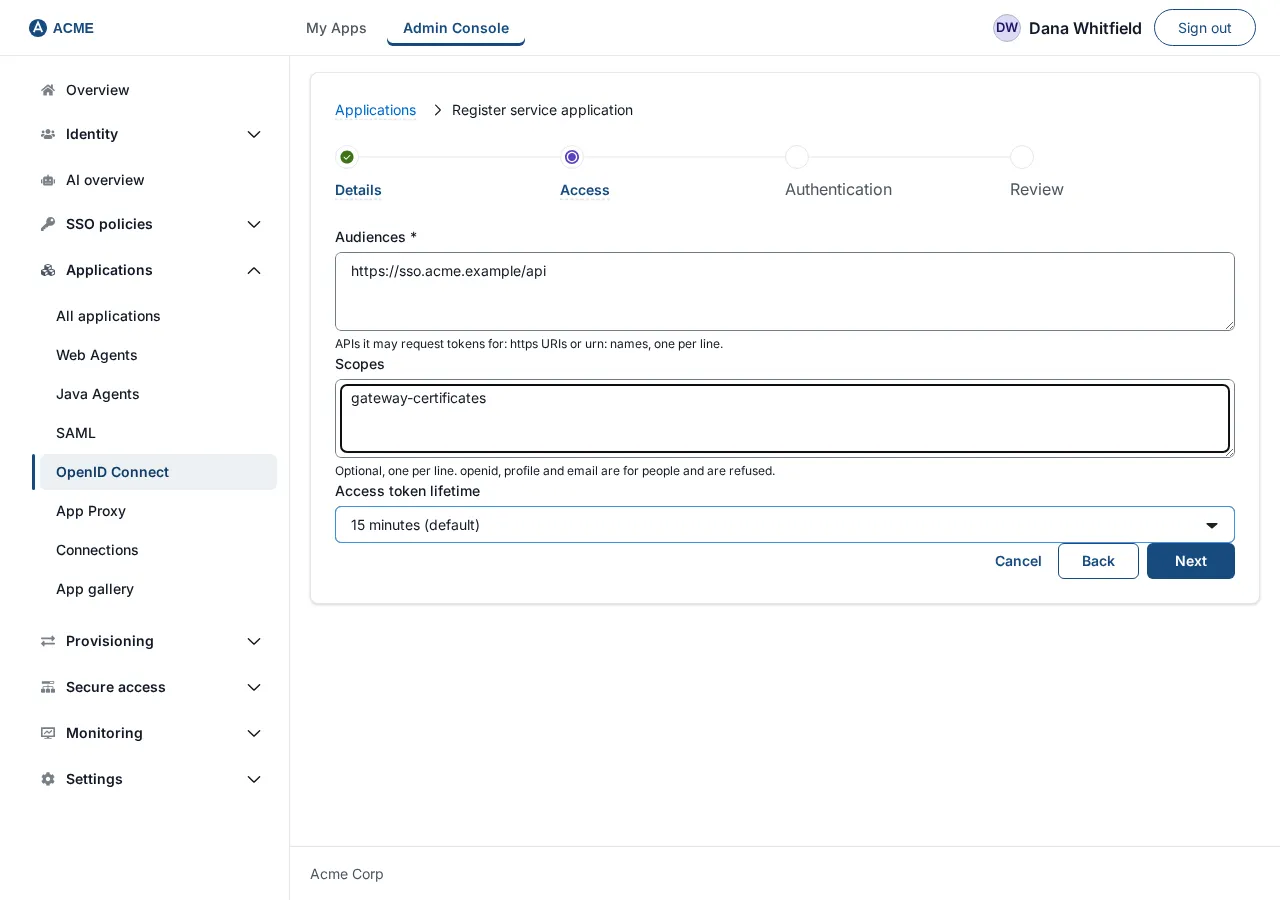
Field Value Audiences https://sso.acme.example/api— your SSOGEN address with/apiadded, nothing else. The wizard says an audience cannot be this SSOGEN; the exact address ending/apiis the one exception, and only together with the scope below.Scopes gateway-certificatesAccess token lifetime 15 minutes (default), or 5 minutes, 30 minutes, 1 hour -
Authentication: choose Private key JWT (recommended) and paste the tool’s Public keys (JWKS) (public keys only, at most 5, each with a unique
kid; RSA or EC P-256), or choose Client secret. -
Review shows the token address and a sample call. Select Register. With a client secret, the page then shows Client secret once: “You will not see this again. Copy the secret now and store it in your secret manager.” Select I have copied it.
Step 2: the tool gets a token. With a client secret:
curl -s -X POST https://sso.acme.example/oauth2/token \ -u "acme-certificate-manager:$CLIENT_SECRET" \ -d grant_type=client_credentials \ --data-urlencode resource=https://sso.acme.example/api \ -d scope=gateway-certificatesThe answer holds access_token, token_type Bearer, expires_in and scope. With Private key JWT you send a signed client_assertion instead of -u (the Review step shows the exact shape).
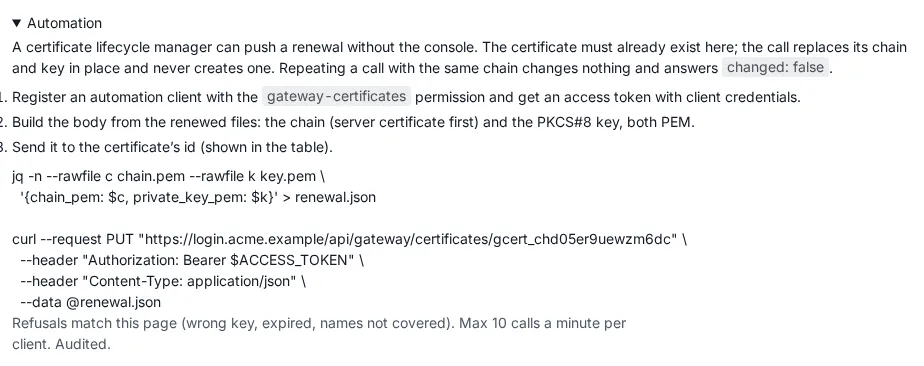
Step 3: the tool pushes the renewed certificate. The certificate’s ID is shown in the Certificate column of the table (gcert_…). The same panel is on the screen under Automation with your address filled in:
jq -n --rawfile c chain.pem --rawfile k key.pem \ '{chain_pem: $c, private_key_pem: $k}' > renewal.jsoncurl --request PUT "https://sso.acme.example/api/gateway/certificates/gcert_xxxxxxxx" \ --header "Authorization: Bearer $ACCESS_TOKEN" \ --header "Content-Type: application/json" \ --data @renewal.jsonThe answer is {"certificate_id": …, "version": 2, "chain_sha256": …, "not_after": …, "changed": true}. Sending the same chain again changes nothing and answers "changed": false, so a retry is safe. The checks are the same as in the console (wrong key, expired, a name no longer covered…) and nothing is stored when one fails. The call is rate limited per client, and every push is recorded in the audit log as a rotation made by the client. If the client does not hold the permission the answer is code SSO-CERT-403-CLIENT; an unknown certificate ID is SSO-CERT-404.
11. Assign people and open the application from My Apps
Section titled “11. Assign people and open the application from My Apps”11.1 Assign the people
Section titled “11.1 Assign the people”-
Applications, App Proxy, open Acme Finance, tab Assignments.
-
Under People, use Assign a person to search and choose Maria Lopez. Under Groups, use Assign a group for
Finance(“Assigning a group grants the application to every member.”). Remove takes access away.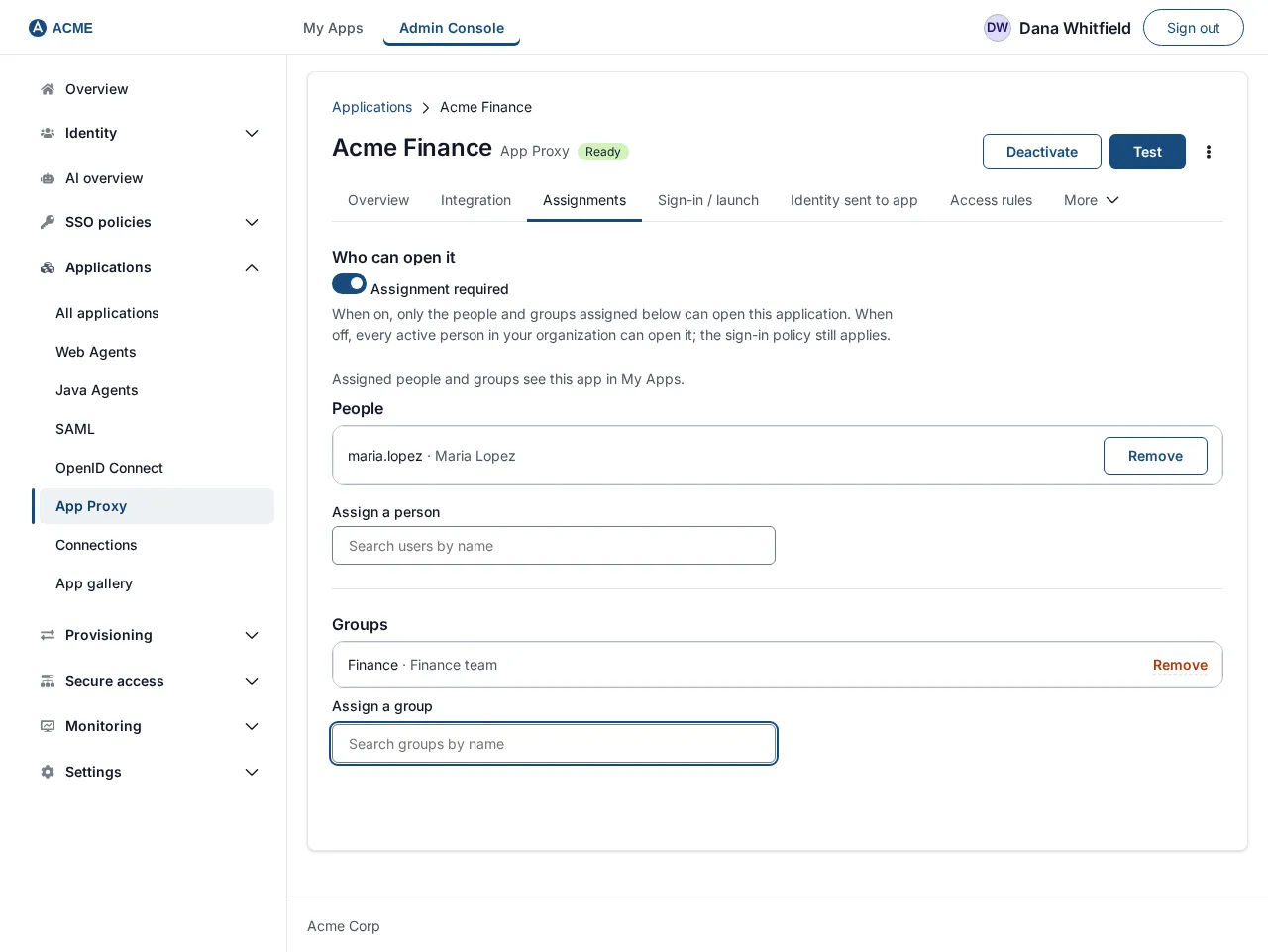
Only assigned people see the tile. The realm’s own access rules and the policy still apply on top.
11.2 What the employee sees
Section titled “11.2 What the employee sees”-
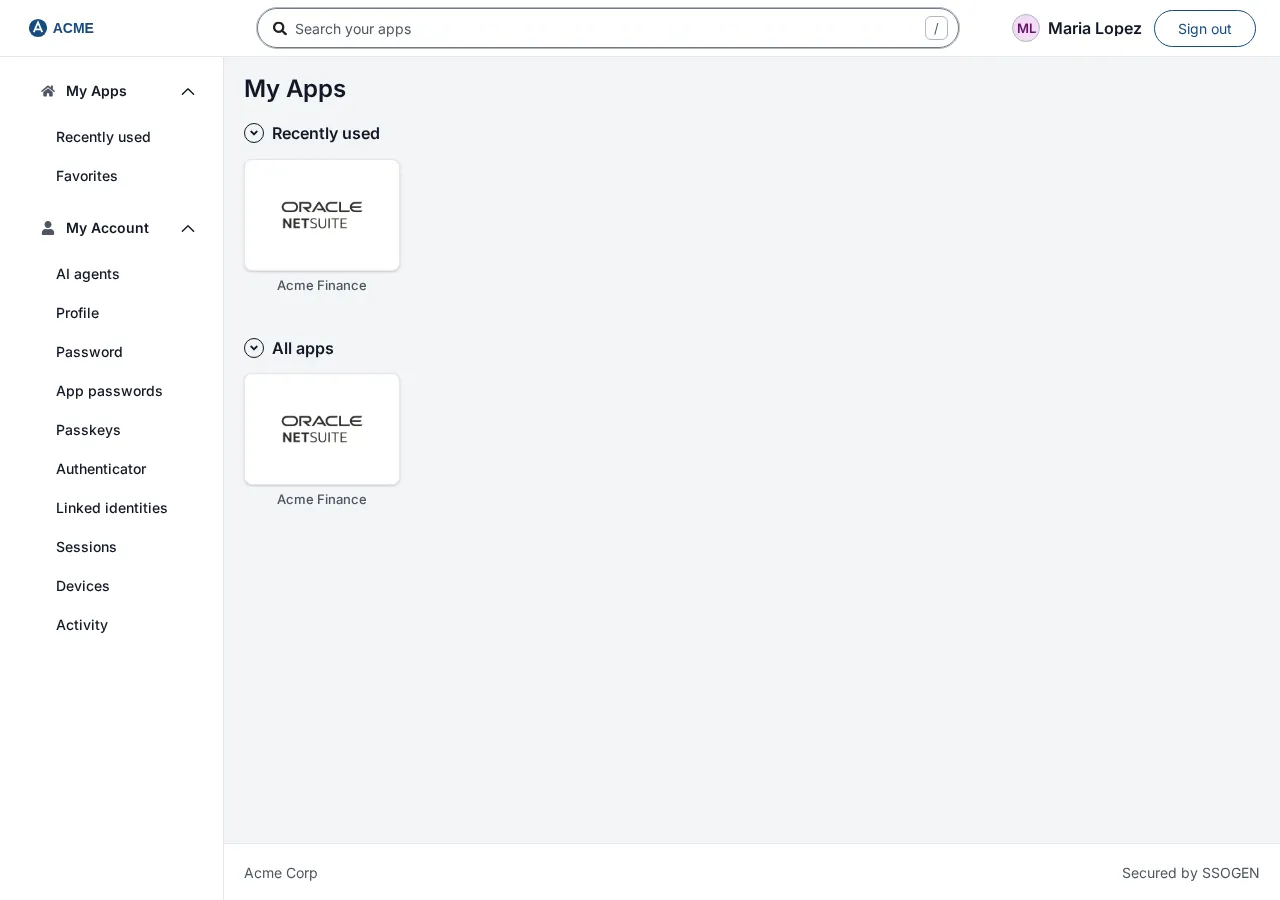
Maria signs in at the SSOGEN sign-in page and lands on My Apps. She sees the tile Acme Finance. (You can use the search box Search applications if there are many tiles.)
-
She selects the tile (it is labelled Launch Acme Finance for a screen reader). The browser opens
https://finance.internal.acme.example/in the same window: the My Apps sends it to the hostname marked for the My Apps, with the path of the launch URL. The App Proxy sends her to SSOGEN to sign in; because she is already signed in, she comes straight back, unless the hostname’s policy needs more (for example a second factor), in which case SSOGEN asks for it first. The application then opens and receives her identity in the headers.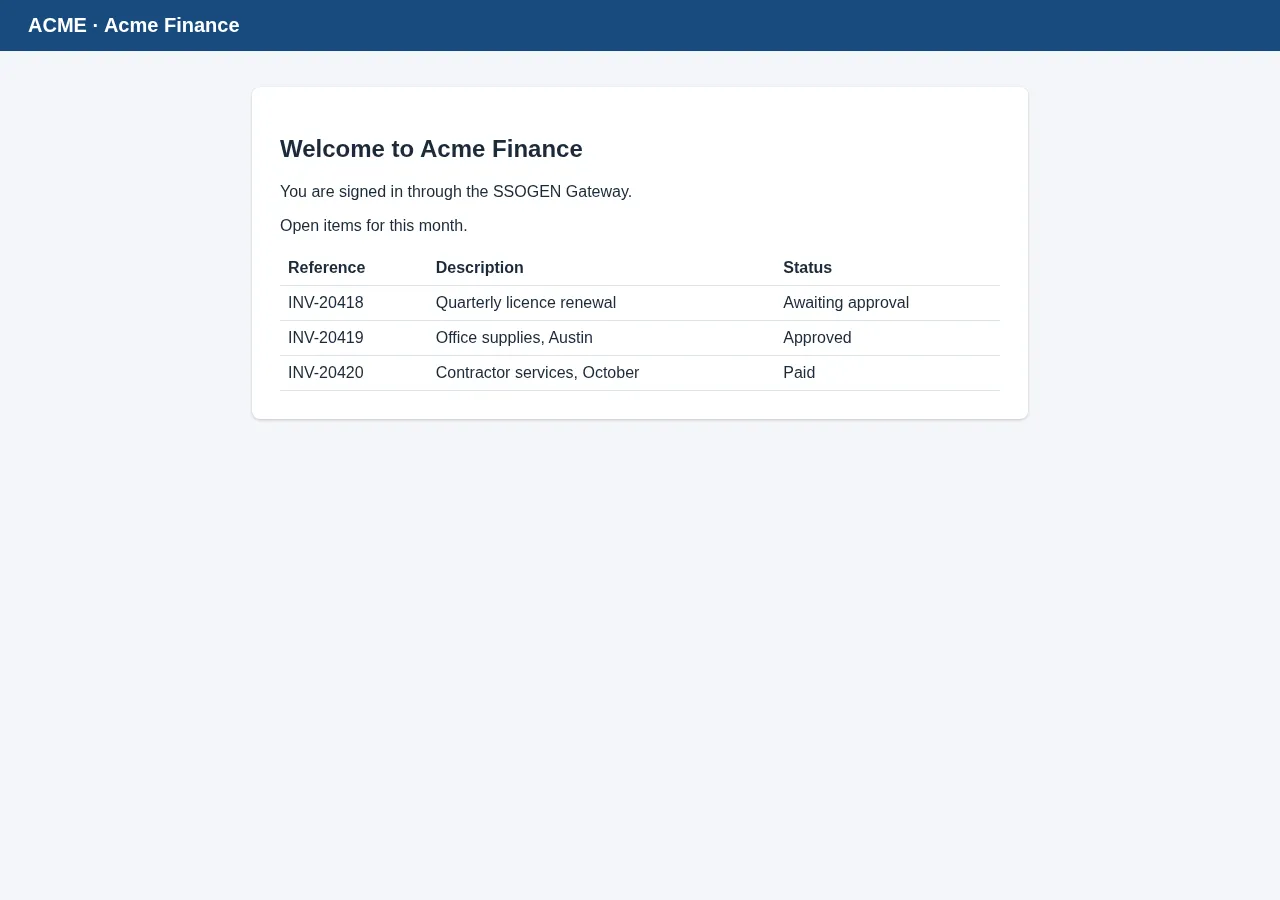
-
A tile that cannot open shows a badge: Not set up yet (“Your administrator has not finished setting this application up.”) or Unavailable (“This application is switched off for now. Try again later or ask your administrator.”).
If the launch fails the person sees one of these messages on My Apps:
| Message | What to check |
|---|---|
| This application has no launch URL configured yet. | Add a Launch URL on the Launch tab. |
| App Proxy route/gateway binding is not configured for this application. | The Route ID and gateway ID of the application (section 3). |
| App Proxy binding does not match the registered application. | The Route ID or gateway ID does not match a route of this application. |
| The gateway for this application is not available. | The gateway ID is not an SSOGEN Gateway that belongs to a group (section 6, Gateway node (membership)). |
| You are not assigned to this application. | Section 11.1. |
| Access to this application is not allowed. | A policy or realm rule denied it: use SSO policies, What if. |
| This application asks for a stronger sign-in than it can offer you. Please ask your administrator. | The person has no way to meet the policy’s strength. |
On a phone (a narrow window) the tiles stack in one column and work the same way.
12. Check each step
Section titled “12. Check each step”| After | Check | Expect |
|---|---|---|
| Section 2 | nslookup finance.internal.acme.example |
The address of the gateway or load balancer |
| Section 2 | curl -I from the gateway host to a back-end server (2.5) |
An HTTP status, no TLS error |
| Section 3 | Applications, App Proxy | Acme Finance listed; Review shows App Proxy, route and edge |
| Section 4 | App Proxy certificates | The row with Valid and Covers showing the hostname |
| Section 5 | Gateways, Listeners | The internal listener in the table; its Hostnames count rises after section 7 |
| Section 6 | App Proxy routes | The route in the list; Saved revision N went up by one |
| After a few minutes | Gateways, instances table, Config | Running revision N equal to the published revision, with no Not in effect line |
| After a few minutes | Gateways, App Proxy certificates served | Finance internal 2026: version 1 (current) |
| Section 7 | Hostnames table | The row shows Internal, listener internal, the certificate and its expiry, and Opens from My Apps |
| From an office computer | curl -vI https://finance.internal.acme.example/ |
A TLS handshake with your certificate, then a redirect (HTTP 302) to the SSOGEN sign-in |
| From an office computer | openssl s_client -connect finance.internal.acme.example:443 -servername finance.internal.acme.example </dev/null | openssl x509 -noout -subject -dates |
The subject and dates of the certificate you uploaded |
| Section 8 | Sign in to the internal hostname from outside the office zones | Refused |
| Section 11 | Sign in as Maria and select the tile | The application opens; the application shows Maria as the signed-in user |
| Audit | Monitoring, Audit | Entries for the certificate upload and the hostname changes |
13. Common problems
Section titled “13. Common problems”| What you see | Likely cause and what to do |
|---|---|
| Gateways shows under a hostname Not in effect on edge_acme_hq_01: the App Proxy listen address is in use on the gateway host | The port or address of a listener is already used, overlaps another listener or is not an address of the host. Change the listener (section 5). Open the port in the host firewall. |
| the gateway could not fetch the certificate, so only its hostnames stop working | The gateway could not download the certificate. Check it can reach SSOGEN, and that the transport profile in its file is mtls (certificates are released only over mtls). Other hostnames are not affected. |
| the certificate the gateway received does not match the published one, so only its hostnames stop working | The gateway received something other than what the configuration names. Rotate the certificate again. |
| the load balancer’s client certificate authority is unusable, so the listener is off | The authority you pasted on the load-balancer listener could not be loaded. Paste a valid PEM and save again. |
| this gateway is too old, so the group’s hostnames are held back until every gateway of the group is upgraded | Upgrade every gateway of the group. |
| A banner This gateway group’s routes have not compiled since … Its gateways get no configuration changes and no certificates until they compile again. Fix the hostnames or listeners now. | The group’s hostnames and listeners contradict each other. Read the reason in brackets, then fix the hostnames or listeners. The gateways keep serving the last routes that compiled for a limited time. |
| The browser shows a certificate warning | The certificate does not cover the name, or an internal authority is not trusted by the computer. Check Covers, and that the device trusts your authority. |
| The browser shows a page from another application, or 404 | The name does not match a hostname of this listener. Check the hostname is on the listener that DNS points at, and that the certificate chain is the one you expect (openssl s_client). |
| After sign-in the page returns to the SSOGEN sign-in again | Several gateways without load-balancer persistence (section 9.4). |
The page says This application is temporarily unavailable. with the code SSO-EDGE-503-CONNECTOR-UNAVAILABLE |
The route reaches its servers through an Outbound Connector and no tunnel of that connector group is up. Open Secure access, Outbound Connector and read the Tunnels column; see Outbound Connector for private networks. |
| After the move to 4.3.0 a link or a redirect inside the application points at the internal name, or the application loses its session cookie | The route’s Host header is Internal and the application builds links or cookies a rewrite cannot reach. Tick the content type under Rewrite links in response bodies, set the Internal cookie domain (optional), or choose External. |
| The back end answers 502 or 503 | No back-end server is healthy or reachable. Check the Health check path and the gateway’s route to the servers; check the trust bundle file (2.4); check the gateway’s event list on the Gateways screen. |
| Not in effect … backend trust bundle is not on the gateway | The secret:// file is missing on that gateway (section 2.4). |
See Troubleshooting the gateway for how to read the Gateways screen’s Not in effect and Turned off lines.