Gateway troubleshooting: routes, certificates, 503
Use this when an SSOGEN Gateway is offline, a route or hostname does not work, or the Admin Console shows Not in effect. Start in the Admin Console (section 1 to 5), then go to the server (section 7). The examples use the fictional company Acme Corp, the gateway group eg_acme_hq and the instance edge_acme_hq_01.
The idea behind “not in effect”. When you save something in the console, SSOGEN publishes it as a new revision of the group’s configuration. Each SSOGEN Gateway fetches the revision (by default every 30 seconds on a 4.3.0 gateway, every five minutes on an older one), checks its signature, and tries to apply every part of it. If one item cannot be applied on that server (for example a route whose trust file is missing there), the gateway leaves out that item only, runs everything else, and tells SSOGEN why. If a whole feature cannot run (for example the Directory Connector has no trust bundle file), it turns that feature off and keeps the others. If the gateway cannot apply the revision at all, it refuses it and keeps running the previous one. The console shows all three.
1. Where to look
Section titled “1. Where to look”| Place | What it tells you |
|---|---|
| Secure access, Gateways, the instances table of the group, column State | Whether the server is reporting, and its health. |
| The same table, column Config | Which revision it runs, whether it refused a newer one, and any Not in effect or Turned off line. |
| The same table, column App Proxy certificates served | Which certificate versions it serves compared with what you published. |
| The group’s Hostnames not in effect list and the red banner above it | Hostnames a server does not serve, and why. |
| Recent events (up to 50) | What the fleet reported: When, Gateway, Category, Severity, Mode. An old error is usually a solved one: read the dates. |
| Secure access, App Proxy routes | A line under a route’s name, in a warning color, for each server that left the route out. |
| Secure access, App Proxy routes, a route’s Hostnames table | A line under a hostname for each server that does not serve it. |
| Monitoring, Audit | Who changed what. |
The gateways screen refreshes itself every 15 seconds.
2. The instance’s State and Last seen
Section titled “2. The instance’s State and Last seen”| You see | Meaning and what to do |
|---|---|
| healthy, degraded, unhealthy | What the gateway says about itself. Read Config and Recent events for why. |
| offline | The server has not reported in the last minute. An SSOGEN Gateway reports about every minute, so look at Last seen over two or three refreshes before you act. If it stays offline: is the service running (systemctl status ssogen-edge), can the server reach SSOGEN address over HTTPS, and has its identity certificate expired (Certificate expires)? See section 7. |
| · N events queued | The server holds events it could not deliver yet. Expected while SSOGEN is unreachable. |
| Never activated (in Config) | The server has never applied any configuration, so it serves nothing and every App Proxy request is refused. Publish at least one route, or find out why it cannot fetch configuration (section 7). |
| No instance has reported in. The configuration is published and nothing has collected it yet. | The group exists but no server has contacted SSOGEN. Enroll one (Install and enroll an SSOGEN Gateway). |
| Certificate expires | The gateway’s own identity certificate. It renews itself when the last third of its life begins. If it did not renew and expires, the server can no longer prove who it is to SSOGEN. Enroll it again with a new token to give it a new identity. |
3. The Config column
Section titled “3. The Config column”The column joins up to three phrases with semicolons.
| Phrase | Meaning |
|---|---|
| Running revision 41 | The server applied revision 41. |
| Never activated | It has applied none. |
| revision 42 published but not active | A newer revision exists and this server has not applied it yet. Wait for its next check (by default 30 seconds on a 4.3.0 gateway, five minutes on an older one), or look for a refusal on the same line. |
| revision 42 was refused: … | The server could not apply revision 42 at all and kept running the previous one. The sentence after the colon says why, in words like those of section 4. A mode name in brackets, for example (App Proxy), says which feature refused. |
| Not in effect: … and Turned off: … | Section 4. |
A server that refuses a revision goes on serving the previous one. Fix the cause and the next revision (or the next check) is applied. You do not need to republish unless the cause was in what you published.
4. “Not in effect” and “Turned off”
Section titled “4. “Not in effect” and “Turned off””A line looks like this:
Not in effect: route route_acme_finance (backend trust bundle is not on the gateway); directory connection dir_acme (bind secret is not on the gateway). Turned off: Directory Connector (Directory Connector trust bundle is missing or not usable on the gateway host)
- Not in effect lists items the server left out. Each entry is the item’s kind (route, remote resource, directory connection, certificate, listener), its ID, and a reason in brackets. Up to five are named, then and N more.
- Turned off lists features (App Proxy, Directory Connector) the server could not run, with a reason.
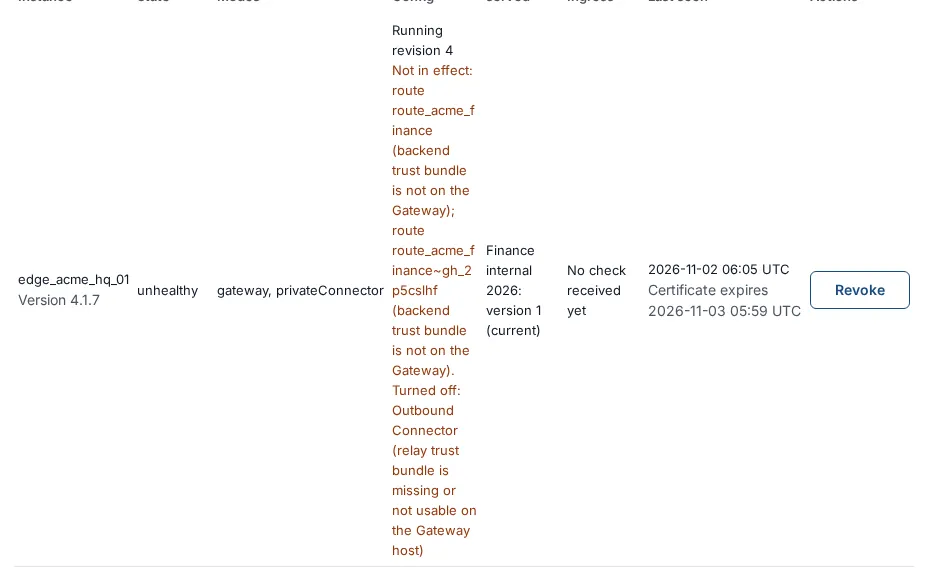
A connector or relay problem is not a “not in effect” line: it shows as a missing tunnel. Secure access, Outbound Connector lists each connector’s tunnels, the Uplink relay section of App Proxy routes raises an alarm, and the audit trail records edge.tunnel.alarm_raised. A person whose route reaches its servers through a connector with no tunnel sees This application is temporarily unavailable. with SSO-EDGE-503-CONNECTOR-UNAVAILABLE. See Outbound Connector for private networks and Reach a Gateway through a relay.
What a person sees: a route that is not in effect answers This application is temporarily unavailable. with the code SSO-EDGE-503-NOT-IN-EFFECT, before any sign-in check. A resource or connection that is not in effect is simply not served. Other routes keep working.
4.1 The reasons
Section titled “4.1 The reasons”| The reason says | What it means | What to do |
|---|---|---|
| … is not on the gateway | A file named by a secret:// reference does not exist on that server. |
Create it under the gateway’s secret directory: secret://trust/acme-internal-ca is the file <secret directory>/trust/acme-internal-ca (for example /etc/ssogen-edge/secrets/trust/acme-internal-ca). Copy it to every server in the group. |
| … is readable by other users or too large on the gateway | The file’s permissions allow group or others to read it, or it is larger than 1 MiB. | chmod 600 the file and make the service account its owner: sudo chown ssogen-edge:ssogen-edge … then sudo chmod 0600 …. Keep it under 1 MiB. |
| … is not a valid secret reference | The text typed in the console is not a secret:// name, or has an invalid path. |
Correct it in the console. |
| … needs a secret directory on the gateway, and it has none | The server was started without --secret-directory. |
Add --secret-directory /etc/ssogen-edge/secrets to the service command (see Install and enroll an SSOGEN Gateway) and restart. |
| … could not be read on the gateway | The file exists but reading it failed (a permission or disk problem). | Check the owner, the mode and the disk. |
| … could not be used | The file was read but its content is not usable (for example a trust file that holds no certificate). | Replace the file with valid PEM text. |
| Gateway-local material is missing or not usable on the gateway host | Something the server needs on its own disk is missing. The field names it: the Directory Connector trust bundle or a listen address (an install listener that has no TLS certificate cannot present a published certificate). | Provide the file, or give the install listener its certificate (--tls-certificate, --tls-private-key), or move those hostnames to a listener of their own. |
| the App Proxy listen address is in use on the gateway host | A listener’s address and port are already held, overlap another listener, or the address is not on this host. | Change the listener on Secure access, Gateways, Listeners. Open the port in the host firewall. Do not use a port below 1024: the packaged service cannot bind it. |
| the revision carries no … for the mode | A feature is turned on but nothing was published for it, for example the Directory Connector with no connection. | Publish what it needs, or turn the feature off in the local file. |
| the … could not be built | The routes in the revision could not be turned into a working App Proxy configuration. | Read the group’s red banner and fix the hostnames or listeners. |
| the gateway could not fetch the certificate, so only its hostnames stop working | The server asked SSOGEN for a certificate and did not get it. | Check the server can reach SSOGEN, and that its transportProfile is mtls (certificates are released only over mtls). SSOGEN releases only certificates that the group’s current published routes use. |
| the certificate the gateway received does not match the published one, so only its hostnames stop working | The chain or key the server received does not match the fingerprints in the signed revision. | Rotate the certificate again from App Proxy certificates. |
| the load balancer’s client certificate authority is unusable, so the listener is off | The authority certificates pasted on a load-balancer listener cannot be loaded. | Open the listener, paste a valid PEM bundle (up to 8 certificates) and save. |
| this gateway is too old, so the group’s hostnames are held back until every gateway of the group is upgraded | One server of the group runs an outdated release, so SSOGEN withholds hostnames and certificates from the whole group. | Upgrade every server of the group (Install and enroll an SSOGEN Gateway, section 8). |
| its connector or relay settings break a rule the Gateway enforces; check the group’s connector addresses and uplink | The configuration’s Connector addresses or uplink are not valid. | Open Secure access, App Proxy routes, the group’s Connector addresses and Uplink relay, correct them and save. See Outbound Connector for private networks. |
| it turns on a mode this Gateway was not enrolled for: … connector addresses one enrolled as Outbound Connector | A connector group’s settings reached a Gateway that was not enrolled for that role. | Enroll the connector with an Outbound Connector token, in a group of its own. |
| the mode could not be configured with it | A feature refused the revision after the checks, for example the App Proxy did not start. | Read the server’s log (section 7). |
| the gateway gave no reason the console can show; see its local event log | The server reported a reason the console has no wording for. | Read the server’s events and log (section 7), or send a support bundle. |
4.2 What the names refer to
Section titled “4.2 What the names refer to”When a reason names a field it is translated into the screen where you set it:
| Wording | Where you set it |
|---|---|
| App Proxy routes | Secure access, App Proxy routes |
| directory connections | Secure access, Directory Connector |
| backend trust bundle | A route’s Backend trust bundle ref |
| bind secret | A directory connection’s bind password reference |
| target credential | A Remote Access resource’s stored credential reference |
| listen address | A listener’s address and port |
| Directory Connector trust bundle | The --directory-trust-bundle option of the gateway service |
| certificate | An App Proxy certificate |
5. Hostnames, certificates and listeners
Section titled “5. Hostnames, certificates and listeners”5.1 Hostnames not in effect
Section titled “5.1 Hostnames not in effect”The group’s section shows a bold Hostnames not in effect and one line per server and reason, for example edge_acme_hq_01 does not serve finance.internal.acme.example: the gateway could not fetch the certificate, so only its hostnames stop working. The same reasons appear under the hostname in the route’s Hostnames table as Not in effect on edge_acme_hq_01: …. Use the table in section 4.1.

5.2 The group’s routes do not compile
Section titled “5.2 The group’s routes do not compile”A red banner reads This gateway group’s routes have not compiled since 2026-10-06 09:14 (…). Its gateways are still given the last routes that compiled, until … ; after that they get no configuration changes and no certificates. Fix the hostnames or listeners now. The second form reads Its gateways get no configuration changes and no certificates until they compile again. The words in brackets are the reason. Fix what the reason names, on App Proxy routes (hostnames) or Gateways (listeners). The servers keep serving the last good routes in the meantime, but they do not pick up new certificates.
5.3 Certificate versions
Section titled “5.3 Certificate versions”Column App Proxy certificates served shows each certificate the server presents:
| You see | Meaning |
|---|---|
| Finance internal 2026: version 2 (current) | The server serves what you published. |
| Finance internal 2026: serving version 1, published version 2 (warning color) | The server has not switched yet. It picks up a rotation on its next check (by default 30 seconds on a 4.3.0 gateway, five minutes on an older one). If it stays like this, look for a certificate reason in Config. |
| A certificate that is no longer published: version N | The server still serves a certificate that you deleted or removed from every hostname. It disappears with the next revision. |
| None | The server serves no App Proxy certificate. Expected if it has no TLS hostname. |
Rotate a certificate before it expires: see Publish an internal app through the App Proxy, section 10. A certificate that is not valid shows a banner on App Proxy certificates.
5.4 The browser sees a certificate warning, a 404 or a 503
Section titled “5.4 The browser sees a certificate warning, a 404 or a 503”| You see | Likely cause |
|---|---|
| A certificate warning | The certificate does not cover the name, has expired, or your device does not trust its authority. Compare the Covers column with the name, then run openssl s_client -connect finance.internal.acme.example:443 -servername finance.internal.acme.example. |
| 404 from the App Proxy | The name is not a hostname of the listener the browser reached, for example a name sent to the wrong listener. |
This application is temporarily unavailable. with SSO-EDGE-503-NOT-IN-EFFECT |
The route is left out on that server: section 4. |
This application is temporarily unavailable. with SSO-EDGE-503-UNAVAILABLE |
The gateway cannot confirm SSOGEN’s current access state right now, so it refuses protected requests and sign-in callbacks. Check the server can reach SSOGEN. It recovers by itself when it can. |
| 503 from a back-end server | No back-end server is healthy or reachable. Check the route’s Health check and the gateway’s route to the servers. |
6. What the person sees when sign-in to the application fails
Section titled “6. What the person sees when sign-in to the application fails”These pages show a code. The reason is in the audit log and on the application’s Sign-in to the application tab.
| Code and message | Meaning |
|---|---|
SSO-KRB-403-PRINCIPAL, SSO-KRB-403-DELEGATION: Sign-in to this application is not available for your account. |
The person has no usable Windows account, or Active Directory refuses delegation for that service. |
SSO-KRB-502-KDC: The sign-in service for this application did not respond. |
The domain controller is unreachable or slow, or the clocks differ. |
SSO-KRB-500-KEYTAB: Sign-in to this application is not configured correctly. |
The keytab file is missing, readable by others, or wrong. |
SSO-KRB-503-UNAVAILABLE: This application is temporarily unavailable. |
Includes Kerberos when the helper cannot run on the host (it needs Enterprise Linux 9 or newer with krb5-libs 1.21 or later). |
SSO-FORM-502-REJECTED, SSO-FORM-502-UNSUPPORTED: SSOGEN could not sign you in to this application. Your administrator has been told. |
The application did not accept the shared account’s sign-in, or its login page is not one the App Proxy can fill. |
SSO-FORM-503-PAUSED: Sign-in to this application is paused. Try again in a few minutes. |
Repeated failed fills paused the route. Fix the shared account’s password, then wait a few minutes. |
SSO-FORM-503-BUSY: Many people are signing in to this application right now. Try again in a moment. |
A fill for the same session is already in progress. |
SSO-FORM-503-UNAVAILABLE: This application is temporarily unavailable. |
SSOGEN could not be reached, or it was too busy to answer. |
SSO-FORM-403-NOACCOUNT: Sign-in to this application is not configured. |
No shared account is saved for the application. |
SSO-EDGE-403-BACKEND-SIGNIN: Sign-in to this application was refused. |
SSOGEN refused to release the application’s sign-in. |
See Sign people in to the back-end application for the fixes.
7. On the gateway
Section titled “7. On the gateway”Run these as an administrator of the server.
The gateway’s own view, which also works when the service is stopped:
ssogen-edge-diagnostics --config /etc/ssogen-edge/edge.yaml --statusssogen-edge-diagnostics --config /etc/ssogen-edge/edge.yaml --livenessssogen-edge-diagnostics --config /etc/ssogen-edge/edge.yaml --readinesscurl -s http://<admin-address>/readyz--liveness and --readiness exit with an error code when the check fails. The readiness answer lists each check with a reason: configuration.active, identity.usable, platform.keys, gateway.listener, gateway.routes, gateway.authorization, directory.connections. A new SSOGEN Gateway with no published routes is not ready: that is normal until you publish one. If the diagnostics command cannot connect, the administration address may have been changed: pass the same --admin-address as the service.
Logs. The service writes to the journal (journalctl -u ssogen-edge). The App Proxy keeps its own log in the state folder; send it to SSOGEN support with the support bundle. Events are also kept as lines in the event spool folder until SSOGEN has them.
Support bundle. A redacted snapshot to send to SSOGEN support. It contains no keys, cookies or tokens:
ssogen-edge-diagnostics --config /etc/ssogen-edge/edge.yaml --support-bundle /tmp/gateway-support.jsonCommon situations
Section titled “Common situations”| What you see | Cause and fix |
|---|---|
| The service refuses to start, and the message names a file or an option | Typical causes: a private key readable by group or others (make it 0600); a listen address that is a name instead of an IP address; a listener certificate that is the gateway’s own identity (not allowed); a memory limit set too low; directoryApi.listen set without the Directory Connector. |
| No feature becomes ready and the configuration is refused | Look at /readyz and the latest config event: an error beginning configuration was refused: lists every problem. A refused revision never replaces the active one. A server that has never applied one has no routes, so every App Proxy request is refused. Typical causes: the server’s file and the signed configuration disagree about the realm, group or instance, or the configuration enables a feature the file does not allow. |
| After an upgrade the gateway is not ready and an event says a revision was quarantined | The stored revision no longer passes the new program’s checks and there was no usable previous revision. The gateway moved it aside and waits for SSOGEN to deliver a revision it accepts. Do not delete the state folder: that also deletes the server’s identity. Remove the quarantine folder named in the event only after you have diagnosed it. |
SSOGEN’s key set … in readiness (platform.keys) |
While SSOGEN is unreachable the gateway keeps serving its stored revision for a limited time, but cannot start new sign-ins or remote sessions once its saved copy of SSOGEN’s keys is too old. It recovers shortly after SSOGEN answers. If it says no key set is held, SSOGEN refused the gateway’s identity: enroll again. |
| The service is active but nothing is served | The App Proxy stopped repeatedly. systemd restarts the service by itself after a short delay. Look at the App Proxy log in the state folder. |
| The App Proxy will not start after a memory limit was set | The memory limit is below what the App Proxy needs. Raise the service’s memory limit; ask your SSOGEN contact for the minimum. |
| Directory operations answer unavailable | The gateway’s connection to the directory is failing: check the directory’s certificate against the trust bundle, the bind secret, and the network. |
Every RDP session closes at once with the reason protocol |
The packaged service file was changed. Restore it (running sudo ./install.sh --apply from the Edge archive does this). If the problem persists on a server with SELinux, send a support bundle to SSOGEN. |
Withdraw grants
Section titled “Withdraw grants”If you suspect a person kept access they should not have, Secure access, Gateways, Withdraw grants on the group makes its gateways stop accepting the access grants they hold. It does not sign anyone out of SSOGEN: their next request simply gets a new grant, which is decided again by the policy. The page answers “N grants withdrawn from eg_acme_hq.”
Roll back
Section titled “Roll back”An SSOGEN Gateway keeps the previous configuration. If a revision you published causes trouble, publish the corrected settings; the server applies a new revision item by item and goes back to the previous revision by itself if a feature refuses the new one. To roll an SSOGEN Gateway program back to an older version, first read the downgrade note in Install and enroll an SSOGEN Gateway, section 8.