Install SSO gateway: package, configuration and enrollment
This guide takes you from an empty Linux server to an SSOGEN Gateway that shows online on the Gateways screen of the Admin Console. It uses the fictional company Acme Corp with SSOGEN at https://sso.acme.example and an SSOGEN Gateway on a host called gw01.acme.example.
Terms used here
- SSOGEN Gateway: the software you install. One running copy is an instance (or “Gateway”).
- Gateway group: a name for one or more instances that share the same configuration (for example two servers behind a load balancer). You choose the name when you issue the token. Configuration (routes, hostnames, certificates) is published per group, and every instance in the group receives it.
- Enrollment: the one-time step in which an instance proves, with a token, that you allowed it, and receives its own identity certificate from SSOGEN.
- Mode: what an instance is allowed to do: App Proxy (the Gateway itself), Outbound Connector, Directory Connector. A mode runs only when the local file, the instance’s identity and SSOGEN’s signed configuration all agree it should.
1. Check the requirements
Section titled “1. Check the requirements”| What | Requirement |
|---|---|
| Operating system | Enterprise Linux 9 or newer (RHEL, Rocky Linux, AlmaLinux, Oracle Linux) on x86-64 with systemd, useradd, sha256sum and root access. The installer refuses anything else. |
| Kerberos back-end sign-in | Needs the host’s krb5-libs 1.21 or later, which Enterprise Linux 9 provides. |
| Network, outbound | HTTPS from the gateway to your SSOGEN address (https://sso.acme.example); to each back-end server of your applications; to your domain controllers (TCP 88) if you use Kerberos; to your directory (LDAPS) if you use the Directory Connector; to each SSH, RDP or VNC host if you use Remote Access. |
| Network, inbound | The gateway port (9943 by default) from your employees, or from your load balancer. Nothing else. The health port, 127.0.0.1:9942, stays on the server and is never opened. |
| Ports below 1024 | The gateway cannot listen on a port below 1024 (it runs without that privilege on purpose). It listens on an unprivileged port by default. To offer port 443 to employees, map 443 to the gateway’s port with your firewall or load balancer. |
| Admin console role | Issuing an enrollment token needs a super administrator. |
| Sizing | Ask your SSOGEN contact for CPU and memory guidance for your expected load. |
2. Issue an enrollment token (Admin Console)
Section titled “2. Issue an enrollment token (Admin Console)”You do this in the Admin Console, signed in as a super administrator.
- Open Secure access, then Gateways.
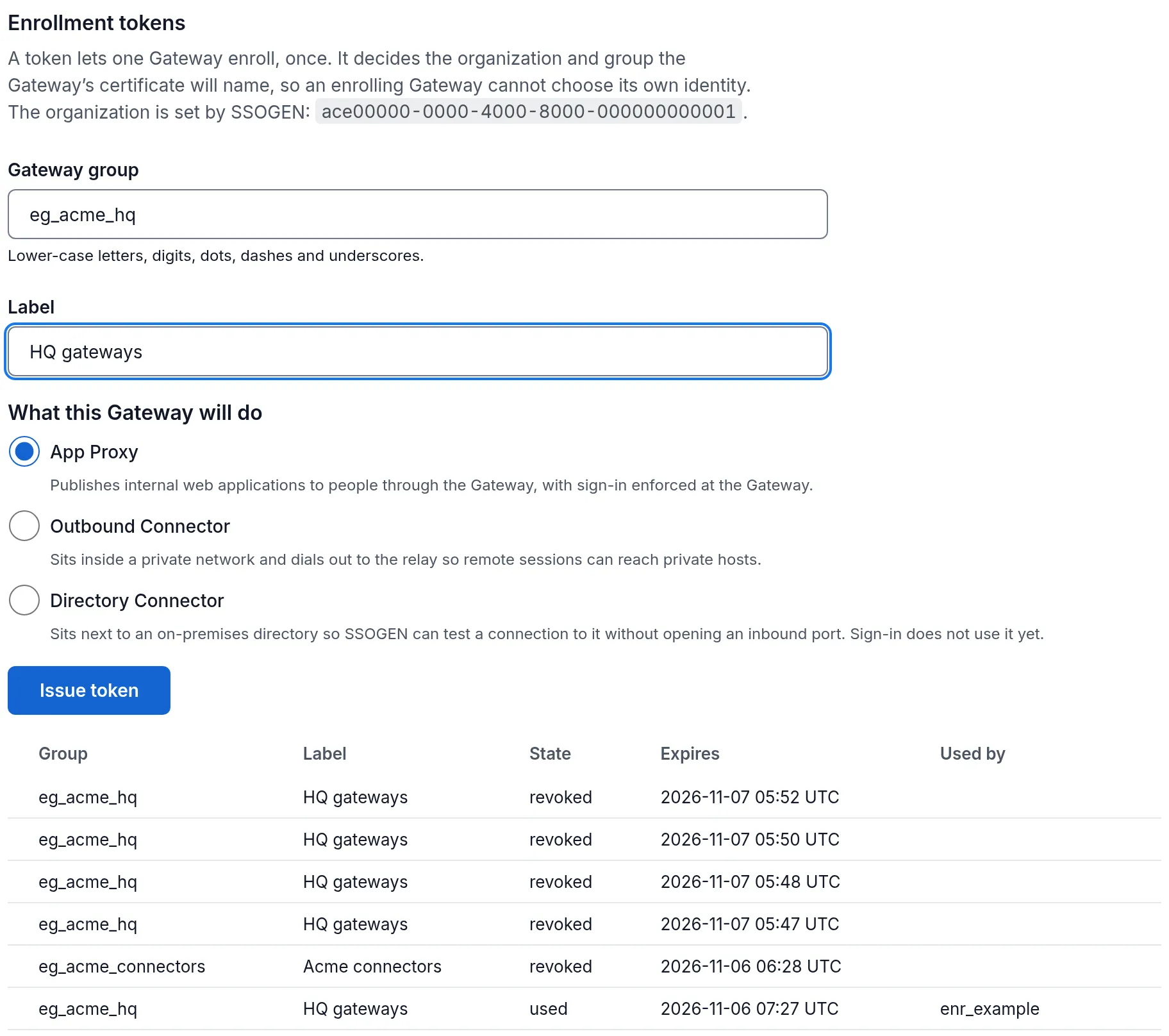
- In the Enrollment tokens section, read the sentence under the heading. It tells you the organization, for example “A token lets one Gateway enroll, once. It decides the organization and group the Gateway’s certificate will name, so an enrolling Gateway cannot choose its own identity. The organization is set by SSOGEN:
<id>.” That id is therealmIdin the configuration file; the console also fills it in for you in step 5 below. - In Gateway group, type the group name, for example
eg_acme_hq. Use lower-case letters, digits, dots, dashes and underscores only, starting with a letter or digit (up to 128 characters). To add a server to a group that already exists, type that group’s name exactly. If you type anything else the screen says “A gateway group id is lower-case letters, digits, dots, dashes and underscores.” - Optionally type a Label (up to 128 characters), for example
HQ gateways. - Under What this Gateway will do, choose App Proxy (the default), Outbound Connector or Directory Connector. One token grants one role.
- Select Issue token. The button stays disabled until the gateway group is filled in.
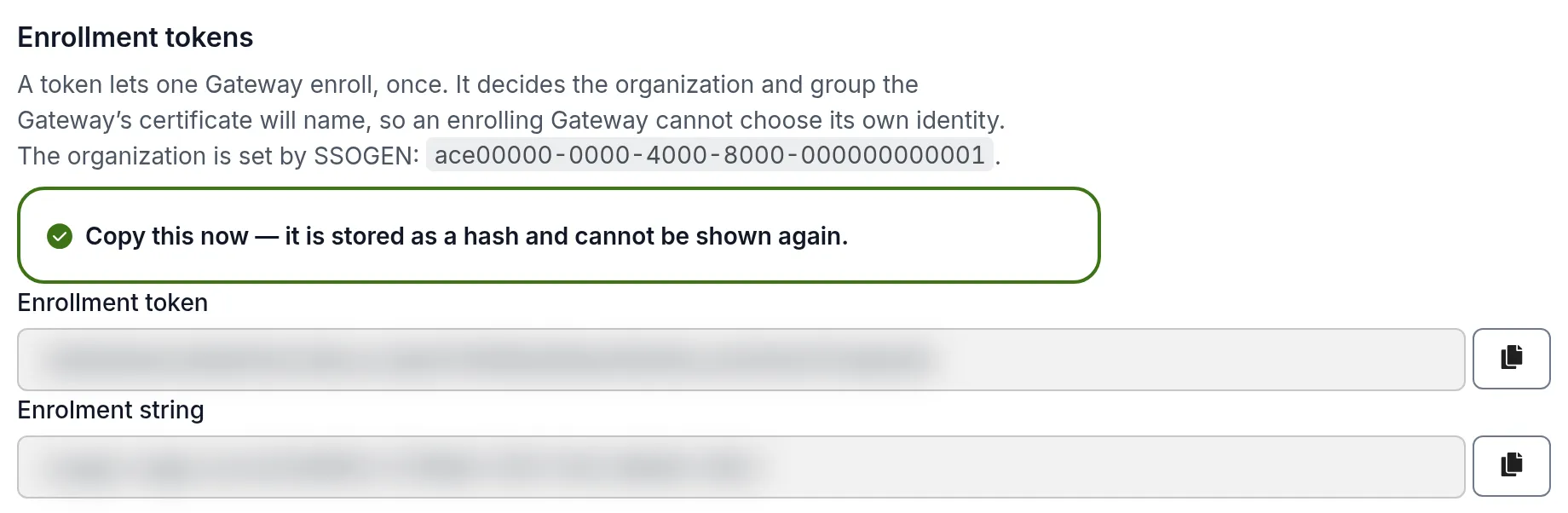
A green message appears: “Copy this now — it is stored as a hash and cannot be shown again.” The token is shown in a copy box labelled Enrollment token. Beneath it, in a second box labelled Enrollment string, is one pasted string that starts ssogen-edge-enrol:. It holds the token, your SSOGEN address and the fingerprint of the authority that issues Gateway identities, so with it you need no trust bundle download (section 5). Copy it now and keep it private. If you lose it, revoke it and issue another.
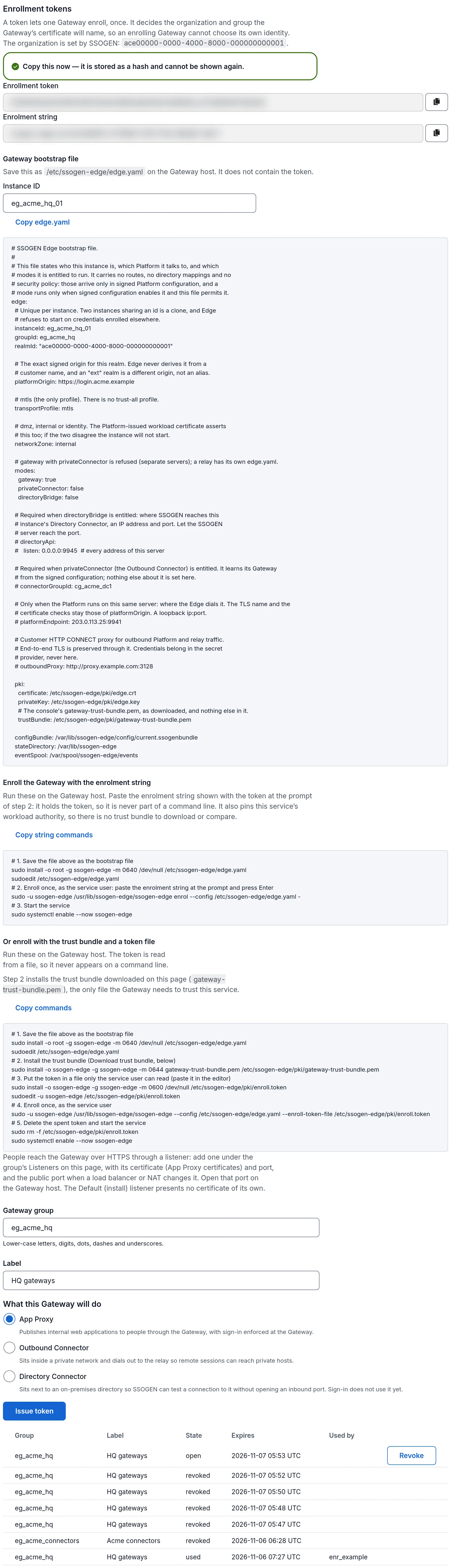
Below the token the console shows the finished bootstrap file (Gateway bootstrap file, with the group, organization id, SSOGEN address, zone and role filled in; you can edit the Instance ID and the file follows) and the Enroll the Gateway commands, each with a copy button. The file does not contain the token. Steps 4 and 5 of this guide explain the same file and commands.
The token appears in the Enrollment tokens table with these columns: Group, Label, State, Expires, Used by, and an actions column.
- State is
openuntil it is used or expires, thenused,expiredorrevoked. - A token is valid for 24 hours from the moment you issue it, and works once.
- To cancel an open token, select Revoke on its row.
3. Install the Edge
Section titled “3. Install the Edge”On gw01.acme.example. Check the archive, unpack it and run the installer as root. --check and --plan change nothing.
sha256sum -c ssogen-edge-<version>-<date>-linux-amd64.tar.gz.sha256tar -xzf ssogen-edge-<version>-<date>-linux-amd64.tar.gzcd ssogen-edge-<version>-<date>-linux-amd64sudo ./install.sh --checksudo ./install.sh --plansudo ./install.sh --applyinstall.sh runs install-edge.sh, which takes --mode to say what the server does: gateway, directoryConnector, outboundConnector or relay, joined by commas where allowed. Without --mode an upgrade keeps the roles of the existing file. A Gateway and an Outbound Connector cannot share a server, and the installer refuses that combination. See Outbound Connector for private networks.
The default gateway port is 9943 and the health port is 127.0.0.1:9942. If a port is taken, add --listen-port <port> and --admin-port <port> (1024 to 65535, different from each other) to --plan and --apply. The installer never opens a firewall port: open the gateway port yourself.
The installer creates the following and does nothing else:
| Item | Location |
|---|---|
| The gateway programs | /usr/lib/ssogen-edge/ |
| Diagnostics command | /usr/bin/ssogen-edge-diagnostics |
| Service definition | ssogen-edge.service |
| A sample configuration file | /etc/ssogen-edge/edge.yaml.sample |
| Folder for the gateway’s keys (owner only) | /etc/ssogen-edge/pki/ |
Folder for secret:// files (owner only) |
/etc/ssogen-edge/secrets/ |
| State, event spool and log folders | /var/lib/ssogen-edge, /var/spool/ssogen-edge, /var/log/ssogen-edge |
| Service account | ssogen-edge (no login) |
| SELinux policy module (loaded only where SELinux is enabled) | /usr/share/selinux/packages/ssogen-edge/ |
It installs no key, no certificate and no configuration, and does not start the service. The instance becomes itself when it enrolls.
SELinux
Section titled “SELinux”Keep SELinux enforcing. Where SELinux is enabled, --apply loads the Edge’s own policy module, so the service runs confined in its own domain (ssogen_edge_t), labels the gateway and health ports it uses, and restores the labels of the Edge’s files. There is nothing to set up by hand. --check and --plan show what is loaded and what would be.
If your SSOGEN address, or outbound proxy uses a port other than 443 or 8443, run sudo ./install.sh --apply once more after you write edge.yaml (section 4), so that port is labelled too. A back end on a port that is not a web port, and each RDP port a Remote Access resource uses, needs one label: semanage port -a -t ssogen_edge_backend_port_t -p tcp <port> (RDP: -t ssogen_edge_remote_port_t).
Never set SELinux to permissive or disabled for the Edge. If SELinux refuses the Edge something, sudo ./install.sh --check counts the refusals; send the output of sudo ausearch -m AVC -ts boot -se ssogen_edge_t | audit2allow -w to SSOGEN support.
4. Write the configuration file
Section titled “4. Write the configuration file”The bootstrap file says only who this instance is and where SSOGEN is. It carries no routes, no secrets and no policy: those arrive from SSOGEN. A file with a key it does not know is refused, so a typo cannot silently turn a mode on or off.
Copy the sample and edit it:
sudo cp /etc/ssogen-edge/edge.yaml.sample /etc/ssogen-edge/edge.yamlsudo chown root:ssogen-edge /etc/ssogen-edge/edge.yamlsudo chmod 0640 /etc/ssogen-edge/edge.yamlsudoedit /etc/ssogen-edge/edge.yamlA complete file for an App Proxy-only SSOGEN Gateway:
edge: instanceId: edge_acme_hq_01 groupId: eg_acme_hq realmId: 3f2b1c9e-7a64-4d1e-9b8a-5c0d2e4f6a71 # the organization id shown on the gateways screen platformOrigin: https://sso.acme.example transportProfile: mtls networkZone: internal modes: gateway: true directoryBridge: false pki: certificate: /etc/ssogen-edge/pki/edge.crt privateKey: /etc/ssogen-edge/pki/edge.key trustBundle: /etc/ssogen-edge/pki/gateway-trust-bundle.pem configBundle: /var/lib/ssogen-edge/config/current.ssogenbundle stateDirectory: /var/lib/ssogen-edge eventSpool: /var/spool/ssogen-edge/eventsEvery field:
| Field | What to put | Notes |
|---|---|---|
instanceId |
A name that is unique for this server, for example edge_acme_hq_01 |
Two instances with the same name are a clone, and the gateway refuses to start on credentials enrolled elsewhere. You will type this name again in the console (see Publish an internal app). |
groupId |
The group you typed in step 2 | Must match the token’s group. |
realmId |
The organization id from the gateways screen | A different value makes SSOGEN refuse the enrollment. |
platformOrigin |
The exact SSOGEN address: https://, a host name, optionally a port, no path |
No user name or password in it. |
transportProfile |
mtls |
The only profile the Gateway accepts; a file that names another stops the start. App Proxy certificates are only released over mtls. |
networkZone |
dmz, internal or identity |
Declare where the server lives. SSOGEN records it at enrollment and the gateway’s certificate asserts it, so changing only this line makes the gateway refuse to start. A dmz gateway may run the App Proxy only: the file is refused if you also turn on Directory Connector there. Required if more than one mode is on. |
modes.gateway / privateConnector / directoryBridge |
true or false |
What this server is allowed to run. A mode actually runs only when SSOGEN’s configuration also enables it. |
directoryApi.listen |
Only for Directory Connector: an exact ip:port |
A host name is refused. See Directory Connector. |
outboundProxy |
Optional: your HTTP CONNECT proxy, for example http://proxy.acme.example:<port> |
Traffic to SSOGEN stays encrypted end to end through it. Use http://: an https:// proxy address is refused. Do not put a user name or password in the URL. |
pki.certificate, pki.privateKey |
Where the gateway writes its identity at enrollment | The private key file must be owner-only (mode 0600) or the gateway refuses to start. |
pki.trustBundle |
The console’s gateway-trust-bundle.pem, as it is |
Holds the authority that issues gateway identities, and nothing else: the gateway does not start with any other certificate in the file (see the note below). |
configBundle, stateDirectory, eventSpool |
Folders the service account owns | The defaults in the sample match the installer. |
5. Enroll
Section titled “5. Enroll”Enrollment is one command, run once, before the service starts. You have two ways: with the enrollment string (the short way, 4.3.0 and later) or with a token file and the trust bundle.
With the enrollment string
Section titled “With the enrollment string”Save the finished bootstrap file the console showed (section 2) as /etc/ssogen-edge/edge.yaml, then paste the string at the prompt. The - makes the command read the string from the keyboard, so the code is never on a command line or in a file:
sudo -u ssogen-edge /usr/lib/ssogen-edge/ssogen-edge enrol --config /etc/ssogen-edge/edge.yaml -sudo systemctl enable --now ssogen-edgeThe command reads the Gateway-identity authority from SSOGEN over HTTPS, keeps it only if its SHA-256 is the one in the string, writes it as the trust bundle, and enrolls. You download and compare nothing. It refuses, and shows nothing of the string, when:
- the text is not an enrollment string (“not a valid enrollment string”) or is too long;
- it has expired: ask for a new one;
- its address is not the
platformOriginin the file; - SSOGEN presents another authority than the one in the string (the string is for another organization or is out of date);
- a file already at the trust bundle’s path holds a different bundle.
With a token file and the trust bundle
Section titled “With a token file and the trust bundle”-
Put the token in a file only the service account can read. The
pkifolder is owner-only, so use it:sudo -u ssogen-edge sh -c 'umask 077; printf "%s\n" "PASTE-THE-TOKEN-HERE" > /etc/ssogen-edge/pki/enroll.token' -
Run the enrollment as the service account:
sudo -u ssogen-edge /usr/lib/ssogen-edge/ssogen-edge \--config /etc/ssogen-edge/edge.yaml \--enroll-token-file /etc/ssogen-edge/pki/enroll.token \--instance-label "HQ gateway 1"--instance-labelis optional text that is sent to SSOGEN with the request. -
Check that it worked: the command exits with status 0 and the identity files exist.
echo $?sudo ls -l /etc/ssogen-edge/pki/You should see
edge.crtandedge.key(and yourgateway-trust-bundle.pem). The gateway generated the key on this server; the key never left it. -
Delete the token file; it is spent:
sudo rm -f /etc/ssogen-edge/pki/enroll.token
Offline enrollment, for a server that cannot reach SSOGEN, is not available in this release. Enroll online as above.
6. Ports, service options and secret files
Section titled “6. Ports, service options and secret files”People reach the App Proxy through a listener that you add in the Admin Console, with its certificate, under the group’s Listeners on the gateways screen (see Publish an internal app). The Default (install) listener presents no certificate of its own. The gateway listens on all addresses on port 9943 unless you chose another with install.sh --listen-port in section 3. Open that port in your firewall.
To change a port later, run sudo ./install.sh --apply --listen-port <port> --admin-port <port> again from the bundle. The installer writes the service options into a drop-in file and keeps them across upgrades. To add other options, create your own override:
sudo systemctl edit ssogen-edgeand enter the installed command line with your option added. The empty ExecStart= line is required: it clears the installed command before setting yours. Keep --secret-directory /etc/ssogen-edge/secrets in it, or no secret:// reference resolves. If you already used install.sh --listen-port, your override replaces the installer’s drop-in, so repeat its --listen-port and --admin-address options in your line.
[Service]ExecStart=ExecStart=/usr/lib/ssogen-edge/ssogen-edge --config /etc/ssogen-edge/edge.yaml \ --secret-directory /etc/ssogen-edge/secrets --drain-seconds 60| Option | Meaning | Default |
|---|---|---|
--config |
Path to the configuration file | /etc/ssogen-edge/edge.yaml |
--secret-directory |
A folder where secret:// references from your configuration are looked up (see below). The installed service already passes /etc/ssogen-edge/secrets. |
/etc/ssogen-edge/secrets in the installed service |
--access-log |
A file for a redacted access log; empty means no access log | off |
--admin-address |
Where health, status and metrics are served | 127.0.0.1:9942 |
--drain-seconds |
How long in-flight work may finish after a drain signal (1 to 600) | 30 |
--config-poll-interval |
How often the gateway asks SSOGEN for new configuration (30 seconds to 1 hour) | 30s |
--directory-trust-bundle |
PEM authority every Directory Connector directory certificate must chain to | none |
--validate-config |
Check the configuration file and the stored configuration, then exit | n/a |
--version |
Print the gateway version, then exit | n/a |
If a load balancer sits in front of the gateway, use a load-balancer listener in the console, which accepts forwarded client addresses only from your load balancer’s authenticated connection (see the App Proxy guide).
Secret files. Configuration never contains a password or key; it contains a reference such as secret://trust/acme-internal-ca. The gateway reads that name as a file under the secret directory:
| Reference | File on the gateway |
|---|---|
secret://trust/acme-internal-ca |
/etc/ssogen-edge/secrets/trust/acme-internal-ca |
secret://edge/keytabs/svc-edge |
/etc/ssogen-edge/secrets/edge/keytabs/svc-edge |
secret://ldap/bind-password |
/etc/ssogen-edge/secrets/ldap/bind-password |
The file must be readable only by its owner (no group or other permissions) and at most 1 MiB, or the gateway will not use it. Create the folder once:
sudo install -d -m 0700 -o ssogen-edge -g ssogen-edge /etc/ssogen-edge/secrets /etc/ssogen-edge/secrets/trust7. Start the service and check health
Section titled “7. Start the service and check health”sudo systemctl enable --now ssogen-edgeThe service reports itself started only when every mode can really serve, or after two minutes with the reasons in systemctl status, so the command can take a while the first time.
Where SELinux is enabled, run sudo ./install.sh --check from the bundle once the service is up: it shows that the service runs in its own domain and counts the SELinux refusals for the Edge since boot. None is the expected answer.
On the server, check the gateway’s own view:
ssogen-edge-diagnostics --config /etc/ssogen-edge/edge.yaml --statusssogen-edge-diagnostics --config /etc/ssogen-edge/edge.yaml --livenessssogen-edge-diagnostics --config /etc/ssogen-edge/edge.yaml --readiness--liveness and --readiness exit non-zero when the check fails. You can also ask the admin listener directly:
curl -s http://127.0.0.1:9942/readyz| Signal | Meaning |
|---|---|
/livez |
The controller loop is running (and, when the App Proxy is on, it is alive). |
/readyz |
Every enabled mode can serve. The answer lists each check with a reason. |
/status, /version, /metrics, /synthetic |
Status, version, Prometheus-style metrics and a built-in self-test, on the same listener. |
The readiness checks are named configuration.active, identity.usable, platform.keys, gateway.dataplane, gateway.listener, gateway.routes, gateway.authorization, gateway.revocations and directory.connections. A fresh gateway that has no published routes yet is not ready: that is normal until you publish a route.
If something is wrong, the support bundle is a redacted snapshot you can send to SSOGEN (it never contains keys, cookies or tokens):
ssogen-edge-diagnostics --config /etc/ssogen-edge/edge.yaml --support-bundle /tmp/gateway-support.jsonLogs: the service writes to the system journal (journalctl -u ssogen-edge), the proxy engine’s log is /var/lib/ssogen-edge/gateway/envoy.log, and /var/log/ssogen-edge is rotated daily.
The gateways screen
Section titled “The gateways screen”Back in the Admin Console, open Secure access, Gateways. The screen refreshes itself every 15 seconds.
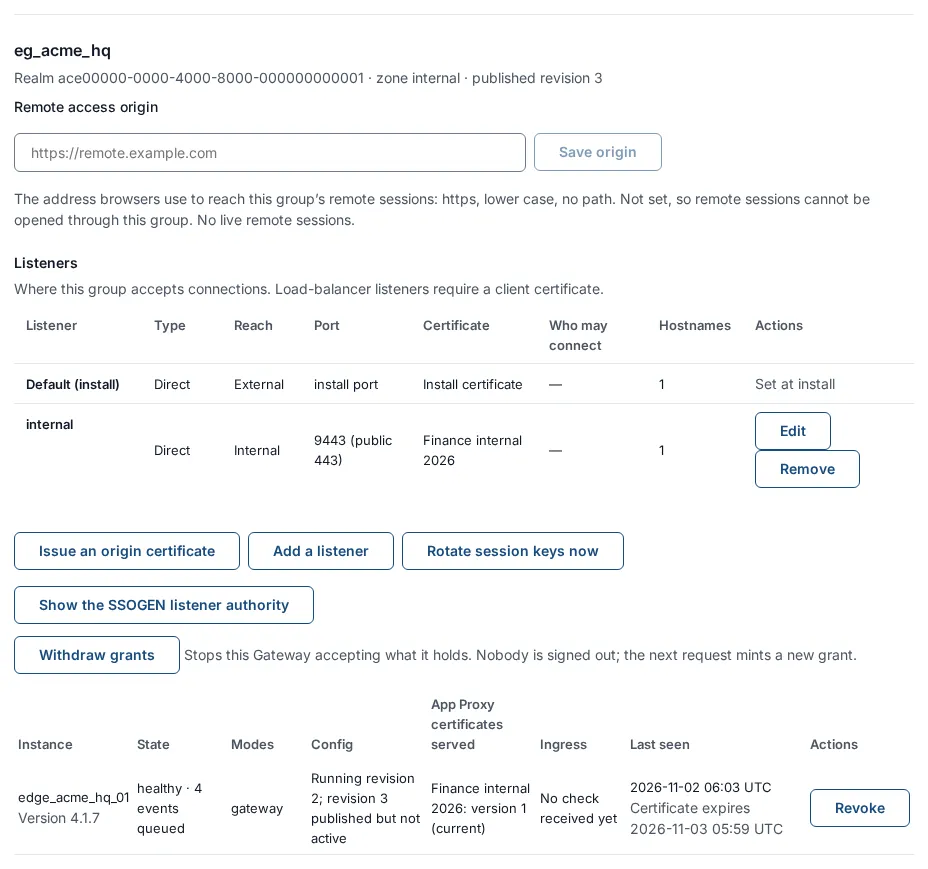
Per gateway group you see a section headed with the group name, with the line “Realm … · zone … · published revision …”, then these parts (the first needs permission to read Remote Access):
- Remote access origin: the address browsers use to reach this group’s remote sessions (only needed for Remote Access).
- Listeners: where the group accepts connections (App Proxy guide).
- Hostnames not in effect: appears only when some instance is not serving a hostname, with the reason. See Troubleshooting.
- Withdraw grants: see below.
A group’s Connector addresses and Uplink relay are not on this screen. They are below a route on Secure access, App Proxy routes: see Outbound Connector for private networks and Reach a Gateway through a relay.
The instances table (“Instances in group”) has these columns:
| Column | What it shows |
|---|---|
| Instance | The instanceId from the file, with “Version N” under it (the gateway program version, as the gateway reports it). |
| State | healthy, degraded or unhealthy as the gateway reports it. When it has not reported recently: “offline · Cannot reach SSOGEN since …”. Followed by “· N events queued” if the gateway holds events it could not deliver yet. |
| Modes | The modes running, for example gateway. |
| Config | “Running revision N” (the published configuration it has applied), or “Never activated”; plus “revision N published but not active” when it has not picked up the newest one yet; plus “revision N was refused: reason” if it rejected a revision; plus the Not in effect and Turned off lines described in Troubleshooting. |
| App Proxy certificates served | For each certificate the instance serves, “Apps wildcard: version 4 (current)”, or in a warning color “serving version 3, published version 4” when it lags. “None” if it serves no certificate. |
| Ingress | Lines about the instance’s listener and ingress state, shown in a warning color when something is wrong. |
| Last seen | When it last reported, with “Certificate expires …” under it: when the gateway’s own identity certificate expires. It renews itself in the last third of its life. |
| Actions | Revoke, for a super administrator. A revoked instance shows Revoked. |
A gateway reports in about every 60 seconds, and the screen counts an instance online when its last report is within the last minute. If a healthy instance flickers to offline between reports, look at Last seen over a couple of refreshes before you worry.
The first time an instance enrolls, its group appears here by itself: groups are created by use, not declared separately.
Recent events lists up to 50 of what the fleet has reported: When, Gateway, Category, Severity, Mode. An old error is usually a solved one, so read the dates.
Withdraw grants. A gateway keeps short-lived access grants for the people it signed in. Withdraw grants on a group stops that group’s gateways accepting the grants they already hold. It does not sign anyone out: the next request simply obtains a new grant. The screen answers “N grants withdrawn from eg_acme_hq.”
8. Update an SSOGEN Gateway
Section titled “8. Update an SSOGEN Gateway”The gateway is updated by running the installer of a newer Edge archive. The console shows each instance’s version but does not push updates.
-
Upgrade SSOGEN first, then the gateways (see the note at the top).
-
Unpack and verify the new archive as in section 3 and run
sudo ./install.sh --checkand--plan.--applykeeps the old programs in/usr/lib/ssogen-edge/previous, and never touchesedge.yaml, the identity or the state folder. -
For several instances in one group, upgrade one at a time. Drain the server so a load balancer stops sending new work, then let in-flight work finish:
sudo systemctl kill --signal=SIGUSR1 --kill-whom=main ssogen-edgeReadiness goes false first, then in-flight work has up to
--drain-secondsto finish, then the process exits. -
Run
sudo ./install.sh --apply, thensudo systemctl restart ssogen-edge. Wait forreadyzto answer ready before the next server.
If a new program rejects the stored configuration, it does not stop: it keeps the old one aside, stays not ready and serves nothing until SSOGEN delivers a configuration it accepts. Do not delete the state folder to recover: that also deletes the instance’s identity. See Troubleshooting.
Rolling the configuration back. SSOGEN pushes configuration and each instance applies it item by item. If a mode refuses a revision the instance returns to the previous revision by itself. The Config column tells you which revision is running.
Going back to an older gateway release is not a supported procedure in this release: contact SSOGEN support before you try it. An older gateway may refuse the configuration SSOGEN now publishes and stay on the last one it accepted.