Active Directory sync and directory changes
A connected directory (Connect Active Directory or LDAP) is the source of truth for the people it holds. Active Directory sync (the same applies to any LDAP directory) works in two ways to keep SSOGEN in step with it:
- At sign-in. Each time someone signs in through the directory, SSOGEN creates their account if it does not exist yet and refreshes their details. This only ever adds group memberships.
- By import. An import reads the whole directory, creates everyone who is missing, refreshes details, and, when you ask, switches off people who have left. Use it to have people ready before their first sign-in, and to end access for people who left.
This guide covers the Import users button, how to read its result, and what each kind of change in the directory does to the matching person in SSOGEN.
1. Run an import
Section titled “1. Run an import”-
Open Identity → Directories and click your directory (for example Acme Active Directory).
-
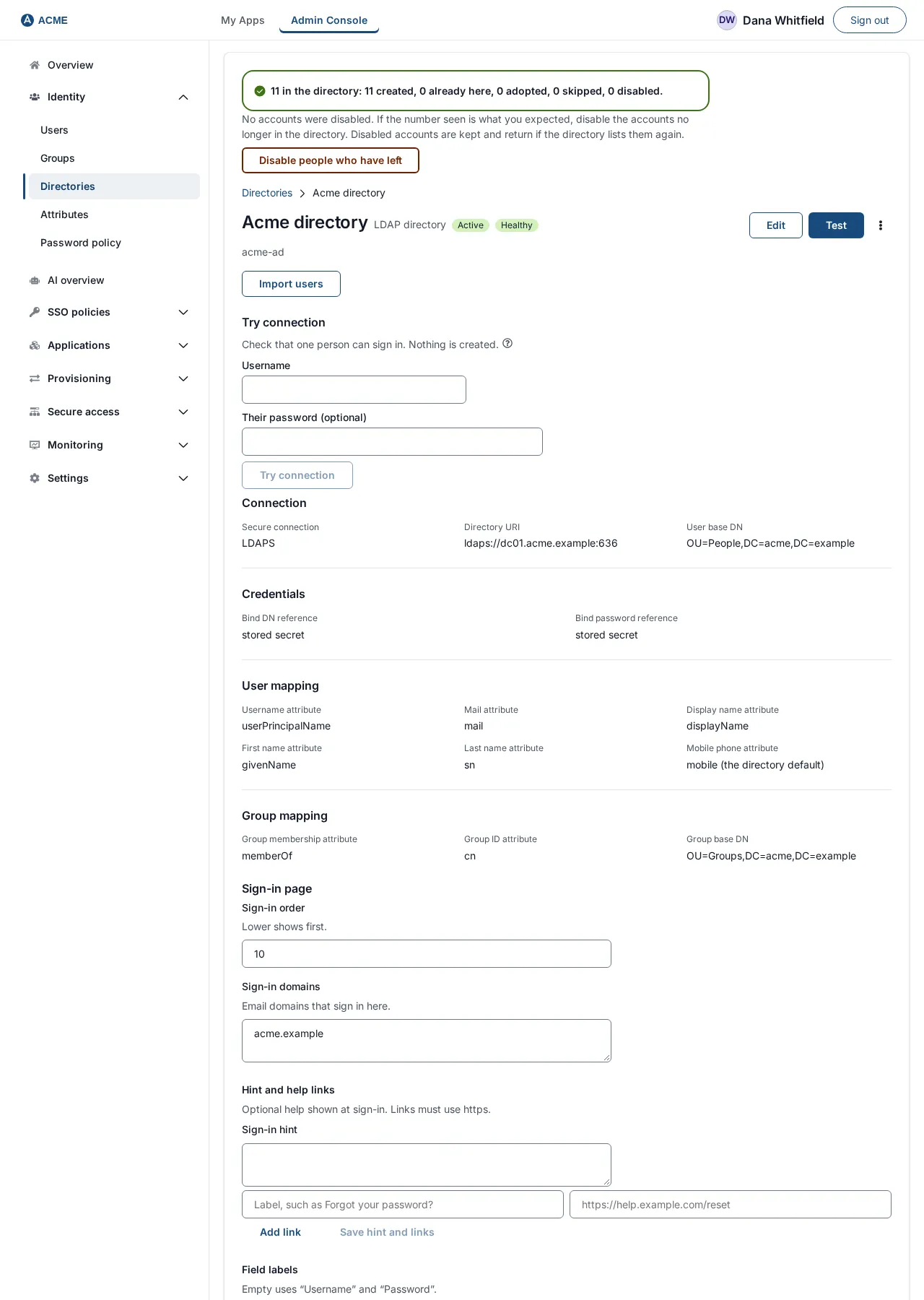
Choose Import users. The button appears only while the directory is Active. If the directory has stopped being active in the meantime the page says Activate this directory before importing from it.
-
Wait for the result banner. For example:
1,204 in the directory: 1,190 created, 12 already here, 0 adopted, 2 skipped, 0 disabled.
| Word in the result | Meaning |
|---|---|
| in the directory | How many people SSOGEN read. Check this number against what you expect. |
| created | New accounts, source Provisioned from directory name. |
| already here | People who already had an account through this directory; their details were refreshed. |
| adopted | People who matched an account that already existed from another source (for example one an administrator created); SSOGEN linked them and left the account as it was. |
| skipped | Entries it could not use (see below), or people disabled in the directory who were not brought in. |
| disabled | People switched off because they are no longer in the directory, or are disabled in it. |
| enabled again | People SSOGEN had switched off because of the directory, who are back. |
| removed from groups | Group memberships that came from the directory and are no longer there. |
Warnings appear under the banner as yellow notes, one per problem, for example an entry that has no value in the username attribute, or two entries that claim the same username. After 20 problems the run says further problems suppressed.
An import never disables anybody by itself
Section titled “An import never disables anybody by itself”After Import users, the banner is followed by:
No accounts were disabled. If the number seen is what you expected, disable the accounts no longer in the directory. Disabled accounts are kept and return if the directory lists them again.
This is deliberate. If User base DN points at the wrong part of the directory, the run would see only a handful of people and everybody else would look as if they had left.
- Check n in the directory against reality. If it is wrong, fix User base DN or Username attribute (Edit, then activate the new revision) and import again.
- When the number is right, choose Disable people who have left. This runs the import again and now ends access for people who are gone. (The run in which you choose it can still halt; see below.)
When a run halts
Section titled “When a run halts”A run that would change a lot of people’s access stops for you to look. It halts, without changing anyone’s access, when the directory returns nobody, when every known person would be switched off at once, or when more than the larger of 5 people and 10 % of the directory’s active people would be switched off, switched back on, or removed from groups. The banner is a warning and reads, for example:
1,204 in the directory: 0 created, 1,190 already here, 0 adopted, 0 skipped, 0 disabled. Halted before changing anybody’s access: 300 to disable, 0 to enable again, 0 group memberships to remove. Nothing was changed. Check the base DN, filter and username attribute.
People are still created and refreshed in a halted run, but nobody is disabled, re-enabled or removed from a group. Look for the cause (a wrong base DN, a changed username attribute, an outage that left the directory half-empty); once fixed, run again.
A run also never retires anyone if the listing was cut off at its limit of 100,000 people (the note says to run it in narrower slices by organizational unit).
Import errors
Section titled “Import errors”| Message | Meaning |
|---|---|
| The directory did not answer. Nothing was changed and no accounts were disabled. | The directory was unreachable. Nothing happened. Fix connectivity and try again. |
| Activate this directory before importing from it. | The directory is not Active. |
| That connection is not an LDAP directory. | Wrong connection. |
| The directory could not be read. | Another failure. Use Test on the directory page and read the message. |
How many entries SSOGEN reads per request is the setting Directory import page size under Settings → Security, section Directories.
2. Which people an import may change
Section titled “2. Which people an import may change”This is the most important rule. An import only ever changes accounts that this directory created (source Provisioned from directory name):
- It creates people, refreshes the details the directory owns, adds and removes the group memberships the directory owns, disables people who are absent or disabled, and switches back on only people it disabled itself.
- A person who matches an account from another source is adopted: linked, but never changed. If that person is gone from the directory the run reports it and does nothing.
- It never undoes a decision of yours. If an administrator disabled, locked or archived someone, an import leaves that as it is.
- Switching a person off is never archiving or deleting. Their status reason on the user’s record reads Removed from directory (they have left) or Disabled in directory (they are disabled there). Their sessions end.
- It will not switch off the last administrator who can still sign in to the Admin Console: that account stays active and the run reports the refusal. See Admin Console sign-in and lockout protection.
- A person who is already disabled in the directory when an import first sees them is not brought in; the run counts them as skipped.
- Group memberships go only to the group this directory created. A group that someone else made with the same name is never filled by the import, and the run reports that the name is taken.
3. What happens when the directory changes
Section titled “3. What happens when the directory changes”| What changes in the directory | What SSOGEN does | When |
|---|---|---|
| A person is added to the base DN | An account is created, with their name, email, phone and groups. | At the next import, or when they first sign in. |
| A person’s name, email or phone changes | The new value is written to their account. A value the directory no longer holds is left as it is, not erased. | At the next import or their next sign-in. These fields are read-only in the console. |
| A person leaves (entry deleted or moved out of the base DN) | The account is disabled with the reason Removed from directory, and their sessions end. | At an import run with Disable people who have left. |
| A person who was imported earlier is disabled in the directory | The account is disabled with the reason Disabled in directory. | At the same kind of import. |
| A disabled person is enabled again in the directory (or reappears) | The account is enabled again, but only if the directory was what disabled it. | At an import run with Disable people who have left. |
| A person is moved to another OU inside the base DN | Nothing changes. | |
| Only the case of a username changes | Nothing changes. SSOGEN compares usernames in lower case. | |
A person’s username really changes (for example mlopez becomes maria.lopez) |
The old account is treated as someone who left and a new account is created: one departure and one arrival. Reassign access on the new account. | At the next import. |
| A person is added to a group | The matching SSOGEN group is created if needed and they are added. | At sign-in (adds only) or the next import. |
| A person is removed from a group | The membership the directory created is removed. A membership you added by hand is kept. | At an import that is allowed to retire; not at sign-in. |
| A group is renamed | The new name is a new group. People move across at the next import; the old group stays with its remaining members and application assignments until you delete it. | |
| A group is deleted | Its memberships are removed from people at the next import; the SSOGEN group itself stays until you delete it. | |
| The password is changed in the directory | SSOGEN does not store the password, so the new one simply works at the next sign-in. | Immediately. |
Within a single sign-in SSOGEN reads a person’s groups from the directory, but a sign-in never removes a group: it only adds. This is so one sign-in with a partly unreadable directory cannot take away someone’s access.
4. When SSOGEN’s own settings for the directory change
Section titled “4. When SSOGEN’s own settings for the directory change”- You disable the directory in SSOGEN. People cannot sign in through it, but their accounts remain. Enable it again to restore sign-in.
- You archive or delete the directory. Archiving cannot be undone. People provisioned from it remain as accounts, but cannot sign in through it, so give them another way in (a local password, or another provider) first.
- The directory is unreachable. Sign-in through it fails. An import refuses to run and changes nothing.
- You edit the connection. The change is a new revision and applies only when activated; the current configuration keeps serving until then.
5. Scheduled sync
Section titled “5. Scheduled sync”SSOGEN can also run the import on a timer, per directory. The schedule is read and set through the administration API (GET and PUT /admin/api/identity-providers/{connection_id}/sync-schedule). What it provides:
- a schedule: enabled or not, an interval from 15 minutes to 24 hours (default 1 hour), and whether new people are created (create_new, default on);
- retirement (switching off leavers) that is off until an administrator confirms the number of people the latest run saw (the request must carry that number); and then only up to a threshold of people per run (count up to 1,000 and a percentage up to 50 %);
- a run that exceeds the threshold halts, lists the people it is waiting to change by name, and can be applied after review.
It uses exactly the same rules as the manual import described above.
End-to-end example: Acme migrates its first 1,200 people
Section titled “End-to-end example: Acme migrates its first 1,200 people”- The AD directory is Active (see the previous guide).
- Identity → Directories → Acme Active Directory → Import users. The banner says 1,204 in the directory: 1,204 created, 0 already here, 0 adopted, 0 skipped, 0 disabled. Expected: Acme has about 1,200 employees.
- Identity → Users: 1,204 people with the source Provisioned from Acme Active Directory. Open Maria Lopez: her groups were created from
memberOf. - Assign the Acme Wiki application to the group Engineering (Manage groups).
- A month later, James leaves and is deleted from AD. Run Import users, then choose Disable people who have left. The banner now says 1 disabled.
- Open James: the badge is Disabled and the status reason Removed from Acme Active Directory. Sign-in is refused and his sessions have ended.
- Months later James is rehired and recreated in AD with the same username. Run Import users and then Disable people who have left: the banner shows 1 enabled again.
Troubleshooting
Section titled “Troubleshooting”| Symptom | Cause and fix |
|---|---|
| in the directory is far lower than expected | User base DN is too narrow, or Username attribute is missing on many entries. Edit and re-import before disabling anyone. |
| in the directory is far higher than expected | The base DN is too wide (includes computers or service accounts). Narrow it. |
| The result says Halted… | See “When a run halts”. Fix the cause, then run again. |
| Someone left but is still active | The import has not run with Disable people who have left (a plain import never disables), or they were not created by this directory (an adopted account is never changed). |
| A person who left is still in a group | The membership was added by hand, or the removal is waiting for a retiring run. |
| Disabled in the directory but still signing in to SSOGEN | Run an import with Disable people who have left; until then SSOGEN has not yet seen the change. |