MCP server authorization for Oracle EBS agents
MCP server authorization in SSOGEN checks every tool call an AI agent makes before it reaches your MCP server. To let an AI agent use Oracle E-Business Suite (EBS) tools this way, you set up who the agent is, what it may call, what a person must approve, how every call is checked and recorded, and how you take access away.
What MCP is and what SSOGEN adds
Section titled “What MCP is and what SSOGEN adds”The Model Context Protocol (MCP) is an open standard that lets an AI agent discover and call tools offered by a server: “list invoices”, “get a purchase order”, “approve a requisition”. The agent sends JSON messages over HTTPS to the MCP server, and the server runs the tool. An MCP server for EBS is a program, written by you or a vendor, that talks to EBS (for example through its REST or database interfaces) and exposes a short list of named tools. SSOGEN does not provide that program.
SSOGEN’s job is everything around the tool call: who the agent is, whether it may call this tool, whether a person has agreed, and the record. The MCP Gateway sits in front of your MCP server and decides each call.
The chain from agent to EBS tool
Section titled “The chain from agent to EBS tool”| # | Where | What happens |
|---|---|---|
| 1 | Your EBS MCP server | Runs behind the MCP Gateway at an https address, for example https://ebs-mcp.acme.example/mcp. |
| 2 | SSOGEN, Applications | An application “Acme EBS Tools” published through an App Proxy route. |
| 3 | SSOGEN, application’s Non-human callers tab | Protocol MCP, a resource identifier, and scopes mapped to tool names. |
| 4 | SSOGEN, AI agents | The agent is registered, with owners, a key, granted scopes, and its modes. |
| 5 | The agent | Gets a short-lived token tied to its key, and calls tools. |
| 6 | The MCP Gateway | Checks the token, the key proof and the tool against the granted scopes. Passes your server the agent’s identity, never its token. |
| 7 | SSOGEN, Audit | Records each decision. |
Step group 1: publish the MCP server through the Gateway
Section titled “Step group 1: publish the MCP server through the Gateway”- Run your EBS MCP server so that it accepts MCP over HTTP POST (the “Streamable HTTP” transport) at a path such as
/mcp. It should connect to EBS with its own service account in EBS, and it should accept connections only from the SSOGEN Gateway, for example by a network rule or a firewall allowing only the SSOGEN Gateway host. SSOGEN does not send it a token; it tells the server who is calling (see “What your MCP server receives”). - In SSOGEN, register an application Acme EBS Tools published through an App Proxy route (see the SSOGEN Gateway guides). The route’s back end must be https. Note the route’s public host, for example
ebs-mcp.acme.example. - The Gateway serving the route must be up to date so that it supports AI agents. If it is not, saving the next step shows “An enforcer serving this application is too old to enforce this. Update it, then try again.”
Step group 2: register the MCP server in SSOGEN
Section titled “Step group 2: register the MCP server in SSOGEN”In SSOGEN, an “MCP server” is an application whose Non-human callers setting uses the MCP protocol. There is no separate registration form; the MCP servers page lists what you configure here.
-
Turn on AI agents for the organization if you have not (see Turn on AI agents and register one).
-
Open Applications, select Acme EBS Tools, then open the tab Non-human callers.
-
Set Non-human callers to Allow, and tell the application which non-human identity is calling. (Choose Allow only on behalf of a person, and tell the application which person if every call must be for a person.)
-
Resource identifier:
https://ebs-mcp.acme.example/mcp. For an MCP server this must be on the same host as one of the application’s App Proxy route hosts. If not, the console says “The resource host must be one of this application’s App Proxy route hosts.” -
Protocol: choose MCP (the hint says “MCP is for App Proxy routes only”).
-
Largest request body (bytes): optional, up to 4194304. A larger request is refused. Leave it empty for the default.
-
Under Scope catalog, select Add scope for each permission. With MCP, each scope has a Tools box instead of methods and paths: “Each scope names the tools it allows.” Separate tool names with commas. The tool names must be exactly the names your MCP server advertises. The examples below are names your own server might use:
Scope Kind What it allows, in words Tools ebs.invoices.readStandard Read supplier invoices list_invoices, get_invoiceebs.po.readStandard Read purchase orders get_purchase_orderebs.invoices.approveSensitive Approve a supplier invoice for payment approve_invoice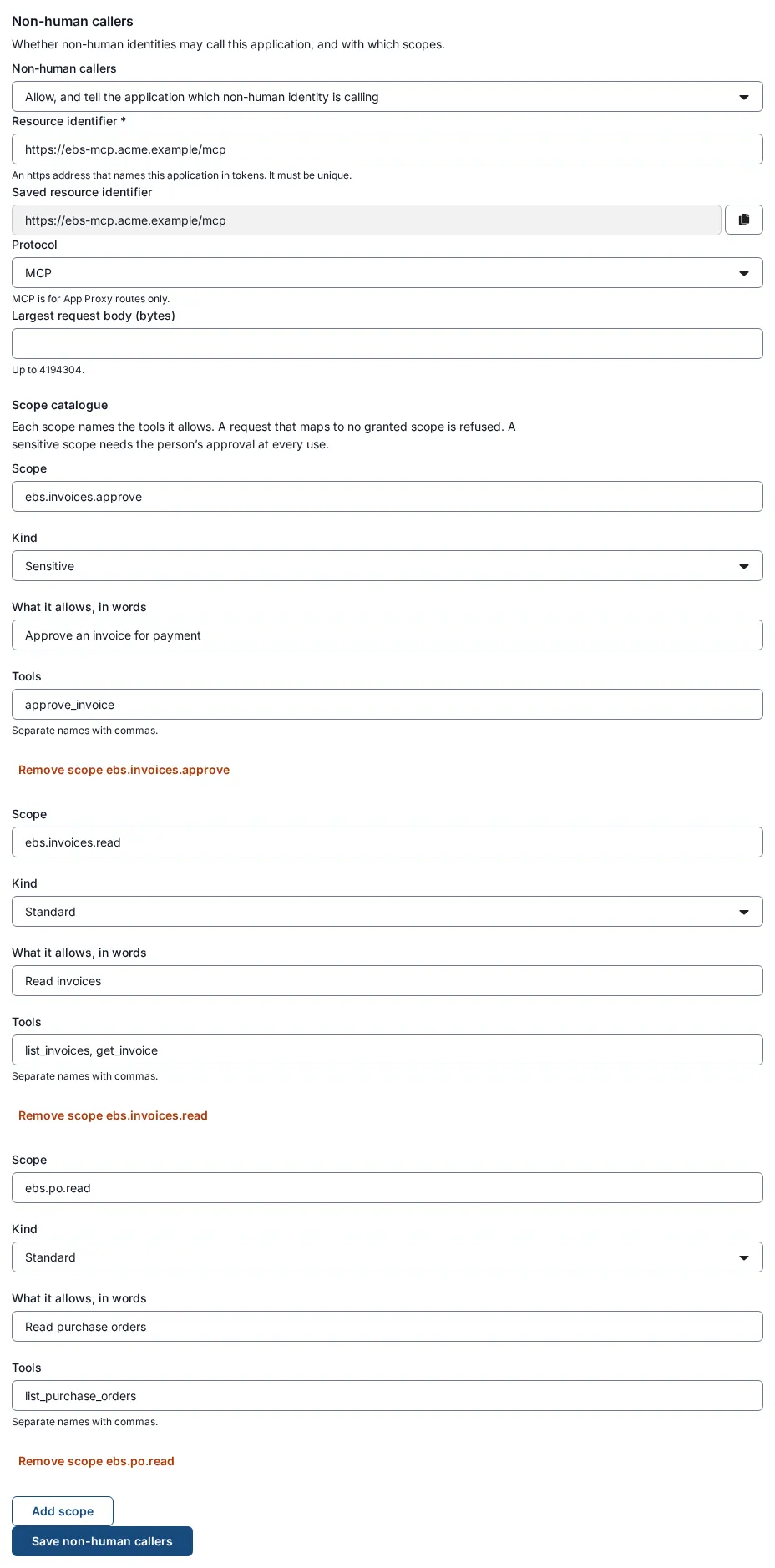
-
Select Save non-human callers.
What is enforced. The MCP Gateway reads only the outer envelope of each MCP message: the method and, for a tool call, the tool name. It never reads the tool’s arguments or results. A tool call is allowed only if the tool is named in a scope the agent holds. A tool named in no scope, or an unknown tool, is refused (403). initialize, ping, tools/list and notifications need only a valid token for the resource. Batched messages (a JSON array) are refused, and a body over the limit is refused (413).
Check it. Open AI agents, then MCP servers. The page says “Applications that AI agents reach over the Model Context Protocol (MCP) through an App Proxy route. Change one in the application’s Non-human callers settings.” You should see a row: Application Acme EBS Tools, Resource identifier https://ebs-mcp.acme.example/mcp, Who may call “Allow, and tell the application which non-human identity is calling”, and Largest request “Default”.
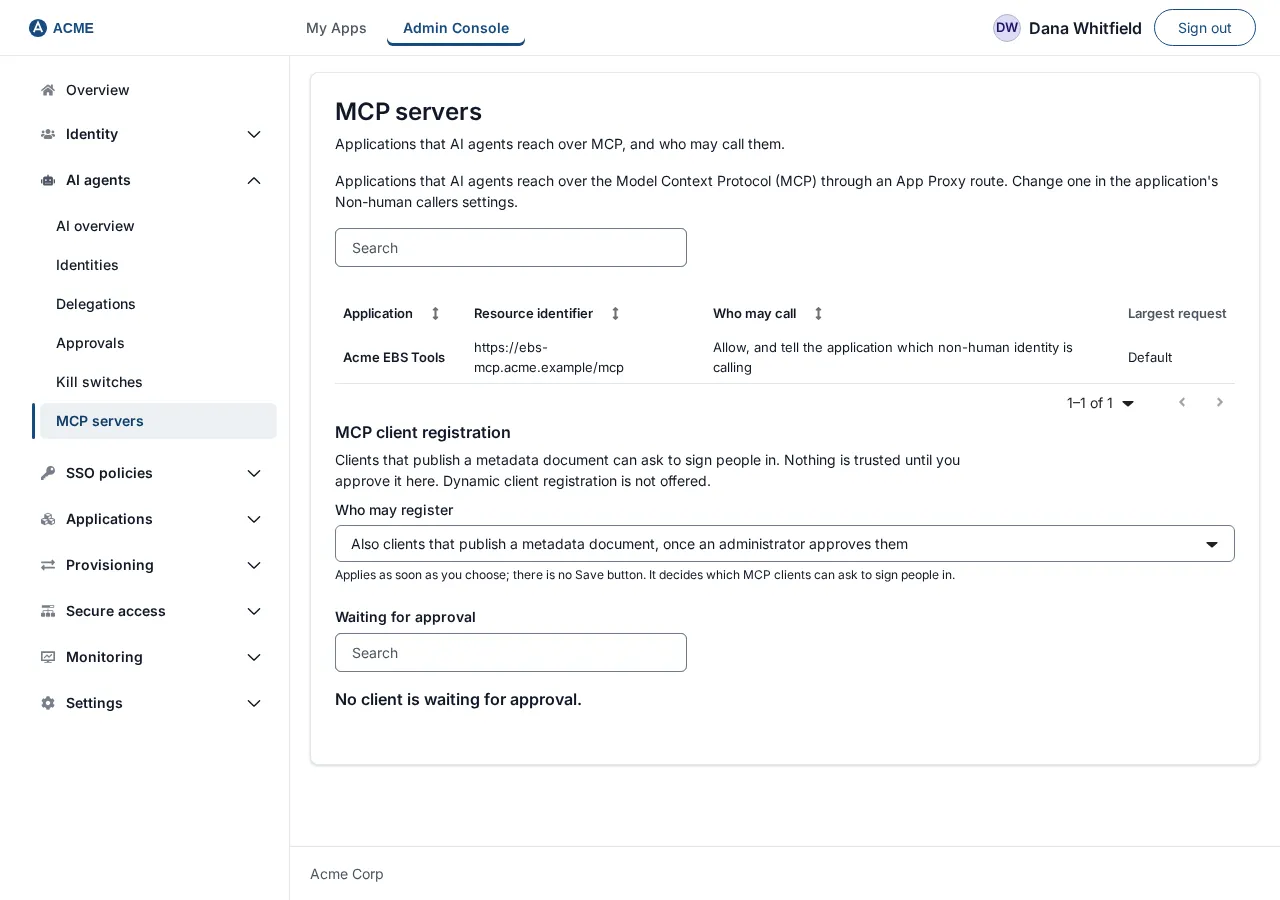
The MCP Gateway picks up the change on its next configuration refresh, which can take up to about five minutes.
Then verify the MCP Gateway answers as an MCP resource. From any machine that can reach the route, send a request with no token:
curl -i -X POST https://ebs-mcp.acme.example/mcp \ -H 'Content-Type: application/json' \ -H 'Accept: application/json, text/event-stream' \ -d '{"jsonrpc":"2.0","id":1,"method":"initialize","params":{"protocolVersion":"2025-06-18","capabilities":{},"clientInfo":{"name":"check","version":"1"}}}'You should get HTTP/1.1 401 with a header like WWW-Authenticate: DPoP resource_metadata="https://ebs-mcp.acme.example/.well-known/oauth-protected-resource/mcp". Fetch that address: it lists your resource, the SSOGEN sign-in server in authorization_servers, your scopes in scopes_supported, and says tokens are DPoP-bound and header-only. If you get anything else, the route is not yet an MCP route: recheck the previous steps and wait for the refresh.
Step group 3: register the AI agent
Section titled “Step group 3: register the AI agent”Follow Turn on AI agents and register one, with these values:
| Wizard step | Value for this example |
|---|---|
| Name and type | Name EBS Assistant, Identifier ebs-assistant, Type AI agent (or MCP client for an agent that works only for a person and has no secret key; see below). What it does: Looks up invoices and purchase orders in Oracle EBS for Accounts Payable. |
| Owners | Maria Lopez, primary. |
| Keys | The public key set generated on the machine where the agent runs. A type MCP client may instead be a public MCP client with no keys; it then acts only for a person. |
| Access | Application Acme EBS Tools. Tick ebs.invoices.read and ebs.po.read. Tick ebs.invoices.approve only if a person will approve each use. |
| Modes and expiry | Acts on its own for a back-office automation, Acts for a person for an assistant working for Maria (then enter its Redirect URIs, for example http://127.0.0.1:8765/callback for a desktop tool, or an https address), or both. Expires on a date within 365 days. |
| Test access | Select Test access. For Acme EBS Tools you should see Would be allowed. The preview shows what your MCP server will receive. |
What the agent must do
Section titled “What the agent must do”This part is for the people building or configuring the agent, because it is code, not a console setting. SSOGEN publishes its discovery documents at /.well-known/oauth-authorization-server (and /.well-known/openid-configuration) on your organization’s address, for example https://login.acme.example. They list the endpoints below and dpop_signing_alg_values_supported.
Every request. The agent sends Authorization: DPoP <access token> and a DPoP header holding a fresh proof signed with the key the token is bound to. By default a Bearer token is refused; it is accepted only at an MCP server where an administrator chose DPoP or Bearer (see “Token binding”). The agent includes the resource parameter with the MCP server’s resource identifier whenever it asks for a token.
Acts on its own
Section titled “Acts on its own”- The agent sends a token request to
https://login.acme.example/oauth2/tokenwithgrant_type=client_credentials, exactly oneresource(https://ebs-mcp.acme.example/mcp),scope(for exampleebs.invoices.read), its identifier asclient_id, a signed client assertion (private key JWT, signed with RS256 or ES256 using the key you registered, with the key’skidin its header), and a DPoP proof. - SSOGEN may answer with an error
use_dpop_nonceand aDPoP-Nonceheader. The agent repeats the request with that nonce in its proof. - SSOGEN checks, in order: the client assertion; that the agent is active, within its expiry and review dates, and its type’s kill switch is off; that the resource is registered and open to agents; that every requested scope is within the agent’s grant (it is never silently narrowed: an out-of-grant scope is refused); and that policy allows it.
- The response has
token_type: DPoPand an access token that lives about four minutes (never more than 270 seconds). There is no refresh token; the agent repeats the request when it expires.
Acts for a person
Section titled “Acts for a person”- The agent pushes its authorization request to
/oauth2/parwith a PKCE challenge (S256), the thumbprint of its DPoP key (dpop_jkt), theresourceand thescope, and receives arequest_uri. - The agent opens
/oauth2/authorizein the person’s browser with thatrequest_uri. The person signs in under the application’s policy, then sees the consent screen (see What people see). - After Approve, the browser returns to one of the agent’s Redirect URIs with a one-use code. The agent exchanges it at
/oauth2/token(with its DPoP proof) for an access token and a refresh token. The refresh token lasts for the delegation (idle for 24 hours loses it), rotates on each use, and keeps working while the person is signed out, until the delegation expires or is revoked. - SSOGEN re-checks the person, the delegation and the agent at every token issue and refresh. Effective access is the agent’s grant, limited to what the person approved, limited to what the person can currently reach. If the person is disabled, loses access, or withdraws the delegation, the next refresh fails.
Sensitive scopes: approval at each use
Section titled “Sensitive scopes: approval at each use”A Sensitive scope is never part of the delegation. For ebs.invoices.approve the agent must:
- Send a request to
/oauth2/bc-authorize(a “backchannel authentication request”), authenticated with its client assertion and a DPoP proof with nonce. It names thescope, theresource, the delegation id aslogin_hint, an optionalbinding_messageof up to 64 characters (letters, digits, spaces and. , : # / _ -; this is shown to the person as “The agent says”), andrequested_expiryof at most 600 seconds. Only an agent with its own key can do this; a public MCP client cannot. - Poll
/oauth2/tokenwithgrant_type=urn:openid:params:grant-type:cibano faster than every 5 seconds. The answers areauthorization_pending,slow_down,expired_token,access_denied, and finally a single access token for that scope, valid up to 270 seconds, with no refresh token. - Meanwhile the person sees the request on their Approvals page and decides. Approving gives the agent a short window to use that scope, not approval of one operation. Each approval is single-use.
The call
Section titled “The call”The agent sends its MCP messages (initialize, tools/list, tools/call with params.name the tool name) to https://ebs-mcp.acme.example/mcp. A tools/call of a tool outside the agent’s scopes gets 403 insufficient_scope naming the scope needed, so a well-behaved client can ask for it.
What your MCP server receives
Section titled “What your MCP server receives”Your server gets no token and no SSOGEN credential. It is told whether the agent acts on its own or for a person, the agent’s identifier, and, when the agent acts for a person, who that person is. Test access on the agent’s page shows the exact values your server receives.
Your server decides what EBS responsibility or data to use for the call. Mapping the delegated person to an EBS user is the MCP server’s work; SSOGEN does not do it.
Test a call
Section titled “Test a call”- Before any agent code runs: on the agent’s page, select Test access. This asks the policy exactly what a real request would be asked and reports Would be allowed or why not. It issues nothing.
- With a client that meets the requirements above: run the agent, ask it to list tools, then call
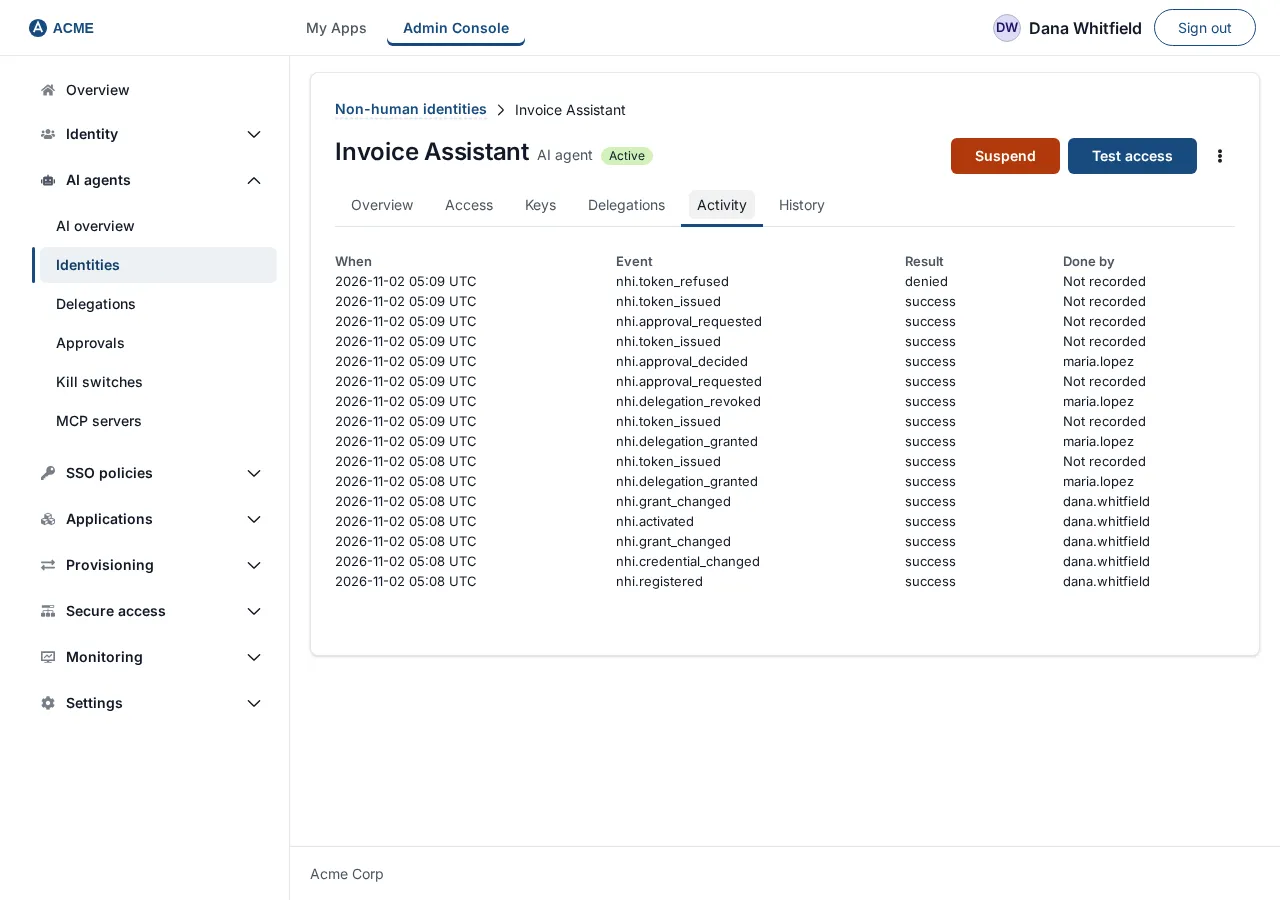
get_invoice. Then open the agent’s Activity tab; you should see a token issued and, for each call, an access decision. - A deliberate refusal: ask for a tool in a scope you did not grant. You should see 403 with
insufficient_scope, and a refused decision in Activity.
How each call is authorized and audited
Section titled “How each call is authorized and audited”For every tool call the MCP Gateway: checks the token’s signature and its binding to the caller’s key; checks the audience is this MCP route; checks the key proof; maps the tool name to a scope and requires the agent to hold it. For an agent acting for a person it also relies on the delegation. Every decision, allowed or refused, becomes an audit event recorded in SSOGEN (an “AI agent access decided” entry), with the agent, the person if any, the resource, the scope and the tool name, and the result. Token issues and refusals, delegations, approvals and kill-switch changes are separate entries. No entry contains a token, a key or the agent’s message text.
Find them in AI agents, then Identities, open the agent, Activity tab (columns When, Event, Result, Done by), or in Monitoring, then Audit.
Revoke or stop access
Section titled “Revoke or stop access”| You want to… | Do this | Takes effect |
|---|---|---|
| Stop one person’s delegation | Agent page, Delegations tab, Revoke delegation for |
Immediately for new tokens; tokens already issued stop within 5 minutes. |
| Pause the agent | Agent page, Suspend, confirm. | New tokens stop at once; issued tokens within 5 minutes. Reactivate reverses it. |
| Remove the agent for good | The menu on the agent’s page, Revoke permanently, type its identifier. | Permanent. |
| Stop every agent of a type | AI agents, Kill switches, Engage for AI agent. | As above. |
| Stop only one tool | Remove the tool from its scope in the application’s Non-human callers tab and select Save non-human callers. | When the MCP Gateway refreshes (up to about five minutes). Removing a scope also removes it from every agent’s grant. |
Token binding
Section titled “Token binding”On the application’s Non-human callers tab, the Token binding section sets which tokens an MCP server accepts: DPoP only (recommended), the default, or DPoP or Bearer. DPoP ties a token to a client key; a stolen Bearer token can be replayed. Allow Bearer only for MCP clients that cannot send a DPoP proof. A Bearer token has one audience (this MCP server), standard scopes only, and lasts at most 270 seconds; its refresh family is not tied to a key and lasts at most 24 hours. Choosing DPoP or Bearer needs you to tick an acknowledgement, then select Apply token binding. Switching back to DPoP only asks for confirmation and revokes every Bearer refresh family: clients holding a Bearer token must register again with a DPoP key. If an acknowledgement is no longer current, the page says “Bearer tokens are refused here until you acknowledge the changed Bearer terms again.” Saving is refused while a Gateway serving the route is too old to support it.
Clients that publish a metadata document
Section titled “Clients that publish a metadata document”Under AI agents, MCP servers, the section MCP client registration has the setting Who may register: Only clients an administrator registers (the default) or Also clients that publish a metadata document, once an administrator approves them. The second choice asks you to confirm (“Let clients that publish a metadata document ask to register?”), because anyone on the internet can then make a request that appears in the list. Nothing is trusted until you approve it. Under Clients waiting for approval, select a client to see its host and the addresses people are sent back to after sign-in, with a warning for a loopback address and for a name that an approved client already uses. Select Approve or Deny.
Limits of MCP server authorization
Section titled “Limits of MCP server authorization”- No MCP server is provided for Oracle EBS. You supply it.
- Dynamic client registration is not offered. An agent is registered by an administrator, or, if you allow it, a client that publishes a metadata document can ask and waits for an administrator’s approval (see “Token binding” and “Clients that publish a metadata document” below).
- The MCP Gateway filters the list answers (such as
tools/list) to the agent’s scopes, so an agent sees only the tools it may call. - SSOGEN does not see the tool arguments or results.
- Your MCP client must meet the DPoP and PAR requirements above.