SSOGEN / Learn / LDAPS Port 636 and the Other LDAP Ports, Explained
Learn
LDAPS Port 636 and the Other LDAP Ports, Explained
Connect to 636 for LDAPS, where TLS starts before any LDAP message; plain LDAP and StartTLS use 389, and Active Directory's global catalog adds 3268 and 3269.
Updated
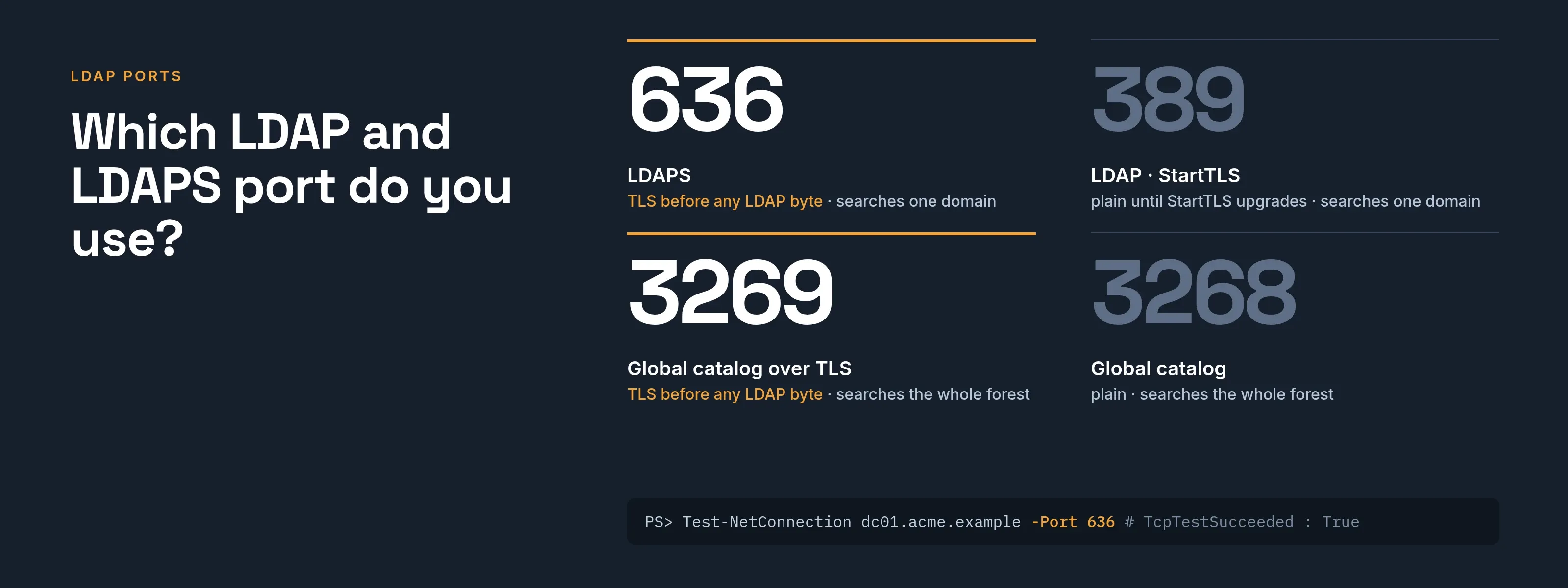
The LDAPS port is TCP 636. A client that connects there negotiates TLS before it sends any LDAP message. Plain LDAP uses 389, LDAPS uses 636, and Active Directory adds two global catalog ports, 3268 and 3269. Microsoft’s LDAPS setup article (read 2026-10-09) states that connections to 636 or 3269 negotiate SSL/TLS before any LDAP traffic is exchanged.
Which LDAP and LDAPS port do you use?
Microsoft’s port requirements list (read 2026-10-09) gives these ports:
- 389 (TCP and UDP) for LDAP; the list shows LDAP on UDP 389 as well as TCP 389.
- 636 (TCP) for LDAP SSL.
- TCP 3268 and 3269 for the global catalog.
Four ports on an Active Directory domain controller
- LDAP clientAn application or tool
- Domain controllerActive Directory
- LDAP client to Domain controller1Port 389: LDAP, with StartTLS if the client upgradesPlain LDAP unless the client upgrades with StartTLS. Searches one domain.
- LDAP client to Domain controller2Port 636: LDAPS, encrypted from the first byteTLS is negotiated before any LDAP traffic. Needs a valid certificate.
- LDAP client to Domain controller3Port 3268: global catalogSearches all directory partitions in the forest.
- LDAP client to Domain controller4Port 3269: global catalog over TLSForest-wide search, encrypted from the first byte.
| Port | Name | Use it when | What Active Directory does with it |
|---|---|---|---|
| 389 | LDAP (and StartTLS) | An application searches or signs in against one domain, and can upgrade to TLS | Answers ordinary LDAP queries for a single domain partition (Microsoft, global catalog searches) |
| 636 | LDAPS | The same, with TLS from the first byte | Accepts TLS connections once the domain controller has a valid certificate (Microsoft) |
| 3268 | Global catalog | You must search every domain in the forest | A bind here searches all directory partitions in the forest; a server that is not a global catalog refuses the bind (Microsoft) |
| 3269 | Global catalog over TLS | The same forest-wide search, encrypted from the first byte | TLS is negotiated before any LDAP traffic (Microsoft) |
One consequence, from Microsoft’s archived Windows 2000 Server page on global catalog searches (read 2026-10-09): a global catalog search accepts a NULL base DN, while a one-level or subtree search with a NULL base DN on port 389 fails.
If a tool works on one port and fails on the other, check the base DN before you suspect the network.
What is the difference between StartTLS and LDAPS?
Both end up encrypted; the difference is when encryption starts.
- LDAPS connects to 636 and performs the TLS handshake first.
- StartTLS connects to 389, speaks plain LDAP for one request, then asks the server to switch to TLS.
RFC 4513, section 3 (read 2026-10-09) describes using the StartTLS operation (defined in RFC 4511) to set up TLS in an LDAP session. The RFC doesn’t mention LDAPS or port 636, which is why both styles are common in practice.
Choose by what the server offers and what your firewall allows, not by preference.
Both need a server certificate. Under RFC 4513, section 3.1.3, the client must verify the server’s identity as presented in its certificate, so the name you connect to must appear in the certificate’s Subject Alternative Name or Common Name.
What does an Active Directory domain controller need for LDAPS?
Microsoft lists the certificate requirements (read 2026-10-09):
- It sits in the Local Computer’s Personal store, or in the NTDS store, which a domain controller prefers if a certificate is there.
- A matching private key is present.
- Enhanced Key Usage includes Server Authentication.
- The domain controller’s fully qualified name appears in the Subject common name or as a DNS entry in the Subject Alternative Name.
- A CA that the domain controller and the LDAPS clients trust issued it.
No setting needs to be switched on. Microsoft says installing a valid certificate lets the LDAP service accept SSL connections for LDAP and global catalog traffic.
How do you test an LDAPS port?
These are standard commands, not specific to any product. The host names are samples: replace dc01.acme.example with your own host.
Step 1: check that the port is open (from Windows).
Test-NetConnection dc01.acme.example -Port 636Test-NetConnection (read 2026-10-09) tests TCP connectivity to the port you give with -Port. TcpTestSucceeded : True means a TCP connection was made; it tells you nothing about the certificate.
Step 2: see which certificate the server presents (from Linux or macOS).
openssl s_client -connect dc01.acme.example:636 -servername dc01.acme.example -showcertsIn the OpenSSL documentation (read 2026-10-09):
-connect. Names the host and port.-servername. Sets the SNI name.-showcerts. Prints the certificate list as the server sent it.-CAfile. Add-CAfile acme-root-ca.pemto verify against your own CA.-starttls ldap. A supported protocol option to test StartTLS on 389.
Check the Verify return code at the end of the output.
Step 3: run a real query.
ldapsearch -H ldaps://dc01.acme.example:636 -x -D "CN=svc-ssogen,OU=Service Accounts,DC=acme,DC=example" -W -b "DC=acme,DC=example" "(sAMAccountName=maria.lopez)" dnIn the OpenLDAP ldapsearch manual (read 2026-10-09), -H takes the server URI, -x is simple authentication, -D the bind DN, -W prompts for the password and -b sets the search base.
For StartTLS on 389, use -H ldap://dc01.acme.example -ZZ, which requires the TLS upgrade to succeed. On Windows, Microsoft’s article tests with Ldp.exe (Connection, Connect, port 636); RootDSE information appears on success.
To read what the server sent, paste the certificate or the whole chain into the free certificate and CSR decoder.
It shows the names, dates and key, and checks that each certificate was issued by the next. It runs in your browser and uploads nothing.
Why does LDAPS fail? A troubleshooting table
| What you see | Likely cause | How to check | Fix |
|---|---|---|---|
Timeout, or TcpTestSucceeded : False |
Port blocked, wrong host, or the service is down | Test-NetConnection host -Port 636 from the same network as the client |
Open TCP 636 (and 3269 if you use the global catalog) between client and domain controller |
| Connection opens, then the TLS handshake fails | The domain controller has no usable certificate, or you used 636 against a server that only offers StartTLS | openssl s_client shows no certificate or a handshake error |
Install a certificate that meets the list above, or use StartTLS on 389 |
| Certificate name mismatch | You connected by IP address, short name or alias that is not in the certificate | Compare the Subject and Subject Alternative Name with the name you typed | Connect with the exact name on the certificate |
| Untrusted CA | The client does not trust the issuing CA | Verify return code is not 0 (ok) |
Install the root (and issuing) CA certificate on the client; never trust the server certificate in its place |
| Incomplete or misordered chain | The server sent the leaf without its issuing CA, or in the wrong order | -showcerts lists them in the order sent; paste into the decoder to check leaf first |
Install the issuing CA on the server so it sends the full chain |
| Expired certificate | Renewal missed | Read the validity dates in the decoder | Renew; Microsoft notes AD DS picks up a new certificate without a restart on Windows Server 2008 and later |
| Several valid certificates on the domain controller | Windows picks one you did not intend | Microsoft says Schannel selects the first valid certificate it finds and may not pick the right one | Keep one valid LDAPS certificate, or place the intended one in the NTDS store |
What about firewalls?
Open TCP only for the ports you use, from the client’s network to the domain controllers:
- 636. For LDAPS.
- 389. If you use StartTLS.
- 3268 or 3269. Only for forest-wide searches.
- UDP 389. Microsoft’s list also shows UDP 389 for LDAP, which this page doesn’t cover.
- Plain 389. If everything on your side can use TLS, block it from untrusted networks.
How SSOGEN connects over LDAPS
SSOGEN always encrypts the directory connection, as the directory guide describes. You choose LDAPS (ldaps://dc01.acme.example:636) or StartTLS (ldap:// on 389).
- When you change the choice, the wizard rewrites the start of the address and swaps the standard port.
- The address must use the host name on the certificate, not an IP address or short name.
- SSOGEN waits 5 seconds to connect and 10 seconds for an answer.
Its Test step reports these failures from the table above in plain messages:
- A directory that cannot be reached (check 636 or 389 and any firewall).
- A certificate that is not trusted.
- A certificate that does not name the host.
- A handshake that fails because the port and secure connection type do not match.
Add a company CA once, under Settings, Certificates, as the authority that issued the directory’s certificate (not the directory’s own certificate). The trusted certificates guide has the steps.
To see where SSOGEN fits in front of a directory, read LDAP SSO and LDAP vs Active Directory.
Questions people ask
What port is LDAPS?
TCP 636. For the Active Directory global catalog over TLS, it’s 3269.
Is LDAPS the same as StartTLS?
No. LDAPS encrypts from the first byte on 636. StartTLS upgrades a connection that began as plain LDAP on 389.
Is port 389 insecure?
It carries plain LDAP unless the client upgrades with StartTLS, and Microsoft’s article says LDAP traffic is unsecured by default.
Do I need 3268?
Only to search across every domain in a forest. For one domain, use 389 or 636.
Is LDAP port 636 TCP or UDP?
TCP. Microsoft’s port requirements list gives LDAP SSL as TCP 636, and the global catalog ports 3268 and 3269 as TCP too.
Plain LDAP on 389 is listed for both TCP and UDP. For LDAPS, open TCP 636 between the client and the domain controller.
Can LDAP and LDAPS run at the same time?
On an Active Directory domain controller, yes. Installing a valid certificate lets the LDAP service accept SSL connections for LDAP and global catalog traffic.
Microsoft’s port list still shows 389 beside 636. Each client picks its own port, so you can move clients one at a time.
How do you know if LDAPS is enabled?
Connect to port 636 and check that it answers. In Ldp.exe, choose Connection, then Connect, and enter the domain controller and port 636. RootDSE information in the right pane means it works.
Test-NetConnection only proves that the port is open, not that the certificate is usable.
Is LDAPS SSL or TLS?
People use both names. Microsoft’s article writes SSL/TLS, and RFC 4513 calls the protection TLS.
What matters is that port 636 negotiates encryption before any LDAP traffic is exchanged, and that the certificate passes the client’s checks.
How do you convert LDAP to LDAPS?
On Active Directory there’s no switch; Microsoft says LDAPS has no user interface for configuring it. Installing a valid certificate on the domain controller turns it on.
Then point clients at ldaps:// and port 636, and confirm with the three tests above.
Where to go next
- Check the certificate. Use the decoder.
- Connect a directory. Follow the directory connection guide.
- Keep reading. Return to the Learn hub.
Sources, all read 2026-10-09: Microsoft LDAPS setup article, Microsoft port requirements, RFC 4513.