SSOGEN / Learn / ACS URL, Entity ID and Audience: What Each SAML Value Is and What Must Match
Learn
ACS URL, Entity ID and Audience: What Each SAML Value Is and What Must Match
The ACS URL is the application address that receives the signed SAML assertion, and it has to read the same, character for character, everywhere SAML carries it.
Updated
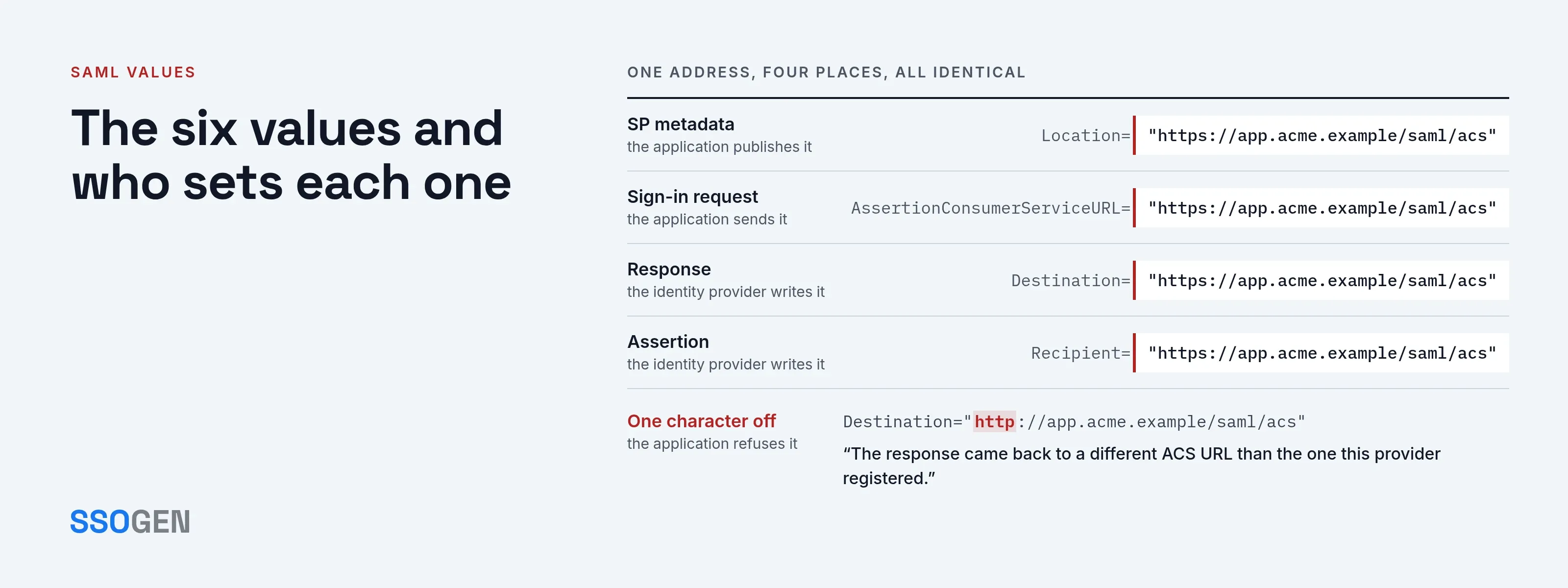
The ACS URL is the endpoint on the application (the service provider) where the identity provider delivers its response after the user signs in. The application defines it and registers it with the identity provider. It is one of six or seven values in a SAML connection that look alike, come from different sides and are compared in different places.
Most failed SAML configurations trace back to one value copied from the wrong side, or differing by one character. This page lists each value, who sets it and exactly where it is compared.
The six values and who sets each one
| Value | What it is | Set by | Where you find it |
|---|---|---|---|
| SP entity ID | The application’s name for itself. Often a URL, but it is an identifier and does not have to resolve. | The application | SP metadata entityID; the Issuer of its sign-in request |
| ACS URL | Where the identity provider delivers the assertion. | The application | SP metadata AssertionConsumerService; sometimes in the request |
| IdP entity ID | The identity provider’s name for itself. | The identity provider | IdP metadata entityID; the Issuer of every assertion |
| SSO URL | Where the application sends the person to sign in. | The identity provider | IdP metadata SingleSignOnService |
| Audience | Who the assertion is addressed to. Normally the SP entity ID. | The identity provider, from what it has on file for the application | Audience inside the assertion |
| Metadata | An XML file describing one side: its entity ID, endpoints and certificates. | Each side publishes its own | A metadata URL or a downloaded file |
Some of these values are not endpoints. An entity ID is an identifier: the metadata specification (section 2.2.1) limits it to 1,024 characters and uses it as the unique identifier of a SAML entity.
It often looks like https://app.acme.example/saml/metadata, which suggests a page you can open, but it does not have to resolve.
The OASIS element behind each value, and where it is compared
The names below come straight from the SAML 2.0 Core and Metadata specifications (both read 2026-10-11).
| Value | OASIS element or attribute | Specification | Compared by | Against |
|---|---|---|---|---|
| ACS URL (registered) | AssertionConsumerService, attribute Location, inside SPSSODescriptor |
Metadata 2.4.4 | The identity provider | The AssertionConsumerServiceURL in the request |
| ACS URL (requested) | AssertionConsumerServiceURL attribute of AuthnRequest |
Core 3.4.1 | The identity provider | Its registered copy: the spec says the responder must make sure the value is associated with the requester, and names metadata as one way |
| SP entity ID | EntityDescriptor, attribute entityID (required) |
Metadata 2.3.2 | The identity provider | The Issuer of the incoming request |
| IdP entity ID | EntityDescriptor, attribute entityID; in messages, Issuer |
Metadata 2.3.2; Core 2.2.5 | The application | The Issuer of the response and assertion |
| SSO URL | SingleSignOnService, attribute Location, inside IDPSSODescriptor |
Metadata 2.4.3 | The browser follows it | Nothing is compared; a wrong value sends the person to the wrong place |
| Audience | Audience inside AudienceRestriction |
Core 2.5.1.4 | The application | Its own entity ID |
| Destination | Destination attribute of Response |
Core 3.2.2 | The application | The URL where the message was actually received |
| Recipient | Recipient attribute of SubjectConfirmationData |
Core 2.4.1.2 | The application | The ACS URL it expects |
The specification sets these rules:
- Destination: if present, the actual recipient must check that it identifies the location where the message was received, and must discard the response if it does not.
- Audience: the condition is valid only if the relying party is a member of one or more of the audiences listed.
- Recipient: the value names the entity or location where the assertion can be presented. One use is to prevent an intermediary from redirecting it elsewhere.
The ACS URL therefore appears in four places that must agree: the SP metadata, the request, Destination and Recipient. The entity ID appears in three: the SP metadata, the request Issuer and Audience.
What the metadata looks like
Metadata removes manual entry: one import fills in the entity ID, the endpoints and the certificate together. These skeletons use placeholder values for a fictional Acme application and are not working files.
Service provider metadata, published by the application:
<EntityDescriptor xmlns="urn:oasis:names:tc:SAML:2.0:metadata" entityID="https://app.acme.example/saml/metadata"> <SPSSODescriptor protocolSupportEnumeration="urn:oasis:names:tc:SAML:2.0:protocol"> <KeyDescriptor use="signing"> <!-- the application's certificate, if it signs requests --> </KeyDescriptor> <AssertionConsumerService index="0" isDefault="true" Binding="urn:oasis:names:tc:SAML:2.0:bindings:HTTP-POST" Location="https://app.acme.example/saml/acs"/> </SPSSODescriptor></EntityDescriptor>Identity provider metadata, published by the identity provider:
<EntityDescriptor xmlns="urn:oasis:names:tc:SAML:2.0:metadata" entityID="https://sso.acme.example/saml/idp"> <IDPSSODescriptor protocolSupportEnumeration="urn:oasis:names:tc:SAML:2.0:protocol"> <KeyDescriptor use="signing"> <!-- the certificate that signs assertions --> </KeyDescriptor> <SingleSignOnService Binding="urn:oasis:names:tc:SAML:2.0:bindings:HTTP-Redirect" Location="https://sso.acme.example/saml/idp/sso"/> <SingleSignOnService Binding="urn:oasis:names:tc:SAML:2.0:bindings:HTTP-POST" Location="https://sso.acme.example/saml/idp/sso"/> </IDPSSODescriptor></EntityDescriptor>Two rules in the metadata specification matter here:
- Endpoint selection (section 2.2.3). An indexed endpoint such as
AssertionConsumerServicecarries a requiredindexand an optionalisDefault. When a service provider lists several, the default is the first withisDefault="true"; that is how an identity provider selects one endpoint when several are registered. - Expiry (section 2.3.2). A document published as a root element must carry
validUntilorcacheDuration, so a metadata file that worked last year can be refused today.
To inspect a real file, open it in the SAML metadata checker. It runs in your browser, shows the role, entity ID and endpoints with their bindings, and parses each certificate.
For an application that publishes no metadata, the SAML metadata generator builds a clean file. Both are free and upload nothing.
The same fields under different names
Product screens rarely say “AssertionConsumerService”. Microsoft’s documentation (read 2026-10-11) labels the fields in Entra as follows:
- Application side: Identifier (Entity ID), Reply URL (Assertion Consumer Service URL) and Sign on URL.
- Identity-provider values it returns: Login URL, Microsoft Entra Identifier and Logout URL.
The SSOGEN guide to registering a SAML application notes that screens use labels such as “Entity ID”, “Reply URL”, “Identifier” and “Login URL”. This crosswalk maps them.
| Label you may see | Value it means | Owner |
|---|---|---|
| Identifier, Entity ID, Audience URI, SP Entity ID | SP entity ID | Application |
| Reply URL, ACS URL, Assertion Consumer Service URL, Consumer URL | ACS URL | Application |
| Login URL, SSO URL, Sign-in URL, Single Sign-On Service URL | SSO URL | Identity provider |
| Issuer, IdP Entity ID, Entra Identifier | IdP entity ID | Identity provider |
| Sign on URL (Entra’s application field) | The application’s own login page, used for sign-in started at the application | Application |
The usual mismatches and the error each causes
The SSOGEN SAML tracer and decoder page has a longer table of fields to check, with error text from SSOGEN’s guides. These rows cover the values on this page, with the message SSOGEN shows:
| Mismatch | Typical cause | SSOGEN message |
|---|---|---|
| SP entity ID differs between request and registration | Copied from another environment, or a trailing slash | “No service provider is registered here with that entity ID.” |
| IdP entity ID differs from the metadata | Entered by hand, not imported | “The metadata names a different entity ID than the one entered.” |
Destination is not the ACS URL |
http instead of https, or a different path |
“The response came back to a different ACS URL than the one this provider registered.” |
Recipient is not the ACS URL |
Registered with one address, used with another | “The response was addressed to a different address than this provider’s ACS URL.” |
Audience is not the SP entity ID |
Entity ID typed rather than copied | “The assertion was addressed to a different service provider. Its audience must be this provider’s entity ID.” |
ACS URL not https |
A test address left in | “The assertion consumer service URL must be https.” |
Other vendors word the same faults differently.
Microsoft’s reply URL documentation reports a reply address mismatch in an OpenID Connect or OAuth request as error AADSTS50011 and says redirect URIs are case-sensitive.
That is Microsoft’s rule for its own product, not a SAML rule, yet the practice applies everywhere: compare scheme, host, port, path and case, character for character.
How to find each value in an application that already works
- Open the application’s SAML settings and look for a metadata URL. If one exists, open it in the metadata checker, which lists the entity ID and ACS URL directly.
- If there is no metadata, read the fields using the crosswalk above. Copy values rather than retyping them.
- Capture a real sign-in. In the browser’s Network tab, preserve the log, sign in and find the POST to the ACS URL. Its
SAMLResponsecarriesDestination,Recipient,Audienceand theIssuer; the SAML tracer guides you through the capture and decodes the message. For a redirect to the identity provider, theSAMLRequestholds the SPIssuerand, if sent, theAssertionConsumerServiceURL. - Compare the captured values with what each side has on file, in the order the tracer page lists.
This procedure applies to sign-in started at the application. When the identity provider starts it, there is no request and therefore no requested ACS URL to compare against. SP-initiated vs IdP-initiated SSO covers that difference.
Setting the values in SSOGEN
When SSOGEN is the identity provider, the values split by owner, as the guide to registering a SAML application sets out:
- From the application: SP entity ID, ACS URL and single logout URL.
- From SSOGEN: IdP entity ID, single sign-on URL and signing certificate.
The worked example uses https://sso.acme.example/saml/idp as the IdP entity ID and https://sso.acme.example/saml/idp/sso as the single sign-on URL. The Redirect and POST bindings share that address.
Copy the SP entity ID exactly as the application states it, because SSOGEN refuses a request whose Issuer differs. The ACS URL must be https. Import the IdP metadata address into the application and it fills in the remaining values.
Questions people ask
What does ACS URL stand for?
What is a SAML metadata document?
What is a SAML URL?
How to decode SAML assertion?
Where to go next
- The hub. Start with what an identity provider is.
- The two roles. Read IdP vs SP for the roles these values belong to.
- The request side. SP-initiated vs IdP-initiated SSO explains why it differs.
- Inside the message. A SAML assertion, annotated shows where Audience, Recipient and Destination sit.
- Setup. Follow register a SAML application.
Sources, all read 2026-10-11: SAML 2.0 Core, OASIS (2.2.5, 2.4.1.2, 2.5.1.4, 3.2.2, 3.4.1); SAML 2.0 Metadata, OASIS (2.2.1, 2.2.3, 2.3.2, 2.4.3, 2.4.4); Enable SAML single sign-on for an enterprise application, Microsoft Learn; Redirect URI best practices, Microsoft Learn.