SSOGEN / Learn / SP Initiated SSO vs IdP Initiated SSO: Both Flows, Step by Step
Learn
SP Initiated SSO vs IdP Initiated SSO: Both Flows, Step by Step
SP initiated SSO starts at the application with a request; IdP-initiated sends a response nobody asked for, and InResponseTo shows which one you have.
Updated
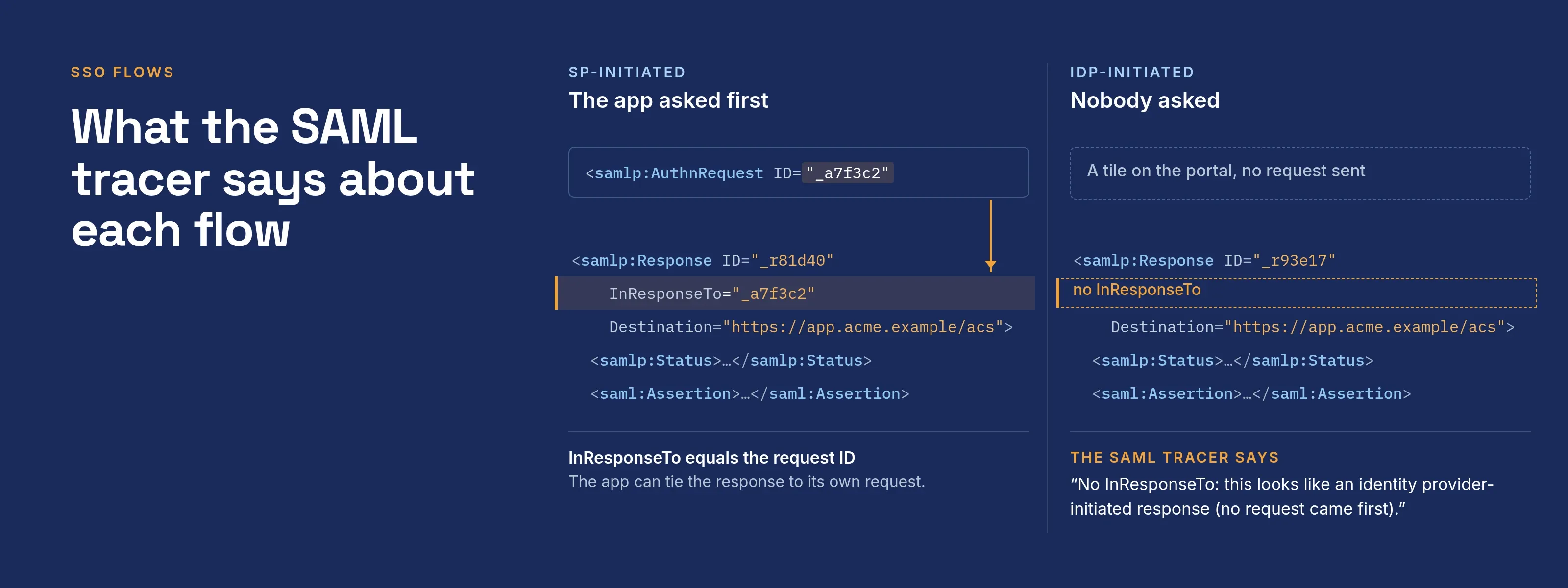
SP initiated SSO starts at the application (the service provider, SP). A person opens the application or a bookmarked link, the application sends an authentication request to the identity provider (IdP), and the IdP answers that request.
IdP-initiated SSO starts at the IdP. The person selects an application tile on a portal, and the IdP posts a SAML response to the application without a prior request.
The SAML profile calls this an unsolicited response, and its one visible difference is that it has no InResponseTo value.
To start an SP-initiated test without the application, build the request with the SAML request builder.
To find out which flow you have, paste the SAML response into the SAML tracer and read the “In response to” field.
For the vocabulary (IdP, SP, ACS URL), start with IdP vs SP and the identity provider hub.
SP-initiated SAML flow, message by message
The steps below follow section 4.1.3 of the SAML 2.0 Profiles specification (Web Browser SSO Profile) and the bindings in the SAML 2.0 Bindings specification.
| Step | Who sends what | Carried by | What to look for |
|---|---|---|---|
| 1. First access | Browser asks the SP for a resource | Ordinary HTTP request | The profile puts no restriction on its form (4.1.3.1). The SP may keep the original address in RelayState. |
| 2. Pick the IdP | SP decides which IdP to use | Implementation-specific | The SP can use IdP discovery or an intermediary (4.1.3.2). |
| 3. Request | SP sends an AuthnRequest with its own ID and an Issuer |
Redirect binding (SAMLRequest query parameter) or POST binding (hidden form field) |
In the Redirect binding the XML is compressed with DEFLATE, base64-encoded, then URL-encoded (3.4.4.1). |
| 4. Sign in | IdP identifies the person | IdP’s own login page or existing session | ForceAuthn="true" obliges a fresh login (4.1.3.4). |
| 5. Response | IdP returns a Response whose InResponseTo equals the request ID |
POST binding to the ACS URL: SAMLResponse and RelayState form fields |
The assertion must be signed with the POST binding (4.1.4.5). |
| 6. Checks and access | SP verifies, then grants or denies | Its own session | Signature, Recipient, NotOnOrAfter, and InResponseTo equal to the ID it sent (4.1.4.3). |
Two RelayState rules are easy to miss:
- If a request carries
RelayState, the IdP must return that exact value with its response (Bindings 3.4.3 and 3.5.3). - The value must not exceed 80 bytes. Third parties can tamper with it, so the spec says to protect its integrity, for example with a checksum or a pseudo-random value.
Make a deep link in RelayState a lookup key on the SP side, not a raw URL the SP redirects to unchecked.
IdP-initiated SAML flow: the unsolicited response
Section 4.1.5 of the profile covers this flow: the IdP “MAY initiate this profile by delivering an unsolicited <Response> message” to the SP. It takes four steps.
- The person signs in to the IdP portal and selects the tile for the application.
- The IdP builds a
Responsewith noInResponseTo, and none in the bearerSubjectConfirmationDataeither. The profile says the attribute must not be present. - The browser posts the response to the SP’s default ACS endpoint, normally the one marked as default in the SP’s metadata.
- The IdP may add a
RelayStatethat names the landing page. Without one, the SP “SHOULD” send the person to a default location it has designated.
The SP still checks the signature, Recipient, Audience and the time window.
The only check it can’t make is the request match: section 4.1.4.3 applies the InResponseTo check “unless the response is unsolicited”, in which case the attribute must be absent.
The ACS URL, entity ID and audience page explains the other checks. For the elements in the assertion itself, see the annotated SAML assertion.
Third-party-initiated login in OIDC
OpenID Connect has no unsolicited token. An OpenID Connect relying party (RP) always sends an authentication request, and the provider answers it. The OIDC equivalent is “third-party initiated login.”
Under OpenID Connect Core, section 4, the third party sends the person to a login initiation endpoint at the RP.
iss. Required: the issuer to use.login_hintandtarget_link_uri. Optional parameters on the call.- Ordinary request. The RP then runs an ordinary authorization request.
- Must check
target_link_uri. The endpoint can’t then be used as an open redirector. - Should defend against clickjacking. The RP should apply this defense.
The RP registers the endpoint. OpenID Connect Dynamic Client Registration defines initiate_login_uri as a URI “using the https scheme that a third party can use to initiate a login by the RP”.
Because the RP builds the request, it still gets a state and nonce to compare. This is SP-initiated login with a different starting point, not a SAML unsolicited response.
What differs for security
An SP checks that the response’s InResponseTo equals the ID of its original request (Profiles 4.1.4.3). An unsolicited response has nothing to compare, so the check is skipped by design.
The major vendors describe the flow as follows:
| Vendor | What it says | Source |
|---|---|---|
| Auth0 | IdP-initiated flows “carry a security risk and are therefore not recommended”. It names login CSRF, where an attacker tricks a legitimate user into logging in with the attacker’s identity, because neither side can verify that the user started the flow. | Read 2026-10-11 at Auth0 IdP-initiated single sign-on |
| Microsoft Learn | Entra ID’s IdP-initiated sign-in is an unsolicited SAML response posted to the app’s ACS URL when the user selects the My Apps tile. App owners should select only the flows their app implements. It doesn’t call the flow unsafe. | Validate a SAML app, read 2026-10-11 |
| Okta | Defines both flows and RelayState without rating them by risk. |
Okta’s SAML concepts page |
The mitigations are the ones the profile already requires (4.1.4.5):
- Signed assertions.
RecipientandAudiencechecks.- A short
NotOnOrAfter. - A record of used assertion IDs. A captured response can’t be replayed.
RelayState has a separate weakness. Bindings 3.5.5.2 warns that nothing protects the pairing of a message with its RelayState, so an attacker can swap values between two valid responses.
When each flow is used
| Situation | Flow | Why |
|---|---|---|
| Person clicks an app tile on the company portal | IdP-initiated | The IdP knows the app and posts to it directly. |
| Person opens a bookmarked app URL, or follows a link in email | SP-initiated | The app sees no session and starts the request. |
| Deep link to a specific record | SP-initiated | The original address is kept in RelayState. |
| App requires every response to match a request | SP-initiated only | The app is set to require a response that matches a request. |
Many portals blur the line. Microsoft’s guidance says that if the Entra application has a Sign on URL, the My Apps tile can redirect to the app’s sign-in page, which makes the sign-in SP-initiated.
To test a true IdP-initiated flow, clear that URL for the test run.
What the SAML tracer says about each flow
The decoder on the SAML tracer page shows an “In response to” row.
- No
InResponseTo. Quick checks raise a warning: “No InResponseTo: this looks like an identity provider-initiated response (no request came first).” InResponseTopresent. The response gets no warning.- A heuristic. It matches Microsoft’s validator advice that a response containing
InResponseTowas SP-initiated. - A note, not an error. The same response can be fully valid for an app that accepts IdP-initiated sign-in.
Troubleshooting by symptom
| Symptom | Likely cause | Check |
|---|---|---|
| The app rejects the sign-in because no request matches the response | The app only accepts SP-initiated login and the portal tile posts an unsolicited response | Open the app’s own sign-in URL, or set the portal tile to use it. |
| Tile works, bookmark fails (or the reverse) | Only one flow is configured on one side | Compare the IdP’s sign-on URL setting and the app’s SSO URL. |
InResponseTo is present when you expected IdP-initiated |
The tile redirected to the app, which sent a request | See the Sign on URL note above. |
| Lands on the home page instead of the deep link | RelayState missing, too long or not returned |
Look for the RelayState field in the POST. It must not exceed 80 bytes. |
| Response goes to the wrong ACS | Several ACS endpoints and the default is not the one expected | Check which AssertionConsumerService is marked default in the SP’s metadata. |
| Fails only on the IdP-initiated path with an audience or recipient error | Values compared are for the wrong ACS | Decode the response and compare Destination, Recipient and Audience. |
How SSOGEN handles these flows
When SSOGEN is the identity provider for a SAML application, it starts a SAML sign-in only when the application sends it a request (register a SAML application).
- My Apps tile. It opens the application’s own SSO sign-in address, which sends the person to SSOGEN with a request.
- Every response. It carries
InResponseTo. - No request. Opening SSOGEN’s single sign-on address without one ends, after sign-in, with “The authentication request could not be read, or was not valid.”
- The fix. Almost always the Launch URL: point it at the application, not at SSOGEN.
Questions people ask
What is the difference between SP-initiated and IdP-initiated SSO?
Is IdP-initiated SSO secure?
What is RelayState in SAML?
Which flow does a My Apps or portal tile use?
Where to go next
- The full picture. Read what SAML is.
- Every field. Read the SAML assertion, annotated.
- How IdPs and SPs fit together. Read the identity provider hub.
- A real response. Decode it with the SAML tracer.
Sources, all read 2026-10-11: SAML 2.0 Profiles, sections 4.1.3, 4.1.4 and 4.1.5; SAML 2.0 Bindings, sections 3.4 and 3.5; OpenID Connect Core 1.0, section 4; OpenID Connect Dynamic Client Registration 1.0; Microsoft Learn: Entra single sign-on SAML protocol; Microsoft Learn: validate a SAML app; Auth0: IdP-initiated SSO; Okta: Understanding SAML.