SSOGEN / Learn / Claude Code SSO and Identity for AI Coding Assistants
Learn
Claude Code SSO and Identity for AI Coding Assistants
Claude Code SSO covers who may use the assistant; tool credentials and MCP access to company systems are two more things to plan separately.
Updated
When a developer points an AI coding assistant at company systems, three identity questions follow, and single sign-on answers only the first:
- Who is allowed to use the assistant at all?
- What credential does the assistant hold when it reads a repository, a ticket system or a database?
- Which tool servers can it reach, and as whom?
Claude Code SSO, as most teams mean it, handles the first question. This page covers all three, based on the vendors’ own documentation, checked on 2026-10-08.
Pattern 1: single sign-on into the assistant’s account
This pattern controls who gets in and who pays. The assistant is tied to an account at its vendor, and your identity provider signs people into that account.
- Claude Code. Anthropic’s authentication documentation lists the paths:
- Claude for Teams or Enterprise, with SSO named among the Teams features.
- Claude Console teams, which can add users in bulk or set up SSO.
- A self-hosted Claude apps gateway: developers sign in with corporate SSO through
/login, and the gateway-issued token is the session’s only credential. - Routes through Amazon Bedrock, Google Cloud or Microsoft Foundry, which authenticate against that provider instead.
- Codex. OpenAI’s authentication documentation says signing in with ChatGPT follows workspace permissions, and users who sign in through SSO should have MFA enforced by their organization’s SSO administrator. The alternative is an API key.
- Enforcing the choice. Both vendors let administrators lock the route: Claude Code with the managed settings
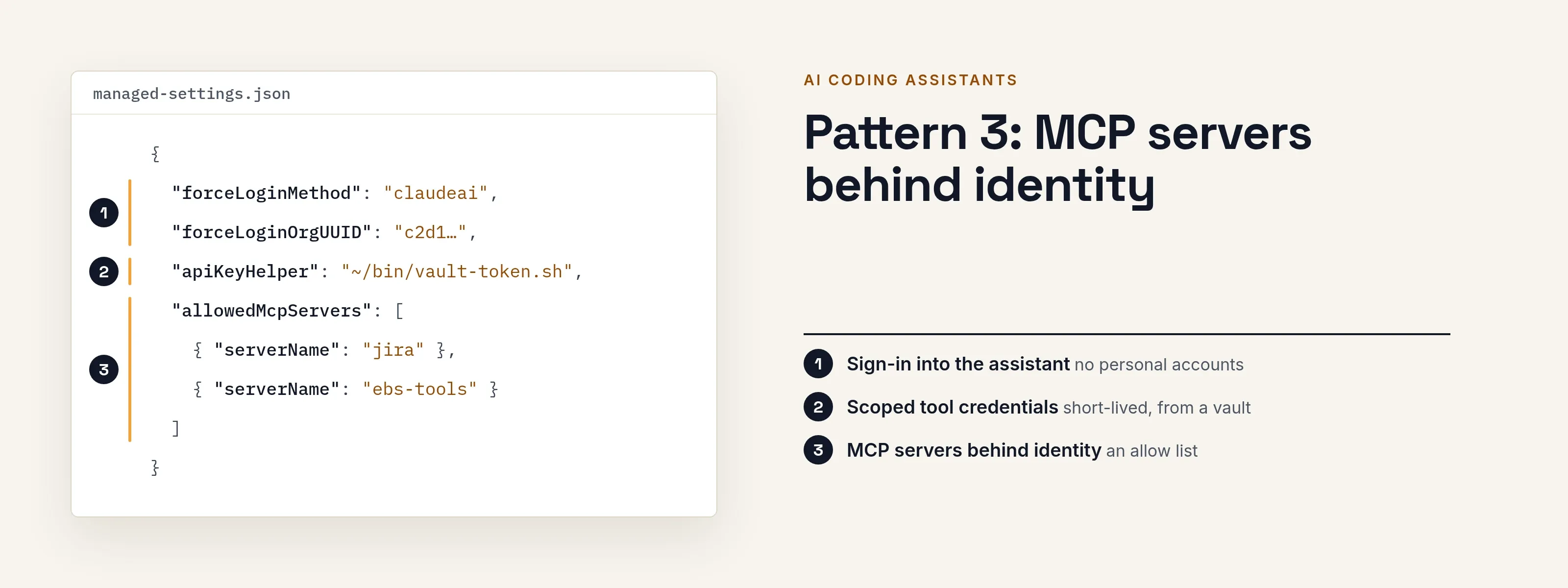
forceLoginMethodandforceLoginOrgUUID, Codex withforced_login_methodandforced_chatgpt_workspace_id. Without them, a developer can sign in with a personal account that your SSO never sees.
Pattern 1 gives you the sign-in event and offboarding: remove the person at your identity provider and they lose the seat. It says nothing about what the assistant can do inside your systems.
Pattern 2: scoped credentials for tool access
Once signed in, the assistant uses whatever credentials it can find, and most incidents start here. Give it credentials that are narrow, owned and short-lived.
| Credential | Who it identifies | How long it lasts | What to watch |
|---|---|---|---|
| Developer’s own login from SSO | The developer | Until it expires or is revoked | Anything the assistant can run, the developer’s rights allow |
ANTHROPIC_API_KEY or a Codex API key |
The key, billed to an account | Until revoked | A static secret. Claude Code uses a key from this variable once approved, ahead of a subscription login |
apiKeyHelper script (Claude Code) |
Whatever the script fetches | As rotated | Anthropic describes it for dynamic or rotating credentials such as short-lived tokens from a vault |
claude setup-token token |
The subscription | One year, per Anthropic | Meant for CI where a browser login is unavailable. Treat it like a password |
Codex auth.json |
The login | Cached locally | OpenAI says to treat ~/.codex/auth.json like a password because it holds access tokens |
| A personal access token in an MCP header | The person who made it | As configured | Anthropic’s MCP docs show static Authorization: Bearer headers as one option. The token is only as narrow as its scopes |
Two rules follow from the table:
- Don’t let the assistant hold a human’s broad token when a narrow one will do.
- Don’t use a shared key for a pipeline where an audit will ask who acted.
The model credentials in this table reach the vendor’s models. Credentials for your own systems are separate, and those are the ones to scope.
Pattern 3: MCP servers behind identity
The Model Context Protocol is how an assistant calls tools: your ticket system, your database, your ERP. Each server needs to know who is calling.
- OAuth to the server. Claude Code’s MCP documentation (read 2026-10-09) describes OAuth 2.0 for remote servers. Run
/mcporclaude mcp login <name>and finish in the browser. Tokens refresh automatically and are stored in the system keychain or a credentials file. The server’soauthblock can limit the requested scopes. - Headers from a helper. For servers with other schemes, such as short-lived tokens or Kerberos, the
headersHelpersetting runs a command and sends the headers it returns. Claude Code runs it fresh on each connection, with a 10-second timeout, and doesn’t cache the result. - Organization control. Organizations can supply servers through
managed-mcp.jsonormanagedMcpServers, and set allow and deny lists withallowedMcpServersanddeniedMcpServers. - GitHub Copilot. GitHub’s MCP documentation describes OAuth sign-in to a server and bearer-token headers. It also names an organization and enterprise policy, “MCP servers in Copilot,” which is disabled by default and applies to Copilot Business and Copilot Enterprise.
The server side matters as much. If an MCP server accepts any caller with a key, the assistant’s sign-in protects nothing. The server, or a gateway in front of it, must verify who is calling and for which person.
What to check before you roll it out
- Can you force the sign-in route? If not, personal accounts will appear.
- Where do tool credentials live? Search developer machines and CI for static keys that outlive the person.
- Does each MCP server verify the caller? Record how, and whether it knows the person or only the assistant.
- Which actions need a human in the moment? Reading code and merging to production are different risks.
- Can you stop one assistant or one token fast, and prove afterward who used it?
How SSOGEN covers the tool and MCP patterns
SSOGEN covers the second and third patterns for the systems on your own network:
- An assistant or agent that calls your applications is registered as a non-human identity with named owners and an expiry. It has no password, and its tokens last minutes and are bound to its key.
- When it works for a developer, the developer approves it first and can withdraw that approval. Sensitive scopes need approval every time.
- The MCP Gateway in the SSOGEN Gateway checks each tool call against the granted scopes and records the decision.
Two requirements apply to assistants directly:
- DPoP. SSOGEN accepts an MCP client only if it proves it holds a key with every request.
- PAR. A client acting for a person must push its authorization request first.
- Registration. An administrator registers every agent, and a plain bearer token is refused.
Check your assistant’s current documentation for DPoP and PAR before you plan a rollout. The setup guide has the details, and the MCP Gateway and AI agent identity pages explain the model.
Questions people ask
Does SSO for Claude Code also protect my internal systems?
No. It controls who can use the assistant. The systems the assistant calls need their own credentials and checks, as in patterns 2 and 3.
Can I stop developers from using a personal account?
Yes. Both Claude Code and Codex document managed settings that restrict the login method or organization. Without them, a personal login works.
Is a long-lived token for CI a problem?
Yes, it’s a standing secret. Anthropic says claude setup-token makes a one-year token for environments without a browser. Store it as a secret, limit what the job can reach, and rotate it.
Should an MCP server trust the assistant’s sign-in?
No. Signing in to the assistant doesn’t tell the server who’s calling. The server or a gateway must verify the caller on every request.
Where to go next
- MCP. Read how MCP authentication works.
- Security. See why agentic AI security starts with identity.
- Identity. See how non-human identity is managed.
- Mechanisms. DPoP and OAuth token exchange explain the mechanisms behind key-bound tokens.
Sources, all read 2026-10-08: Claude Code authentication, Codex authentication, GitHub Copilot MCP documentation.