SSOGEN / Learn / Password Manager vs SSO: What Each One Does and When to Use Which
Learn
Password Manager vs SSO: What Each One Does and When to Use Which
A password manager stores and fills a separate password for each site, while SSO has one identity provider vouch for you, so no application password exists to steal.
Updated
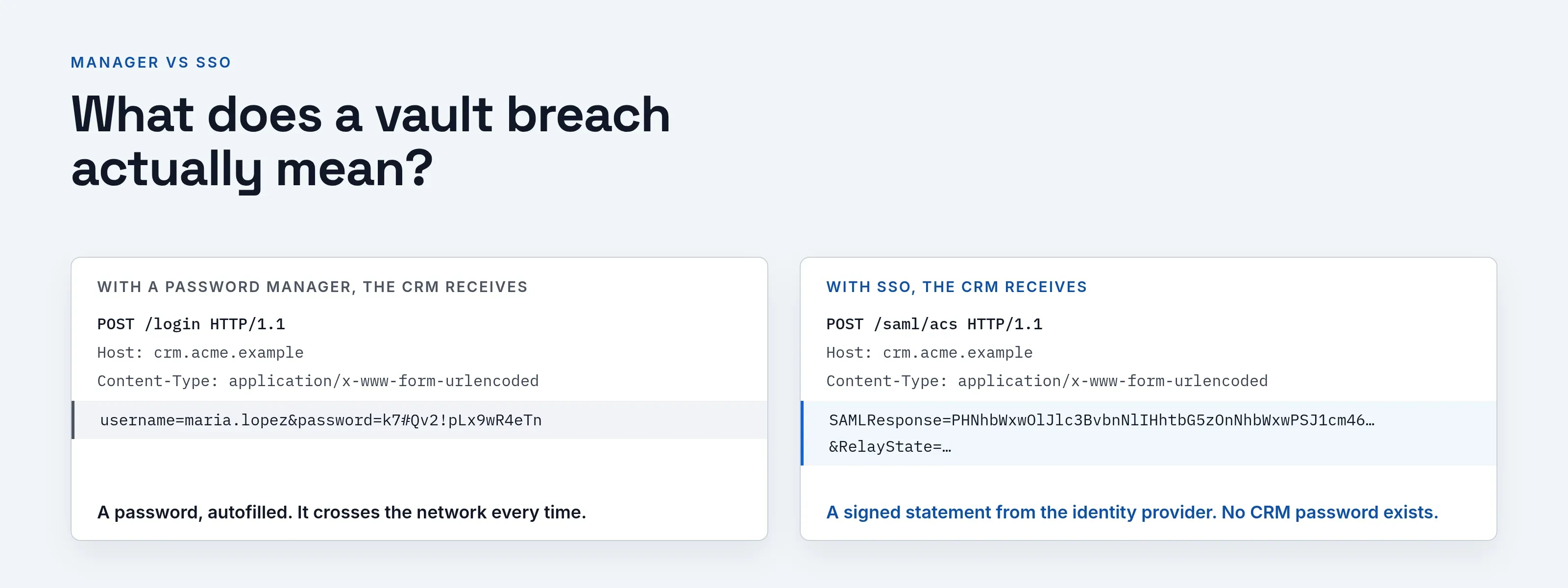
Password manager vs SSO is a question about where the password lives. A password manager is a vault: it stores a separate password for every site and fills it in at sign-in. The site still receives a password, so the secret crosses the network every time.
With single sign-on (SSO), you authenticate once to an identity provider, and each application receives a signed statement that you did. There is no application password to type or steal.
The two solve different parts of the problem, so many organizations run both. This page covers when each fits, the risks of each, and what a vault breach does and does not mean.
What does a password manager store, and what does an identity provider do?
Password manager. CISA calls it an easy-to-use program that generates, stores and even fills in all your passwords, warns you about weak or re-used ones, and leaves you remembering one strong password, the manager’s own (CISA, Use Strong Passwords, page undated, read 2026-10-09).
Replay. The key word is replay: the manager holds the secret and presents it to each site on your behalf.
Identity provider. It works the opposite way. In NIST SP 800-63C (Revision 4, page dated 26 Aug 2025, read 2026-10-09), federation lets a person get services from multiple relying parties without holding separate authenticators at each one.
Assertion. The application trusts the identity provider’s assertion, not a password you typed into it.
Our pages on what SSO is and how it works show the flow.
Where the password lives
Password manager
A vault that replays passwords
- Stores one password per site in an encrypted vault
- The application receives a password, typed or autofilled
- Works with almost any site with a password field
- A copied vault is not an opened vault; the master password matters
Single sign-on
An identity provider vouches for you
- Holds one identity; the application stores no password for you
- The application receives a signed assertion or token
- Needs applications that support SAML, OpenID Connect or similar
- A taken-over provider account reaches whatever it can open
| Password manager | SSO | |
|---|---|---|
| What is stored | One password per site, in an encrypted vault | One identity at the identity provider; the application stores no password for you |
| What the application receives | A password, typed or autofilled | A signed assertion or token |
| Who controls it | You, or your company if it runs a business vault | The organization that runs the identity provider |
| Works with | Almost any site with a password field | Applications that support SAML, OpenID Connect or a similar protocol |
| Leaving the company | Shared items must be rotated by hand | Remove one account and access to every connected application ends |
| New password per site | Yes, generated and remembered by the vault | No password per site exists |
When does each one fit?
Consider a fictional company, Acme Corp (acme.example), and a fictional employee, Maria Lopez, who signs in to dozens of systems. Her sign-ins sort as follows.
| Sign-in | Better fit | Why |
|---|---|---|
| Payroll, ticketing, the CRM (all support SAML or OIDC) | SSO | One place to enforce a second step and to switch access off |
| An old internal invoice app with only a login form | SSO with form fill, or a vault | The app cannot speak SAML; something has to type its password |
| A supplier portal Acme does not manage | Password manager | Acme has no identity provider relationship with it |
| Maria’s personal email, bank and shopping | Password manager | Not company apps; a company identity provider should not hold them |
| A shared account for a vendor dashboard | Vault with sharing, then replace it | Shared passwords are the hardest to rotate when staff leave |
As a rule of thumb:
- Organization owns the relationship. Use SSO.
- You own it alone, or the application cannot join an identity provider. Use a password manager.
Our page on SSO benefits and risks covers the company side.
Is a password manager safe?
Yes, it is safer than reusing passwords, and the sources agree. CISA recommends using a password manager (Use Strong Passwords, above).
NIST SP 800-63B-4, section 3.1.1.2 (Revision 4, page dated 26 Aug 2025, read 2026-10-09), says services must allow password managers and autofill, and should permit paste when autofill APIs are not available.
It also says services must not impose other composition rules or require periodic password changes; a change is forced only on evidence of compromise.
Reused passwords are the fuel for credential stuffing.
“Safe” does not mean “risk free”. The main risks are below.
What are the risks of a password manager?
The main downside is concentration: one vault holds many secrets, so the master password and the device that opens the vault matter most.
The other risks are a lost master password, personal vaults the company cannot see, and the fact that the site still receives a password.
- One vault holds many secrets. If an attacker gets your master password and any second step, they get the vault. CISA advises a long, memorable passphrase for the manager’s password, and separately, MFA on your important accounts (Use Strong Passwords, above).
- A phished or malware-infected device. A vault is decrypted on your device while it is open, so malware there can matter more than the vault’s cryptography. The ICO’s account of the LastPass case (below) turned on exactly this: a keylogger on a personal device captured a master password.
- Lost master password. A vendor that cannot read your vault may not be able to reset it. Check the recovery option before you need it.
- Shared and unmanaged use. A staff member’s personal vault holds work passwords the company cannot see or rotate.
- The site still gets a password. A password manager does not stop a lookalike site from collecting a password you were tricked into entering. Phishing-resistant sign-in methods do; see phishing-resistant MFA and passkeys compared with passwords.
What does a vault breach actually mean?
Vendors describe a “zero-knowledge” design: the vault is encrypted on your device with a key derived from the master password, so the vendor stores only ciphertext and never holds the master password.
If that holds, stealing the vendor’s storage gives an attacker encrypted files, and the remaining protection is how hard the master password is to guess.
The best-documented case is LastPass in 2022. The sequence below is as the company and a regulator described it.
| Date | What was published | Source |
|---|---|---|
| 25 Aug 2022 | LastPass announced an incident in one of its development environments in which source code and proprietary technical information were taken, with no indication at the time that master passwords, personal information or vault data were exposed. LastPass later revised that assessment | UCLA security office summary, page dated 26 Aug 2022, read 2026-10-09; LastPass notice of 25 Aug 2022, updated since, read 2026-10-09 |
| 22 Dec 2022 | LastPass said that cloud backup storage had been accessed and customer vault data copied. Website URLs were not encrypted. Usernames, passwords, secure notes and form-filled data were, with 256-bit AES, and the master password is “never known to LastPass” | LastPass notice, read 2026-10-09 |
| 11 Dec 2025 | The UK Information Commissioner’s Office announced a £1.2 million fine. It described the two August 2022 incidents, said a keylogger on a senior employee’s personal device captured a master password and that multi-factor authentication was bypassed with a trusted-device cookie, and reported no evidence that customer passwords were decrypted | ICO announcement, read 2026-10-09 |
Two conclusions follow:
- A copied vault is not an opened vault. What the attacker can do depends on master password strength and the encryption settings.
- Unencrypted fields such as site addresses still tell an attacker which accounts you hold, which helps targeted phishing.
This page does not judge the case; it reports what the notices and the regulator said.
If a vault incident affects you, change the master password first, then change the passwords for your most valuable accounts, and turn on a second step for each.
Which password manager is safest?
No source cited here ranks password managers by safety, so this page does not either. “Has never been hacked” is a claim nobody can verify from outside, and it describes the past, not the design.
When choosing one:
- read the vendor’s security documentation and any independent audit it publishes;
- check that a second step protects the vault;
- prefer one whose recovery process you understand.
This page does not name a product.
What is the biggest disadvantage of SSO?
Concentration: one identity provider guards every connected application, so an attacker who takes over an account there reaches whatever that account can open.
NIST’s federation guidance (SP 800-63C, above) treats attacks on assertions and on identity providers as threats to design against.
The mitigations are:
- Strong sign-in. A second step at the provider that cannot be phished.
- Short sessions. For sensitive applications.
- Monitoring. Alerts and an audit log.
The other limits are practical:
- Protocol support. An application must support the protocol.
- Availability. If the identity provider is down, sign-ins stop.
Our SSO benefits and risks page covers both sides, and SSO versus MFA clarifies a common confusion.
Do security experts recommend password managers?
CISA does, for individuals, and NIST requires that password fields accept them (sources above). Neither says a password manager replaces SSO or a second step; CISA lists MFA as a separate action beside the manager.
Why do organizations use both?
They cover different ground.
- SSO. Handles the applications that can join it and removes the password from them.
- Password manager. Covers the rest: sites the company does not control, legacy tools without SAML, and personal accounts.
A sensible split at Acme:
- Put every application that supports SAML or OIDC behind the company identity provider, with a second step at that sign-in.
- Give employees a business password manager for applications that cannot join, so unmanaged passwords are at least unique and visible to the company.
- Keep personal accounts out of the company identity provider and the company vault.
- When someone leaves, disable the identity provider account first, then rotate any shared vault items.
A message you can send to staff:
Subject: Where your passwords go
Company applications sign you in through Acme single sign-on, so you won’t type a password for them.
For any site that does ask for a password, use the company password manager and let it generate the password. Do not reuse your single sign-on password anywhere else, and do not store it in the manager if you can avoid it.
If you are unsure which category a site falls into, ask help@acme.example.
What does SSOGEN do for applications that only take a password?
SSOGEN is an identity provider, so applications that support SSO protocols receive an assertion, not a password.
For internal applications that accept only a typed username and password, the SSOGEN Gateway’s App Proxy provides form fill SSO: the user signs in to SSOGEN once, and the App Proxy enters the application password for them.
- Stored encrypted. The passwords sit in the secret vault and cannot be read back (per-person form fill guide).
- Saved with consent. A user saves one only after agreeing and confirming a second step.
- Never shown again. Not even to that user (My Account: app passwords).
Form fill covers applications published through the App Proxy; for websites outside your company, a general-purpose password manager remains the right tool.
Where to go next
Related pages: what SSO is, SSO benefits and risks, SSO versus MFA, credential stuffing, NIST password guidelines or app passwords, or return to the Learn hub.
Sources, all read 2026-10-09: CISA, NIST SP 800-63B-4 and 800-63C Revision 4, LastPass’s notices, the UCLA security office, the UK ICO and The Register.
Product names belong to their owners; SSOGEN is not affiliated with them.