SSOGEN / Learn / Passkey vs Password: Seven Attacks on One Employee's Day
Learn
Passkey vs Password: Seven Attacks on One Employee's Day
A passkey beats a password against phishing, reuse and a stolen server database because there is no shared secret to type, steal or crack.
Updated
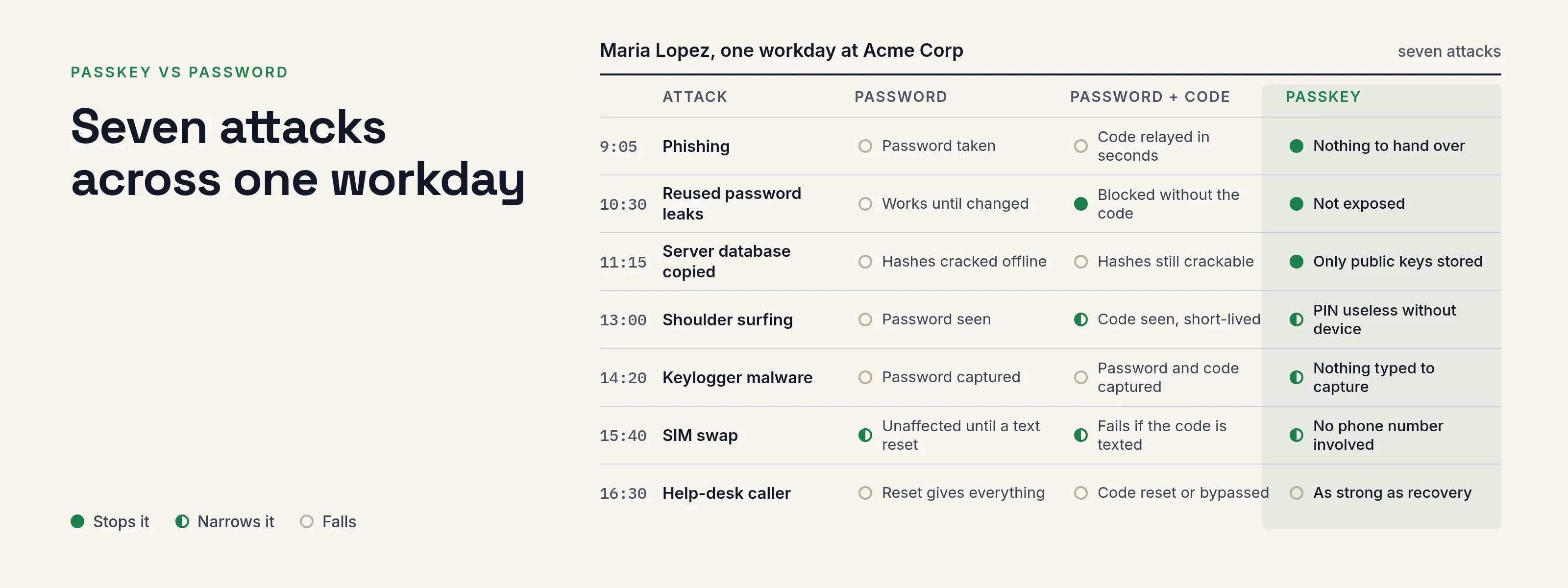
Passkey vs password, in short: a passkey beats a password against phishing, password reuse and a stolen server database, because there is no shared secret to type, steal or crack.
It does not defeat every attack. A stolen laptop with a weak device PIN, malware inside a live session or a poorly controlled help desk can still let an attacker in.
The walk-through below follows Maria Lopez, a fictional employee at Acme Corp, through seven attacks and shows how each sign-in method holds up. For how a passkey works internally, see what a passkey is.
Seven attacks across one workday
Two terms are used in the table:
- “Password plus code”. A password and a six-digit code from an authenticator app or a text message.
- “Passkey”. A synced or hardware-bound passkey approved with a fingerprint, face, PIN or security key.
The last column cites the sources: NIST SP 800-63B-4 and the W3C Web Authentication spec, Level 3, both read on 2026-10-08.
| Attack on Maria | Password alone | Password plus code | Passkey | What the sources say |
|---|---|---|---|---|
| 1. Phishing. 9:05, an email sends her to a look-alike Acme sign-in page. | Attacker gets the password. | Attacker relays the password and the live code to the real site within seconds. | Nothing usable to hand over. The browser offers the passkey only to the site it was created for. | NIST 3.2.5 says phishing resistance needs cryptographic binding to the verifier, and treats typed one-time codes as not phishing-resistant. WebAuthn 13.4.9 has the server validate the origin. |
| 2. Credential stuffing. 10:30, a hobby forum she joined in 2019 leaks. She used the same password at work. | Works until she changes it. | Blocked unless the attacker also has the code. | Not exposed. Each site gets its own key pair, and the forum never held anything that signs in to Acme. | WebAuthn scopes every credential to one relying party (section 4, “Public Key Credential Source”). |
| 3. Server-side breach. 11:15, an attacker copies Acme’s identity database. | Hashes are cracked offline; weak passwords fall first. | Hashes still crackable, and authenticator-app seeds the server holds are a secret too. | Only public keys are stored. They cannot sign in. | NIST 3.1.1.2 requires salted, hashed password storage. WebAuthn 7.1 and 7.2: the server keeps and checks against the public key. |
| 4. Shoulder surfing. 13:00, a stranger watches her type at the airport. | Password seen. | Password seen, code seen but short-lived. | She touches a sensor or enters a device PIN. The PIN is useless without the device. | Not a spec topic. This row is our reasoning from how the flow works: the PIN is checked locally and never sent. |
| 5. Keylogger malware. 14:20, a trojan records keystrokes. | Password captured. | Password and the current code captured, usable inside the code’s window. | Nothing typed to capture. Malware that already controls the session can still ride it. | NIST 3.2.8 requires explicit authentication intent, which limits silent use of a key. It does not stop malware that sits in a signed-in browser. |
| 6. SIM swap. 15:40, an attacker moves her phone number to their SIM. | Unaffected, until a text reset exists. | Fails if the code is texted. Fine if the code comes from an app. | No phone number involved. | NIST 3.1.3.3 and 3.2.9 restrict PSTN delivery of codes and ask for alternatives to be offered. |
| 7. Help-desk social engineering. 16:30, a caller pretends to be Maria and asks for a reset. | A password reset gives the attacker everything. | The caller asks to reset or bypass the code. | Same weak point: the recovery path. A strong passkey with a weak reset is as strong as the reset. | NIST section 4.2 covers recovery; it must be usable, so it is the part most worth designing on purpose. |
In summary, passkeys close off the first three attacks in practice and narrow the next three.
The seventh is exactly as strong as your recovery process. Rows 4 and 5 are partly our own analysis, as marked; the specifications do not state them.
When you still need a password
Plan to keep some passwords during the transition. These are the common reasons:
| Situation | Why a password stays | What to do |
|---|---|---|
| A device with no passkey support, such as an old kiosk browser | Passkeys need a supporting browser and a device PIN, fingerprint or face | Keep a password plus authenticator code for that app only |
| A shared workstation | Passkeys are tied to a person’s device or security key | Give people a security key, or keep password plus code |
| Account recovery | A person who lost every device needs some route in | Recovery codes, then a checked help-desk reset |
| A legacy application that only knows passwords | The application cannot take a passkey itself | Put it behind SSO so the person signs in once, at the identity provider |
| New hires on day one | They have no passkey yet | Start with password and a second factor, then add the passkey |
Passkey vs 2FA vs security key
These three are not levels on one scale: 2FA is a pattern, a passkey is a credential and a security key is a device.
Two-factor authentication (2FA). Two kinds of evidence, usually a password and a code. It limits the damage of a stolen password, but typed codes can still be phished (row 1). MFA types lists the options and how they rank.
A passkey. A credential, not a pattern. One approval covers something you have (device or key) and something you are or know (fingerprint, face or PIN). It cannot be typed into a fake page and replaces both password and code.
A security key. A physical device that can hold a passkey: one storage option alongside a phone or laptop.
Choose a key when:
- the passkey must not sync to a cloud account;
- employees do not all use one phone brand;
- a rule or regulation requires hardware.
NIST 800-63B (section 2.3) says syncable authenticators must not be used at its highest assurance level, AAL3, which requires a private key that cannot be exported.
Moving an organization to passkeys
Policies set how strong a sign-in must be, and single sign-on applies them to every application behind the identity provider. A sensible rollout order:
- Enroll everyone in a second factor first, with recovery codes, so that raising a policy never locks anyone out.
- Check that email notices work, so users are notified when a sign-in method is added or removed.
- Let people add a passkey and offer passkey sign-in on the policy that governs your main applications.
- Test before you enforce. Choose a pilot user and application, and check what the policy would require.
- Pilot one sensitive application. Require a passkey or security key for that application alone, and move a small team onto it.
- Turn off the weak second steps such as text message and email once the pilot is stable. NIST does not accept email as a second factor and restricts text messages.
- Widen, and keep recovery. Move more applications over and leave recovery codes on. Document your help-desk identity check before anyone resets a user’s methods.
Keep at least two administrators who can meet the required strength, so that a policy change cannot lock everyone out.
A sign-in method added during a session should not be able to confirm that same session. Otherwise someone who finds an unattended session could approve their own new passkey. See step-up authentication.
The product details are in the multi-factor authentication guide and on passkey authentication.
Questions people ask
Is a passkey more secure than a password?
Against phishing, reuse and database theft, yes: nothing shared is typed or stored. It does not fix a weak recovery process.
Is a passkey the same as two-factor authentication?
One approval carries both a possession check and a local check, so it covers the same ground.
It is a single credential, and many policies treat it separately from “password plus code”.
Do I need a security key if I have a passkey?
No. A key is one place to store a passkey, and the better choice when the passkey must not sync.
Can I use a passkey and a password together?
Yes. Many organizations keep both during the transition, with the password as a fallback until recovery is proven.
Where to go next
- Mechanics. Read what is a passkey.
- Sign-in. See the passkey authentication page.
- Full list. Compare MFA software with passkeys.
- Exact screens. Follow the multi-factor authentication guide and creating a policy.
- Adoption. Who moved first, and what stalled the rest, is in passkeys in the enterprise.
- Failure modes. For the full list of ways a passkey can still fail, read are passkeys safe.
- Phishing. A passkey stops a relayed sign-in; see AiTM phishing.
- SIM swap. A passkey does not travel over the phone network, so a SIM swap gives an attacker nothing.
- Reuse. There is no reused password for credential stuffing to replay.
Sources, all read 2026-10-09: NIST SP 800-63B-4, W3C Web Authentication Level 3.