SSOGEN / Learn / Passkeys for Enterprise: Why Organizations Wait, and What Makes a Rollout Work
Learn
Passkeys for Enterprise: Why Organizations Wait, and What Makes a Rollout Work
Passkeys for enterprise are held back by legacy applications, account recovery, shared devices and the choice between synced and device-bound passkeys, not by doubts about security.
Updated
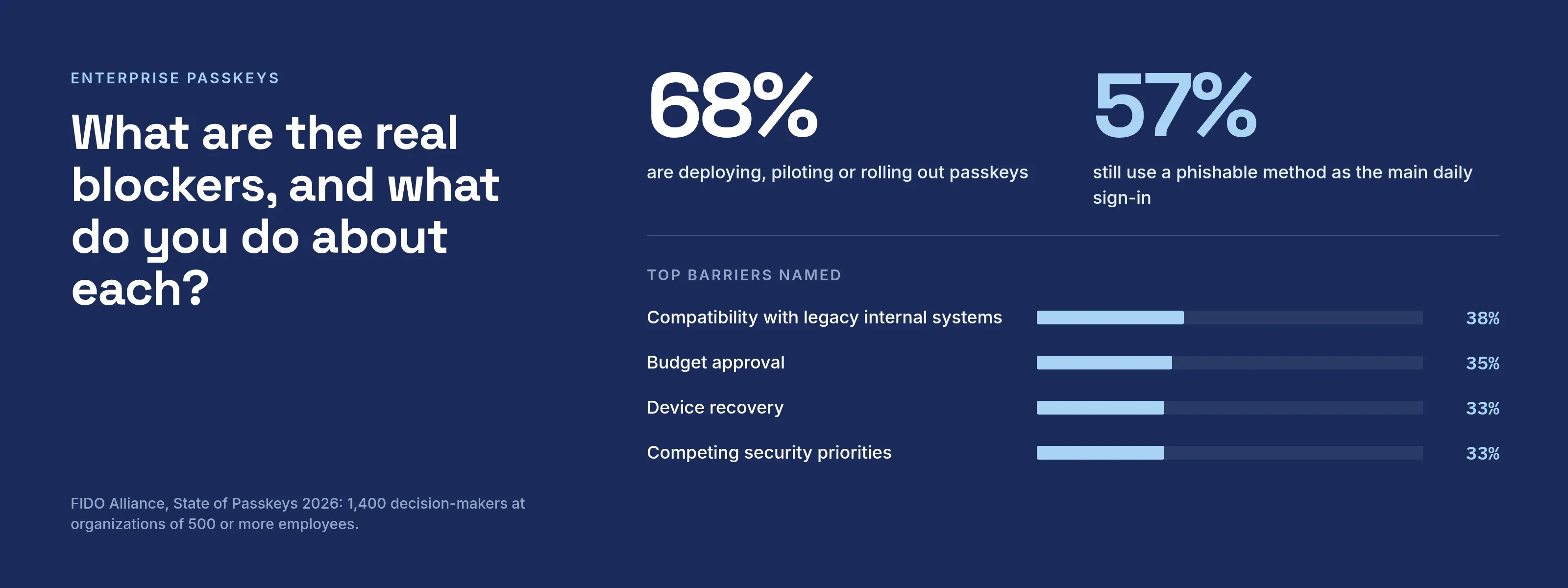
Passkeys for enterprise are FIDO credentials that employees use instead of passwords, either synced through a provider account or bound to one device. Doubts about their security are not what holds adoption back.
The State of Passkeys 2026 (read 2026-10-08) is a FIDO Alliance survey of 1,400 decision-makers at organizations with 500 or more employees, interviewed in April 2026.
- 68%. Were deploying, piloting or rolling out passkeys.
- 57%. Still used a phishable method as the main daily sign-in.
Deploying passkeys is not the same as retiring passwords. The sections below cover the blockers and what the early movers did.
What is the difference between synced and device-bound passkeys?
The FIDO Alliance (read 2026-10-08) defines two types:
- Synced passkeys are copied across a user’s devices by a credential manager, such as iCloud Keychain or Google Password Manager.
- Device-bound passkeys stay on one device; security keys are in this group.
The W3C WebAuthn Level 3 Recommendation (section 6.1.3, dated 25 August 2026, read 2026-10-09) tracks the difference with two flags:
- Backup eligibility. Fixed when the credential is created.
- Backup state. It can change.
Synced and device-bound passkeys
Synced passkey
Copied across devices by a credential manager
- Encrypted and stored with a cloud passkey provider
- Examples: Apple iCloud Keychain, Google Password Manager
- Lost device: other devices still hold the passkey
- Attestation: not supported, per Microsoft
- NIST SP 800-63B-4: usable up to AAL2
Device-bound passkey
Stays on one device, security keys included
- On one device, never leaves it
- Examples: FIDO2 security keys, Microsoft Authenticator
- Lost device: register another passkey first, or recover through an administrator
- Attestation: can be enforced
- NIST SP 800-63B-4: needed at AAL3
| Synced passkey | Device-bound passkey | |
|---|---|---|
| Where the private key lives | Encrypted and stored with a cloud passkey provider, usable on other devices signed in to that provider | On one device, never leaves it |
| Examples (Microsoft’s list) | Apple iCloud Keychain, Google Password Manager | FIDO2 security keys, Microsoft Authenticator |
| Lost device | Other devices still hold the passkey | Register another passkey first, or recover through an administrator |
| Attestation | Not supported, per Microsoft | Can be enforced |
| NIST SP 800-63B-4 | Usable up to AAL2 | Needed at AAL3 |
- Attestation. Microsoft’s passkey documentation (read 2026-10-08) says that with attestation on in Entra ID, only device-bound passkeys are allowed, because synced passkeys provide no device provenance.
- AAL3. NIST SP 800-63B-4 (section 2.3.2, dated 26 August 2025, read 2026-10-09) says syncable authenticators must not be used at AAL3, because the private key can be exported.
- Who uses which. Microsoft recommends security keys for regulated industries and privileged users, and synced passkeys for most other users.
- Sync encryption. Apple’s support article (published September 16, 2024, read 2026-10-08) says iCloud Keychain syncs end to end encrypted, with keys Apple does not know.
- Mix. Most organizations use both types. In FIDO’s 2026 survey, 50% of deployers use a mix, 23% mainly synced and 22% mainly device-bound.
Why are organizations not adopting passkeys?
Two FIDO surveys from different years give the same answer. In 2026, organizations that had not gone fully passwordless gave three top reasons, tied at 16%:
- Enough for now. Passwords plus MFA is enough for now.
- Legacy. Legacy compatibility.
- Recovery. Account recovery.
Across all 1,400 respondents, the top barrier was compatibility with legacy internal systems (38%), followed by budget approval (35%), device recovery (33%) and competing security priorities (33%).
The 2025 survey covered 400 US and UK decision-makers (September 2024, margin of error 4.9 points, underwritten by Axiad, HID and Thales; FIDO Alliance release, read 2026-10-08).
Non-adopters cited complexity (43%), cost (33%) and unclear implementation (29%).
These are respondents’ statements, not measured outcomes.
What are the real blockers, and what do you do about each?
| Blocker | Why it happens | What to do first | What the sources say |
|---|---|---|---|
| Legacy and non-web applications | The application checks a password itself and cannot call WebAuthn | Put the sign-in in front of the application at an identity provider or gateway; leave the app alone | Legacy compatibility: 38% rated it a barrier (FIDO 2026) |
| Shared and service accounts | A passkey needs the person present to approve it, per Microsoft; a batch job or kiosk login has no such person | Keep these on other credentials, and give each human their own account | Shared devices such as kiosks: 39% of those with technical barriers (FIDO 2026) |
| Recovery and lost devices | A device-bound key is gone with the device | Register two credentials per person, document an administrator recovery path | FIDO 2026: 89% were confident they could restore access; approaches named included an admin process (51%) and more than one registered credential (41%) |
| BYOD and mixed ecosystems | Each operating system has its own passkey provider and minimum version | Publish the supported device list, test cross-device sign-in | Microsoft lists minimums such as iOS 16+ and macOS 13+ for Apple Passwords, Android 9+ for Google Password Manager |
| Helpdesk and enrollment | Remote staff must register a credential without an IT person beside them | Require a recent MFA before registration, then schedule waves | Remote enrollment complexity: 36% (FIDO 2026); Entra requires MFA within five minutes before registering |
| Attestation and compliance | Audit asks which authenticator model was used | Decide which groups need device-bound with attestation | Synced passkeys carry no attestation (Microsoft); AAL3 needs device-bound (NIST) |
| Cost and effort | Keys, training and support time, and the work of auditing apps | Start with one group, measure helpdesk calls, then widen | Microsoft says security keys raise equipment, training and helpdesk cost; it lists passkeys in Entra ID as available with no extra license |
The same survey names two more: concern that synced passkeys can be exported (39%) and difficulty managing the lifecycle of physical tokens (29%).
Microsoft’s enablement guide (dated 2026-03-08, read 2026-10-09) also lists known gaps:
- Guest users cannot register a passkey.
- If a user principal name changes, you must delete the passkey and register it again.
Windows 11 version 24H2 asks users for consent before an application can use passkeys. Cross-device sign-in requires Bluetooth, which some organizations block (Microsoft, Windows passkey support, dated 2026-05-12, read 2026-10-08).
What did organizations that moved do first?
- Who started first (2025). The 2025 survey asked deployers which users they started with: users with access to intellectual property (39%), administrators (39%) and executives (34%).
- Passkey mix (2025). 47% of deployers used both device-bound and synced passkeys.
- Results (2025). They reported a positive impact on security (90%), user experience (82%) and help-center calls (77%).
- Results (2026). The 2026 survey covered 945 organizations that had begun a rollout. They reported more confidence in security (47%), faster logins (45%), fewer password-reset tickets (35%) and fewer phishing incidents (32%). Another 6% said it was too early to tell.
- Microsoft’s profiles. They follow the same pattern: IT administrators, executives and engineering get device-bound passkeys with attestation, while HR and sales get synced or device-bound passkeys without it.
All of these figures are self-reported by decision-makers and do not describe any single company.
What does a rollout path look like?
The plan below is for Acme Corp (acme.example), a company of 400 employees.
| Phase | Who | Passkey type | Exit test |
|---|---|---|---|
| 0. Inventory | Everyone | None yet | Every application listed with how it signs people in |
| 1. Pilot | IT staff, 20 volunteers | Device-bound, attestation on | Lost-key drill completed; two credentials per person |
| 2. Privileged | Administrators, finance approvers | Device-bound, attestation on | Passkey required for admin apps |
| 3. Staff | All employees on supported devices | Synced allowed, device-bound for exceptions | Helpdesk tickets by cause reviewed |
| 4. Retire | Everyone | Passkey primary | Passwords removed where no app depends on them |
Do not skip phase 0. Legacy systems top the survey lists, and listing every application is the only way to learn which ones cannot accept a passkey.
Checklist before phase 2
- Two registered credentials per person, on different devices.
- A written recovery path that does not use a phishable code.
- A list of applications that will keep a password, with an owner for each.
- A statement of which groups need attestation, agreed with audit.
A notice for a lost device
Subject: Lost your phone or key? Do this
If you lose the device that holds your passkey, tell help@acme.example from a colleague’s phone or from the office. We will confirm who you are and let you register a new passkey. Your other registered passkey still works. Never read us a code that you did not request.
Can a passkey get hacked, and what is the downside?
- Hard to phish. A passkey works only for the site or application it was created for (Microsoft, read 2026-10-08).
- Downgrade attacks. Microsoft also notes that attackers use them to push users onto weaker methods.
- Weak points. They are around the passkey: recovery, and any fallback method left enabled. See are passkeys safe.
- Practical downsides. Legacy compatibility, recovery work, differences between operating systems and the cost of hardware keys.
Do passkeys cost money, and how many does each person need?
- Licensing. In Microsoft Entra ID, passkeys are available in every edition, Free included, with no extra license (Microsoft, read 2026-10-09).
- Hardware. Hardware security keys cost money and add training and helpdesk time.
- Credentials per person. Plan for at least two registered credentials per person, on different devices.
- Evidence. 41% of the organizations confident in recovery named that as a reason (FIDO 2026).
When are passkeys not the answer yet?
- You need AAL3 or attested devices for everyone. Use device-bound keys for those people. Synced passkeys do not qualify at AAL3.
- The account is not a person. Service accounts and unattended jobs need workload credentials. See non-human identity.
- Your identity provider cannot register them. 26% of respondents with technical barriers named missing provider support.
- Shared devices. Kiosks and shift terminals need a design of their own.
- You have not fixed the fallback. A password or SMS code left beside a passkey keeps the phishing hole open.
Where do I find my passkey, and who owns it?
- On Windows. Open Settings, then Accounts, then Passkeys to see the passkeys saved on that device.
- Synced providers. Passkeys held by a synced provider are managed in that provider (Microsoft support, read 2026-10-08).
- Ownership. No single company owns passkeys; they are FIDO credentials.
- Storage. Synced passkeys are stored in credential managers such as iCloud Keychain and Google Password Manager, both named on the FIDO Alliance passkeys page (read 2026-10-08).
Where does single sign-on fit?
- Built-in passkeys. SSOGEN is an identity provider and SSO server with built-in passkey sign-in, which a policy can require.
- Federation. It can also federate to another provider over SAML or OpenID Connect, and that provider then enforces its own password and second-step rules (identity providers overview).
- Applications that cannot change. The Web Agent or Gateway confirms that the user has signed in before the request reaches the application, so the application needs no support for the sign-in method.
- More. See legacy application SSO and MFA for legacy applications.
Where to go next
- What is a passkey
- Passkey vs password
- Passwordless authentication
- What is a security key
- Phishing-resistant MFA
- MFA types
Sources, all read 2026-10-08: FIDO Alliance, NIST SP 800-63B-4, W3C WebAuthn Level 3, Microsoft and Apple pages linked above.