SSOGEN / Learn / Phishing Resistant MFA: What Qualifies, What Does Not, and How to Roll It Out
Learn
Phishing Resistant MFA: What Qualifies, What Does Not, and How to Roll It Out
Phishing-resistant MFA binds the proof to the real site, so a fake page gets nothing reusable; passkeys and smart cards qualify, while codes and push approvals do not.
Updated
Phishing resistant MFA is multi-factor authentication in which a fake website cannot collect the user’s proof and replay it on the real one. Two kinds of method meet that bar today:
- FIDO2/WebAuthn credentials (passkeys and security keys);
- PKI-based credentials such as smart cards.
Typed codes, text messages and push approvals do not qualify, because users can be tricked into handing them over. This page covers what the standards require, a table comparing common methods and a rollout order.
What does phishing-resistant mean?
NIST SP 800-63B (read 2026-10-09) defines it in section 3.2.5.
The protocol must prevent an attacker impersonating the verifier (the real service) from obtaining a usable authenticator output, without relying on the user to spot the fake.
The key phrase is “without relying on vigilance”. Training helps, but a control that works only when nobody is fooled is not resistant.
NIST names two mechanisms:
- Verifier name binding (section 3.2.5.2). The authenticator output is bound to a verified name, normally the hostname or its parent domain, through how the secret is selected, derived or signed. WebAuthn works this way: the browser supplies the real origin, and a credential created for one site is never offered to another.
- Channel binding (section 3.2.5.1). The output is signed together with an identifier of the connection, so an impostor cannot relay it over a different channel, even with a valid certificate of its own. NIST’s example is client-authenticated TLS with PIV or CAC cards.
Both rest on one principle: the response is bound to where it is given, and the user never types a secret that is valid anywhere else.
Which methods qualify?
NIST’s list is short. Only cryptographic authentication can be phishing-resistant, whether single-factor (section 3.1.6) or multi-factor (3.1.7), and only if it also meets the binding requirements in 3.2.5.
In practice, that means:
- Passkey or FIDO2 security key. Cryptographic and bound to the site.
- Certificate-based smart card. Cryptographic and bound to the channel.
NIST states explicitly that out-of-band authentication, including a code sent to a phone, is not phishing-resistant.
The CISA fact sheet “Implementing Phishing-Resistant MFA” (October 2022, read 2026-10-09) places FIDO/WebAuthn and PKI-based MFA at the top of its ranking:
- FIDO/WebAuthn is, in CISA’s words, the only widely available phishing-resistant option. Authenticators are separate roaming tokens (USB or NFC) or built into a laptop or phone.
- PKI-based MFA, with PIV and CAC cards as the well-known example, is strong but less widely supported, and depends on mature identity management.
CISA ranking of MFA methods against phishing
- FIDO/WebAuthnListed at the top of the ranking; the only widely available phishing-resistant option.Strongest
- PKI-based MFAListed at the top; strong but less widely supported, and it needs mature identity management.Strongest
- Authenticator app codeBelow phishing-resistant MFA; a good choice for smaller organizations that cannot move at once.Some resistance
- Push with number matchingBelow phishing-resistant MFA; resists push bombing but is still vulnerable to phishing.Some resistance
- Text or voice codeA last resort and a temporary stop.Weak against phishing
NIST does not count these as phishing-resistant:
- Passwords.
- Look-up secrets.
- One-time passwords. Single or multi-factor.
- Out-of-band authentication.
A manually entered authenticator output is not bound to the session being authenticated, so an impostor can relay it.
For the device side, read what a passkey is.
How the methods compare against real-time phishing and prompt bombing
Test every method against two attacks:
- Real-time phishing. A fake page collects the username, the password and the code, and the attacker relays them to the real site within seconds. CISA’s example is exactly that: the user submits the password and the six-digit code from an authenticator app.
- Prompt bombing, also called push fatigue. The attacker sends approval requests until the user taps Accept.
The table combines CISA’s ranking with NIST’s classification.
| Method | Beaten by real-time phishing? | Beaten by prompt bombing? | Also exposed to |
|---|---|---|---|
| Passkey or FIDO2 security key | No (bound to the site) | Not applicable, nothing to approve remotely | Device loss, weak recovery |
| PKI smart card | No (channel binding) | Not applicable | Weak issuance and recovery |
| Push approval with number matching | Yes | Resists it, per CISA | Tricked users who type the number |
| Push approval, plain tap | Yes | Yes | User error |
| Authenticator app code (TOTP) | Yes | Not applicable, no prompts | Relay within the code’s window |
| Text or voice code | Yes | Not applicable | SS7 weaknesses and SIM swap, per CISA |
| Emailed code | Yes | Not applicable | Mailbox compromise |
- App code and number matching. CISA ranks authenticator-app OTP and push with number matching below phishing-resistant MFA, yet still calls them the best choice for smaller organizations that cannot move at once.
- SMS and voice. CISA calls them a last resort and a temporary stop.
- What does not apply. The same page notes that push bombing, SS7 and SIM swap attacks do not apply to phishing-resistant MFA. For the attack itself, see MFA fatigue attacks.
Is TOTP still worth using if it is not phishing-resistant?
Yes. A time-based code still stops an attacker who has only a stolen or guessed password, needs no hardware, works offline and runs on any phone.
- The limit. It cannot stop a user from typing the current code into a fake page.
- Validity window. The code stays valid on the real site for its time step, 30 seconds by default in RFC 6238 (read 2026-10-09), which says servers should accept at most one extra step for network delay.
- Where to use it. Treat TOTP as the minimum for everyone and the fallback for users who cannot yet use a stronger method.
- Where not. It is not the end state for administrators and other high-value accounts.
- More. MFA types compares all the factor types at more length. The authenticator app explainer shows how the codes are calculated.
A worked example: one fake page, two employees
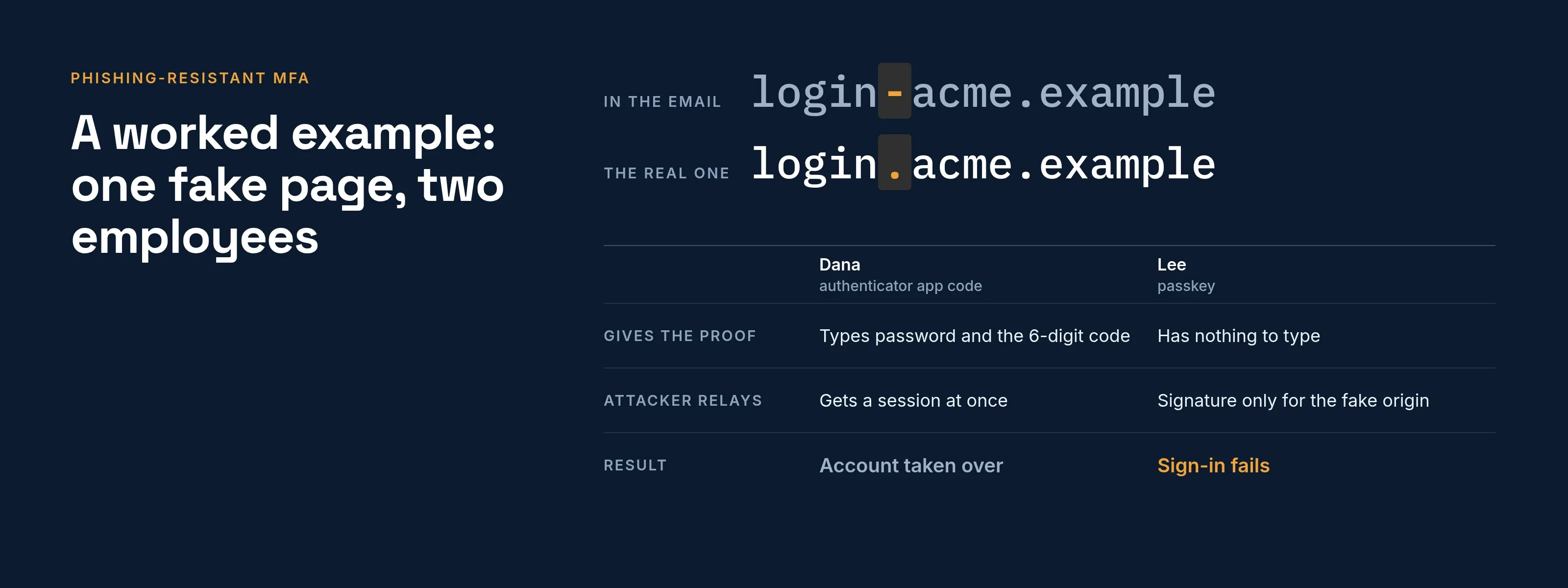
Two Acme Corp employees, Dana and Lee, receive a message pointing to login-acme.example, a copy of the real login.acme.example.
| Step | Dana (authenticator app code) | Lee (passkey) |
|---|---|---|
| Opens the fake page | Sees a normal-looking form | Sees a normal-looking form, but the browser offers no Acme passkey for a different domain |
| Gives the proof | Types password and the 6-digit code | Has nothing to type |
| Attacker’s side | Relays both to login.acme.example at once and gets a session |
Can only request a signature for the fake origin, which the real server rejects |
| Result | Account taken over | Sign-in fails |
Lee was not more careful. The proof simply did not exist in a form that could be given away.
How to roll out phishing-resistant MFA
CISA advises phasing the work by what you protect and which users attackers target most, rather than switching everyone at once. A sequence that follows that advice:
- Inventory sign-ins. List the applications, which methods each accepts, and which accept nothing beyond a password. CISA suggests taking systems with no MFA support to senior leadership.
- Start with the services that support it. CISA notes that most hosted mail and single sign-on systems support FIDO.
- Pilot with high-value users. CISA suggests help desk and IT system administrators as the first group. It also names attorneys with e-discovery permissions and HR staff, who can read personnel records, as high-value targets.
- Enroll two authenticators per user, such as a phone passkey and a spare security key, before requiring anything.
- Design recovery before enforcing. Recovery becomes the weak point. Decide how a lost device is replaced and who verifies identity, so the fallback is not a text code an attacker can request.
- Require it where it matters, then widen. Keep weaker methods as a documented fallback only for users not yet moved, as CISA does for organizations that cannot switch yet.
- Add controls around what remains. Where phishing-resistant methods are not possible, CISA recommends extra prevention and detection, such as number matching on push approvals.
For step 4, the passkey explainer has a tool that checks, in your own browser and without sending anything, whether that browser and device can use a passkey.
Common mistakes
- Calling push with number matching phishing-resistant. CISA puts it below FIDO and PKI and rates it vulnerable to phishing.
- Leaving a phishing-prone fallback available to everyone. If an attacker can select “use a text code instead” on the sign-in page, the strong method protects nothing. Limit fallbacks by user group.
- Registering one authenticator. A lost phone then means a help-desk reset, which is also an attack route.
- Counting enrollment as protection. A passkey on file does nothing while the password still signs users in.
How SSOGEN handles second steps
In SSOGEN, an administrator sets the sign-in requirement in an authentication policy through its Required strength setting. The policy is assigned to the My Apps and My Account sign-in or to individual applications.
- Second step lists which methods count. Authenticator app codes and recovery codes are on by default.
- Text-message and email codes are off by default and labeled weaker and weakest, because NIST SP 800-63B does not accept email as a second factor and restricts SMS.
- The SSOGEN Authenticator is a standard TOTP code app. Passkeys are a separate sign-in, offered where a policy allows them, and a policy can set Required strength to Passkey or security key.
Plan enrollment before raising a policy: users with no usable method cannot sign in once one is required.
Details are in the multi-factor authentication guide and the overview of MFA software.
Questions people ask
Is phishing resistant MFA the same as MFA?
No. MFA means two or more factors; phishing-resistant MFA is the subset in which the proof is bound to the real site. Most MFA in use today is not.
Is a passkey phishing-resistant?
Yes. Passkeys use WebAuthn, which is NIST’s example of verifier name binding.
Is number matching phishing-resistant?
No. CISA lists it as resisting push bombing but still open to phishing.
Does NIST require it?
At its highest assurance level, AAL3, the authenticator must provide phishing resistance (section 2.3.2). At AAL2, verifiers must offer at least one phishing-resistant option, and federal agencies must require it of staff, contractors and partners (section 2.2.2). Both read 2026-10-09.
How do you make MFA phishing-resistant?
Move sign-in to passkeys, FIDO2 security keys or smart cards, then remove the weaker fallbacks. Register two authenticators per user, protect recovery and start with administrators. Adding a stronger option while leaving a text code open to everyone does not help, because an attacker picks the weaker route.
Is Microsoft Authenticator phishing-resistant?
Not in its phone sign-in or code modes. Microsoft’s built-in Phishing-resistant MFA strength lists Windows Hello for Business, FIDO2 security keys and certificate-based authentication (multifactor). Authenticator phone sign-in appears only in the Passwordless and MFA strengths (Microsoft Learn, read 2026-10-09).
What is the difference between passwordless and phishing-resistant MFA?
Passwordless means no password is used; phishing-resistant means the proof cannot be relayed from a fake site. The two overlap but differ. In Microsoft’s strengths, Authenticator phone sign-in is passwordless yet not on the phishing-resistant list.
Can I still be hacked if I use 2FA?
Yes. CISA lists phishing, push bombing, SS7 attacks on text codes and SIM swap as ways attackers get past some forms of MFA. Any MFA is better than none, but only phishing-resistant methods close all four routes.
What are the three types of MFA?
The three factors are something you know, something you have and something you are (CISA fact sheet, read 2026-10-09). MFA requires two or more. Phishing resistance is a property of the method, so two factors can still be phishable.
Where to go next
- The device side. Read what a passkey is.
- Every method. Compare them in MFA types.
- The attack. Understand MFA fatigue attacks.
- Rollout blockers. For the blockers that slow a workforce rollout, see passkeys for enterprise.
- Not safe in every respect. Phishing-resistant does not mean safe in every respect; see are passkeys safe for recovery, sync and malware.
- Assurance levels. For the NIST assurance-level reasoning and dated milestones, see the future of authentication.
- Hub. Return to the Learn hub.
Sources, all read 2026-10-09: NIST SP 800-63B, CISA fact sheet, Microsoft authentication strengths.