SSOGEN / Learn / Are Passkeys Safe? What They Stop, and How They Can Still Fail
Learn
Are Passkeys Safe? What They Stop, and How They Can Still Fail
Passkeys stop look-alike pages, reused passwords and stolen password databases, and their weak points sit around them: account recovery, synced cloud accounts and devices that already hold malware.
Updated
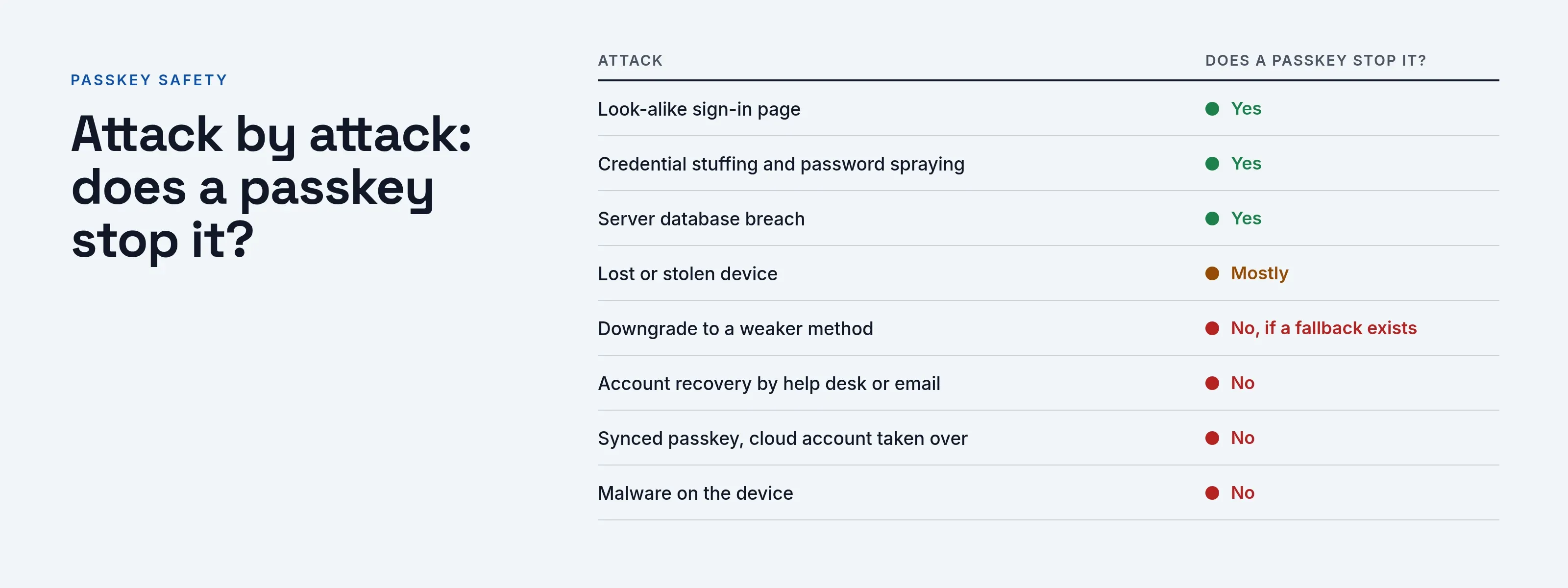
Are passkeys safe? Against the attacks behind most account takeovers, yes. A passkey cannot be typed into a look-alike page, a leaked list cannot replay it, and the server stores nothing that signs in. The weak points are in the systems around the passkey:
- the recovery route
- the cloud account that syncs it
- a weaker sign-in method that is still enabled
- malware on the device
The sections below go attack by attack, with the standard or source behind each.
For how the technology works, read what a passkey is.
What do passkeys protect against?
Three attacks, all because of how the credential is built: each site gets its own key pair, and the private key never leaves the authenticator.
- Phishing. The W3C Web Authentication spec says a credential can only be accessed by origins belonging to its Relying Party (Level 3, W3C Recommendation of 25 August 2026, read 2026-10-09). Section 13.4.9 says the server “MUST” validate the origin when a credential is registered and each time an assertion is verified. NIST SP 800-63B-4 section 3.2.5 defines phishing resistance as preventing secrets from reaching an impostor verifier (NIST SP 800-63B-4, page dated 26 Aug 2025, read 2026-10-09).
- Credential stuffing. There is no shared password to reuse, so a list leaked on a forum holds nothing that signs in to a work account. See credential stuffing.
- A stolen server database. The site stores only a public key. The FIDO Alliance says that with passkeys there are no passwords to steal and no sign-in data that can be used to perpetuate attacks (FIDO Alliance, Passkeys, read 2026-10-09).
Attack by attack: does a passkey stop it?
“Stops it” means the passkey itself defeats the attack, as the sources below describe it. The last two columns, which most comparisons leave out, carry the detail.
The cards group the table rows into three outcomes.
What a passkey stops, and where it can still fail
Stopped
The passkey itself defeats it
- Look-alike sign-in page
- Credential stuffing and password spraying
- Server database breach: only public keys are stored
Mostly stopped
Depends on the device lock
- Lost or stolen device
- A weak device PIN, or a phone taken while open, is a gap
Not stopped
The weak point sits around the passkey
- Downgrade to a weaker method, if a fallback exists
- Account recovery by help desk or email
- Synced passkey, cloud account taken over
- Malware or a malicious extension on the device
- Stolen session cookie after sign-in
| Attack | Does a passkey stop it? | What remains |
|---|---|---|
| Look-alike sign-in page | Yes. The passkey is offered only to the site that created it. | The person can still be tricked into other actions, such as approving a consent screen. |
| Credential stuffing and password spraying | Yes for the passkey. | If the account also keeps a password, that password is still attackable. |
| Server database breach | Yes. Only public keys are stored. | Other data in the breach is unaffected. |
| Downgrade to a weaker method at sign-in | No, if a fallback exists. | Every fallback (a code, a text, a password) is as exposed as it ever was. |
| Account recovery by help desk or email | No. Recovery bypasses the passkey. | The reset path is now the easiest way in. |
| Synced passkey, cloud account taken over | No. | The attacker reaches the keys through the account that syncs them. |
| Lost or stolen device | Mostly. The device lock is the barrier. | A weak device PIN, or a phone taken while open, is a gap. |
| Malware or a malicious extension on the device | No. | Code running where the browser runs can act inside the sign-in. |
| Stolen session cookie after sign-in | No. | The session, not the passkey, is what gets stolen. |
The sections below trace each “What remains” entry to its source.
The session cookie row follows NIST’s session section, which describes session secrets used as bearer tokens and an emerging specification, device bound session credentials, that proves possession instead.
The lost-device row is our own reasoning from how the device lock works.
What are the downsides of passkeys?
Five, roughly in order of how often they cause incidents:
- Recovery decides the real strength. The WebAuthn spec defines no protocol for backing up private keys. A user who loses an authenticator generally loses the credentials bound to it, and a user with only one registered is locked out (section 13.4.6). NIST SP 800-63B-4 treats account recovery as a separate process and says it “SHALL” always notify the subscriber or their designee.
- Sync trades assurance for convenience. NIST says syncable authenticators “SHALL NOT” be used at AAL3. They need an exportable private key, and AAL3 prohibits key export (in its AAL3 requirements and in section 3.2.13 on non-exportable keys).
- Central revocation is hard. NIST’s syncable authenticator threat table notes that traditional PKI can revoke access centrally with CRLs. No similar process exists for syncable authenticators or other FIDO WebAuthn-based credentials (Appendix B, Table 5).
- A fallback weakens the whole. The downgrade section below covers this.
- Support is uneven. Not every browser, device or service accepts a passkey yet. The device check on the passkey page tests yours.
Can a passkey get hacked?
None of the sources reviewed for this page attacks the cryptography. Published attacks target what surrounds it.
Downgrade at sign-in
- Publication. On August 12, 2025, Proofpoint researcher Yaniv Miron published a FIDO authentication downgrade (read 2026-10-09).
- Method. The team showed that a phishing proxy could present itself so that a Microsoft Entra ID sign-in treated the browser as one without passkey support.
- Result. The user was then offered a weaker method, such as an authenticator code.
- Condition. The attack works only if the account has another method enabled.
- In the wild. Proofpoint wrote that it had not seen the technique used in the wild.
Hijacked browser APIs
- Report. SecurityWeek reported on August 14, 2025 (Passkey Login Bypassed via WebAuthn Process Manipulation, read 2026-10-09).
- Method. SquareX researchers showed at DEF CON how to forge the registration and login steps by injecting script into the page’s WebAuthn calls.
- Requirement. The attack requires a malicious browser extension or a script-injection flaw on the site.
- Scope. SecurityWeek stresses that it does not attack the passkey cryptography.
- Basis. This summary rests on the news report, not on SquareX’s own write-up.
Both attacks fit WebAuthn section 13.4.8: malicious code on an origin within the scope of a site’s credentials can undo the guarantees WebAuthn provides.
How does a downgrade happen, and what stops it?
A downgrade needs two conditions: a passkey account that still accepts another method, and a user who accepts the weaker prompt. The fix is policy, not cryptography.
| Control | Effect on a downgrade |
|---|---|
| Remove methods that can be relayed (typed codes, texts, push approvals) for people who have a passkey | Nothing weaker to fall back to |
| Keep one tightly controlled recovery path | Fewer routes, each watched |
| Require a passkey or security key for sensitive applications | A weaker method is refused at that application |
| Alert when a person who normally uses a passkey signs in with a code | The shift is visible |
The last row is our own suggestion, not from a standard. A worked example for Acme Corp (acme.example):
| Time | Person | Source | Method | Reading |
|---|---|---|---|---|
| Mon 09:02 | maria.lopez | 192.0.2.10 | passkey | normal |
| Tue 09:04 | maria.lopez | 192.0.2.10 | passkey | normal |
| Wed 03:17 | maria.lopez | 192.0.2.44 | authenticator code | new source, first fallback in 90 days, worth a call |
The call matters most if Maria never expected a code prompt, because the prompt may have come from a fake page.
Are synced passkeys less safe than device-bound ones?
They protect against different risks. The FIDO Alliance says a cloud service copies synced passkeys across devices, while device-bound passkeys, security keys included, never leave a single device.
It says device-bound passkeys on hardware keys offer the highest assurance (read 2026-10-09).
| Synced passkey | Device-bound passkey | |
|---|---|---|
| Survives losing one device | Yes, via the sync account | No, unless a second one is registered |
| Main extra risk | The sync account and its recovery | Losing the only device |
| NIST AAL3 | Not allowed | Allowed if the key is non-exportable |
| How a site can tell | BE flag 1 | BE flag 0 |
WebAuthn conveys the difference in the backup eligibility (BE) and backup state (BS) flags, section 6.1.3, and recommends that sites store the most recent values.
It also says sites should make sure each account has additional authenticators or a recovery process.
NIST Appendix B sets three conditions for keys in a sync fabric:
- They must be stored only in encrypted form.
- Access to them must be protected by AAL2-equivalent multi-factor authentication.
- Private-key operations must happen on the local device.
What happens if I lose my device?
It depends on the passkey type. A synced passkey stays in your cloud account and comes back on a new device; a device-bound passkey is gone with the device. In both cases, treat the lost device as compromised.
NIST’s section on loss, theft, damage and compromise says to assume a lost authenticator has been stolen or compromised, and the provider must suspend, invalidate or destroy it promptly. The steps:
- Sign in from another device with a second passkey or a recovery method you set up earlier.
- Remove the lost device’s passkey and sign out its sessions.
- If your passkeys sync, secure that cloud account first: change its password and check its recovery options.
- Tell the help desk, so it questions anyone who calls later using your name.
- Register a new passkey and a spare, stored in a separate place.
With a single device-bound passkey and no spare, recovery is the only way back, so the recovery process sets the account’s real security.
How do you make recovery strong?
NIST and the WebAuthn authors both identify recovery as the weak point. NIST’s syncable authenticator table says cloud-based account recovery processes can reach synced keys, “a potential weakness”.
Its mitigations:
- Bind multiple authenticators at AAL2 and above.
- Require AAL2 authentication to add a new one.
- Notify the user of any recovery activity.
- Use a user-controlled secret, one the sync provider doesn’t know, to encrypt and recover keys.
A help-desk checklist (our own suggestion, not from a standard):
- Verify the caller against something an attacker cannot look up. A birth date does not qualify.
- Send a notice to the person’s other contact channel before and after the recovery.
- Log who approved it, and accept that a safe process is slow.
A message you can send to users before an incident:
Subject: Add a second way to sign in
Your passkey lives on one phone. If that phone is lost, getting back in can take a day. Please add a second passkey, on a security key or another device, and keep the recovery codes we gave you somewhere offline. If someone calls you and asks you to approve a sign-in or read out a code, hang up and call help@acme.example.
How does recovery work with single sign-on?
With single sign-on, recovery and sessions are managed in one place. SSOGEN covers each part as follows.
| Part | What SSOGEN does |
|---|---|
| Recovery codes | Gives each user ten single-use recovery codes for a lost second factor, and an organization can turn them off; the multi-factor authentication guide covers the setup |
| Administrator reset | When recovery goes through an administrator, the Reset MFA dialog warns that the person will sign in with their password alone until they enroll a new factor, so the administrator must confirm who is asking |
| Session rule | A method added during a session cannot confirm that same session for the next change |
| Active sessions | You can review active sessions and sign them out one at a time |
| Audit log | Records each sign-in and its result |
Questions people ask
Can a passkey be phished?
Not in the usual way. The browser offers it only to the site that created it, but the sign-in around it can be phished, as the downgrade research above shows.
Is a synced passkey safe enough for work?
NIST allows syncable authenticators at AAL2 and below under the Appendix B conditions, and not at AAL3. Whether that is enough depends on what the application protects.
Do passkeys replace passwords?
Not by themselves; the site decides whether the password goes.
WebAuthn says that once a credential is backed up, a site may offer to make the account password-free. Until it does, the password still signs in, and credential stuffing and phishing still work against it.
Can I move a passkey to another device?
A device-bound passkey cannot be copied, because WebAuthn defines no protocol for backing up or sharing private keys.
Register a second passkey instead. A synced passkey follows your account to new devices through the provider’s cloud service, as the FIDO Alliance describes it.
Do passkeys stop malware?
No. NIST section 3.2.8 asks for explicit authentication intent, partly to make silent use by malware harder, but code on the endpoint can still act inside a signed-in session.
Where to go next
- Choices. Compare them in passkey vs password.
- Strength. See phishing-resistant MFA and the other MFA types.
- Attacks. Read how attackers bypass MFA.
Sources, all read 2026-10-09: W3C Web Authentication Level 3, NIST SP 800-63B-4, the FIDO Alliance, Proofpoint and SecurityWeek, linked above.
A passkey does not protect a session copied after sign-in; see session hijacking. Passwordless authentication ranks the methods by phishing resistance.