SSOGEN / Learn / MFA Bypass: How Attackers Get Past MFA, and What Stops Each Method
Learn
MFA Bypass: How Attackers Get Past MFA, and What Stops Each Method
Attackers get past MFA by tricking the person, stealing the session or using a door that never asked for a second step, not by defeating the factor itself.
Updated
MFA bypass is access to an account protected by multi-factor authentication without defeating the second factor itself. Attackers do not guess the factor. Instead, they:
- get the user to hand it over;
- steal the session that the sign-in produces;
- call the help desk;
- use a protocol that never asks for a second step.
Each route needs its own defense, and a phishing-resistant method closes several at once. MFA is still worth having. This page covers what it stops, what it does not, and how to close each gap.
Is MFA still worth having?
Yes. CISA’s fact sheet on phishing-resistant MFA (October 2022, read 2026-10-08) says that with MFA, an attacker holding a stolen password still cannot get in without the second factor, which stops common techniques such as password spraying.
The same document says “any form of MFA is better than no MFA”, and notes that some forms are open to phishing, push bombing, SS7 weaknesses and SIM swapping.
What MFA stops and what it does not
What MFA stops
Per CISA and Microsoft
- An attacker holding a stolen password cannot get in without the second factor
- Some common techniques, such as password spraying
- Common password-only attacks, in Microsoft's 2019 figure
What MFA does not stop
The routes this page covers
- A person approving something they should not
- A session copied after sign-in
- A path that never asked for a second step
- A weak recovery process
- A device that is already infected
Microsoft quantified the first half. Its 2019 security blog post (published August 20, 2019, read 2026-10-09) states that MFA “can block over 99.9 percent of account compromise attacks”.
The figure comes from Microsoft’s own 2019 data, and the post does not break it down by attack type.
The figure means that MFA stops the common password-only attacks. It does not mean that MFA stops the attacks described below, which target setups where MFA exists but a route around it is open.
For the full case in favor, see why MFA is important.
What are the main MFA bypass attacks?
The sources below document these eight routes. The “Detail” column links to a dedicated page where one exists.
| Attack | How it works | What it defeats | What stops it | Detail |
|---|---|---|---|---|
| Adversary-in-the-middle phishing | A fake page sits between the person and the real site and relays the password and code, then keeps the session cookie the real site returns. | Passwords, typed codes, push approvals: any method that ends in a session the proxy can copy | Phishing-resistant sign-in (FIDO2, certificates); access rules that check the device on every use of a session | AiTM phishing |
| MFA fatigue (push bombing) | With a valid password, the attacker triggers approval prompts until the person taps Accept. | Plain push approval | Number matching, code entry instead of tap, limits on prompt frequency, phishing-resistant methods | MFA fatigue attacks |
| SIM swapping | The attacker convinces the carrier to move the victim’s phone number to a SIM they hold, then receives the texts and calls. | Text and voice codes; recovery by phone number | Methods that do not use the phone number; no phone-number recovery for high-value accounts | SIM swapping |
| Session or token theft | Malware or a proxy copies the signed-in session cookie or token, which is already past MFA. | Every sign-in method, because the check is over | Short session lifetimes, device-bound access rules, anomaly monitoring | Session hijacking |
| Help desk social engineering | The caller poses as the employee or as IT and asks for a reset, a new device or a code. | Any method with a human reset path | A written identity check, call-back to a known number, extra review for admin accounts | Covered below |
| Legacy protocols with no MFA | Old mail and sync clients send only a username and password and cannot show a second-step prompt. | MFA on the modern sign-in page | Block legacy authentication; find the clients still using it | Covered below |
| OAuth consent phishing | The person signs in normally, then is asked to grant a malicious app permission to their mail or files. | MFA entirely, since the grant happens after sign-in | Restrict who can consent; admin approval for new apps; review granted apps | Covered below |
| Recovery flow abuse | The attacker uses “forgot password” or “lost my device” to reach a weaker path than the sign-in itself. | The second factor, if recovery needs less | Recovery as strong as sign-in; notices to the owner; limits on what a reset allows | Covered below |
What the sources say about each row
Adversary-in-the-middle. Microsoft’s analysis of AiTM phishing (July 12, 2022, read 2026-10-08) says this is “not a vulnerability in MFA”: the proxy steals the session cookie, so the attacker is authenticated “regardless of the sign-in method”. Microsoft recommends FIDO2, certificates and Conditional Access evaluated at each use of a cookie.
Fatigue. MITRE lists MFA request generation as T1621 (version 1.2, last modified October 24, 2025, read 2026-10-08), including abuse of self-service password reset prompts. Mitigations: code entry or hardware tokens instead of simple push, and limits on MFA request frequency.
SIM swap and SS7. CISA defines SIM swapping as social engineering of the carrier. NIST SP 800-63B-4 (page dated 26 Aug 2025, read 2026-10-08), section 3.1.3.3, restricts the phone network for out-of-band codes and points to risk indicators such as a device swap, SIM change or number port.
Session theft. MITRE’s T1539, steal web session cookie (version 1.5, last modified May 12, 2026, read 2026-10-08), notes that session cookies can bypass some multi-factor authentication protocols. Its mitigations:
- hardware tokens that bind the login domain into the sign-in;
- regular deletion of persistent cookies;
- login audits that detect stolen cookies in use.
Help desk. CISA advisory AA23-320A (first published November 16, 2023, latest revision July 29, 2025, read 2026-10-09) documents four of the routes above in a single campaign. The Scattered Spider actors:
- phoned help desk staff to reset passwords and transfer MFA tokens;
- asked employees for one-time codes;
- used repeated prompts;
- persuaded carriers to move phone numbers.
Legacy protocols. Microsoft’s guide to blocking legacy authentication (page dated March 2026, read 2026-10-09) says legacy protocols do not support MFA. By Microsoft’s analysis, over 97 percent of credential stuffing attacks and over 99 percent of password spray attacks use legacy authentication, and would stop if basic authentication were blocked.
Consent phishing. Microsoft’s admin consent workflow overview (page dated November 2024, read 2026-10-08) lists the controls. An administrator can turn off user consent, or turn on a workflow where a reviewer approves or denies requests. Each request generates email notices and audit entries.
Recovery abuse. We found no neutral source that ranks recovery attacks, so this page does not rank them. MITRE’s T1621 names self-service password reset as a way to generate prompts; CISA’s advisory describes help desk resets as a route. Treat recovery as attack surface.
Which MFA methods resist these attacks best?
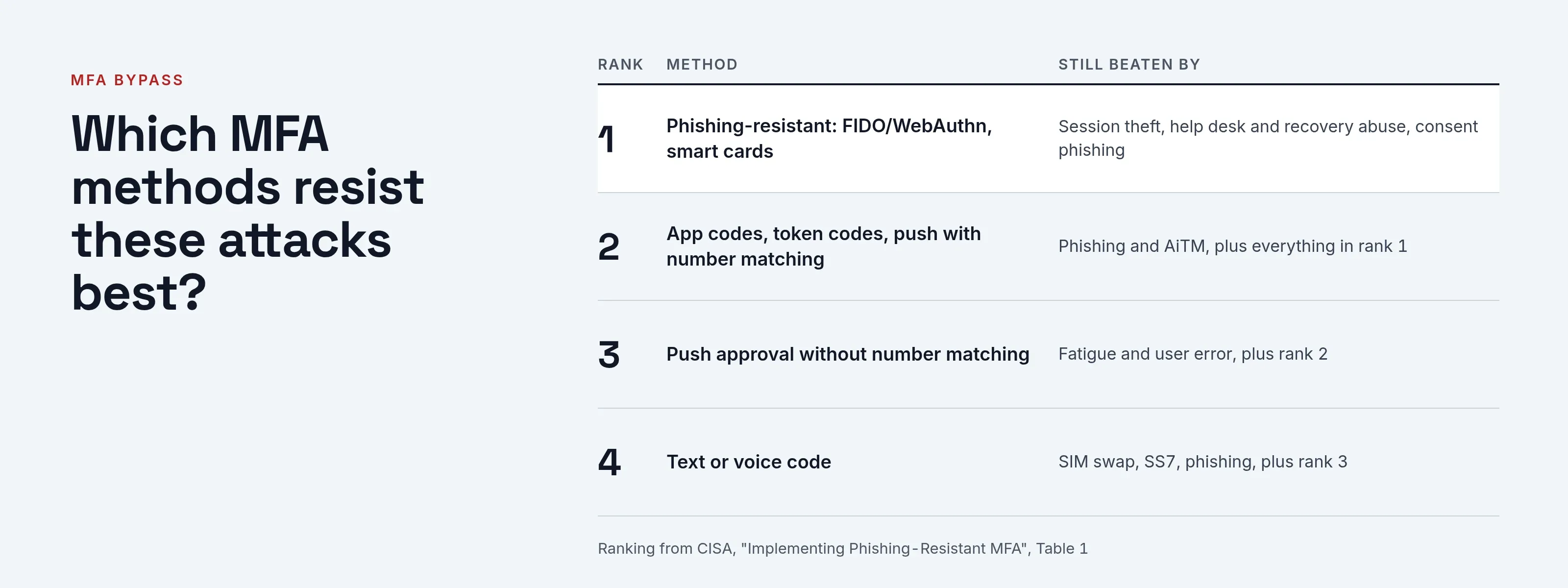
CISA’s Table 1 ranks forms of MFA from strongest to weakest by their exposure to phishing, push bombing, SS7 and SIM swap.
The table below reproduces that ranking and adds the bypass routes each method still leaves open. Read phishing-resistant MFA for what qualifies and MFA types for how each works.
| Rank | Method | Beaten by | Per CISA |
|---|---|---|---|
| 1 | Phishing-resistant: FIDO/WebAuthn, PKI-based (smart cards) | Session theft after sign-in, help desk and recovery abuse, consent phishing, legacy protocols if left open | Resistant to phishing; push bombing, SS7 and SIM swap are not applicable |
| 2 | App codes (OTP), token codes, push with number matching | Phishing and AiTM, plus everything in rank 1 | Vulnerable to phishing; resistant to push bombing; SS7 and SIM swap not applicable |
| 3 | Push approval without number matching | Fatigue and user error, plus rank 2 | Vulnerable to push bombing and user error |
| 4 | Text or voice code | SIM swap, SS7, phishing, plus rank 3 | A last resort, or a temporary step while moving to something stronger |
Even the first row has gaps. A phishing-resistant sign-in cannot protect an account that a help desk resets for a stranger, or a session cookie copied from an infected laptop.
For that reason, the checklist below covers process as well as methods.
A worked example: reading the sign-in log
Acme Corp (acme.example) reviews one morning of sign-ins, and each pattern points to a different route. The IP addresses come from the documentation range, 192.0.2.0/24.
| What the log shows | Likely route | First step |
|---|---|---|
| Maria’s password was entered correctly, MFA passed, then within minutes the same session appears from 192.0.2.45, a country she was not in | Session or AiTM theft | End the session, reset the password, require a managed device |
| Ken denied six prompts over twenty minutes, then accepted one at 02:14 | Fatigue | Reset his password; switch the policy from tap to number matching or codes |
| Tom’s mailbox sync signs in from 192.0.2.46 with the client app shown as a legacy protocol and no MFA entry | Legacy protocol | Block legacy authentication for the tenant after finding the clients using it |
| Sarah’s text codes started going to a phone she says is not hers | SIM swap | Remove the phone number as a method; contact the carrier |
| A reset of Lisa’s second factor, requested by phone, and a sign-in an hour later from 192.0.2.47 | Help desk or recovery abuse | Review the call record; apply the identity check below |
| A new app with broad mail permissions was approved by Dana, who says she never opened it | Consent phishing | Revoke the grant; restrict user consent |
Treat each pattern as an indicator, not a verdict. The same log line can have an innocent cause, such as a user changing phones.
Checklist for administrators
Work through these in order; each item maps to a route above.
- Turn on MFA for every account, administrators first. Without MFA, an attacker has no second step to defeat.
- Block legacy authentication after checking the sign-in log for clients still using it (Microsoft’s guide shows the Client App filter). If your identity system offers report-only mode, start there, as Microsoft’s guide does.
- Move administrators and help desk staff to phishing-resistant methods first. CISA names help desk staff, IT administrators, attorneys with e-discovery rights and HR staff as high-value targets.
- Replace plain push approval with number matching or code entry, and limit how many prompts one account can receive.
- Treat text and voice codes as a temporary step, and remove the phone number as a recovery route for high-value accounts.
- Document the help desk identity check. Require a call-back to a number already on file and a second approver for admin accounts. Make it a rule that nobody is ever asked to read out a code.
- Shorten session lifetimes for administrators and require a managed device for sensitive applications.
- Restrict app consent to administrators or an approval workflow, and review granted apps regularly.
- Alert on the changes themselves: a new factor, a reset, a new device, a new inbox rule, a new app grant.
- Notify the account owner whenever a sign-in method is added or removed.
- Test recovery. Simulate a lost phone and see how far a stranger could get.
What MFA does not stop
MFA does not stop:
- a user approving something they should not;
- a session copied after sign-in;
- a path that never asks for a second step;
- a weak recovery process;
- a device that is already infected, because that device can read the session.
A phishing-resistant method removes the typed or tapped proof an attacker would relay, but it does not remove the human at the help desk.
We found no verifiable figure for how often these attacks succeed in practice, so this page does not quote one.
How SSOGEN handles this
SSOGEN offers passkeys, which count as a sign-in that cannot be phished, alongside authenticator app codes. Email and text codes stay off unless a policy lists them.
Several controls target the recovery and session routes above:
- Step-up for changes. Adding or removing a second-step method needs a second step completed in the last 5 minutes, with an authenticator code or a recovery code. An email or text code does not count, and a method added during a session cannot confirm that same session.
- Owner notice. If outgoing email is set up, SSOGEN emails the account owner when an authenticator, recovery codes or another sign-in method is added or removed.
- Administrator reset. The Reset MFA action on a user warns the administrator that the person will sign in with a password alone until they enroll again, so “make sure you are talking to the right person.”
- Lockout. By default, 10 wrong codes in a row lock second-step sign-in for 15 minutes.
- Sessions. Sessions default to a 30-minute idle timeout and a 12-hour maximum. See the multi-factor authentication guide and security settings.
Questions people ask
What is MFA bypass?
Any attack that reaches an MFA-protected account without defeating the second factor directly: phishing the code, flooding the user with prompts, stealing the session or using a path without MFA.
Can MFA be bypassed?
Yes. Any form of MFA raises the attacker’s cost, but CISA and Microsoft both document routes around it. Even the strongest methods leave the help desk and session theft open.
What is the most common MFA bypass attack?
We found no source that ranks them by frequency, so this page does not name one.
Is SMS MFA safe?
It is the weakest common option. CISA calls text and voice a last resort and a temporary step, and NIST restricts the phone network for out-of-band codes.
Do passkeys bypass 2FA?
No. CISA lists FIDO/WebAuthn, the standard behind passkeys, as a form of MFA, and as the phishing-resistant one. A passkey sign-in is not a way around the second factor, though it does not protect a copied session or a weak reset process.
Does a passkey stop MFA bypass?
It stops the phishing routes. It does not stop session theft after sign-in or a weak reset process.
Where to go next
Read adversary-in-the-middle phishing, SIM swapping, session hijacking, MFA fatigue attacks and phishing-resistant MFA, or return to the Learn hub. The attack-by-attack table shows which attacks a passkey stops.
Sources, all read 2026-10-08 and re-checked 2026-10-09, are linked above: CISA, Microsoft, MITRE ATT&CK and NIST.