SSOGEN / Learn / Entra Agent ID: What Microsoft Documents, Object by Object
Learn
Entra Agent ID: What Microsoft Documents, Object by Object
Entra Agent ID is Microsoft's framework that extends Microsoft Entra to AI agents, so organizations can authenticate, authorize, govern and protect them like other non-human identities.
Updated
Entra Agent ID is Microsoft’s set of identity objects for AI agents inside Microsoft Entra. Microsoft’s page What is Microsoft Entra Agent ID? calls it an identity and security framework that extends Microsoft Entra capabilities to AI agents. Organizations use it to authenticate, authorize, govern and protect these non-human identities.
This page restates Microsoft’s documentation as read on 2026-10-08. Microsoft updates those pages often, and they remain the source of record.
The objects Microsoft defines
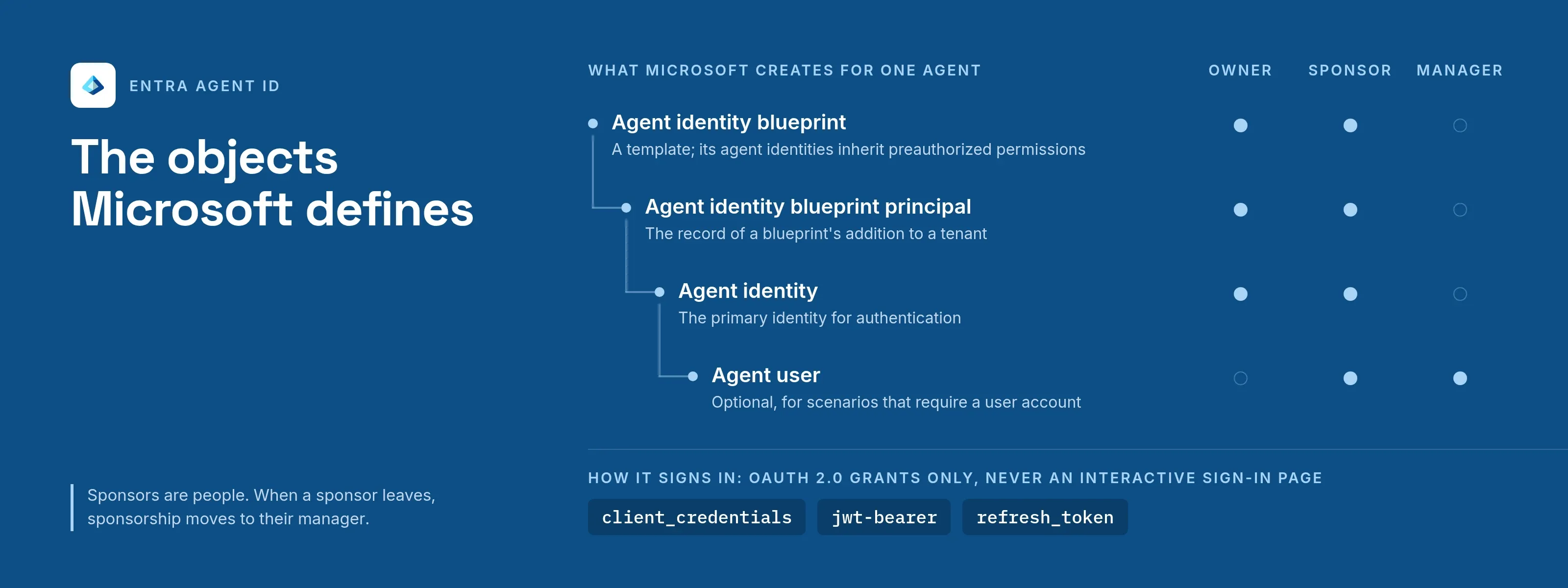
Microsoft’s Graph overview of Agent ID lists four building blocks:
| Object | What Microsoft says it is |
|---|---|
| Agent identity blueprint | A template that defines the agent identity type, including permissions that its agent identities are preauthorized to inherit |
| Agent identity blueprint principal | The record of a blueprint’s addition to a tenant |
| Agent identity | The primary identity for authentication |
| Agent user | An optional account for scenarios that require a user account |
Through a blueprint, an agent can create one or more agent identities and an agent user for each, and every identity and user can hold its own access rights (Governing agent identities).
Across tenants, an agent gets a blueprint principal in each tenant. Microsoft compares this to a multitenant application with a service principal in each tenant.
How agents authenticate
Agents use OAuth 2.0, with token exchange patterns that rely on federated identity credentials, according to Microsoft’s authentication protocols for agents page. The page sets out these rules:
- All agent entities are confidential clients. No agent entity type supports interactive flows, so authentication is programmatic.
- The documented grant types are
client_credentials,jwt-bearer(used for on-behalf-of exchanges) andrefresh_token. - There are three flows: an agent acting on behalf of a user, an autonomous app flow with no user context, and a flow for an agent that has its own user account, for example to have a mailbox.
- Managed identities are the preferred credential type. Blueprints must not use client secrets as client credentials in production; Microsoft points to federated identity credentials with managed identities, or client certificates.
- Microsoft recommends its SDKs, such as Microsoft.Identity.Web and the Microsoft Entra ID Auth SDK (sidecar), because implementing the protocol steps by hand is “complex and error-prone”.
The FAQ adds one important limit. Agent identities can’t sign in to Microsoft Entra sign-in pages, so they can’t use single sign-on with OpenID Connect or SAML.
Microsoft directs teams to web APIs for integrating agents with apps and services (Entra Agent ID FAQ).
Owners, sponsors and managers
The Graph overview lists three kinds of administrative metadata:
- Owner, on blueprints, blueprint principals and agent identities.
- Sponsor, on those objects and on agent users.
- Manager, on agent users.
Sponsors are human users accountable for decisions about an agent’s lifecycle and access. When a sponsor leaves the organization, sponsorship transfers automatically to their manager, and lifecycle workflows can notify co-sponsors and managers of the change.
Access and governance
A new agent identity starts with limited permissions, such as delegated OAuth scopes inherited from its blueprint. Further access comes through access packages, which cover security group membership, OAuth API permissions and Microsoft Entra roles.
- The agent identity, its sponsor or an administrator requests the package.
- The request goes to the approvers the package names.
- When an assignment with an expiry date is close to ending, the sponsor receives a notice and can request an extension or let it lapse.
Microsoft also documents access reviews for agent identities, and Conditional Access policies that can be set at the blueprint level and evaluate agent risk from Microsoft Entra ID Protection.
The FAQ and the Graph overview add two limits:
- Agents are blocked from a list of high-risk Microsoft Graph permissions, including
Application.ReadWrite.AllandDirectory.ReadWrite.All. - Highly privileged directory roles such as Global Administrator can’t be assigned to agent identities.
Logging
Sign-in reports and audit logs capture agent activity. By default, however, audit logs don’t mark agent identities as a separate type, according to the FAQ:
- Actions by an agent identity appear as a service principal.
- Actions by an agent user appear as a user.
To tell them apart, join on object IDs.
Availability and licensing, as stated
- Availability. Microsoft’s page states that Agent ID is available to all Microsoft Entra customers.
- Security features. Extending Microsoft Entra security features to agents requires Microsoft Agent 365.
- Licenses. The governance page lists the license plans that apply to governing agent identities.
These terms change, so check Microsoft’s current licensing pages before planning.
How SSOGEN describes its own agent identity
Many organizations run more than one identity system, so here is SSOGEN’s model in the same terms. SSOGEN registers each AI agent as a non-human identity with:
- one to five named human owners;
- an expiry or review date;
- no password.
The agent proves itself with a key, and its tokens are bound to that key. To act for a person, it needs that person’s approval first, and the person can revoke it. Sensitive scopes require a fresh approval every time.
See AI agent identity and the guide to access control for AI agents.
What a team using any identity provider should still decide
No identity product makes these decisions for you. Settle them before an agent touches a production system.
- Ownership. Name a human who answers for each agent. Decide what happens when that person leaves, and who reviews the agent and how often.
- Scopes. Document what each agent may reach, in terms a reviewer understands. Give each agent its own identity so scopes aren’t pooled, and keep sensitive actions out of standing grants.
- Approvals. Decide which actions need a person in the loop at that moment, such as payments, and which can run on a standing grant.
- Audit. Decide what you must be able to answer later: which agent, for which person, with which scope, and with what result. Confirm that your logs record it, and add it where they don’t.
- Stopping. Know how fast you can suspend one agent or a whole class of agents, and test it.
- Reach. List the systems agents must reach, older applications included, and confirm how each one will accept an identity.
Questions people ask
What is Microsoft Entra Agent ID?
Microsoft describes it as an identity and security framework that extends Microsoft Entra capabilities to AI agents, covering identity management, access protection, governance and compliance.
Does Entra Agent ID only work with Microsoft agents?
Microsoft states that it works with agents built on Microsoft and non-Microsoft platforms. It documents integration for agents from platforms such as AWS Bedrock and n8n, through its sidecar SDK or workload identity federation.
Can an agent identity use SAML or OpenID Connect single sign-on?
No, according to Microsoft’s FAQ. Agent identities can’t sign in to Microsoft Entra sign-in pages, so they can’t use single sign-on with those protocols.
Who is responsible for an agent identity?
Microsoft documents owners, sponsors and managers. Sponsors are the human users accountable for lifecycle and access decisions.
Where to go next
Read about non-human identity and how AI agent governance works in practice. Agent tokens are built on OAuth token exchange and DPoP. For the current product, start with Microsoft’s Entra Agent ID documentation.
Sources, all read 2026-10-09: What is Microsoft Entra Agent ID?, Authentication protocols for agents, Entra Agent ID FAQ.