SSOGEN / Learn / Evilginx and Adversary-in-the-Middle Phishing: How It Works and What Stops It
Learn
Evilginx and Adversary-in-the-Middle Phishing: How It Works and What Stops It
Evilginx and other AiTM phishing kits sit between you and a real sign-in, then keep the session cookie it produces, so a code alone does not stop them.
Updated
Evilginx is an open-source adversary-in-the-middle (AiTM) phishing framework. Its GitHub page calls it a standalone man-in-the-middle attack framework for phishing login credentials along with session cookies, which lets it bypass two-factor authentication (Evilginx project page, BSD-3-Clause, read 2026-10-08).
Permitted use. The author permits its use only for penetration tests with written permission and says defenders should find ways to protect their users.
AiTM phishing. The technique: the fake site relays everything the victim types to the real site and keeps the authenticated session that comes back.
This page. It is for defenders. It covers how the attack works, what each step leaves in the logs and what stops it. It contains no build or deployment steps.
What is an AiTM attack?
- The proxy. Microsoft defines AiTM phishing as an attacker placing a proxy server between the user and the website.
- What it steals. The proxy lets the attacker steal both the password and the session cookie that proves an authenticated session (Microsoft Security blog, “From cookie theft to BEC”, 12 July 2022, read 2026-10-08).
- Scale. According to Microsoft, the campaign it described targeted more than 10,000 organizations from September 2021.
- Speed. Payment fraud followed as soon as five minutes after the credential and session theft.
- Not an MFA flaw. Microsoft is explicit about this. The user completes MFA on the real site; the attacker takes what the site returns afterward.
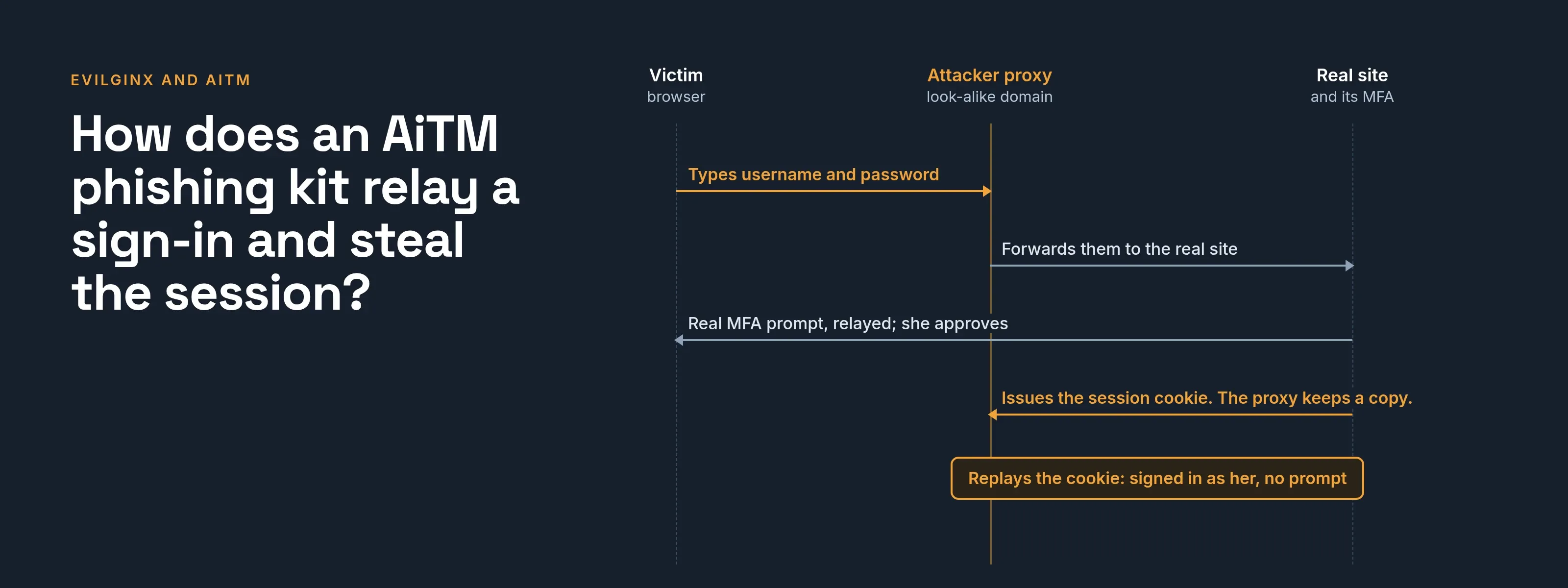
How does an AiTM phishing kit relay a sign-in and steal the session?
How an AiTM relay steals a signed-in session
- Victimbrowser
- Attacker proxylookalike domain
- Real siteand its MFA
- Victim to Attacker proxy1Opens the link and sees a lookalike sign-in pageThe proxy fetches the real page live, so it looks right.
- Victim to Attacker proxy2Types username and passwordThe proxy reads them as they pass through.
- Attacker proxy to Real site3Forwards the credentials to the real site
- Real site to Victim4Real MFA prompt, relayed through the proxyThe victim completes MFA on what is really the genuine site.
- Real site to Attacker proxy5Issues the session cookieThe proxy keeps a copy.
- Attacker proxy6Replays the cookie: signed in as the victim, with no prompt
The table follows the sequence in Microsoft’s write-up of a campaign that used Evilginx2 and adds what each step means for your logs.
Where a row says “follows from the design,” the entry is an inference from how a relay works, not a measured result.
| Step | What the victim sees | What the attacker gets | What evidence remains |
|---|---|---|---|
| 1. Lure | An email, in Microsoft’s example with an HTML attachment claiming to be a voice message | Nothing yet | The email, and the click or open |
| 2. Fake page | A sign-in page that looks like the real one, on a domain that is not the real one | The page is served from the attacker’s proxy, which fetches the real page live | Web proxy or DNS logs show a request to an unfamiliar domain |
| 3. Credentials | They type username and password | The password, as it passes through | None at the identity provider yet |
| 4. MFA | The real MFA prompt, relayed. They enter the code or approve | The code, and the proxy completes the real MFA | The identity provider records a successful MFA, but from the proxy’s address (follows from the design) |
| 5. Session | They land on the real application, signed in | The session cookie the real site issued | A successful sign-in with a session ID |
| 6. Reuse | Nothing | Access as the user, without any sign-in prompt | The same session ID used from another address or country; Microsoft lists this as a sign |
In Microsoft’s example, the victim lands in a genuine Office 365 session, so nothing looks wrong. That is why a user who “checked” the sign-in page can still be compromised.
What is the difference between AiTM and MITM?
MITM. NIST defines a man-in-the-middle (MitM) attack as one where an attacker sits between two communicating parties to intercept or alter the data between them (NIST CSRC glossary, from SP 1800-21B, read 2026-10-08).
AiTM. A MITM attack aimed at the sign-in, and it usually leaves the network path alone. The victim connects to the attacker’s own domain, which relays to the real site, so no encryption has to be broken.
VPN. The same mechanism answers the VPN question. A VPN protects the path between the device and the VPN endpoint. In an AiTM attack, the proxy is the site the user chose to open, and the connection to it is as private as the attacker wants.
Sources on VPNs. Neither Microsoft nor CISA discusses VPNs in this context; the conclusion follows from the mechanism they describe.
Classic phishing. It collects what the victim types. AiTM also collects what the real site sends back, which is why a one-time code does not protect the session.
Why does MFA not stop it?
CISA’s fact sheet “Implementing Phishing-Resistant MFA” (October 2022, read 2026-10-08) describes the simplest form.
A threat actor sends an email that leads to a website mimicking a company login portal, and the user submits the username, password and the 6-digit code from an authenticator app.
CISA ranks app-based codes and push below phishing-resistant MFA and describes them as vulnerable to phishing.
The relay defeats any factor a user can hand over:
- Typed codes. The user enters them on the fake page.
- SMS codes. The user enters them on the fake page.
- Approvals. They are granted on the real prompt.
See MFA types and how attackers bypass MFA for the wider list.
What actually stops AiTM phishing?
Methods that check the site
NIST SP 800-63B-4 defines phishing resistance as preventing authentication secrets and valid authenticator outputs from reaching an impostor verifier (SP 800-63B-4, section 3.2.5, read 2026-10-08).
Manually entered outputs such as OTPs cannot qualify, because typing a code does not bind it to the session.
NIST names two mechanisms:
- Channel binding ties the output to the connection (section 3.2.5.1).
- Verifier name binding ties it to an authenticated identifier such as the host name (section 3.2.5.2).
WebAuthn/FIDO2 is NIST’s example, because it selects the secret based on the authenticated domain name.
- Scope. The W3C WebAuthn Level 3 Recommendation (25 August 2026, read 2026-10-08) scopes credentials to a relying party.
- Enforcement. The browser and authenticator enforce that scope together.
- Origin check. Section 13.4.9 covers validating the origin of a credential.
- On the attacker’s domain. A security key or passkey has nothing to sign for the real site.
See phishing-resistant MFA, security keys and passkeys compared with passwords.
Making a stolen session unusable elsewhere
Microsoft’s token protection (a Conditional Access session control; page dated 14 August 2026, read 2026-10-08) accepts only sign-in session tokens cryptographically bound to the registered device.
A stolen token therefore does not work from another device. Check its limits before relying on it:
- Native apps. Windows, iOS/iPadOS and macOS are generally available.
- Browser-based apps. Pre-release, and only for selected web apps that reach Azure Resource Manager.
- Supported resources. A short list (Exchange Online, SharePoint Online, Teams and a few more).
Microsoft describes it as one layer of defense in depth.
Shrinking the window
According to Microsoft’s continuous access evaluation page (read 2026-10-08), access tokens last one hour by default.
For supported services, access can end within minutes of events such as:
- Password reset. The user’s password is reset.
- Revoked tokens. An administrator revokes refresh tokens.
- High user risk. The user’s risk level is high.
Microsoft notes up to 15 minutes of propagation delay for those events.
Clients that negotiate CAE sessions receive longer-lived tokens, up to 28 hours, because event-driven revocation replaces the fixed lifetime.
Location-based enforcement works only with IP-based named locations.
Conditional Access can also evaluate the signals Microsoft names in the AiTM blog: group membership, IP location and device status.
What training can and cannot do
- What it does. Training helps users spot and report the lure.
- Why “look for mistakes” is weak. The fake page is a live copy of the real one.
- The reliable check. The address in the address bar.
- The reliable control. A sign-in method that performs that check for the user.
What does this not stop?
| Control | What it does not cover |
|---|---|
| Phishing-resistant sign-in | Applications or accounts that still accept a typed code or an approval as another way to sign in |
| Token protection | Browsers and apps outside the supported list; sessions already stolen before it was enforced |
| Short sessions | The minutes between theft and use; Microsoft reported fraud within five minutes |
| Conditional Access location rules | Sign-ins from shared or varying egress addresses, which Microsoft says make IP-based rules harder to apply safely |
| Awareness training | A well-made relay shows the real page |
How do you detect and respond?
Microsoft’s blog lists these indicators (read 2026-10-08). In sign-in logs, look for:
- Reused session ID. A session ID created in one app sign-in, then reused in other apps from different countries.
- Impossible travel. Impossible-travel alerts.
- Unusual countries. Activity from countries the user does not normally sign in from.
In mail, look for:
- Inbox rules. New inbox rules, such as auto-archiving mail from certain domains.
- Deleted mail. Deleted phishing mail.
- Mail access. Many mail item access events from untrusted addresses.
Microsoft names these Identity Protection detections: Anomalous Token, Unfamiliar sign-in properties, Unfamiliar sign-in properties for session cookies, and Anonymous IP address.
Acme Corp (acme.example) example timeline for Maria Lopez:
| Time (UTC) | Event | Source |
|---|---|---|
| 09:02 | Maria opens a link in an email and signs in through the fake page | 192.0.2.40 (the proxy, not her) |
| 09:03 | Successful sign-in with MFA recorded | 192.0.2.40 |
| 09:07 | Mailbox accessed with the same session | 192.0.2.88 |
| 09:09 | New inbox rule created | 192.0.2.88 |
| 09:30 | Security reviews an Identity Protection alert for session cookies | n/a |
Response, following Microsoft’s emergency revocation page (dated 19 June 2026, read 2026-10-08):
- Block new sign-ins.
- Revoke the user’s sessions.
- Disable the user’s registered devices if needed.
Some applications use their own session cookies. Microsoft says Entra cannot revoke those directly: a session cookie issued by an application stays valid until that application ends it.
After revocation, reset the password, review MFA methods and inbox rules, and check what the session accessed.
What does SSOGEN do about it?
SSOGEN limits how long a session lives, lets users end their own sessions and records every sign-in for administrators.
- Idle timeout. On the security settings page, the sign-in idle timeout defaults to 30 minutes (range 1 to 1,440).
- Maximum lifetime. The sign-in maximum lifetime defaults to 720 minutes (range 5 to 43,200).
- Own sessions. Users can see and end their own sessions in My Account.
- Sign out other sessions. This signs out every other browser and device at once.
- Audit log. The audit log records sign-ins and their results for review.
Questions people ask
What is the goal of a phishing attack?
To obtain something that lets the attacker act as the victim: a password, a code or, in AiTM, the session itself. Microsoft’s campaign used the session for mailbox access and payment fraud.
Does a VPN protect against MITM attacks?
No. A VPN protects the path to the VPN endpoint, not the choice of site. See the section above.
Is AiTM a flaw in MFA?
No. Microsoft calls MFA an essential pillar of identity security. AiTM steals the session cookie issued after a real sign-in.
Where to go next
- Defense. Read phishing-resistant MFA.
- Prompt abuse. Read MFA fatigue attacks.
- Stolen sessions. Read session hijacking.
- Password reuse. Read credential stuffing.
- All topics. Return to the Learn hub.
All sources were read 2026-10-08 and re-checked 2026-10-09. Evilginx is the name of a project owned by its author; SSOGEN is not affiliated with it.