SSOGEN / Learn / NIST Password Guidelines: What SP 800-63B-4 Requires
Learn
NIST Password Guidelines: What SP 800-63B-4 Requires
NIST's password guidelines put the duty on the service: at least 15 characters when a password is the only factor, no forced rotation, no composition rules.
Updated
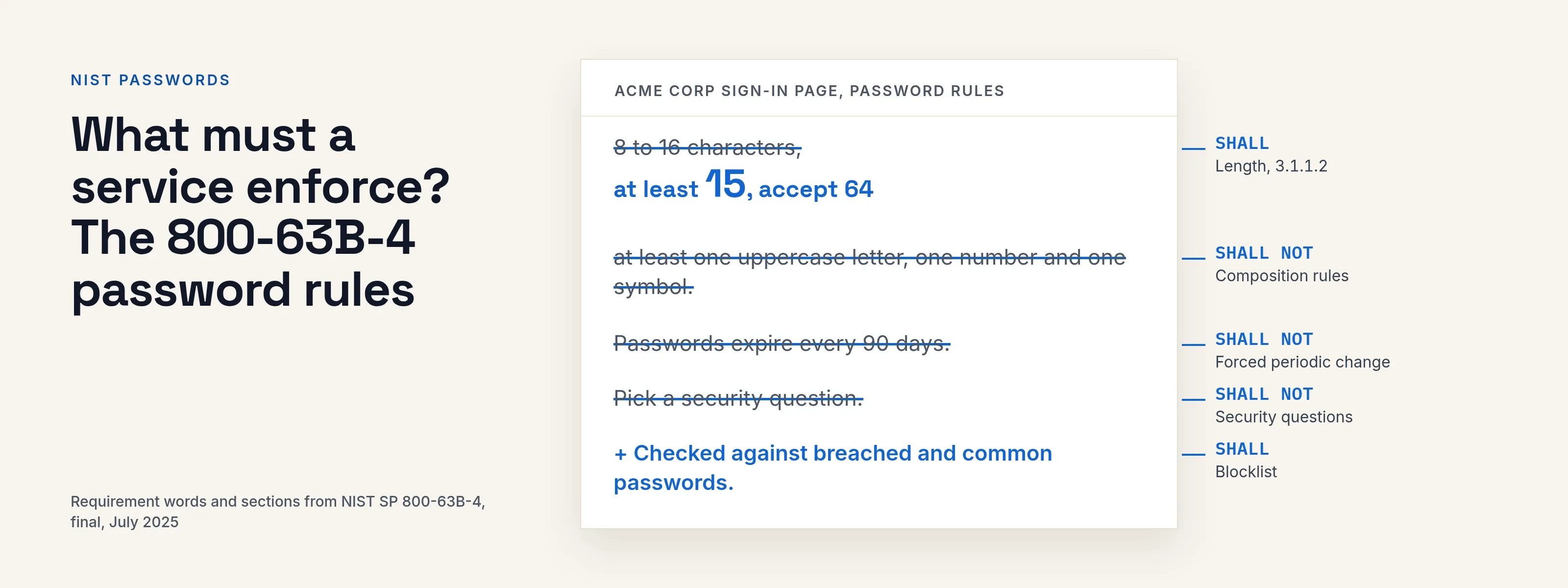
The NIST password guidelines are in SP 800-63B, part of NIST’s Digital Identity Guidelines. They place the obligations on the service, not the user:
- If a password is the only factor, the service must require at least 15 characters.
- It must not require periodic password changes or composition rules such as “one symbol, one capital”.
- It must check new passwords against a blocklist.
This page covers the current revision, 800-63B-4. NIST’s Revision 4 listing (read 2026-10-08) dates it July 2025 and says it replaces the March 2020 edition.
Which version of NIST 800-63B is current?
Revision 4 is current. The NIST publication page (read 2026-10-08) says it was published on 31 July 2025 with status Final and replaces the March 2020 edition.
We checked the requirements below against the final text of SP 800-63B-4 and its web edition (read 2026-10-08).
The document’s change log (Appendix E) lists two password items:
- Section 3.1.1.2 raises the minimum length for a password used as a single factor.
- Section 3.2.10 adds separate requirements for locally verified secrets, called activation secrets.
This page compares only these two items against the 2020 edition.
NIST’s requirement words carry precise meaning:
- SHALL and SHALL NOT are mandatory for a service that claims to follow the guideline.
- SHOULD is a strong recommendation.
- MAY is optional.
NIST uses “verifier” for the service that checks the password. The rules in the table apply to that service, not to the person typing.
What must a service enforce? The 800-63B-4 password rules
| Topic | Requirement | Word | Section |
|---|---|---|---|
| Minimum length, password is the only factor | At least 15 characters | SHALL | 3.1.1.2 |
| Minimum length, password is one of several factors | At least 8 characters; shorter than 15 is allowed | MAY allow shorter, SHALL require 8 | 3.1.1.2 |
| Maximum length | Accept at least 64 characters | SHOULD | 3.1.1.2 |
| Accepted characters | All printing ASCII characters and the space; Unicode characters | SHOULD | 3.1.1.2 |
| Composition rules | No other composition rules, for example mixing character types | SHALL NOT | 3.1.1.1 and 3.1.1.2 |
| Forced periodic change | Do not require it; do force a change on evidence of compromise | SHALL NOT, and SHALL force a change | 3.1.1.2 |
| Blocklist | Compare a new password against known common, expected or compromised passwords; make the person choose another if it matches | SHALL | 3.1.1.2 and 3.1.1.1 |
| Hints and knowledge-based questions | Do not let people store a hint an unauthenticated person can read; do not prompt for knowledge-based authentication or security questions when people choose a password | SHALL NOT | 3.1.1.2 |
| Paste and password managers | Allow password managers and autofill; allow paste | SHALL allow managers, SHOULD allow paste | 3.1.1.2 |
| Show while typing | Offer an option to display the password as it is entered | SHOULD | 3.1.1.2 |
| Storage | Store in a form resistant to offline attack: salted (salt of at least 32 bits) and hashed with a suitable password hashing scheme | SHALL | 3.1.1.2 |
| Rate limiting | Limit consecutive failed attempts to no more than 100 | SHALL | 3.2.2 |
Two details in the table are easy to misread:
- Rate limits. The limit of 100 applies to passwords a service verifies. Section 3.2.10 sets a separate limit, no more than 10 consecutive failed attempts, for the activation secret that activates a multi-factor authenticator on the device.
- Length. The 15-character rule applies to a password that stands alone. A service that always adds a second factor falls under the 8-character line. When in doubt, apply the longer minimum.
How often should you change your password?
Change it only when there is evidence of compromise. NIST doesn’t recommend a 90-day cycle.
A service must not require periodic changes, and it must force a change when there is evidence the password is compromised (section 3.1.1.2, read 2026-10-08).
A breach notice or a match on a leaked list counts as that evidence; a calendar date does not.
Change a password immediately in any of these cases:
- the service reports that it was exposed;
- you entered it on a page you now doubt;
- you reused it on a service that was breached.
Otherwise a long, unique password can stay. Reuse turns one breach into many, which is how credential stuffing works.
Passphrase vs password: which should you use?
Use a passphrase for the secrets you must remember, and a long random password from a password manager for everything else. NIST’s Appendix A (read 2026-10-08) says length is a primary factor in password strength.
It says passphrases, meaning passwords made of several words, are often an effective way to get a longer password. It asks services to allow spaces so phrases work.
The difference lies in how the secret is built, not in the field it goes into: a passphrase is a long password made of words.
- Four random, unrelated words beat one word with a capital letter and a trailing “1!”.
- They also beat a famous quote or a lyric, which are easy to guess.
- A manager-generated string is stronger still but impossible to remember, so reserve it for accounts the manager fills in.
For where passwords stop and passkeys begin, see passkey vs password.
Worked example: auditing Acme’s password policy
Acme Corp’s sign-in page says: “8 to 16 characters, at least one uppercase letter, one number and one symbol. Passwords expire every 90 days. Pick a security question.”
The table compares each rule with 800-63B-4, for a password used as the only factor.
| Acme rule today | Position in 800-63B-4 | Change to make |
|---|---|---|
| Minimum 8 | Below the 15-character line for a single factor | Raise to 15, or keep 8 only where a second factor is always required |
| Maximum 16 | Service should accept at least 64 | Raise the cap to 64 or more |
| Upper, number and symbol required | Composition rules are SHALL NOT | Remove |
| Expires every 90 days | Periodic change is SHALL NOT | Remove expiry; keep the forced-change path for suspected compromise |
| Security question | Prompting for KBA or security questions when choosing a password is SHALL NOT | Remove; use email or a recovery code for recovery |
| Paste disabled in the field | Paste is SHOULD be allowed, managers SHALL be | Allow paste and autofill |
| No blocklist | Blocklist check is SHALL | Check new passwords against a breached-password list and common words, plus “acme” and the company’s own terms |
The blocklist row matters most, because a blocklist does more than a symbol rule ever did.
NIST says the service compares the whole password with the blocklist, not substrings.
The list can include context-specific words such as the service name and its derivatives. When it rejects a password, the service should say why and ask for a different one.
What to do with this
If you run a sign-in service
- Set the minimum to 15 for password-only sign-in, or 8 where a second factor is always required.
- Accept 64 characters or more, spaces and Unicode.
- Remove composition rules and scheduled expiry.
- Block known-bad passwords at set and change time.
- Delete hints and security questions.
- Allow paste and password managers.
- Store with a salted, slow password hash and limit consecutive failures.
- Add a second factor; see MFA types and phishing-resistant MFA. For policy design, read password policy.
If you are a person with accounts
- Make each password unique to its account.
- Use a password manager; use a passphrase of four or more random words for the manager and your device.
- Turn on a second factor where offered, and a passkey where it is.
- Change a password when told it was exposed, not on a timer.
- Skip security questions where you can. Where you can’t, treat the answers like passwords and store random ones in the manager.
How SSOGEN handles this
SSOGEN limits repeated attempts around the password. Settings > Security sets these defaults, all adjustable:
- 20 password attempts per client per minute;
- 5 second-step code attempts per person and client per minute;
- a 15-minute lock of the second step after 10 consecutive failed codes.
SSOGEN’s password standard is a minimum of 12 characters and a maximum of 256.
When users choose a new password, Show displays what they typed and Generate fills in a strong random password. SSOGEN also supports passkeys, an open standard; What is a passkey explains how they work.
Questions people ask
Does NIST still require special characters?
No. Section 3.1.1.2 says a service must not impose other composition rules.
What is the NIST minimum password length?
15 characters for a password used alone, and 8 where it is one of several factors.
Does NIST say never to change a password?
No. A service must not require periodic changes, and must force one when compromise is evident.
Is 800-63B a law?
No. It is a technical guideline written for US federal systems. Other organizations adopt it by choice or through a contract.
Where to go next
- Compare. Passkeys and passwords.
- Attacks. See how credential stuffing uses reused passwords.
- Measure. To see how many bits a password carries, use the password entropy calculator.
- Tools. A password manager and single sign-on do different jobs. See password manager vs SSO.
- Keep reading. Return to the Learn hub.
Sources, all read 2026-10-08: NIST publication page, NIST SP 800-63B-4 web edition.