SSOGEN / Learn / Session Hijacking: How Stolen Sessions Work, Why MFA Does Not Help, and What Stops Them
Learn
Session Hijacking: How Stolen Sessions Work, Why MFA Does Not Help, and What Stops Them
Session hijacking takes over a session you already signed in to by stealing its cookie or token, so the attacker never needs your password or second factor.
Updated
Session hijacking is an attack on the period after a user signs in. NIST defines a session hijack attack as one where the attacker inserts themselves between the claimant and the verifier after successful authentication and poses as the subscriber (NIST CSRC glossary, quoting SP 800-63-4, read 2026-10-08).
In practice. The attacker takes the secret the browser sends with every request, usually a cookie, and presents it as their own.
MITRE’s description. Stealing a web session cookie to reach web applications “as an authenticated user without needing credentials” (T1539, version 1.5, last modified 12 May 2026, read 2026-10-08).
Token theft. The same attack against the tokens that applications and identity providers issue instead of cookies.
This page. It covers what a session is, the five common theft routes and their defenses, why a second factor does not protect an existing session, how to detect a stolen session, and what shortens or ends one.
What is a session in cyber security?
- Definition. A session is the period during which a server treats a series of requests as coming from one signed-in user.
- Session identifier. HTTP is stateless, so after sign-in the server issues the browser a session identifier, and the browser returns it on every request.
- Cookies. MDN describes a cookie as a small piece of data a server sends to a browser, which stores it and returns it with later requests.
- Session management. Sign-in status and other state the server must remember is one of the main uses of cookies (MDN, HTTP cookies, read 2026-10-08).
- Bearer secret. That identifier is a bearer secret: whoever presents it is treated as the user.
- OWASP requirements. Session identifiers must have at least 64 bits of entropy, come from a cryptographically secure random number generator, and carry no meaning themselves; the session data stays on the server (OWASP Session Management Cheat Sheet, read 2026-10-09).
- Why it is worth stealing. Everything the server knows about the user’s identity rests on that one value.
- MDN’s definition. MDN’s glossary defines session hijacking as stealing a valid session ID to gain unauthorized access (MDN, Session hijacking, read 2026-10-08).
How do sessions get stolen, and what defends each way?
OWASP lists five vectors for web sessions: predictable session tokens, session sniffing, client-side attacks such as cross-site scripting (XSS), man-in-the-middle attacks and man-in-the-browser attacks (OWASP community, Session hijacking attack, read 2026-10-08).
MITRE adds theft from the local machine and proxy-based phishing frameworks. Combined:
| How it is stolen | What happens, in short | What defends it |
|---|---|---|
| Infostealer malware on the device | Malware reads browser cookie storage on disk or in process memory (MITRE T1539) and sends the cookies away | Keeping malware off the device: endpoint protection, limiting what users can install, a compliant-device requirement. Binding the session to the device so a copied cookie fails elsewhere. HttpOnly does not help, since malware is not JavaScript on the page |
| Adversary-in-the-middle (AiTM) phishing | A look-alike site relays your real sign-in, including your second factor, and keeps the session cookie the real site returns (MITRE names Evilginx2 and Muraena as proxy frameworks) | Phishing-resistant sign-in, where the credential is tied to the real domain (MITRE lists hardware tokens that incorporate the login domain). Device-bound sessions. Read adversary-in-the-middle phishing |
| Cross-site scripting (XSS) | Injected JavaScript on a page of the real site reads document.cookie or a token kept in browser storage |
The HttpOnly attribute, which stops JavaScript reading the cookie (MDN). Not keeping tokens in localStorage or sessionStorage (OWASP). Fixing the XSS itself |
| Network sniffing without TLS | A cookie sent over plain HTTP can be read by anyone on the path | The Secure attribute, so the cookie is only sent over HTTPS (MDN), HTTPS for the whole session, and HSTS (OWASP) |
| Predictable or guessable IDs | Identifiers made from a counter, a timestamp or weak randomness can be guessed | 64 or more bits of entropy from a secure random generator (OWASP); a new identifier after sign-in and after privilege changes |
The table shows two things:
- Layered protection. No single cookie attribute covers every row, so session protection is layered.
- The site is not at fault. The first two rows succeed even when the site has no vulnerability, because the cookie is stolen from the device or from a relayed sign-in.
- Where the fix lives. It belongs to the device and the sign-in method, not only the website.
How do session stealers work?
A session stealer is usually an infostealer: malware that collects what a browser stores, including saved passwords and cookies.
MITRE notes that the malware targets cookie storage on disk or in process memory. Adversaries may also take cookies from other applications that keep authentication cookies in memory (T1539, read 2026-10-08).
The attacker then replays the stolen cookie from their own machine. The server sees a valid session identifier and, on its own, cannot tell that the request comes from somewhere new.
That is both the problem and the basis of every defense. A session is hard to hijack when the server can detect that the wrong party is using the cookie. That requires one of the following, each covered below:
- Device-bound key. Covered under binding the session to the device.
- Detected network change. Covered under detection.
- Risk signal. Covered under detection.
- Fresh authentication. Required before a sensitive step; covered under asking again.
Why does MFA not help once the cookie is stolen?
- Timing. Multi-factor authentication happens at sign-in, and the cookie is issued afterwards.
- The receipt. The cookie says “this person already passed the checks,” and an attacker holding the receipt is not asked to pass them again.
- The sources agree. MITRE’s wording, access “without needing credentials,” states exactly this. NIST’s definition places the attack “after successful authentication.”
- What MFA still does. It stops a stolen password from creating a session in the first place, with credential stuffing as the usual case.
- What MFA does not do. It does not protect a session that already exists.
- Microsoft’s defense. It targets that gap: require interactive reauthentication for sensitive operations, so that “if the attacker is unable to reauthenticate, access is denied, preventing the stolen sign-in session from being used to complete the sensitive operation” (Microsoft Learn, Protecting tokens in Microsoft Entra ID, page date 2025-04-24, updated 2026-06-15, read 2026-10-09).
For MFA bypass in general, see how attackers bypass MFA. For sign-in methods that resist AiTM, see phishing-resistant MFA.
What is the difference between session hijacking and spoofing?
Spoofing is the broader term; hijacking is one specific type of takeover.
NIST’s glossary defines spoofing as an attempt to gain access to a system by posing as an authorized user, and lists impersonating, masquerading, piggybacking and mimicking as forms of it (NIST CSRC glossary, spoofing, citing CNSSI 4009-2022 and NIST IR 8323r1, read 2026-10-08).
| Session hijacking | Spoofing | |
|---|---|---|
| When it happens | After the real user has authenticated | Before or instead of authentication |
| What the attacker takes | An existing authenticated session | The appearance of a trusted identity, address or sender |
| What the attacker needs | The session cookie or token | A forged name, address or message |
| Typical examples | Replaying a stolen cookie | A forged sender address, a fake login page, a forged network address |
| What defends it | Session controls: cookie attributes, binding, short lifetimes, revocation | Authentication of the claimed identity: signed messages, phishing-resistant sign-in |
The two overlap: an AiTM phishing page spoofs a login site, and what it steals is a session.
What is conversation hijacking?
What it is. Conversation hijacking, usually called email thread hijacking, is a different attack with a similar name.
How it works. The attacker gains access to a mailbox, reads ongoing conversations and replies inside a real thread, so a payment request or malicious link arrives from a trusted sender with real history.
The stages. Darktrace lists them: initial compromise through phishing or credential theft, monitoring conversations, inserting replies, then exploiting the trust (Darktrace, thread hijacking, published 26 September 2024, read 2026-10-08).
Warning signs. Email rules with cryptic or single-character names and logins from unfamiliar addresses.
The link to this page. The first stage. A stolen session on a mail account is one way into the mailbox, and the same session controls apply.
If you suspect it. If you suspect a mailbox was reached this way, end the sessions and also check forwarding and inbox rules.
What is token theft, and how does it differ?
- What it is. Token theft is session hijacking applied to the tokens that identity providers and APIs issue, such as access tokens and refresh tokens.
- Microsoft’s three parts. Microsoft calls it “token theft and replay” and divides the defense into three parts: reduce the chance of theft, detect and respond, and block replay (Microsoft Learn, Protecting tokens in Microsoft Entra ID, read 2026-10-09).
- Lifetime. Tokens differ from cookies in lifetime. A refresh token lets a client keep obtaining new access tokens, so a stolen one can outlast a single browser session.
- Access tokens. According to Microsoft, they are valid for one hour by default. With continuous access evaluation they can last up to 28 hours, because critical events and policy changes, not the clock, drive revocation (Microsoft Learn, Continuous access evaluation, page date 2026-04-08, read 2026-10-09).
- Defenses. The defenses below cover both cookies and tokens. For sender-constrained tokens in OAuth, see DPoP.
How do you detect session hijacking?
Look for a session that behaves differently from the user it belongs to. No single signal proves it, so correlate several.
OWASP’s guidance:
- Bind to client properties. Bind a session to client properties such as IP address and User-Agent, and treat mid-session changes as a warning sign. NAT and corporate proxies cause false positives.
- Log a hash. Log a salted hash of the session ID, not the ID itself, so entries can be correlated without exposing the value (OWASP Session Management Cheat Sheet, read 2026-10-09).
| Sign | Why it points to a stolen session |
|---|---|
| The same session used from two networks, or two countries, close together | A cookie replayed from the attacker’s machine while you are still working |
| A change of browser or User-Agent inside one session | The attacker’s tool is not your browser (OWASP), though proxies can cause this too |
| Sensitive actions with no sign-in step before them | The attacker is using the existing session and cannot, or does not, authenticate |
| A new mailbox rule, forwarding address or authenticator added soon after a session starts | Typical early steps once someone is in |
| A user reports being signed out, or sees a session they do not recognize | The session list shows a second device |
| Alerts from your identity provider such as anomalous token, unfamiliar sign-in properties, “stolen session cookie was used” or impossible travel | These are detections Microsoft lists for token theft and AiTM |
MITRE’s detection notes for T1539 add three things to watch:
- Cookie storage. Unusual access to browser cookie storage.
- Memory dumps. Memory dumps of browser processes on the device.
- Token reuse. Token reuse without a fresh authentication.
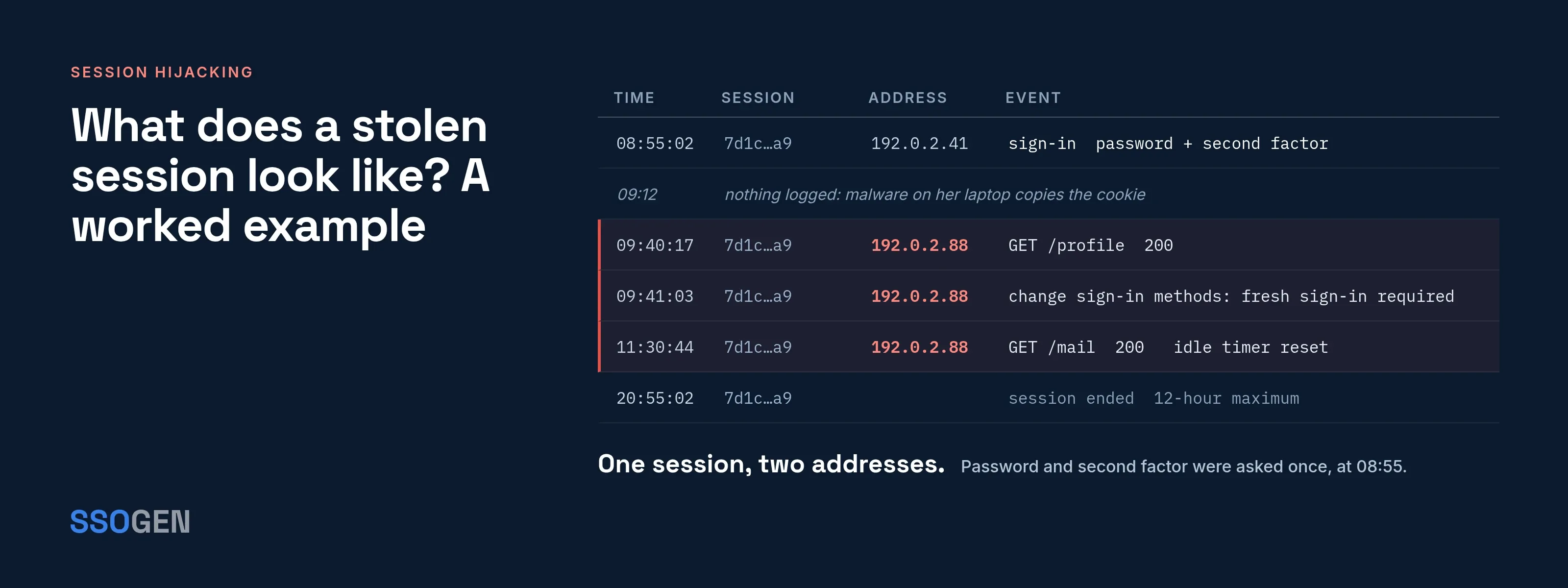
What does a stolen session look like? A worked example
Acme Corp has a 30-minute idle timeout and a 12-hour maximum. These are SSOGEN’s defaults, used here as example numbers.
Maria Lopez signs in at 08:55 from her laptop at 192.0.2.41. At 09:12, infostealer malware on that laptop copies her browser’s session cookie, and at 09:40 the attacker uses it from 192.0.2.88.
A stolen session, step by step
- Maria Lopezlaptop at 192.0.2.41
- The attacker192.0.2.88
- The website
- Maria Lopez to The website1Maria signs in with a password and a second factor08:55. The session starts.
- The website to Maria Lopez2The browser holds the session cookieIt sends the cookie back with every request.
- The attacker to Maria Lopez3Infostealer malware copies the cookie09:12. The malware is on her laptop.
- The attacker to The website4The attacker presents the cookie09:40, from a new address.
- The website to The attacker5The website sees a valid session identifierIt cannot tell on its own that the request comes from somewhere new.
| Time | Event | What a control could do |
|---|---|---|
| 08:55 | Maria signs in with a password and a second factor. The session starts | A new session identifier is issued after sign-in (OWASP) |
| 09:12 | Malware copies the cookie from the laptop | Endpoint protection may block the malware. HttpOnly does not matter here |
| 09:40 | The attacker presents the cookie from 192.0.2.88 |
A device-bound session would refuse a cookie with no matching key. A risk or network rule might challenge a new address |
| 09:41 | The attacker opens Maria’s profile and tries to change her sign-in methods | A step-up check for sensitive actions asks for a fresh authentication the attacker cannot give |
| 09:50 | Maria sees a session she does not recognize, or an alert fires | The helpdesk or Maria revokes the session |
| 11:30 | The attacker is still using the session, because every request resets the idle timer | The idle timeout never fires on a busy attacker |
| 20:55 | The 12-hour maximum arrives | The session ends however much it was used |
The last two rows carry the main lesson. An idle timeout protects an unattended screen, but it does not end a session an attacker keeps busy. Only the absolute maximum lifetime and active revocation do.
How do you prevent session hijacking?
Set cookie attributes correctly
OWASP and MDN agree on the attribute set:
Secure. Sends the cookie only over HTTPS.HttpOnly. Hides it from JavaScript, which helps against XSS.SameSite. Limits cross-site sending. OWASP prefersStrictorLax.Strict. Per MDN, sends the cookie only for requests from its own site.Lax. Also sends it when a user navigates to the site from elsewhere.None. Sends it on cross-site requests and requiresSecure.__Host-prefix. OWASP also recommends it. Per MDN, it requiresSecure, noDomainattribute andPath=/, so the cookie goes only to the host that set it.- OWASP’s example.
Set-Cookie: __Host-SessionID=<value>; Secure; HttpOnly; SameSite=Strict; Path=/. - Browser storage. Do not keep session identifiers or tokens in
localStorageorsessionStorage, OWASP adds, because any script in the page can read them.
Renew the identifier and shorten lifetimes
OWASP calls for a new session identifier after authentication, after permission or role changes and after password changes, with both idle and absolute timeouts enforced on the server.
Its suggested values:
- Idle. 2 to 5 minutes for high-value apps, 15 to 30 minutes for lower-risk ones.
- Absolute. Typically 4 to 8 hours.
Those are OWASP’s figures; set yours according to the risk of each application.
Ask again before sensitive actions
- What a session proves. Treat the session only as proof that “someone signed in earlier.”
- When to ask again. Require fresh proof before changing credentials, adding sign-in methods, approving payments or administering the system.
- Microsoft’s recommendation. Interactive reauthentication with a phishing-resistant method for actions the organization marks as sensitive.
- Read more. See step-up authentication.
Bind the session to the device
Device-bound sessions make a copied cookie useless on another machine.
- Chrome’s Device Bound Session Credentials create a key pair at sign-in, with the private key in secure hardware such as a TPM when available. Cookies are short-lived, and the browser must prove possession of the key before refreshing them.
- Chrome’s limits. Chrome’s page says the feature applies only to HTTPS pages, does not support partitioned cookies, and falls back to ordinary behavior when a device has no secure key storage (Chrome for Developers, “Device Bound Session Credentials”, last updated 15 April 2025, read 2026-10-08).
- The W3C draft specification (Editor’s Draft of 8 September 2026, read 2026-10-08, work in progress and not endorsed by W3C) says the design protects against malware sending credentials to a remote machine. It cannot prevent temporary local access or compromise during the initial registration.
- Microsoft’s Token Protection does the same for sign-in session tokens on supported devices. Microsoft lists native apps on Windows, iOS and macOS as generally available; browser support for selected web apps is not yet generally available (Microsoft Learn, Token Protection, page date 2026-08-14, read 2026-10-08).
Be able to end sessions fast
- Server-side invalidation. OWASP requires the server to actively invalidate a session at logout and to enforce all expiry server-side.
- Continuous access evaluation. It lets supported services stop accepting tokens within minutes of events such as a disabled account, a password change or reset, or an administrator revoking all refresh tokens.
- Latency. Microsoft notes latency of up to 15 minutes.
- Operational path. Revocation also needs a control to trigger it and staff who know when to use it.
What this does not stop
- Malware that already controls the device.
HttpOnlyandSecuredo not stop software that reads cookie storage directly. Device binding and endpoint protection help, but neither is complete. - A fast attacker. Short lifetimes shrink the window without closing it. A cookie stolen and used within minutes works until it expires or is revoked.
- Device binding where it is missing. Chrome’s feature works only in Chrome and on HTTPS pages, and falls back without secure storage. Microsoft’s Token Protection covers named apps and operating systems only, with browser support limited to selected web apps. Check your own browsers and applications.
- Hijack-by-consent. If a user approves an attacker’s request, there is no stolen cookie to find. Read MFA fatigue attacks.
- Detection by IP alone. OWASP warns that NAT and corporate proxies reduce its value, and mobile users change address legitimately.
- Sessions you cannot see. If your applications keep their own sessions, ending the identity-provider session may not end them. Test it.
What should you do if you suspect a session was stolen?
Handle the session first, then the device. These steps use actions named in the sources above.
- End the user’s sessions everywhere, not only the one you can see (in Microsoft’s terms, revoke all refresh tokens).
- Change the password, then check the user’s sign-in methods, mailbox rules and forwarding for anything they did not add.
- Treat the device as compromised and scan it, since the cookie most likely left from there (MITRE T1539).
- Review what the session did, using the audit trail of the applications involved.
- Tell the user what happened. A sample message:
Subject: Please sign out everywhere and call us
We saw sign-in activity on your account from a place and device that do not match you. We have ended your sessions. Sign in again on your usual device and check your account’s device list for any you do not recognize. Then call the helpdesk on the number on the intranet. Do not reply with codes or passwords; we will never ask for them.
What does SSOGEN document about sessions?
SSOGEN provides these session controls:
- Idle timeout. On the security settings page, Sign-in idle timeout defaults to 30 minutes (range 1 to 1,440).
- Maximum lifetime. Sign-in maximum lifetime defaults to 720 minutes, or 12 hours (range 5 to 43,200). Set the maximum below the idle timeout and sessions end sooner.
- Fresh authentication. Account fresh auth max age seconds defaults to 300 (range 60 to 3,600).
- What it covers. It sets how recently a user must have authenticated before changing their own credentials in My Account, which covers the case of a borrowed laptop left signed in.
- User session view. In My Account, users see each active session, how it was signed in and when it was last active, and can sign out any one session or all the others.
- Security events. The same page lists the 20 most recent security events on the account. Both support the detection signals above.
- Audit log. The audit log records sign-ins and refusals for administrators.
Questions people ask
Does HTTPS prevent session hijacking?
It stops network sniffing, one row of the table above. It does not stop malware, XSS or a relayed sign-in.
Does logging out protect me?
Yes, if the server invalidates the session, which OWASP says it must. Closing the tab does not end the session.
Is session hijacking the same as session fixation?
No. Hijacking takes a session the user already has; fixation plants an identifier the attacker already knows. OWASP’s advice to issue a new identifier at sign-in addresses fixation.
Can a passkey or security key stop it?
It stops the AiTM route: MITRE lists hardware tokens that incorporate the login domain as a mitigation for cookie theft by proxy. It does not stop malware that copies a cookie after sign-in. See are passkeys safe and what is a passkey.
How is this different from SSO risk?
One sign-in opens many applications, so one stolen session can reach many of them. Read SSO benefits and risks and SSO vs MFA.
Where to go next
- MFA bypass. Read how attackers bypass MFA.
- Relayed sign-ins. Read adversary-in-the-middle phishing.
- Fresh proof. Read step-up authentication.
- Factors. Read MFA types.
- All topics. Return to the Learn hub.
Sources, all read 2026-10-08 and re-checked 2026-10-09: OWASP Session Management Cheat Sheet and community attack page, MDN cookies and glossary, MITRE ATT&CK T1539, NIST CSRC glossary, Microsoft Learn (token protection, protecting tokens, continuous access evaluation), Chrome for Developers and Darktrace as linked above.
Under SSO, a stolen session reaches every connected application; see is SSO secure. For how browsers are starting to bind sessions to a device, see the future of authentication.