SSOGEN / Learn / SSO vs MFA: Not Alternatives, Two Layers
Learn
SSO vs MFA: Not Alternatives, Two Layers
SSO vs MFA is not a choice: single sign-on sets how often you sign in, multi-factor sets how strong each sign-in is, so most use both.
Updated
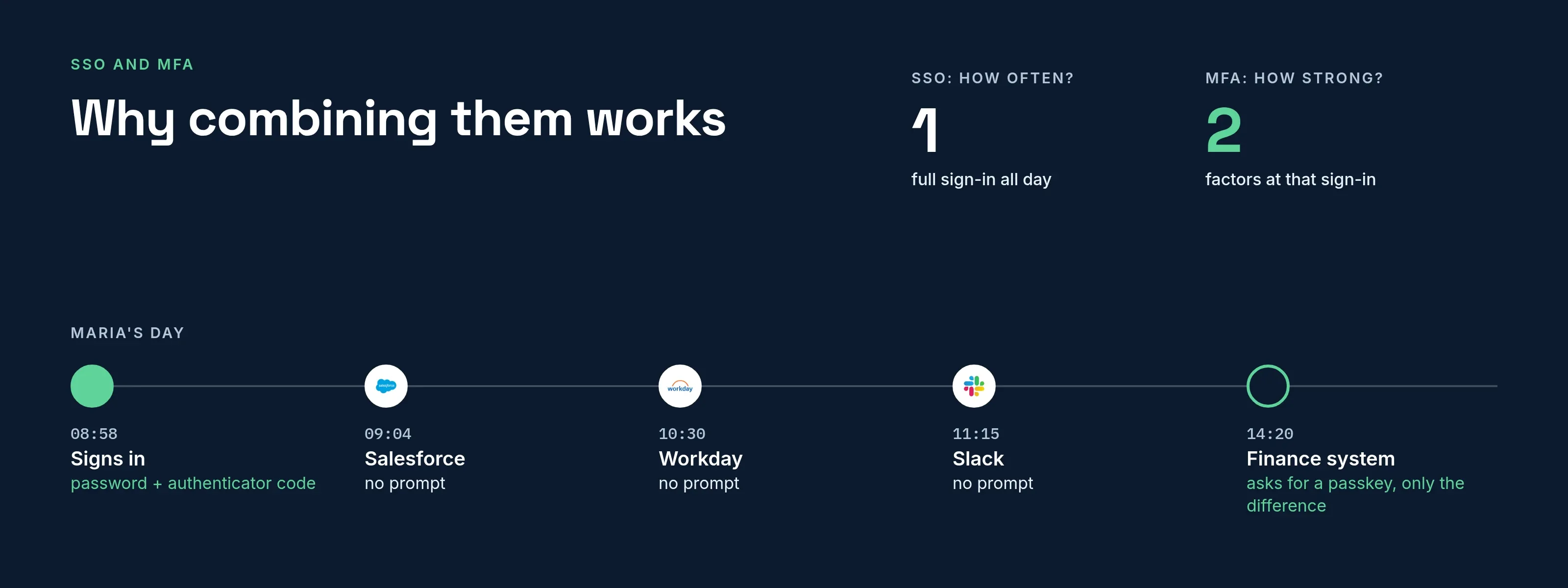
SSO vs MFA is not a choice between two controls, because they answer different questions. Single sign-on decides how many separate sign-ins a person needs. Multi-factor authentication decides what proof one sign-in requires. Either can run without the other, and each covers the other’s weak spot.
The comparison
| SSO | MFA | |
|---|---|---|
| Question it answers | How often must I sign in? | How sure are we it is you? |
| What it changes | The number of sign-ins and passwords | The proof required at a sign-in |
| Where it works | Across many applications | At one sign-in, wherever it happens |
| Typical technology | SAML, OpenID Connect, Kerberos | Authenticator app codes, passkeys, security keys, text or email codes |
| Alone, it protects | Nothing extra; it can make a stolen password more valuable | One sign-in, repeated every time |
| Main risk | One compromised account opens everything | Prompt fatigue, phishable codes, lost devices |
| User experience | Fewer prompts | More friction at the moment it is asked |
Why combining them works
Each control alone leaves a gap:
- SSO without MFA concentrates risk. One stolen password opens every connected application.
- MFA without SSO does not scale. Every application asks for its own second step, users tire of the prompts, and some applications skip it.
Combined, the identity provider asks for the second factor once, at the sign-in that counts, and every connected application inherits the result.
NIST SP 800-63B defines multi-factor as proof of “two different authentication factors” from something you know, something you have and something you are (sections 4.2 and 4.3).
A password plus a code from an authenticator app is two factors. A password plus a security question is one, because both are something you know.
Where MFA sits in the SSO flow
In the sign-in flow, the identity provider checks the second factor when the person authenticates.
- The application never sees it. It receives only the signed message.
- The message states how the person signed in. The application can reject a sign-in that is too weak for what it protects.
- The session makes this efficient. Maria signed in this morning with a password and a code. Later she opens the finance system, which requires something stronger, and she does not have to sign in again from the start.
This is step-up authentication: the identity provider compares the existing session with what the application requires and asks only for the difference.
Mistakes that undo the combination
- MFA only on the portal. If applications can also be reached directly with a local login, attackers use that path.
- Text and email codes as the strong option. Both can be intercepted. NIST SP 800-63B does not accept email as a second factor and restricts text messages.
- No recovery plan. When policy requires a second factor, anyone without a usable method is locked out. Enroll users before the policy tightens.
- Accepting the provider’s MFA on faith. When sign-in comes from another provider, the application should check how strongly the person signed in rather than assume it.
- Long sessions. A second factor requested once a month is barely a control.
How SSOGEN combines them
In SSOGEN, the sign-in policy sets this per application. A policy requires one of three strengths:
- a password
- a password plus a second factor
- a passkey or security key
In the policy wizard, under Requirements, the Second step list has authenticator app and recovery codes on by default. Text message and email are off and labeled weaker and weakest.
If the person has proved less than the policy requires, SSOGEN sends them to prove more instead of refusing, as described in How sign-in decisions work.
When someone signs in through SAML or OpenID Connect, the upstream provider runs its own checks. SSOGEN trusts what that provider reports about how strongly the person signed in.
SSOGEN’s console adds one control for administrators: they enter a code from their authenticator app to switch into admin mode.
Being signed in to the Admin Console does not grant administrator powers by itself, and this setting is on by default. Full setup is in Multi-factor authentication, and the product view is MFA software.
Which one to start with
If the organization has neither, start with MFA on the accounts that matter most: administrators, finance and anyone who can change access. It protects those accounts whether or not applications share a sign-in.
Add SSO next. As each application joins, move the second factor to the identity provider, so users answer it once instead of once per application.
If SSO is already in place, check two things first:
- The identity provider requires the second factor.
- No connected application keeps a separate local login that bypasses it.
Then review session length.
Shorter sessions on sensitive applications make one successful phish worth less, and step-up asks for the second factor again more often.
Questions people ask
Is SSO safer than MFA?
They are not comparable. SSO without MFA can be less safe than separate logins. MFA without SSO is safe but tiring for users.
Does SSO include MFA?
Not by itself. Many products bundle them, but the second factor is a separate policy.
Can I use MFA without SSO?
Yes. Each application can ask for its own second factor, but you configure and monitor each one separately.
Does MFA make SSO unnecessary?
No. MFA addresses the strength of each sign-in, not the number of sign-ins.
Where to go next
- The basics. Read what is SSO, then the benefits and risks of putting sign-in in one place.
- A second step not yet required everywhere. Start with why MFA is important and how to roll it out.
- Gaps. MFA on top of SSO still has gaps; see how attackers bypass MFA.
Sources, all read 2026-10-09: NIST SP 800-63B.