SSOGEN / Learn / SSO Benefits and Risks, With the Mitigations
Learn
SSO Benefits and Risks, With the Mitigations
SSO means fewer passwords, MFA enforced in one place and fast offboarding, with one identity provider as the single point of failure to protect.
Updated
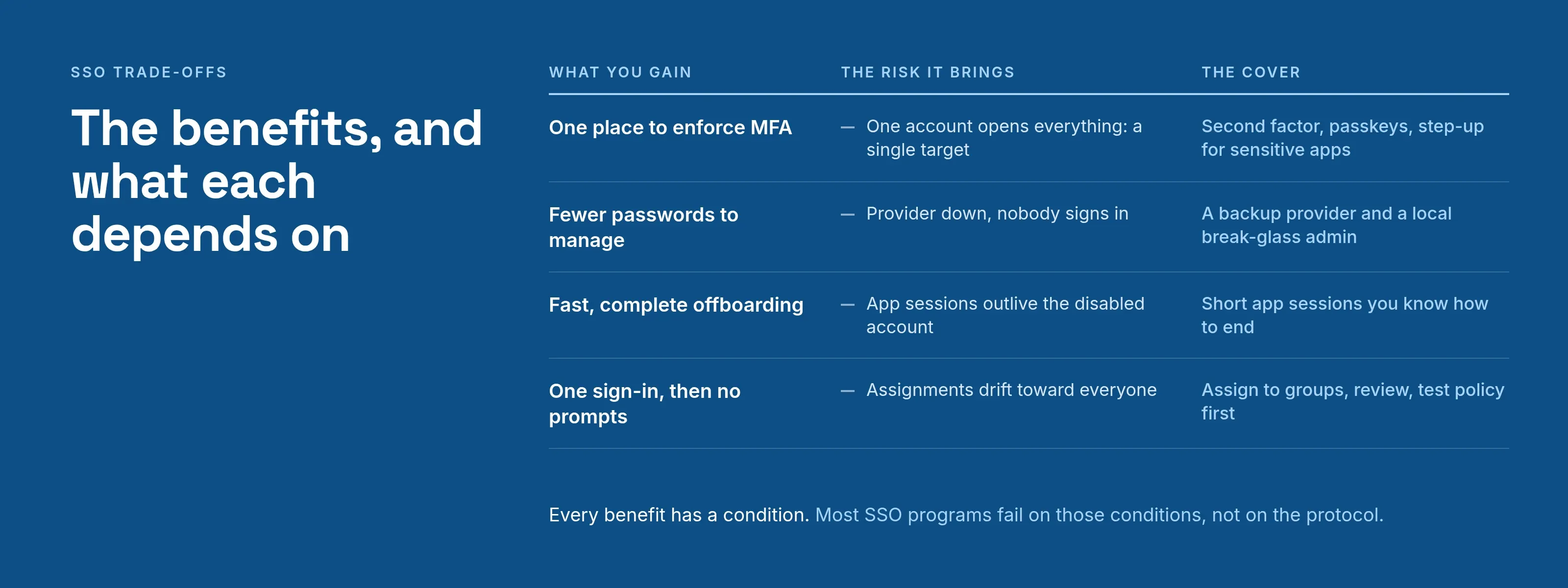
SSO benefits come from moving authentication out of every application and into one place, and the risks come from the same move. This page lists both, with the mitigation for each risk.
The benefits, and what each depends on
| Benefit | Why it happens | What it depends on |
|---|---|---|
| Fewer passwords to manage | Applications stop holding credentials; people remember one | Every application is actually connected, not left on local logins |
| Fewer password resets | Fewer secrets to forget | Reset flow at the identity provider works and is not itself weak |
| One place to enforce MFA | The second factor is asked at the identity provider, once, for all connected applications | Applications cannot be reached by a side path that skips the identity provider |
| Fast, complete offboarding | Disabling one account removes access to every connected application | Application sessions that already exist expire quickly, and local accounts are turned off |
| One audit trail | Every sign-in passes through the same system | The log is kept and someone reads it |
| Less phishing exposure | A password is typed in one familiar place instead of dozens | People are trained to recognize that one place |
| Easier for users | One sign-in, then no prompts | Session lifetime is not so long that it becomes a risk |
Every benefit in the right-hand column has a condition. Most SSO programs fail on those conditions, not on the protocol.
The risks
1. The identity provider is a single point of failure. If it is down, nobody signs in to anything it protects. Applications with an existing session keep working until the session expires, which can hide the outage for hours.
- Mitigation. Run the provider at a level that matches how much you depend on it, and plan a fallback.
- Local administrator. Keep at least one local administrator account that doesn’t depend on any outside provider.
- Backup provider. If you use more than one provider, name a backup in advance so a directory outage doesn’t lock everyone out.
- Fallback strength. Never let the fallback lower the sign-in strength, or it becomes the weakest path.
2. It is also a single target. An attacker who takes over one account at the identity provider gets everything that account can open.
- Mitigation. Require a second factor, prefer phishing-resistant methods such as passkeys, and add step-up for sensitive applications.
- Session limit. NIST SP 800-63B, section 7.2 caps session length: at assurance level 2, reauthentication is due after at most 12 hours.
- Shorter lifetimes. They reduce what a stolen session is worth.
3. Stolen sessions and tokens. A bearer assertion works for whoever presents it, which is why NIST defines federation assurance levels (NIST SP 800-63C, section 4):
- FAL1. A bearer assertion signed by the identity provider.
- FAL2. Adds encryption to the relying party.
- FAL3. Requires proof of a key held by the subscriber.
- Mitigation. Short token lifetimes, TLS everywhere, and sign-in policies that ask again for high-risk applications.
4. Sessions outlive access. Disabling a user at the identity provider doesn’t end sessions the applications already created, because the relying party manages its own session separately (NIST SP 800-63C, section 5.3).
- Mitigation. Set application session lifetimes you can accept, and know where each application’s session can be ended.
5. Applications left outside SSO. The one old system with its own login becomes the easiest way in, and nobody monitors it.
- Mitigation. Inventory every application, then put the legacy ones behind an agent or gateway instead of leaving them alone.
6. Over-broad access through convenience. When opening every application takes one click, assignments drift toward “everyone.”
- Mitigation. Assign applications to groups, review the assignments, and test a policy before it goes live.
What to check before you roll it out
- Can an administrator still sign in if the main identity provider is unreachable?
- Does every connected application reject a sign-in that didn’t come through the provider?
- Is the second factor enforced at the provider, with recovery for lost phones?
- How long does an application session last after a user is disabled?
- Who reads the sign-in log, and how often?
What SSOGEN gives you for these risks
SSOGEN covers each risk above with a policy setting or a component:
- Failover. A policy can name backup identity providers, so people can still sign in when the primary provider is unreachable. The policy’s required strength still applies to a fallback, and a person can use one only where they already have a linked account. Failover can be off, manual or automatic; see Identity provider failover.
- Second factor. A policy can require a second factor or a passkey per application, as described in Multi-factor authentication.
- Break-glass access. Local accounts give you a way back in when another provider is down, as described in Identity providers and federated login.
- Legacy applications. Applications that can’t speak SAML or OpenID Connect connect through the Web Agent or App Proxy, so they don’t stay outside. See single sign-on software.
Questions people ask
What is the biggest risk of SSO?
Concentration: one outage or one compromised account affects many applications. MFA and failover each cover half of that risk.
Does SSO replace the need for MFA?
No. It makes MFA easier to enforce. See SSO vs MFA.
Is SSO worth it for a small company?
Yes. Offboarding and one MFA policy pay off at any size, as long as you keep a local break-glass account.
Can SSO increase security and convenience together?
Yes, when the sign-in is strong and the session has limits. Without those two, convenience is only a longer-lived password.
Where to go next
- Basics. Read what is SSO for the basics.
- The flow. How SSO works covers the flow behind the risks above.
- Security controls. For the controls behind each risk, including Golden SAML and session theft, see is SSO secure.
- Vaults. SSO removes the app password, but a vault still suits sites your company doesn’t manage. See password manager vs SSO.
- Stolen sessions. To see how a stolen session works, read session hijacking.
Sources, all read 2026-10-09: NIST SP 800-63B, NIST SP 800-63C.