SSOGEN / Learn / Active Directory Federation Services: What AD FS Does and When to Replace It
Learn
Active Directory Federation Services: What AD FS Does and When to Replace It
AD FS is a Windows Server role that signs people in to applications with claims, so one Active Directory account works without a password going to each app.
Updated
Active Directory Federation Services (AD FS) is a server role in Windows Server. Microsoft’s AD FS overview (read 2026-10-09) says it shares identity and entitlements across security and enterprise boundaries, which extends the single sign-on users have inside one organization to internet-facing applications.
The model in short: a person signs in once against Active Directory, AD FS issues a signed token with claims about them, and the application trusts the token without ever asking for a password.
This page covers what AD FS does, its parts, one sign-in step by step, and a neutral way to decide whether to keep it or move on.
What does Active Directory federation do?
AD FS is a security token service. An application sends it a request; AD FS authenticates the person and returns a token with statements about them, such as an email address, a user principal name and group membership.
Microsoft’s “The Role of Claims” page (read 2026-10-08) calls these statements about users, used mainly to authorize access to claims-based applications.
A claim value comes either from an attribute store such as an Active Directory account, or from a rule that transforms another claim.
The application that receives the token is the relying party, and in AD FS each connected application is a relying party trust. There are two ways to create one:
- Manually. The wizard in Microsoft’s “Create a Relying Party Trust” procedure (read 2026-10-08) lets you enable the WS-Federation Passive protocol, the SAML 2.0 WebSSO protocol, or both, then add identifiers and an access control policy.
- From metadata. Import the partner’s federation metadata.
For OpenID Connect and OAuth 2.0, Microsoft’s page on AD FS OpenID Connect and OAuth flows and scenarios (read 2026-10-08) covers AD FS 2019 and later.
It lists the authorization code, implicit, client credentials, on-behalf-of, resource owner password and device code flows.
What are claim rules?
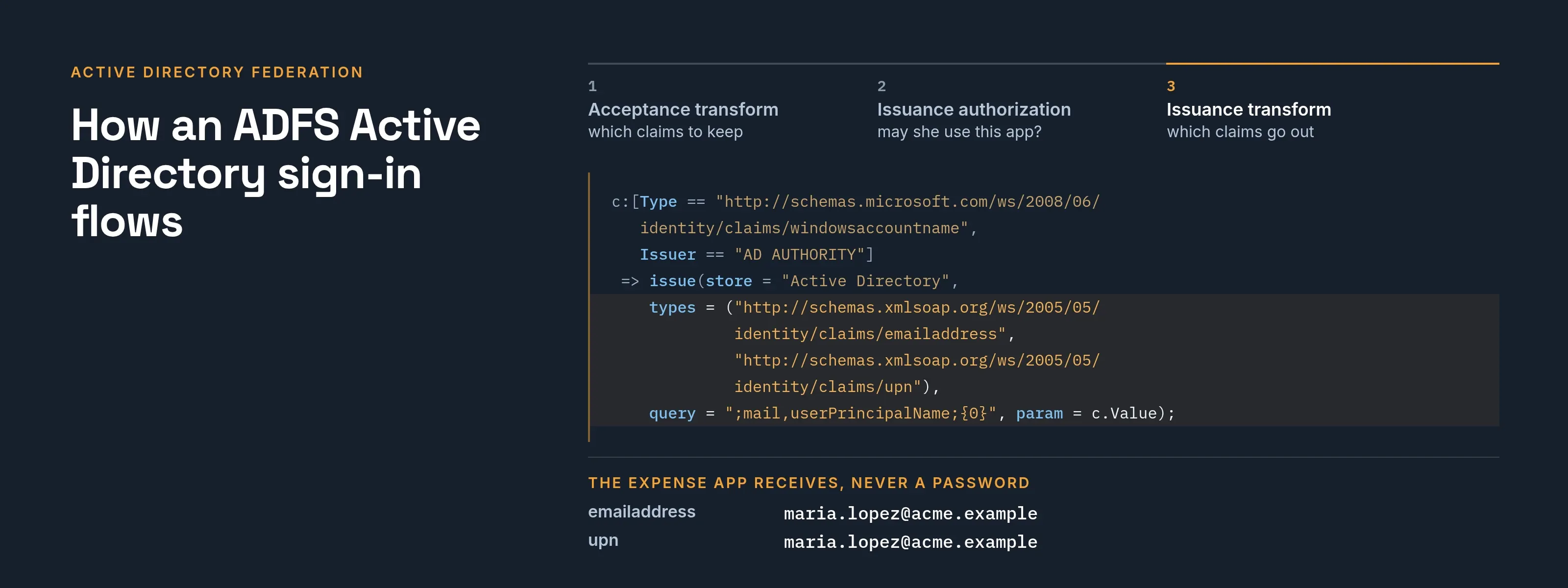
Claim rules decide what a relying party receives. Microsoft describes a three-step claims pipeline (read 2026-10-08, same claims page):
- Acceptance transform rules select which incoming claims to keep.
- Issuance authorization rules decide whether the person may use the relying party.
- Issuance transform rules decide which claims go out.
If sign-in works but the application reports no email, check the issuance transform rules first.
What are the parts of AD federation services?
| Part | What it is | What the requirements page says (read 2026-10-08) |
|---|---|---|
| Federation service | The AD FS servers that authenticate people and issue tokens | Servers must be joined to an Active Directory domain; all servers in a farm are in the same domain |
| Web Application Proxy (WAP) | The proxy role for extranet access | Required for extranet access; it cannot be installed on the same computer as a federation server |
| Farm and database | Several federation servers sharing one configuration | Windows Internal Database (WID) is supported for up to 100 relying party trusts and 30 nodes; beyond either, SQL Server is required |
| Certificates | TLS/SSL, token signing, token decrypting | When the token signing certificate changes, every relying party must be updated or it cannot sign people in |
All four rows come from Microsoft’s AD FS requirements (read 2026-10-09).
The same page lists two firewall requirements:
- TCP port 443 must be open inbound between clients, proxy and federation servers.
- If you use client certificate authentication without port 443 on the certauth endpoint, port 49443 must be open between clients and the proxy.
How an ADFS Active Directory sign-in flows
Maria Lopez at Acme Corp opens an expense application that is a relying party of fs.acme.example. The diagram shows the six steps, and the table after it shows where to look when each one breaks.
One AD FS sign-in, step by step
- Maria's browser
- Expense applicationRelying party
- AD FSfs.acme.example
- Active Directory
- Expense application to Maria's browser1Redirects the browser to AD FS with a sign-in request
- Maria's browser to AD FS2Sign-in request reaches AD FSFrom outside the office it reaches the Web Application Proxy first.
- AD FS to Active Directory3Authenticates Maria against Active DirectoryWindows integrated authentication or a form.
- AD FS4Claim rules run and a token is builtThe token carries her email and UPN.
- AD FS to Maria's browser5AD FS signs the token and returns it
- Maria's browser to Expense application6Browser delivers the token; app opens a sessionThe application reads the claims.
| Step | What happens | Where to look when it breaks |
|---|---|---|
| 1 | The application redirects Maria’s browser to https://fs.acme.example/adfs/ with a sign-in request |
Wrong relying party identifier in AD FS |
| 2 | From outside the office the request reaches the Web Application Proxy first, which passes it to the federation servers | DNS for the service name resolves to the wrong place |
| 3 | AD FS authenticates Maria against Active Directory, with Windows integrated authentication or a form | Browser zone settings for integrated sign-in |
| 4 | Claim rules run and AD FS builds a token with her email and UPN | Missing email: issuance transform rule |
| 5 | AD FS signs the token and Maria’s browser delivers it to the application | Signature check fails: the app holds an old signing certificate |
| 6 | The application reads the claims and opens a session | Wrong name identifier: a second account appears |
For SAML applications the token is an assertion. What is SAML shows what one contains, and federated identity explains the wider pattern.
To inspect an AD FS federation metadata file before you hand it to anyone, paste it into the SAML metadata checker. It runs in your browser, needs no sign-up and uploads nothing.
Troubleshooting table from Microsoft’s own notes
| Symptom | Cause Microsoft documents (read 2026-10-08) | Source |
|---|---|---|
| Only a password option shows on the sign-in page | The app asked for one authentication method, sent as wauth in WS-Federation or RequestedAuthnCtxRef in SAML |
Microsoft’s AD FS FAQ |
| Event 364 or 441 about token binding | Token binding is on by default in AD FS 2016 and causes known proxy and federation problems; the FAQ gives Set-AdfsProperties -IgnoreTokenBinding $true |
AD FS FAQ |
| Integrated sign-in prompts for a password | The federation service name must be in the browser’s local intranet or trusted sites zone | Requirements |
| Every app fails after a certificate change | Relying parties must be updated with a new token signing certificate | Requirements |
When should you replace AD FS?
Start with Microsoft’s own position, as its pages (read 2026-10-08 and 2026-10-09) state it:
- The AD FS overview carries a notice: instead of upgrading to the latest version of AD FS, Microsoft highly recommends migrating to Microsoft Entra ID.
- Microsoft’s AD FS decommission reference gathers a guide, a workshop, a migration wizard, an FAQ and a readiness script.
Neither page, as read, gives an end-of-support date, so this page does not state one. Microsoft’s position is one input; your organization’s reasons are the other:
| Reason you might have | What it suggests | What to check first |
|---|---|---|
| Most new apps are cloud services | A cloud identity provider sits closer to them | Count the relying party trusts and how many users signed in lately |
| Certificate renewals and farm upkeep take real time | Fewer servers and certificates to run | Who owns the token signing certificate renewal, and how many apps would break if it lapsed |
| MFA rules written per relying party | Microsoft’s migration tests say rules that prompt for MFA should be translated into Conditional Access policies | List which relying parties carry additional authentication rules |
| You want one inventory of apps | Microsoft’s wizard lists AD FS apps with a sign-in in the last 30 days and the unique users over 1, 7 or 30 days | Run it, or run the readiness script |
| You need to keep Windows Server identity on your own hardware | AD FS fits | Plan the upgrade path for the farm |
The migration wizard in Microsoft’s AD FS application migration overview (read 2026-10-09) sorts each application into ready to migrate, needs review, or additional steps required.
The wizard handles only SAML applications. Applications that use OpenID Connect, WS-Fed or OAuth 2.0 appear in the activity report, and you configure them manually in Microsoft Entra ID.
When does Active Directory federation remain the right choice?
Keeping AD FS is a valid outcome. The same overview lists settings to review before an application can move, as Microsoft’s tests describe them:
- A relying party with more than one WS-Fed assertion endpoint, because Microsoft Entra supports one.
- A relying party that encrypts only the name identifier, because Microsoft Entra ID encrypts the whole token and doesn’t yet support encrypting specific claims.
- A relying party that verifies the signature on incoming SAML requests, because Microsoft Entra ID accepts a signed request but doesn’t verify the signature.
- Custom issuance authorization or transform rules, which are checked one by one.
If most of your inventory looks like this, keep AD FS for those applications and move the rest. Mixed setups are common, and each side needs an owner.
A message you can send app owners
Subject: Which of your apps sign in through fs.acme.example?
We are reviewing AD FS. Please reply with the app name, the protocol (SAML, WS-Federation, OpenID Connect), who supports it on your side, and whether anything about it is unusual (extra MFA, encrypted tokens, several reply URLs). We need this by Friday to plan certificate renewal.
What SSOGEN does with AD FS
SSOGEN is an identity provider itself, and it also accepts sign-in from the one you already run.
- Roles. With AD FS, SSOGEN acts as the SAML service provider and AD FS as the identity provider.
- Claims. SSOGEN’s default attribute mapping already uses the Microsoft email and name claim URIs that AD FS sends.
Most AD FS servers sit inside a private network, so SSOGEN’s server cannot always fetch their metadata. In that case:
- Download the federation metadata.
- Use the file upload.
- Upload it again whenever AD FS replaces its signing certificate.
The steps, claim settings and error table are in SSO with AD FS; every field is in the SAML identity provider guide.
If your users are kept in a directory rather than behind a federation service, LDAP vs Active Directory explains the difference.
Questions people ask
What is AD FS used for?
AD FS lets people sign in to applications with their Active Directory account, including internet-facing ones outside the company network.
It authenticates the person, then issues a signed token with claims such as email and group membership. It speaks SAML 2.0, WS-Federation or, from AD FS 2019, OpenID Connect (Microsoft pages read 2026-10-08).
Is AD FS the same as LDAP?
No. LDAP is a protocol for querying a directory. AD FS is a token service.
It authenticates the person against Active Directory and returns a signed token, so the application needs no directory access to sign people in. LDAP vs Active Directory covers the directory side.
Is AD FS the same as Active Directory?
No. Active Directory stores accounts and authenticates them. AD FS sits on top and issues tokens to applications.
Does AD FS support OpenID Connect?
Yes, per Microsoft’s flows page: AD FS 2019 and later, alongside SAML 2.0 and WS-Federation.
Is Microsoft Entra ID the same product?
No. AD FS runs on your servers. Microsoft Entra ID is Microsoft’s cloud service, and Microsoft’s pages recommend migrating to it.
Do I need a proxy?
For extranet access, yes. The requirements page says extranet access requires the Web Application Proxy role.
Where to go next
- What is SAML. Read the protocol basics.
- SSO with AD FS. The SSOGEN setup.
- Kerberos. Sign-in inside the domain itself usually runs on it.
- Learn hub. Return to all guides.
Microsoft Entra ID, Windows Server and AD FS are trademarks of their owner; SSOGEN is not affiliated with them.
Sources, all read 2026-10-09: AD FS overview, AD FS requirements, AD FS application migration overview.