SSOGEN / Learn / Biometric Authentication: How It Works, Its Types, Its Limits, and Whether Face ID Is a Passkey
Learn
Biometric Authentication: How It Works, Its Types, Its Limits, and Whether Face ID Is a Passkey
In passkey sign-in your fingerprint or face is checked inside your own phone or laptop, and the website never receives it; the passkey is the credential.
Updated
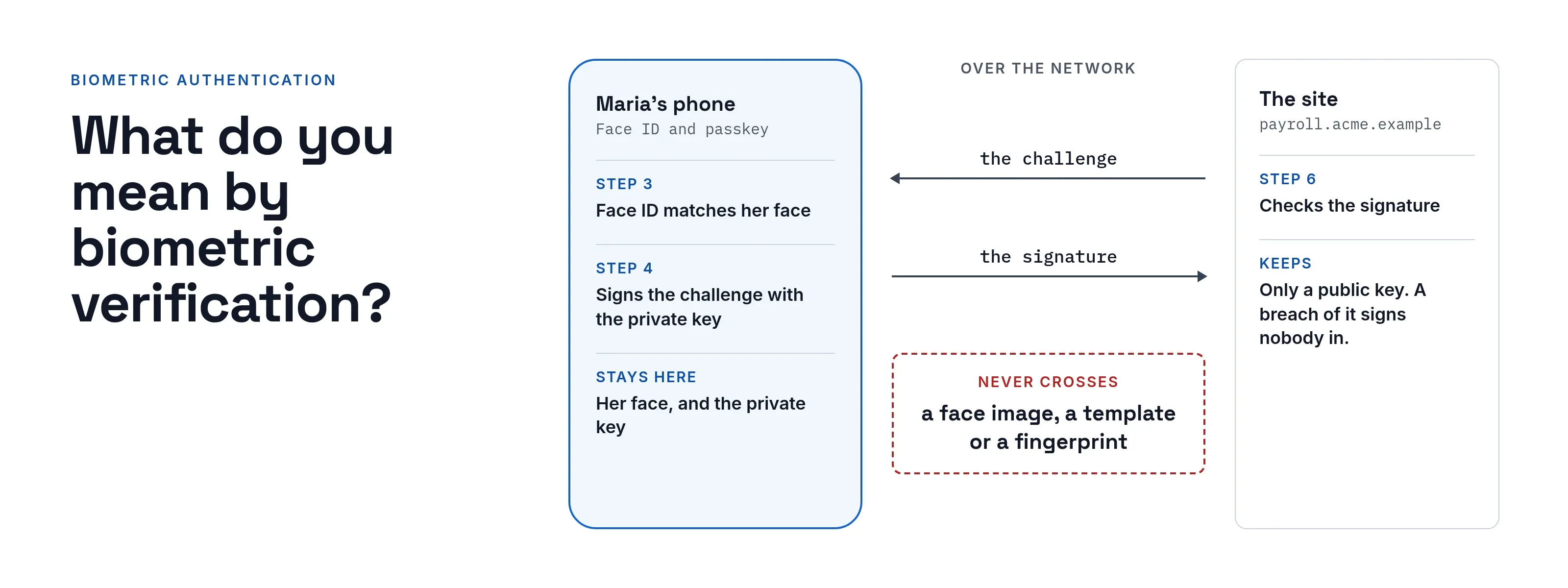
Biometric authentication confirms who you are by comparing a fresh measurement of a trait, such as a fingerprint or a face, with a reference measurement taken when you enrolled. Where the comparison happens matters most. In passkey sign-in and device sign-in, it happens inside your phone or laptop, and the website never receives your face or fingerprint.
For that reason, Face ID is not a passkey. Face ID is the local check that opens the passkey; the passkey is the credential.
What is biometric data?
The UK Information Commissioner’s Office describes biometric data as personal information (ICO guidance on biometric recognition, read 2026-10-08) that is:
- About a person’s characteristics. Physical, physiological or behavioral.
- The result of specific technical processing.
- Able to allow or confirm unique identification.
The system does not compare the raw photo or scan. It converts the capture into a template, a set of numbers, and compares templates.
What is the main purpose of authentication?
NIST defines authentication in two parts (NIST SP 800-63B-4, section 1, web edition dated 26 Aug 2025, read 2026-10-09).
- The definition. Determining that the person trying to use a service controls the authenticators used to claim an identity.
- The aim. In NIST’s words, reasonable, risk-based assurance that the person using the service today is the same person who used it before.
What are the four types of authentication?
NIST names three factor categories, not four:
- something you know (a password or PIN)
- something you have (a physical authenticator)
- something you are (a biometric characteristic)
(Same document, read 2026-10-08.)
Lists with four entries add another category, often location; the NIST text has no fourth category. Biometrics are the “something you are” factor. Our page on MFA types covers how the factors combine.
What do you mean by biometric verification?
- Verification. A one-to-one comparison that confirms a claimed identity: the system compares one fresh sample with one stored template.
- Identification. A one-to-many comparison: it searches many templates to find out who someone is.
The passkey and phone sign-in cases below are verification only.
What are the types of biometric authentication?
Each type measures a different trait, and each can fail in two ways:
- A false accept (NIST calls the rate the false match rate, FMR) admits someone who should be refused.
- A false reject (the false non-match rate, FNMR) turns away the right person (NIST SP 800-63B-4, section 3.2.3, read 2026-10-08).
Lowering one error rate usually raises the other, so every system chooses a trade-off.
| Type | What is measured | A false accept means | A false reject means | What NIST 800-63B-4 says (read 2026-10-08) |
|---|---|---|---|---|
| Fingerprint | Ridge pattern of a finger | Another person’s finger matches | A dry, cut or misplaced finger fails | Should implement presentation attack detection (PAD) |
| Face | Shape and features of the face | Another face, or a fake of yours, matches | Poor light, angle or changed appearance fails | Must implement PAD |
| Iris | Pattern in the colored ring of the eye | Another iris matches | A bad capture fails | Should implement PAD |
| Voice | Characteristics of speech | A recording or similar voice matches | A cold or noisy room fails | Voice comparison must not be used |
| Behavioral | How you type, swipe or move | Another person’s habits look like yours | Your habits change with a new device or an injury | Not addressed in the sections read |
NIST’s accuracy requirements:
- False match rate. 1 in 10,000 or better across demographic groups (required).
- False non-match rate. Under 5 percent (recommended).
- Demographic groups. They include sex and skin tone where these affect performance.
PAD is how a system tries to tell a live trait from a copy, such as a photo held up to a camera.
Why can’t a biometric be reset?
- A password. It can be changed in a minute.
- A fingerprint. It cannot be changed at all.
- Not secrets. NIST says biometric characteristics can often be obtained online or without consent.
- Revocation. NIST adds that template protection schemes exist that allow something like it, but few are available (section 3.2.3, read 2026-10-08).
A biometric is therefore a poor secret to store on a server, which is why safer designs never send it.
Is Face ID a passkey?
No. A passkey is a pair of cryptographic keys created for one website. The private key stays on your device and the site keeps only the public key.
Apple’s page on passkeys says the private key is needed to sign in and the server never learns it.
On devices with Touch ID or Face ID, these can authorize use of the passkey (Apple Support, About the security of passkeys, read 2026-10-09). Face ID is the approval step; the key is the credential.
The biometric stays local, according to each of these sources:
- Apple. Face ID data does not leave the device, is never available to apps or Apple, and is never backed up to iCloud (Apple Support, About Face ID advanced technology, read 2026-10-08).
- FIDO Alliance. Biometric information and processing stay on the device for passkeys in general and are never sent to a remote server. The server sees only assurance that the check succeeded (FIDO Alliance, Passkeys, read 2026-10-09).
- W3C. The Web Authentication standard calls this authenticator-local biometric recognition (Web Authentication Level 3, W3C Recommendation, 25 August 2026, section 14.3, read 2026-10-09).
- NIST. It reaches the same design from the security side. It prefers local verification (a multi-factor authenticator with a biometric comparison as the activation factor) over comparing biometrics at a central verifier (section 3.2.3).
For the full passkey story, read what a passkey is and passkeys compared with passwords.
Worked example: Maria signs in at Acme
Acme Corp (acme.example) runs a payroll site, and Maria Lopez has a passkey for it on her phone. The diagram and table show each step and what the site receives at each one.
Face ID approves the key; the face never leaves the phone
- Maria
- Her phoneFace ID and passkey
- The sitepayroll site
- Maria to The site1Opens the site and chooses her passkey
- The site to Her phone2Sends a fresh random challenge
- Her phone3Face ID matches her faceInside the phone only. Nothing crosses the network.
- Her phone4Signs the challenge with the private keyAlso inside the phone only.
- Her phone to The site5Returns the signed challengeOnly the signature moves over the network.
- The site6Checks the signature against its stored public key
| Step | Where it happens | What moves over the network |
|---|---|---|
1. Maria opens payroll.acme.example and chooses her passkey |
Browser | A request to sign in |
| 2. The site sends a fresh random challenge | Site to phone | The challenge |
| 3. Her phone shows the Face ID prompt and matches her face | Inside the phone only | Nothing |
| 4. The phone signs the challenge with the private key | Inside the phone only | Nothing |
| 5. The phone returns the signed challenge | Phone to site | The signature |
| 6. The site checks the signature against its stored public key | Site | Nothing more |
At step 3, if her face does not match after repeated tries, Face ID stops and asks for the passcode. Apple says Face ID allows five unsuccessful match attempts before it requires a passcode.
At no step does a face image, template or fingerprint cross to the site. An attacker who steals Acme’s site database gets only public keys, which cannot sign in.
Compare a site that stores face templates itself: after a breach, nobody can reset a face.
This is the difference between a biometric that approves a key and a biometric that is the credential the service holds.
What are the pros and cons of biometric authentication?
| Advantage | Disadvantage | |
|---|---|---|
| Effort | Nothing to type or remember | A trait can fail to read (a wet finger, a mask, low light); a fallback is needed |
| Sharing | You cannot tell a colleague your fingerprint the way you can a password | Not a secret: it can often be captured without consent (NIST) |
| Recovery | Nothing to forget | Cannot be changed if exposed |
| Accuracy | Tunable error rates; NIST sets FMR at 1 in 10,000 or better | Two error kinds that trade against each other; performance can differ between groups |
| Fakes | PAD helps tell live traits from copies | PAD is required only for some modalities, and none is perfect |
| Privacy | Local comparison keeps data on the device | A central biometric database is a sensitive store and brings legal duties |
NIST also says a non-biometric alternative must always be available, both for people who cannot use a given trait and for when a sensor fails.
What does this not stop?
- A person forced or tricked into approving. A biometric proves that a trait is present, not that the person chose to sign in.
- A stolen device with its passcode known. Face ID and Touch ID fall back to the passcode (Apple), and the passcode then does the same job.
- Stuffed or phished passwords on the account. If the account still accepts a password, the attacker can use that route. See credential stuffing and phishing-resistant MFA.
- Look-alikes. Apple says the chance of a random person opening a device with Face ID is less than 1 in 1,000,000 with a single enrolled appearance. The chance is higher for twins, siblings and children under 13.
Privacy and legal caution
This section summarizes two sources and is not legal advice.
Article 9(1) of the GDPR prohibits processing biometric data to uniquely identify a person, with exceptions; one is explicit consent for specified purposes (GDPR Article 9 text, read 2026-10-09).
The ICO says organizations processing special category biometric data:
- need a lawful basis and a special category condition
- should run a data protection impact assessment covering false acceptance, false rejection and discrimination risks
- must be transparent
- should consider on-device verification, and whether they need to keep samples
The ICO notes that its guidance is under review following the Data (Use and Access) Act.
Rules differ by country and by state, so ask counsel before your organization collects biometrics itself.
How SSOGEN handles this
SSOGEN uses biometrics the way this page recommends: on the device, as the approval step for a passkey.
- Passkey approval. A user approves a passkey sign-in with the fingerprint, face, PIN or security key their device already uses.
- No biometric received. SSOGEN never receives the biometric.
- Other second steps. SSOGEN also offers authenticator app codes, emailed or texted codes and recovery codes; the multi-factor authentication guide covers each method.
Questions people ask
Is biometric authentication secure?
It is as strong as its sensor, its fake detection and what it protects, and it cannot be reset once exposed. NIST allows it only as part of multi-factor authentication with a physical authenticator.
Is a fingerprint a password?
No. A password is a secret you can change, and NIST says biometrics are not secrets.
Does my phone send my face to the app?
No. Apple says Face ID data does not leave the device and is never available to apps. FIDO says the server sees only that the check succeeded.
Which type is least suitable?
NIST says voice comparison must not be used for authentication.
Where to go next
- Passkeys. Read what a passkey is and passkeys compared with passwords.
- Second steps. Read MFA types and phishing-resistant MFA.
- Passwords. Read the NIST password guidelines.
- All explainers. Return to the Learn hub.