SSOGEN / Learn / Why Is MFA Important? What It Stops, What It Does Not, and How to Roll It Out
Learn
Why Is MFA Important? What It Stops, What It Does Not, and How to Roll It Out
A password is the one thing attackers can buy, guess, phish or replay; a second factor means that stolen password no longer opens the account.
Updated
Why is MFA important? Multi-factor authentication makes a stolen password insufficient on its own. The attacker also needs a second factor the user has or is, such as a phone, a security key or a fingerprint.
CISA’s fact sheet on phishing-resistant MFA (October 2022, read 2026-10-09) states that with MFA, an unauthorized user who compromises one factor, such as a password, still cannot get in without the second.
That blocks some common techniques, including password spraying, but not all of them. The section on what MFA does not stop lists the exceptions.
How much does MFA actually reduce the risk?
The most quoted figure is 99.9 percent. Microsoft’s 2019 blog post (dated August 20, 2019, read 2026-10-09) says MFA can block over 99.9 percent of account compromise attacks, but it names no sample or method.
A better source is a Microsoft study: Meyer and co-authors, “How effective is multifactor authentication at deterring cyberattacks?” (arXiv preprint v1, 1 May 2023, read 2026-10-09).
The study covered commercial Microsoft Azure Active Directory accounts that were reviewed for suspicious activity between April 22, 2022 and September 22, 2022.
A specialist team checked samples for compromise, and the authors estimated the rest of the population statistically. The results:
- The estimated compromise rate was 0.0079% for accounts with MFA and 1.0071% for accounts without, a 99.22% reduction in risk.
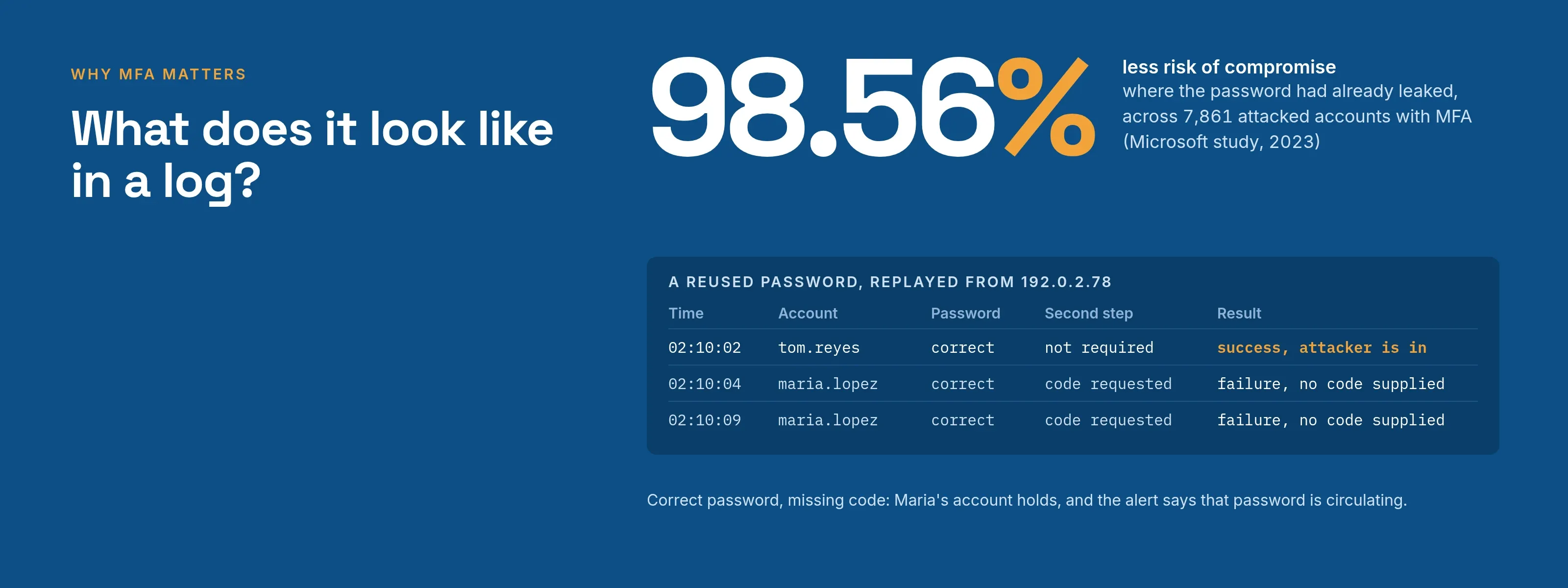
- For a sample of 128,000 accounts whose passwords leaked in that period, the authors confirmed attackers used the password on 7,861 accounts that had MFA. MFA prevented 98.6% of those attacks, and the abstract reports a 98.56% risk reduction.
Two caveats apply:
- One vendor. The data covers one vendor’s accounts, so treat the percentages as one large measurement, not a general law.
- Preprint. The paper is also an arXiv preprint, and we have not seen a peer-reviewed version.
What are the benefits of MFA?
MFA’s benefits fall into four areas. The table shows what each one covers and where it stops.
| MFA benefit | What it does | Where it stops |
|---|---|---|
| Stops credential stuffing and password spraying | A password guessed or replayed from another breach is not enough. See credential stuffing for the attack and its log pattern | A person who types a code into a fake page, or approves a prompt they did not start, hands over the second factor too |
| Limits the damage from a leaked password | In the Microsoft study, MFA cut the risk of compromise by 98.56% where the password was already known to have leaked | The remainder is real: in the paper’s table of failure rates, 1.44% of the attacks on MFA accounts in that sample still got through |
| Meets requirements others set | Published cyber insurance applications ask whether you require MFA for areas such as email and remote access (what the applications ask). New York’s financial regulator requires it, with limited exceptions, for any individual accessing any information system of a covered entity from November 1, 2025, per its July 2025 guidance (read 2026-10-09) (what section 500.12 says) | Answering yes on a form or buying a tool does not make an organization compliant. Your insurer, regulator and counsel decide that |
| Central control | One policy decides who must use which second step, for which application, so there is one place to tighten, test and prove it | Only systems that sit behind that policy are covered. CISA tells organizations to list systems that cannot do MFA and plan to fix or replace them |
Which MFA methods are strongest?
Second factors differ in strength, and the method chosen decides most of the benefit. CISA’s fact sheet ranks them from strongest to weakest:
- Phishing-resistant methods (FIDO/WebAuthn and PKI-based MFA).
- App-based methods (one-time codes, or push with number matching).
- App push without number matching.
- SMS or voice.
CISA calls SMS and voice a last resort and a temporary measure. For small and medium-size businesses that cannot adopt phishing-resistant MFA at once, it names app codes or number-matched push as the best options.
The Microsoft study points the same way. Among accounts with leaked passwords, the share of attacks that MFA failed to stop depended on the second step:
- Authenticator-app code: 0.99%.
- Authenticator-app notification: 0.97%.
- SMS: 1.66%.
The authors put SMS at 40.8% less effective than the Microsoft Authenticator app. Every method is still far better than no MFA, so “any MFA is better than none” is correct.
Moving up the ranking is the next step, not a reason to wait. Read phishing-resistant MFA for what qualifies and MFA types for how each method works.
What does MFA not stop?
CISA lists four ways attackers beat weaker MFA:
- Phishing: a fake login page collects the password and the six-digit code together.
- Push bombing: repeated prompts until someone taps Accept.
- SS7 weaknesses, used to read text or voice codes.
- SIM swap: someone talks a carrier into moving a phone number.
The same table marks push bombing, SS7 and SIM swap as not applicable to phishing-resistant MFA.
MFA also does nothing for a system that never asks for it. The usual gaps are applications with their own local passwords, legacy protocols and shared accounts.
For the techniques in detail, see how attackers bypass MFA and MFA fatigue attacks.
What does it look like in a log?
Acme Corp (acme.example) has 400 employees. A shopping site where Maria Lopez had an account years ago is breached, and her password, reused at work, is replayed against Acme’s sign-in page. The IP addresses come from the documentation range.
| Time | Source | Account | Password | Second step | Result |
|---|---|---|---|---|---|
| 02:10:02 | 192.0.2.78 | tom.reyes | correct | not required | success, attacker is in |
| 02:10:04 | 192.0.2.78 | maria.lopez | correct | code requested | failure, no code supplied |
| 02:10:09 | 192.0.2.78 | maria.lopez | correct | code requested | failure, no code supplied |
Tom’s account requires no second step, so the replayed password completes the sign-in. Maria’s account requires one, so the attacker has the correct password and still gets nowhere.
Correct passwords followed by missing codes are an alert on their own: a password for that account is circulating and must be reset.
A phishing kit leaves a different pattern: a code supplied within seconds from the same unfamiliar address. The method therefore matters as much as whether MFA is on.
How should a small company roll out MFA?
Work in the order an attacker would reach your systems. This checklist follows CISA’s advice to cover all users and all services and to identify systems that do not support MFA.
- List every place a person signs in: email, remote access, administrator consoles, cloud services, backups, and any application with its own password.
- Start with administrators and email, then remote access, then everyone else. Cyber insurance applications ask about these areas by name.
- Pick a method for each group. Authenticator-app codes are a sound floor. Use phishing-resistant methods for administrators and other high-value accounts where you can.
- Leave text and email codes off unless you have a written reason. CISA calls SMS a last resort.
- Enroll users before you require MFA. Anyone without a usable second step is locked out as soon as the rule takes effect.
- Issue recovery codes, and decide who can reset a lost phone and how that person’s identity is verified. A reset path that a caller can talk past undoes the second factor.
- Cover the gaps. Record each system that cannot do MFA, then upgrade it, replace it, or put it behind single sign-on, which CISA says can often add MFA to business applications.
- Turn on number matching if you use push approvals, and tell users what to do with a prompt they did not start.
- Keep evidence: the policy, the list of enrolled users, and the sign-in log.
- Review every quarter. New accounts and contractors arrive without a second step.
What does SSOGEN do about MFA?
The settings are in the multi-factor authentication guide. To require a second step, set a policy’s Required strength to Plus a second factor; the policy lists which second steps count.
- On by default. Authenticator app codes and recovery codes are on by default.
- Off until enabled. Text message and email codes stay off until an administrator turns them on, and the policy screen labels them weaker.
- Enroll first. Once a policy requires a second step, a user with no usable method cannot sign in, so the guide has users enroll before you raise the strength.
- Admin mode. Administrators enter admin mode by confirming a code from their authenticator app, a check that is on by default.
- Applications without MFA. SSOGEN also places the second step in front of a web application that has no MFA of its own, which closes the gap in step 7.
Whether an organization is compliant with a given rule remains a decision for its insurer, regulator and counsel.
Questions people ask
Is MFA the same as two-factor authentication?
Almost. Two-factor authentication is MFA with exactly two factors, while the Microsoft study defines MFA as two or more.
Neither label is stronger in itself. The method sets the strength, so an app code beats an SMS code whatever the setup screen calls it.
Is MFA really necessary?
For any account that matters, yes.
In the Microsoft sample the estimated compromise rate was 1.0071% without MFA and 0.0079% with it. New York’s financial regulator and published cyber insurance applications both ask for it, as the benefits table shows.
What are the downsides of MFA?
Extra friction at sign-in, and lockouts when a user loses the device.
The Microsoft authors note that pre-registering and repeatedly verifying a code can reduce adoption and increase lockouts. Early enrollment and a tested recovery path (see the rollout steps) keep both manageable.
Can you still get hacked with MFA on?
Yes. CISA documents phishing pages that relay a code, prompt bombing and SIM swap. In the Microsoft sample MFA cut the measured risk by well over 98%, but not to zero.
Is SSO an alternative to MFA?
No. Single sign-on reduces how many passwords users have, while MFA protects the sign-in itself. See SSO compared with MFA.
What is the most important account to protect first?
Administrator and email accounts. Both give access to everything else, including password resets.
Where to go next
- Methods. Read MFA types.
- Strongest methods. Read phishing-resistant MFA.
- Attacks. Read how attackers bypass MFA and credential stuffing.
- More guides. Go to the Learn hub.
Sources, all read 2026-10-09: the CISA fact sheet (October 2022), the Microsoft blog post (2019), the Microsoft study (2023) linked above, and the New York DFS multifactor authentication guidance (July 2025).
A second step protects against SIM swapping only when it is not a text message.