SSOGEN / Cyber Insurance MFA Requirements: What Applications Ask and a Checklist
SSOGEN
Cyber Insurance MFA Requirements: What Applications Ask and a Checklist
Insurers ask whether MFA is required for email, remote access, administrators and cloud services; each question has a SSOGEN control, and the audit record shows it.
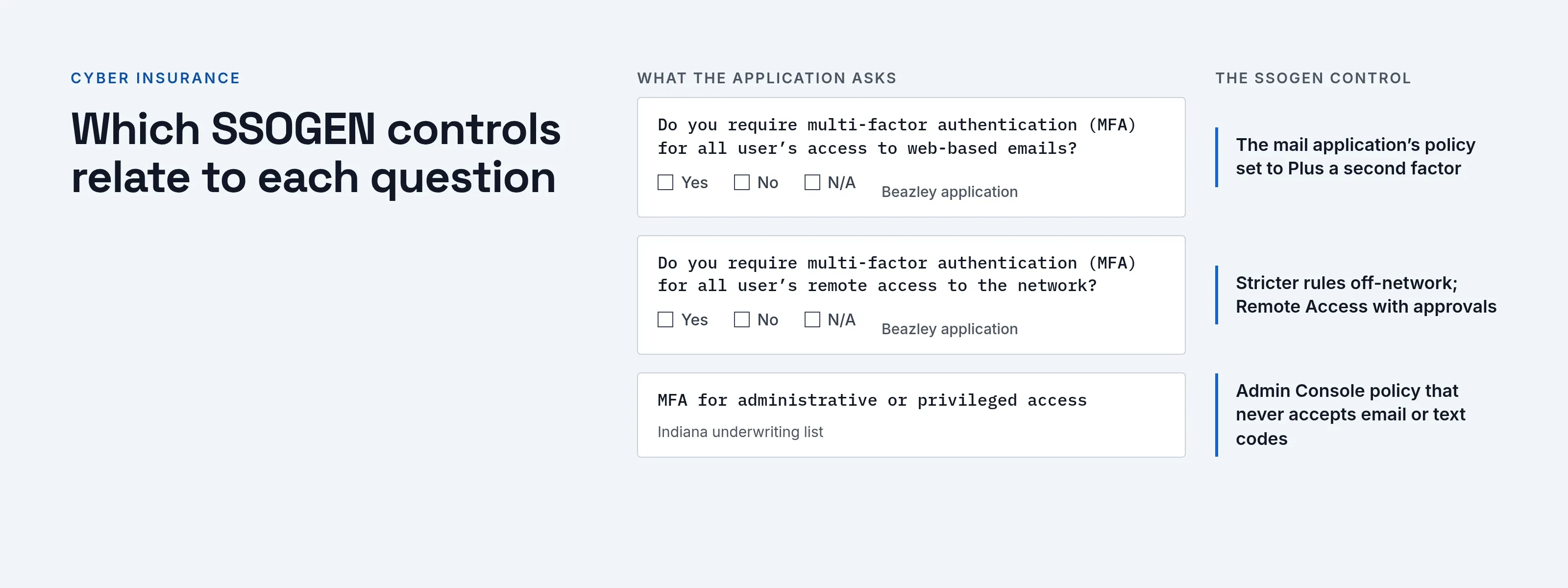
Cyber insurance MFA requirements are not one standard. Each insurer writes its own application, and the underwriter decides what your answers are worth. The questions share one theme: MFA must be required, for all users, in named areas such as email, remote access and administration.
This page covers what primary, published sources say (read 2026-10-08) and the SSOGEN controls that answer each question.
SSOGEN enforces a second factor per application, including legacy web applications with no MFA of their own, and keeps the audit evidence.
It is not insurance or legal advice. Software alone does not make you eligible for coverage or compliant with a policy condition.
Your broker, your insurer and the exact wording of your own application decide that.
What published insurer questions ask about MFA
Beazley publishes a cyber insurance questionnaire for applicants with revenue under 20 million pounds (read 2026-10-08). Under “Cybersecurity Controls” it asks two MFA questions with Yes, No or N/A answers:
- “Do you require multi-factor authentication (MFA) for all user’s access to web-based emails?”
- For applicants with revenue above 1 million pounds: “Do you require multi-factor authentication (MFA) for all user’s remote access to the network?”
The State of Indiana’s Cybersecurity Hub lists underwriting questions as part of its cyber insurance toolkit (read 2026-10-08). The MFA ones are:
- cloud provider services such as Office 365, AWS, Azure and Google Cloud;
- administrative or privileged access;
- web-based email;
- access to the backup environment.
Two things stand out.
- Scope. The questions are about where MFA is required more than about the technology.
- All users. The answer is “all users” or “required”, so an optional setting does not count.
What CISA says about which MFA to use
Insurers differ on method, but CISA’s MFA guidance (read 2026-10-08) ranks them.
- Phishing-resistant MFA. Specifically FIDO/WebAuthn, which ranks first.
- Number matching. Next, as an interim measure against push bombardment.
- Other forms. App codes, fingerprint or face scans, and text and voice messages rank lower.
CISA also states that any MFA is better than none. If your application asks which methods you accept, CISA is the neutral reference to cite.
Which SSOGEN controls relate to each question
| Question topic | Related SSOGEN control |
|---|---|
| Web-based email | If the mail service signs people in through SAML or OpenID Connect, register it in SSOGEN and give it a policy with Required strength set to Plus a second factor |
| Remote access to the network | Rules that require a stronger sign-in off the corporate network (network zones), and Remote Access to SSH, RDP and VNC hosts through the SSOGEN Gateway, with approvals and an audit record |
| Administrative and privileged access | A separate policy for the Admin Console that never accepts email or text codes, and admin mode that asks for an authenticator code before changes (on by default) |
| Cloud provider services | The same policy applies to any application connected by SAML or OpenID Connect |
| Backup environment | Whatever signs in to it, if it sits behind the Web Agent, the Gateway or a SAML or OpenID Connect connection, can carry a policy |
| Phishing-resistant methods | Passkeys and security keys, with a policy option that accepts only a passkey or security key |
| Showing it works | A tamper-evident audit log with export, and a What if simulator that answers “would this person be asked for a second factor?” |
SSOGEN also puts a second factor in front of a legacy web application that has no MFA of its own, through the Web Agent or the Gateway. That is often the gap an application form asks about.
The factors SSOGEN offers:
- Authenticator-app codes. Six-digit codes from an authenticator app.
- Passkeys. Sign-in approved on a device or security key.
- Recovery codes. Single-use codes for people who lose a device.
- Email or text codes. Off unless a policy lists them.
Read MFA software for the detail and the multi-factor authentication guide for the screens.
A checklist before you answer the application
- List the systems each question names (email, remote access, admin accounts, cloud consoles, backups) and write where MFA is enforced for each.
- Check “all users” literally. Contractors, shared mailboxes and break-glass accounts are where answers turn out to be wrong.
- Confirm every administrator account is covered, including those on infrastructure outside your identity system.
- Decide which methods you accept and write down why. Prefer passkeys or authenticator codes to texts.
- Check that people can recover: a person with no usable second method cannot sign in under a strict policy, so plan enrollment and recovery codes first.
- Keep evidence: policy settings, a sample what-if result and an audit export, so you can answer a follow-up question.
- Give your broker the real answer. An inaccurate answer on an application is a bigger risk than a “No”.
Questions people ask
Is MFA required for cyber insurance?
There is no single rule. The published applications above ask whether you require it for named areas, and an insurer may decline or price differently on the answer.
Does SMS count as MFA?
The Beazley questions quoted above do not define MFA, so ask your insurer. CISA lists text messages as an acceptable but lower-ranked form.
Does passing the questionnaire mean we are compliant?
No. The questionnaire is the insurer’s view at one date. Compliance with a regulation is a separate matter: see NYDFS MFA for a worked reading of one.
Where to go next
- Adaptive authentication. Use adaptive authentication policies to require stronger sign-in only where the risk is, then test them before you enforce them.
- The evidence. For the evidence behind these questions, see why MFA is important.
- The attack. For how the attack runs, see MFA fatigue attacks.