SSOGEN / Learn / Step-Up Authentication: Ask for a Stronger Factor Only When It Is Needed
Learn
Step-Up Authentication: Ask for a Stronger Factor Only When It Is Needed
Step-up authentication lets someone sign in normally, then asks for a stronger proof, such as a code or passkey, only on something that needs it.
Updated
Step-up authentication asks a person who is already signed in for stronger or fresher proof of identity when they try something more sensitive.
For example, a user signs in to the intranet with a password, then opens payroll or approves a payment. The system asks for a code from an authenticator app, or a passkey, and returns the user to the same place.
Strong checks go where the risk is, and nobody has to pass them for everything all day.
When should you ask for a stronger factor?
Step-up works best when the trigger fits in one sentence. The usual triggers:
| Trigger | Example | What to ask for |
|---|---|---|
| The application is sensitive | Payroll, source control admin, customer data exports | A second factor every session |
| The action is sensitive | Changing bank details, adding a new sign-in method, approving a payment | A fresh proof, not just a valid session |
| The sign-in is unusual | New country, new device, unfamiliar network | A second factor even for ordinary applications |
| The session is old | Signed in nine hours ago | Sign in again |
| The person is privileged | Administrators | The strongest method you offer, every time |
An existing sign-in can fall short in two ways, and good systems check both separately:
- Too weak: password only, when the application needs two factors.
- Too old: strong, but eight hours ago.
How does step-up authentication work?
The steps are the same whatever a product calls them:
- The person signs in. The system records how they proved who they are (the method) and when.
- They request a resource. The system compares what the resource requires with what the session shows.
- If the session is strong enough and recent enough, access is granted.
- If not, the system does not simply refuse. The person goes through an extra check, and the system keeps the original request.
- After the check, the session is upgraded and the original request continues.
Step 4 is what distinguishes step-up from a plain denial: the person learns what to do and still reaches the resource they requested.
How is step-up expressed in OAuth and OpenID Connect?
APIs have a standard for this. RFC 9470, OAuth 2.0 Step Up Authentication Challenge Protocol, lets a resource server tell a client that its access token came from a sign-in that was too weak or too old.
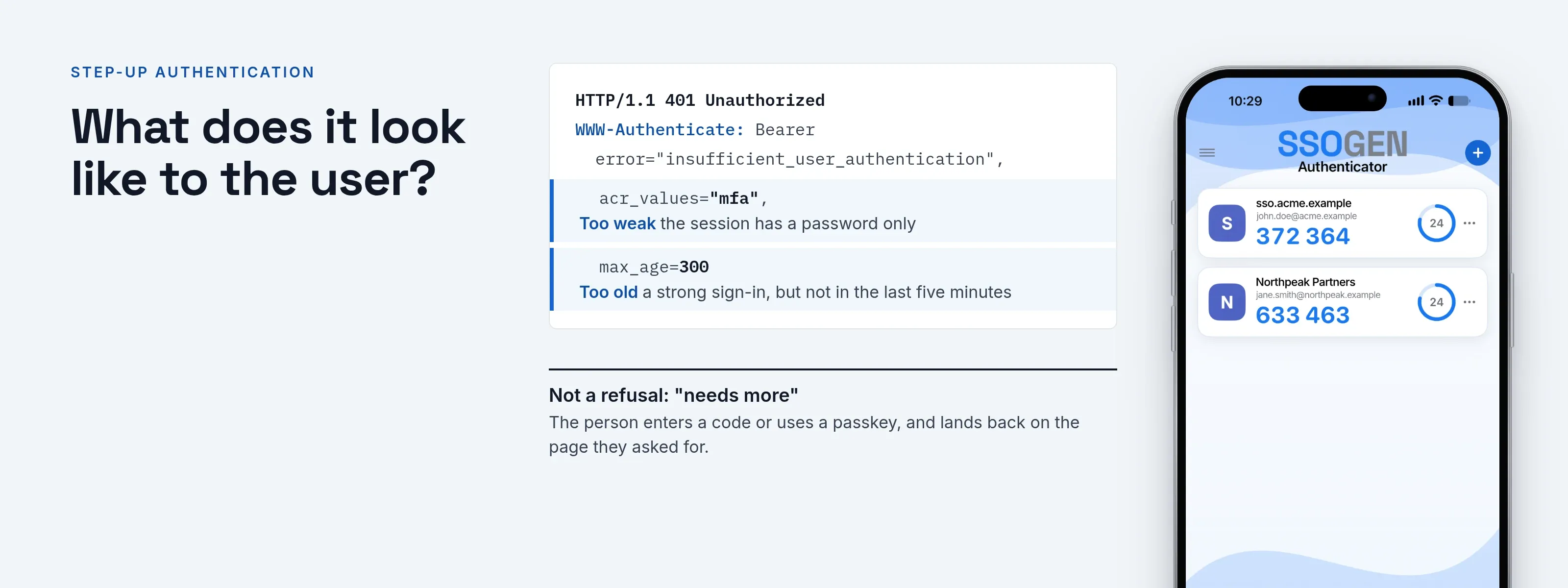
The resource server replies with the error insufficient_user_authentication and a WWW-Authenticate challenge. The challenge can carry two parameters:
acr_values: the authentication level it requires.max_age: the longest time allowed since the last active sign-in, in seconds.
The client restarts authorization with the same acr_values and max_age parameters, which OpenID Connect already defines. The new token carries the acr and auth_time claims, so the resource server can see what was done and when.
An annotated challenge, using the fictional Acme Corp:
HTTP/1.1 401 UnauthorizedWWW-Authenticate: Bearer error="insufficient_user_authentication", error_description="A different authentication level is required", acr_values="mfa", max_age=300The challenge means: this token came from a sign-in that is not good enough for this call; obtain a new one from a sign-in that met the mfa level within the last five minutes.
The value mfa is only an example. The provider and the application agree on acr values; RFC 9470 does not define them.
What does it look like to the user?
Maria Lopez at Acme Corp has a day like this:
- Sign-in. She signs in to My Apps with her directory password and opens the Acme Intranet without further prompts.
- Payroll. She opens Acme Payroll. Its policy requires a second factor, so the page asks for the six-digit code from her authenticator app, and Payroll opens once she enters it.
- Later that day. She opens the Intranet again and is not asked, because her session now carries the stronger proof.
- Next morning. Payroll asks again: its policy says a sign-in older than eight hours does not count.
What do teams get wrong?
- Making the trigger invisible. If the policy cannot be tested, nobody knows who will be asked. Test the decision for a named person and application before changing anything.
- Raising the requirement before enrollment. A person with no second factor set up is locked out when the policy suddenly demands one. Enroll first.
- Checking strength but never age. A strong sign-in from yesterday is still a stolen-laptop risk. Set a recency limit on sensitive applications.
- Asking for a method the person cannot use. A text-message step-up with no phone number, or an authenticator step-up with no app, ends in a help desk call. Offer an ordered list of fallbacks.
- Stepping up only at login. Sensitive actions inside an application need their own check, which usually means the application asks the identity provider again.
- Treating step-up as a replacement for blocking. Some situations call for a refusal, not a challenge.
For the methods that make good step-up targets, see MFA types.
How does SSOGEN do step-up?
SSOGEN makes a sign-in decision every time someone opens an application. The answer is “allowed”, “refused” or “needs more”.
A policy sets three things:
- Required strength: password, plus a second factor, or a passkey or security key.
- Recency: how recently the person must have signed in, from 1 minute to 24 hours.
- Where the person goes when more is needed: SSOGEN’s own second factor, the person’s identity provider, or either, with an ordered list of alternatives.
Rules on the policy, and organization-wide access rules, can require a stronger sign-in in particular situations. When several apply, SSOGEN takes the strictest answer.
Before you save a change, the What if page shows the full decision, rule by rule, for any person and application.
SSOGEN sits in front of the application through the Web Agent or the SSOGEN Gateway, so step-up also covers applications with no MFA of their own.
A rule can only ask for a strength the policy can deliver. If SSOGEN cannot establish a fact a rule depends on, it refuses instead of guessing.
Start with how sign-in decisions work, then rules and conditions and what if and test. The product page is MFA for legacy applications.
Questions people ask
Is step-up authentication the same as MFA?
No. MFA asks for multiple factors at sign-in. Step-up asks for more later, and only when needed, often using MFA as the stronger proof.
What is the difference between step-up and adaptive authentication?
Adaptive authentication picks requirements from risk signals such as location or device. Step-up is the act of asking for more after the first sign-in, and adaptive systems usually trigger it.
Does the user lose their work?
They should not. A well-built flow returns them to the page they requested.
How long does a step-up last?
As long as the policy says. Set a maximum age for the proof that fits how sensitive the application is.
Where to go next
Compare the methods in MFA types, see how provisioning keeps accounts correct in SCIM provisioning, or return to the Learn hub.
Sources, all read 2026-10-09: RFC 9470.