SSOGEN / Learn / SAML SLO: Single Logout Explained
Learn
SAML SLO: Single Logout Explained
SAML SLO ends the sessions at the identity provider and every application it signed in, which is hard because each session lives somewhere different.
Updated
SAML SLO (single logout) is the SAML 2.0 profile that lets one sign-out end a user’s session at the identity provider and at every service provider that session reached. Sign-in is a single delivery: one assertion goes to one application.
Sign-out must find and end sessions in many places. Each session lives in software that may be offline, may never have implemented the profile, or may keep its state in a browser cookie the identity provider cannot reach.
That is why logout fails more often than login.
This page covers four things:
- SAML. It follows the OASIS SAML 2.0 profiles and core specifications.
- OIDC. It covers the OpenID Connect logout specifications.
- Failures. It lists the failures you will see in practice.
- Testing. It lists what to test.
For the roles, see what an identity provider is and IdP vs SP.
Why logout is harder than login
After sign-in, the identity provider holds a session, and each service provider that accepted an assertion holds its own.
The profile calls the identity provider the session authority and the service providers the session participants. Ending “the” session means ending all of them.
The profile’s scope excludes ending a session with a single participant; it covers the case where the user wants every participant’s session ended. Three factors make that hard:
- Many parties. The identity provider must find every participant and contact each one.
- Different channels. Some sessions exist only as a browser cookie, so the message must travel through the browser. Others are reachable server to server.
- No guaranteed answer. A participant can be down, unreachable, or may never have implemented the profile.
How the SAML 2.0 single logout profile works
The profile (identifier urn:oasis:names:tc:SAML:2.0:profiles:SSO:logout, section 4.4) uses two messages, LogoutRequest and LogoutResponse, in these steps:
- A session participant, such as an application, sends a
LogoutRequestto the identity provider’s single logout service. The request must include at least oneSessionIndexfrom the assertion the participant received, and it identifies the user with aNameIDthat strongly matches the one in that assertion. - The identity provider determines which other participants share the session.
- The identity provider sends its own
LogoutRequestto each of those participants. - Each participant ends its local session and returns a
LogoutResponse. - The identity provider returns a
LogoutResponseto the participant that started the exchange.
Two variations apply:
- Identity provider starts. The identity provider can start at step 2 on its own, for example when the user signs out there; step 5 is then skipped.
- Session authority requests. A requester that is the session authority may omit
SessionIndexto end all of the user’s sessions.
Bindings: front channel or back channel
The profile works with a synchronous binding (SOAP, the back channel, directly between servers) or asynchronous bindings (HTTP Redirect, POST or Artifact, the front channel, through the browser). The specification’s guidance:
- A front-channel binding may be required when the session exists only as a browser cookie.
- A participant should start with an asynchronous binding if the user agent is present, which gives the identity provider the best chance of reaching the other participants.
- A synchronous request that bypasses the browser forces the identity provider to use a similar binding for the remaining participants.
Messages must be authenticated. Sign them when they travel over HTTP Redirect or POST; over SOAP, use a signature or another binding mechanism. Each party publishes the endpoint where it accepts these messages in its metadata, as md:SingleLogoutService.
What the response tells you
- Top-level status. The top-level status of a
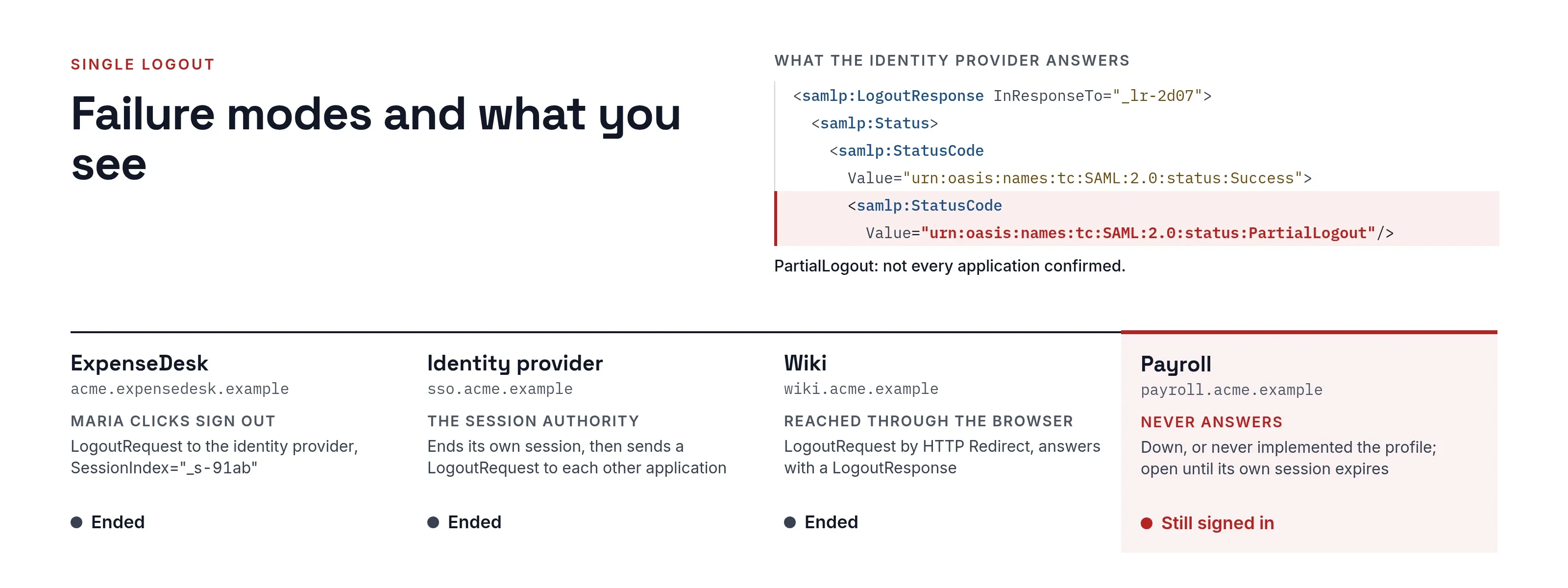
LogoutResponsespeaks only for the party that sent it. - PartialLogout. If an identity provider cannot get every participant to confirm, the core specification requires it to add the second-level status
urn:oasis:names:tc:SAML:2.0:status:PartialLogout. - Retries. The identity provider should try each participant by any usable binding, even after one attempt fails.
The equivalents in OIDC
OpenID Connect splits the same problem into separate specifications, all from the OpenID Foundation:
- RP-Initiated Logout 1.0 lets an application send the browser to the provider’s
end_session_endpoint, withid_token_hintand optionally a pre-registeredpost_logout_redirect_uri. The provider should ask the user to confirm, and must ask if noid_token_hintwas sent. - Front-Channel Logout 1.0 has the provider load each application’s registered
frontchannel_logout_uriin an iframe so the application can clear its cookies. - Back-Channel Logout 1.0 has the provider POST a signed logout token to each application’s
backchannel_logout_uri. The token carries aneventsclaim and asuborsid, and never anonce. - Session Management 1.0 lets an application poll the provider through hidden iframes and
postMessageto detect that the user signed out.
Comparing the mechanisms
| Mechanism | Who starts it | Channel | What ends | Known limits |
|---|---|---|---|---|
| SAML SLO, front channel (Redirect, POST) | An application or the identity provider | Browser | Sessions at the identity provider and each participant reached | Needs the browser present and each participant’s cookies reachable; messages must be signed |
| SAML SLO, back channel (SOAP) | An application or the identity provider | Server to server | Same, without the browser | Cannot clear a session that exists only as a browser cookie; requester must authenticate |
| OIDC RP-Initiated Logout | The application | Browser redirect | The session at the provider; propagation to other apps is separate | post_logout_redirect_uri must be pre-registered; provider may ask the person to confirm |
| OIDC Front-Channel Logout | The provider | Hidden iframes in the browser | Each application’s own session | Browsers that block third-party content can stop the iframe reaching the application’s cookies |
| OIDC Back-Channel Logout | The provider | Server to server POST | Each application’s session, via a logout token | The application endpoint must be reachable from the provider, so not behind NAT or a firewall; no cookies available |
| OIDC Session Management | The application polls | Hidden iframes and postMessage |
Detects the change; the application then ends its own session | Tracking prevention can make the provider iframe report “changed” repeatedly |
Failure modes and what you see
- One service provider never answers. The identity provider cannot confirm that participant, so it should report
PartialLogout. The user is signed out everywhere else but can still use that application until its own session expires. - Only the provider session ends. The application’s own session was never touched, so the user stays signed in there. Okta documents this for its SAML apps: signing out of one app ends one Okta session, and other Okta sessions stay active even though the apps no longer have a valid session (Okta Developer, Configure Single Logout). In the same guide, only apps configured to participate receive outbound logout requests.
- Silent sign-back-in. If the identity provider session survives, the next visit to the application signs the user straight back in, and logout appears to have done nothing.
- Third-party cookie blocking. The OpenID Front-Channel specification notes that some browsers block third-party content by default, which can stop the iframe from reaching the application’s login state; it recommends defensive code that warns the user. The Session Management specification describes tracking prevention causing repeated re-authentication loops, and names back-channel logout as not known to be affected.
- Missing
SessionIndex. A participant request must carry at least one. Only a session authority may omit it, to end all of a user’s sessions. Okta lets you require it, so a request ends one session instead of all of them.
What to test
- Sign in to two or more applications from one identity provider, sign out from the first, and check the others.
- Sign out at the identity provider itself and check each application. Use a private window per application so the cookie state is clean.
- Take one application offline and sign out. Confirm what the user sees and what is logged.
- Sign out in a browser with third-party cookie blocking turned on, which exercises any front-channel path.
- Open a protected page again after sign-out. If you are signed straight back in, the identity provider session is still active.
- Capture the exchange with the SAML tracer and check for a
LogoutRequestwithNameIDandSessionIndex, and aLogoutResponsewith a status.
Where an identity broker fits
A broker sits between applications and several identity providers, so there are two links, each with its own session and its own logout.
- Participant role. The profile notes that an identity provider can itself be a session participant when it relies on another identity provider’s assertions.
- Test both links. If you run a broker, test logout across both links.
See identity broker.
How SSOGEN handles single logout
SSOGEN covers logout at each point where it holds or relies on a session:
- SAML applications. When registering a SAML application, you can set an optional Single logout URL, where the application accepts sign-out messages. If it is empty, “signing out of SSOGEN does not sign the person out of it”. Single logout behavior varies by product, so test it with each application.
- Upstream SAML providers. When SSOGEN signs users in through another SAML provider, the identity provider guide describes Also sign out of this provider. Turn it on, because otherwise the provider signs the user straight back in.
- Web Agent applications. The
SSOGENLogoutScopesetting decides what/ssogen/logoutends:ssoalso ends the SSOGEN session, andlocalends only that application’s session (Web Agent guide).
Questions people ask
What does SAML stand for?
What is replacing SAML?
Is SAML being deprecated?
What's the difference between SAML and SSO?
Where to go next
- Hub. Start with what is an identity provider.
- Roles. Read IdP vs SP.
- Sign-in. Read SP-initiated vs IdP-initiated SSO for the matching question on sign-in.
- Protocol. Read what is SAML for the protocol itself.
Sources, all read 2026-10-11: OASIS SAML 2.0 Profiles, section 4.4; OASIS SAML 2.0 Core, sections 3.7.3 and 3.2.2.2; OpenID Connect RP-Initiated Logout 1.0; Front-Channel Logout 1.0; Back-Channel Logout 1.0; Session Management 1.0; Okta Developer, Configure Single Logout.