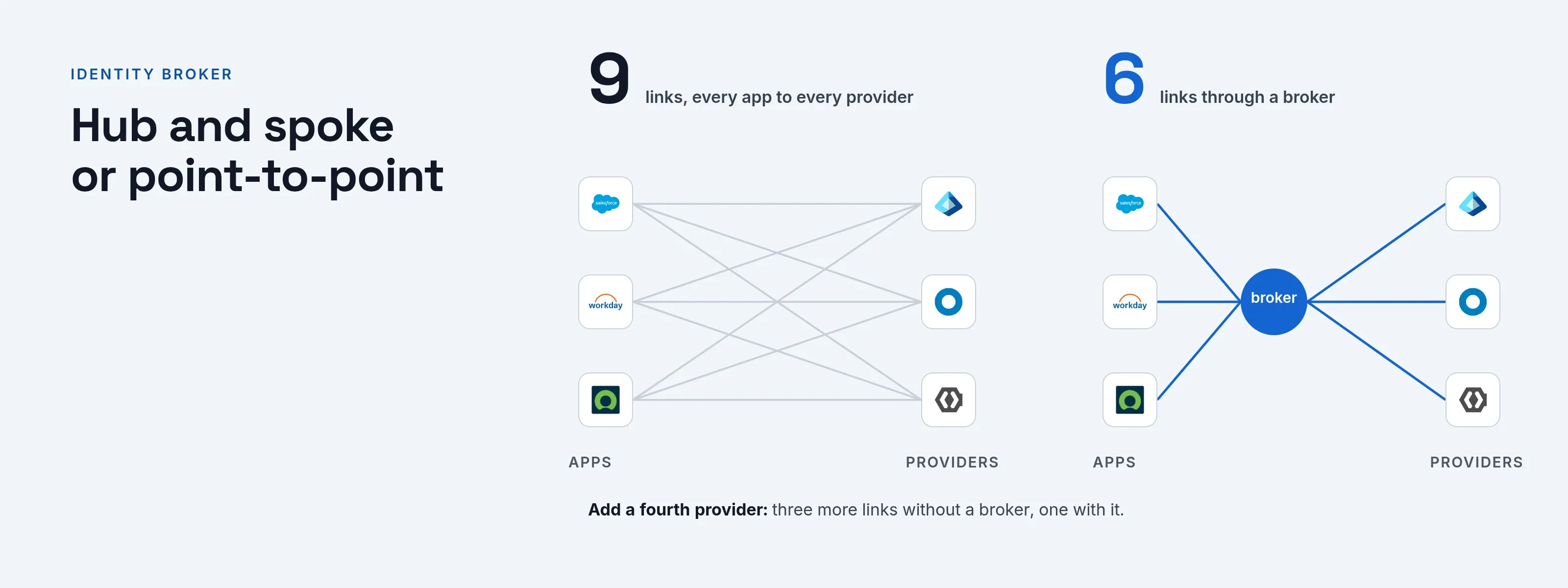
An identity broker (also called a federation hub, identity hub, SAML proxy or IdP proxy) is a service that sits between your applications and several identity providers. Each app trusts the broker once. The broker sends each person to the provider that knows them, takes the answer, and tells the app who signed in.
- To the app. The broker is the identity provider.
- To the real identity providers. The broker is a service provider.
For the basics, start with what an identity provider is.
“Identity broker” also has a second, unrelated meaning. In AWS documentation, a custom identity broker is a program you write that mints sign-in links for the console.
This page covers the other meaning, the login hub.
Hub and spoke or point-to-point
Take three apps and three identity providers:
| Setup | Trust relationships | Adding a provider |
|---|---|---|
| Without a broker | Nine: every app connects to every provider, each with its own metadata, certificates and attribute rules | Touches every app |
| With a broker | Six: each app to the broker, and the broker to each provider | One change, in one place |
“Hub and spoke” is used loosely in federation. InCommon calls its federation hub and spoke for introductions.
It publishes signed metadata so participants find each other, and after that they talk directly, in a mesh.
A login broker is different: the sign-in traffic itself goes through the hub. That gives you one place to enforce rules and log, and it also creates one place that can fail.
How the broker decides which provider a person uses
This step is called home realm discovery, and most write-ups skip it. Three methods are common, and most brokers combine them.
| Method | How it works | Example |
|---|---|---|
| By domain | The person types an email address; the broker reads the domain and picks the provider that owns it. | Entra ID reads the user principal name; SSOGEN reads the part after the @. |
| By link or hint | The application or a bookmark names the provider in the request. | Entra ID accepts domain_hint (OpenID Connect) or whr (SAML and WS-Federation). |
| By choice | The broker shows a list or buttons and the person picks. | A “Sign in with” drop-down. |
Microsoft’s home realm discovery documentation covers the first two methods in detail:
- A domain hint sends the person straight to the federated provider only if the tenant is federated with that domain.
- A hint that does not match a verified federated domain can be ignored.
- Only one home realm discovery policy can be active on a service principal at a time, so plan which one.
- Microsoft advises against auto-acceleration, because it can block stronger sign-in methods such as FIDO.
The OASIS Identity Provider Discovery profile covers the case where you do not run the hub:
- A service provider redirects the browser to a discovery service with its entity ID and a return URL.
- The discovery service sends the person back with the chosen provider’s identifier.
Okta calls its version IdP Discovery. The routing logic can be defined only if the org has more than one identity provider configured.
Federated SSO through a broker
Federated SSO means a person signs in with an account held by another organization or system, and your apps accept the result. A broker makes that manageable at scale. Background is in federated identity.
The app sees the same three things, however many upstream systems exist:
- One issuer. The broker.
- One signing certificate. The broker’s.
- One set of claims. Mapped by the broker.
The trade-off is operational: you run, secure and patch the hub, and every sign-in depends on it.
Claims and attribute mapping
Each upstream provider names facts about the person its own way. One sends mail, another emailaddress, another a user principal name. The broker maps them to one shape, so apps never see the differences.
- Mappers. Keycloak documents this as identity provider mappers, which map incoming tokens and assertions to user and session attributes.
- Stable identifier. Decide up front which attribute it is. If two providers can both issue
maria.lopez@acme.example, a broker that joins accounts by email will join the wrong ones the day one provider lets people type any address. - First login flow. The same documentation describes the authentication flow the broker triggers the first time someone uses a given provider. This is where you decide whether to create a new account, link to an existing one, or ask the person to confirm.
Sessions and logout
A brokered sign-in has at least three sessions:
- The app’s.
- The broker’s.
- The upstream provider’s.
Signing out of the app usually ends only the first. Ending all three requires single logout, and every link in the chain must support it. See SAML single logout for why this is the weakest part of federation.
If the upstream provider keeps its session, the next sign-in through the broker can skip the password prompt. On shared computers, that surprises people.
Failure modes
| Failure | What people see | What to do |
|---|---|---|
| Broker is down | Nobody can sign in anywhere | Run it highly available; keep a local administrator path. |
| One upstream is down | Only that provider’s people are locked out | Show a clear message; consider a second path for administrators. |
| Expired upstream certificate or secret | Sign-in fails after working for a year | Track expiry dates for every upstream. |
| Domain claimed twice | People sent to the wrong provider | One owner per domain; check on add. |
| Mismatched identifiers | Duplicate accounts or access to the wrong account | Pick one stable identifier and test with two providers. |
| Stale session | Sign-out that does not sign out | Test logout end to end, not just login. |
When a broker helps and when it does not
A broker helps when:
- Two companies merge and both directories must work for a while.
- Partners need access and each has its own provider. See contractor and vendor access.
- You have several directories and do not want every app to know about all of them.
- You are leaving a provider gradually. Apps trust the broker, and you move people behind it one group at a time.
A broker adds little in three cases:
- One provider. With one provider and a handful of apps, it is one more system to run.
- Weak upstream sign-in. A broker cannot fix it; it can only restrict what the upstream states.
- Extra hop. A broker in another region adds latency to every sign-in.
Broker options compared
| Option | What the vendor documents | Note |
|---|---|---|
| Keycloak | Delegates authentication to one or more identity providers; supports OpenID Connect v1.0, OAuth v2 and SAML v2.0 providers; mappers; first login flow | Self-run |
| Microsoft Entra External ID (B2B) | Partners sign in with their own credentials; the guest is represented as a user object in your directory; social and enterprise identity providers can be federated | Guest user model, not a pass-through proxy |
| Okta | Inbound federation over SAML and OpenID Connect; IdP Discovery routing; org-to-org federation over OIDC or SAML | Routing needs more than one IdP |
| SSOGEN | SAML, OpenID Connect and LDAP directory providers at once; sign-in domains route by email domain | See below |
| InCommon | Signed metadata aggregates that introduce participants | A metadata hub, not a login proxy |
This table’s facts come from each vendor’s own documentation, linked under Sources. Check them again before you buy.
How SSOGEN brokers sign-in
SSOGEN is a complete identity provider that also brokers other providers. You run several at once (see SSOGEN’s identity provider guide): SAML, OpenID Connect and an LDAP directory such as Active Directory, plus local accounts.
Apps trust SSOGEN once. Add a partner organization’s provider as SAML or OpenID Connect and give it its own sign-in domains, so its people land in the right place.
Home realm discovery is built in. With sign-in domains set, the sign-in page asks for an email address first and reads only the part after the @.
It does not look the account up, so the answer is the same whether or not the account exists.
- One owner per domain. A domain belongs to one provider, and a provider can have up to 20 domains.
- A fallback. A domain no provider claims falls back to a “Sign in with” drop-down.
- Safe rollout. A new provider stays a draft, off the sign-in page, until you validate, test and activate it.
- Mapping per provider. Each provider’s setup maps the upstream email and display name attributes to the SSOGEN account, and a SAML provider builds the username from the NameID, the stable identifier.
For logout, a SAML provider has an Also sign out of this provider setting. Turn it on and signing out of SSOGEN ends the session at the identity provider too.
OpenID Connect providers have the same setting, using the provider’s own sign-out address. Test sign-out end to end, as the failure table advises. See also self-hosted identity provider.
Questions people ask
What is the difference between an identity provider and an identity broker?
What's the difference between IdP and IAM?
What is an identity server?
What are examples of identity providers?
Where to go next
- Multiple identity providers. The product capability page.
- Identity provider hub. Read the hub.
- IdP and an SP. The difference between the two.
- Federated identity. The background.
- Contractor and vendor access. For partner access.
Sources, all read 2026-10-11: Keycloak Server Administration Guide; Microsoft Learn, Home Realm Discovery policy; Microsoft Learn, B2B collaboration; OASIS SAML V2.0 Identity Provider Discovery; Okta identity providers; InCommon trust model.