SSOGEN / Multiple Identity Providers on One Application
SSOGEN
Multiple Identity Providers on One Application
Local accounts, a directory, SAML and OpenID Connect providers sit behind one SSOGEN sign-in page, and a policy decides which ones each application accepts.
Supporting multiple identity providers on one application is a common requirement. Take acme.example and one application, Acme Expenses, used by four groups:
- Employees, with accounts in Microsoft Entra ID.
- A partner, partner.example, that signs in with its own Okta.
- A handful of contractors with no company account at all.
- The finance team, still held in a legacy LDAP directory.
With SSOGEN you do not build four logins. You add the four sources as identity providers and allow the ones you want in the application’s policy.
The sign-in page sends each person to the right place, and the application gets one identity from SSOGEN, whichever source the person used.
This page covers the four kinds of source, how the sign-in page decides what a person sees, where each setting lives, and how to test the result before anyone signs in.
For the concepts, read what an identity provider is and how an identity broker works.
How it fits together
The four kinds of sign-in source
SSOGEN accepts four kinds, listed in the identity provider guide. Use as many at once as you need.
| Kind | What the person does | Who holds the password | Typical use |
|---|---|---|---|
| Username and password (local accounts) | Types a username and password on the SSOGEN sign-in page | SSOGEN | First administrator, small teams, contractors, test accounts, a way back in if another provider is down |
| Directory (LDAP) | Types the username and password they already use at work on the SSOGEN sign-in page | Your directory (Active Directory, OpenLDAP and similar) | A company that keeps people in Active Directory |
| SAML | Is sent to the other system’s own sign-in page | The other system | Entra ID, Keycloak, Okta, AD FS, Shibboleth, a partner’s provider |
| OpenID Connect | Is sent to the other system, using a newer protocol | The other system | Entra ID, Keycloak, Google Workspace, Okta and other modern providers |
In the acme.example scenario, the sources map as follows:
- Entra ID tenant and partner’s Okta. Two SAML providers (IdP 1 and IdP 2) or an OpenID Connect provider (IdP 3), depending on what each supports.
- Contractors. Local accounts.
- Legacy directory. LDAP.
For protocol background, see SAML vs OpenID Connect. For the SSOGEN side of each, see SAML IdP and OpenID Connect provider.
What the sign-in page does with them
The server picks the layout once, from two facts: which providers are offered for this sign-in, and whether any of them claims an email domain.
A provider is offered only if it is active and the application’s authentication policy allows it. Providers appear in sign-in order, lowest number first.
| What is offered | What the person sees |
|---|---|
| Nothing | “No sign-in methods are available here. Contact your administrator.” |
| One password provider (local or LDAP) | A single form with username, password and Sign in |
| One SAML or OpenID Connect provider | The browser goes straight to that provider, with no form |
| Several providers, none with sign-in domains | One form with a Sign in with drop-down |
| Several providers, at least one with sign-in domains | A Who is signing in screen with an Email or username field and Next (identifier-first) |
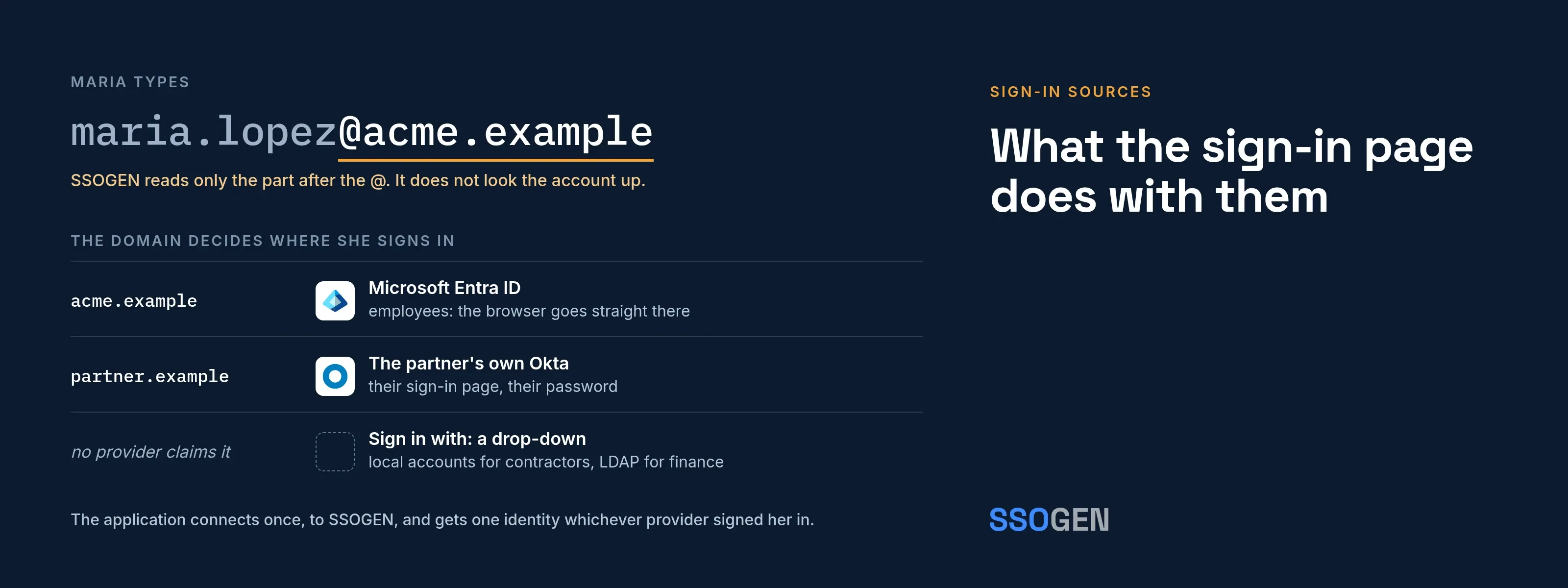
With identifier-first sign-in, Maria types maria.lopez@acme.example. SSOGEN reads only the part after the @. It does not look the account up, so the answer is the same whether or not the account exists.
- Password provider. If the domain belongs to one, she sees the password field.
- SAML or OpenID Connect provider. If the domain belongs to one, her browser goes there.
- No provider claims the domain. She gets the drop-down with every offered provider.
Other products call this home realm discovery. SSOGEN covers it in the sign-in page.
When the drop-down shows, Username and password is preselected if it is offered. Otherwise the first provider in sign-in order is. A policy option, Always make the person choose a provider, starts the drop-down empty.
What is configured where
| Setting | Where | What it controls |
|---|---|---|
| The provider itself | SSO Policies > Identity Providers (a directory under Identity > Directories) | Connection details; a new SAML or OpenID Connect provider is a draft until validated, tested and activated |
| Sign-in order | Provider, Configuration > Sign-in page | A whole number from 0 to 10,000; lower comes first; default 100 |
| Sign-in domains | Provider, Configuration > Sign-in page | Email domains routed to this provider |
| Sign-in restriction | OpenID Connect or SAML provider, Configuration | Who may sign in through the provider, by required claims |
| Allowed providers | Authentication policy, Providers step | Which providers an application accepts; at least one is needed |
| Second factor | Authentication policy | Required strength and who asks for the second step |
| The application | Application, Authentication tab | Which policy it uses |
The policy decides who sees what, so one provider can appear on one application and not on another. My Apps and My Account use the Default policy. The Admin Console has its own setting.
What each provider setting controls
- A sign-in domain belongs to one provider. Saving one already in use says “Another provider already uses domain.”
- A provider can have up to 20 sign-in domains.
- A domain claimed by a provider that this sign-in does not offer routes nowhere. The person gets the drop-down instead.
- A policy with no providers refuses everybody. The application shows as Incomplete.
- A provider in Draft, Validated, Tested, Disabled or Archived state is never offered.
- A directory and the built-in Username and password provider have no sign-in restriction.
By default, a person who signs in through a provider for the first time gets a new SSOGEN account. A person who signs in through three providers has three accounts.
Each provider has an Account matching setting that joins a sign-in to an existing account with the same verified email address:
- The provider needs a sign-in restriction first.
- Only a super administrator can turn it on.
- It never joins an administrator’s account.
Leave it off unless you trust the provider.
After sign-in
- Provider and strength are separate. The provider someone used and how strongly they proved who they are are separate questions. The policy sets a required strength: Password or single sign-on, Plus a second factor, or Passkey or security key.
- A weaker sign-in steps up. If a person signed in more weakly than the policy requires, SSOGEN asks for the second factor first, then continues.
- Provider MFA can count. A provider that does multi-factor authentication itself, and says so, can meet Plus a second factor without a second prompt.
- The policy decides who asks. The policy’s When more is needed setting decides who asks: SSOGEN, the provider again, or either. See adaptive authentication and multi-factor authentication software.
- One connection. You connect the application to SSOGEN once, over SAML, OpenID Connect, the Web Agent or the Gateway. It gets the identity SSOGEN passes on, whichever source signed the person in.
- Check the attributes. Attributes that depend on the provider show in the Test tab as “Supplied at sign-in by provider if asserted”. Check that each source supplies what the application needs. The authentication hub lists the rest of the sign-in features.
Test it before anyone signs in
- Activate each provider: Validate, Test, Activate.
- Open the application, then its Authentication tab, and choose the policy. The summary shows the allowed Providers.
- Open the application’s Test tab. Choose a person such as Maria Lopez and, under Signs in through, a provider. Select Run test.
- Read the checklist. Providers allowed tells you whether the policy admits at least one provider. Provider admitted tells you whether Maria’s provider is one of them, or names the provider she would have to use instead.
- Use What if to try other providers and strengths without signing in. Nothing is stored or sent to the application.
- In a private browser window, open the application and type an address in each claimed domain. Check that you land at the right provider.
If a form appears where you expected the Who is signing in screen, that application offers only one provider, or none of the offered providers has a sign-in domain.
How other products describe the same capability
| Product | What it does | Source |
|---|---|---|
| Keycloak | Identity brokering delegates authentication to one or more identity providers. An application can hint at a provider with the kc_idp_hint parameter; if the alias does not exist, the login form is shown. |
Keycloak Server Administration Guide |
| Microsoft Entra ID | Home realm discovery uses the user principal name to find the sign-in location. Domain hints (domain_hint, whr) accelerate to a federated provider only if the tenant is federated with that domain. Only one HRD policy can be active on a service principal. |
Microsoft Learn |
| Okta | Identity provider routing rules direct people by location, device, email domain, attributes or application. Active rules are evaluated and the first match applies. Routing improves sign-in but is not a security control. | Okta Help Center |
| Auth0 | Identifier-first authentication with home realm discovery sends known domains to the right enterprise login. Database connections lack it, so one custom database connection per organization is advised. | Auth0 docs |
| SSOGEN | Local, LDAP, SAML and OpenID Connect at once; domains route by the part after the @; one domain, one provider; the policy decides which are allowed per application. |
SSOGEN |
Keycloak, Microsoft, Entra, Okta and Auth0 are trademarks of their owners. The comparison reflects each vendor’s public documentation on the dates below and is not an endorsement or a claim about product quality. Check the current pages before you decide.
Questions people ask
Who are the top SSO providers?
What are some examples of identity providers?
What's the difference between SAML and SSO?
What are the top identity providers?
Where to go next
- Background. Start with the identity provider hub and identity broker.
- Run your own. See how SSOGEN runs as your own self-hosted identity provider.
- Setup steps. They are in the identity providers guide and the sign-in page guide.
Sources, all read 2026-10-12: Keycloak Server Administration Guide; Microsoft Learn, Home Realm Discovery policy; Okta, Identity Provider routing rules; Auth0, Multiple Identity Provider Organizations.