SSOGEN / SAML IdP: One SAML 2.0 Identity Provider for Many Applications
SSOGEN
SAML IdP: One SAML 2.0 Identity Provider for Many Applications
Register an application once, copy its entity ID and ACS URL into SSOGEN, give it SSOGEN's metadata, assign people, then press Test and Activate.
A SAML IdP is the identity provider in a SAML 2.0 exchange. It signs the person in and sends the application a signed assertion saying who they are.
SSOGEN is a SAML IdP that many applications trust at once. You register each application one time, give it SSOGEN’s metadata, assign users, and test what the application receives before anyone signs in.
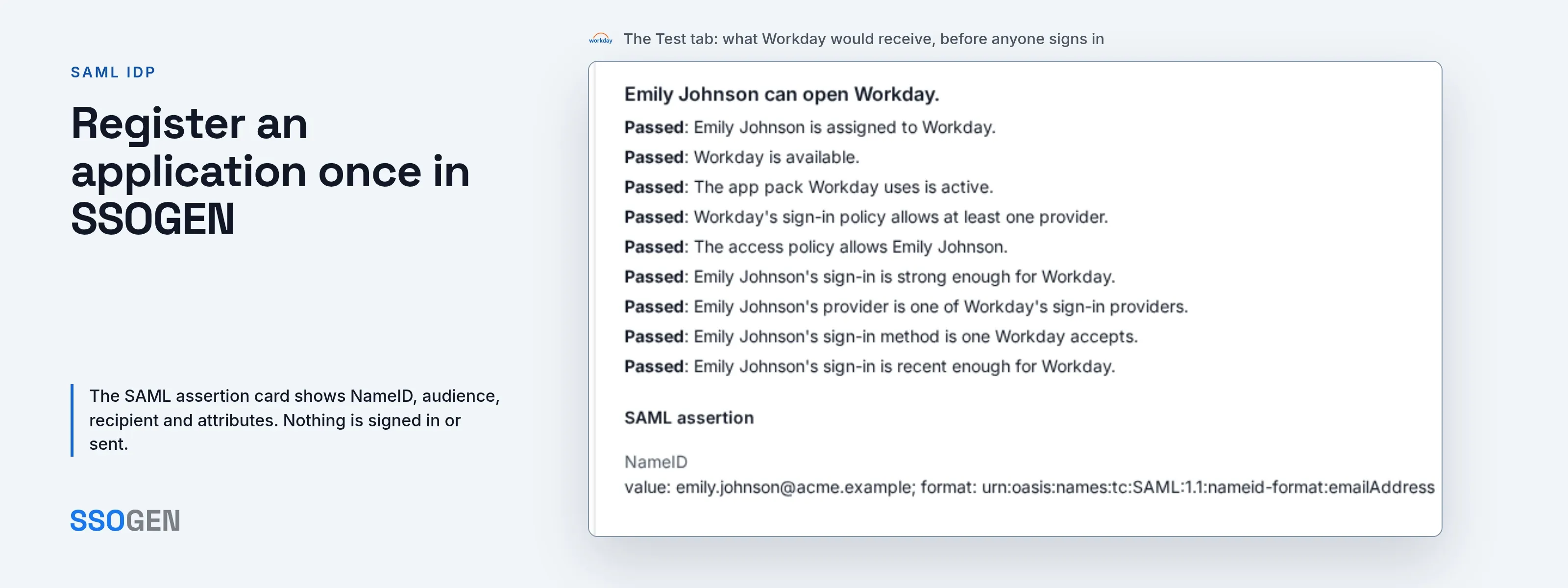
The Test tab previews the exact SAML assertion: NameID, audience, recipient and attributes. It signs no one in and sends nothing, so a misconfigured value shows up before go-live.
What a SAML IdP does
In the OASIS SAML 2.0 technical overview, the identity provider’s single sign-on service “builds a SAML assertion representing the user’s logon security context.”
- The identity provider signs the person in. Its single sign-on service builds the assertion.
- The application is the service provider. It sends the person to the IdP with an authentication request.
- The application trusts the assertion that comes back. It acts on the signed statement of who the person is.
- Both sides agree on a few values. Those values must match exactly.
The background is in what SAML is and IdP vs SP.
Register an application once in SSOGEN
SSOGEN’s guide to registering a SAML application uses a made-up expense service for Acme Corp. In the Admin Console, go to Applications, then SAML, then Register SAML app.
- Enter the application’s values. On the Connection step, give the service provider entity ID and the assertion consumer service URL. Or upload its metadata file in Service provider metadata (optional). The URL must start with
https://. Assertions go only to that registered address, never to one named in a request. See entity ID, ACS URL and audience. - Choose the NameID. On Identity sent to app, pick what names the person. The default sends an opaque
persistentidentifier, not the user name. Most SaaS products match on email, so pickemailand add attributes likedisplayNameorgroups. - Give the application SSOGEN’s metadata. The Integration tab shows the IdP metadata address (for example
https://sso.acme.example/saml/idp/metadata), the IdP entity ID, the single sign-on and single logout URLs and the signing certificate. Import the metadata and it sets all of that up, certificate included. - Assign people. On the Assignments tab, use Assign a person or Assign a group. Everyone in an assigned group, now and later, gets the app.
- Test, then activate. Test picks a person and returns a verdict, a checklist and a SAML assertion card. Then click Activate application on the last wizard step.
SSOGEN starts a SAML sign-in only when the application sends a request. The My Apps tile therefore opens the application’s own SSO sign-in address, which sends the person to SSOGEN. SP-initiated vs IdP-initiated SSO explains the difference.
To check the files you exchange, use the free in-browser tools: the SAML Tracer for live messages, the SAML metadata checker, the SAML metadata generator and the certificate decoder. Nothing is uploaded.
Four ways an application connects to the same SSOGEN
SAML is one of four. All four share the same assignments and the same sign-in policy.
One SSOGEN therefore serves a SaaS product, a modern web application and an older Apache application side by side. For the choice in detail, read SSOGEN’s guide to choosing how to connect an application.
| Way | What the application needs | What it receives | Pick it when |
|---|---|---|---|
| SAML | A place in its settings for an identity provider’s metadata, or an IdP entity ID and SSO URL | A NameID in a signed assertion, plus attributes you choose | It is a SaaS product or enterprise package. Nothing is installed |
| OpenID Connect | A client ID, a client secret or an issuer (discovery) URL | An ID token with claims | You write the app, or it is a single-page or mobile app, or a program calls an API as itself |
| Web Agent | To run behind Apache 2.4 (or Apache 2.2 or Oracle HTTP Server) | Identity in request headers, set by an Apache module | It cannot speak SAML or OpenID Connect, as with Oracle E-Business Suite or PeopleSoft |
| Gateway (App Proxy) | A private network, with nothing installed next to it | Request headers added by the App Proxy | It should be reachable at a published address and you cannot change it |
Choose in this order: a SAML setting first, then OpenID Connect, then the Web Agent, then the App Proxy. If an application offers both SAML and OpenID Connect, either works.
Who signs people in is a separate choice
Being the SAML IdP for an application does not mean SSOGEN holds the password. People sign in with one of these (SSOGEN’s identity provider guide):
- SSOGEN’s own accounts. SSOGEN holds the account.
- A directory. For example Active Directory.
- Another provider. Another SAML or OpenID Connect provider.
Each app’s sign-in policy names which providers may sign people in, and how strongly.
- Toward the app. SSOGEN is still the one SAML IdP.
- Toward a partner’s provider. SSOGEN is the service provider.
Multiple identity providers shows the setup, and identity broker explains the pattern.
SAML IdP options compared
Each row states only what the vendor’s own documentation says on the page read (read 2026-10-12). Blank means the page does not say, not “no”.
| Protocols documented | How it is run or licensed | |
|---|---|---|
| SSOGEN | SAML 2.0, OpenID Connect, Web Agent, Gateway | Hosted by SSOGEN or on-premises (self-hosted) |
| Keycloak | OpenID Connect, OAuth 2.0, SAML | Open source, Apache License 2.0 (repository) |
| Shibboleth IdP | SAML; CAS is mentioned as an alternative | A Java web application you deploy; Apache 2.0 license |
| Microsoft Entra ID | SAML 2.0, OpenID Connect; also password-based and linked SSO | |
| Okta | SAML 2.0 as an identity provider; its identity provider page describes OpenID Connect and SAML |
When another option is the better fit
- Microsoft Entra ID or Okta already in place, with every application speaking SAML or OpenID Connect: a second IdP adds little.
- An open source server you run and extend yourself: Keycloak fits.
- A university or research federation: the Shibboleth IdP is built for that.
SSOGEN is the right choice when one identity provider must serve modern applications and older Apache-based ones, such as Oracle E-Business Suite, in the same place. It has run in production since 2016. See single sign-on software and SSOGEN sign-in.
Questions people ask
What is an IdP for authentication?
What is an example of SAML?
How to configure SAML?
Can you give me an example of an identity provider?
Where to go next
- Background. Read the identity provider hub.
- Register. The guide to registering a SAML application.
- Activate. The guide to assigning, testing and activating an application.
Keycloak, Shibboleth, Microsoft Entra, Okta and the other product names are trademarks of their owners; SSOGEN is not affiliated with them.
Sources, all read 2026-10-12: OASIS SAML V2.0 Technical Overview; Keycloak Server Administration Guide; Keycloak repository; Shibboleth IdP 5 documentation; Microsoft Learn, single sign-on in Entra ID; Okta, SAML concepts; Okta, identity providers; Microsoft Learn, Set up a SAML 2.0 provider.