SSOGEN / Learn / SAML Authentication: How the Sign-In Works and Why It Fails
Learn
SAML Authentication: How the Sign-In Works and Why It Fails
SAML authentication is a browser round trip: the application sends you to your identity provider, which signs you in and posts a signed response back.
Updated
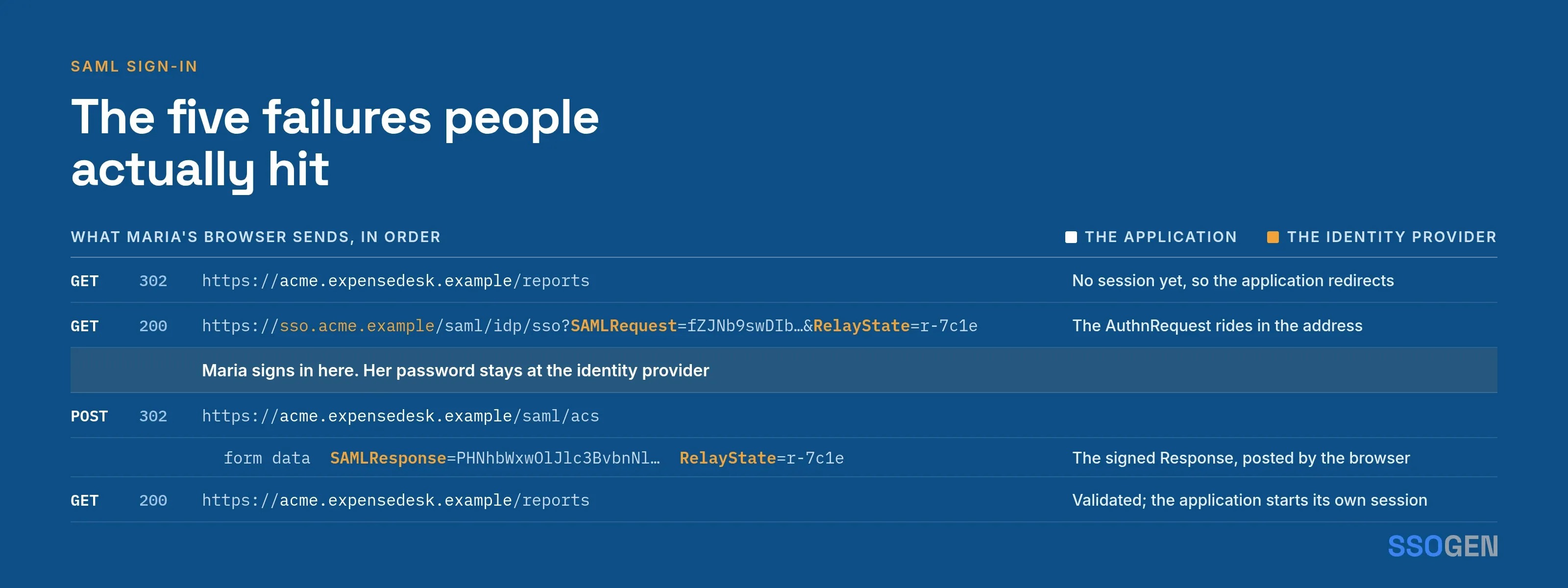
SAML authentication is a browser-mediated exchange between a user, an application and an identity provider:
- The application (the service provider, SP) redirects the browser to the identity provider (IdP) with an
AuthnRequest. - The IdP authenticates the user.
- The browser posts a signed
Responseto the application’s assertion consumer service (ACS) URL. - The application validates the response and starts its own session.
The sequence is the Web Browser SSO Profile, defined in the OASIS SAML 2.0 profiles specification, section 4.1 (read 2026-10-09).
This page traces one sign-in message by message, then lists the SP’s checks and the five most common failures.
For the definition, see what is SAML; for the signed document line by line, see SAML assertion explained.
What happens when someone signs in with SAML (SP-initiated)
Maria Lopez opens https://acme.expensedesk.example/ with no session, and Acme’s IdP is https://sso.acme.example/saml/idp. This is the primary flow of the profile (section 4.1.2, steps 1 to 6).
SP-initiated SAML sign-in, step by step
- Mariabrowser
- Service providerthe application
- Identity providerAcme IdP
- Maria to Service provider1Requests a protected page, with no session yet
- Service provider to Maria2Redirects to the IdP with an AuthnRequestSAMLRequest and RelayState travel in the query string.
- Maria to Identity provider3Follows the redirect to the IdP sign-on URL
- Identity provider4Signs Maria in, or reuses her existing sessionThe SP never sees her password.
- Identity provider to Maria5Returns a form holding the signed ResponseSAMLResponse and the same RelayState.
- Maria to Service provider6Posts the form to the ACS URL
- Service provider7Validates the response
- Service provider to Maria8Creates its own session and shows the page
| Step | Who | What the browser carries |
|---|---|---|
| 1 | Maria requests a protected page at the SP | Nothing SAML yet. The SP has no session for her. |
| 2 | SP builds an AuthnRequest with an ID, its Issuer, and often its ACS URL |
An HTTP redirect to the IdP’s single sign-on URL, with SAMLRequest and RelayState in the query string |
| 3 | IdP reads the request and signs Maria in, or reuses her existing session | Cookies for the IdP only. The SP never sees her password. |
| 4 | IdP builds a Response with a signed assertion, InResponseTo set to the request ID |
An HTML form that posts to the ACS URL: SAMLResponse and the same RelayState |
| 5 | SP validates the response | The POST request itself |
| 6 | SP creates its own session and shows the page | The SP’s session cookie |
Two details matter in practice:
- ACS URL trust. The IdP must establish independently that the ACS URL belongs to the SP, not trust it because the request names it. The profile warns that skipping this check “can result in a man-in-the-middle attack” (section 4.1.4.1).
- RelayState. The IdP returns
RelayStateunchanged, which is how the SP restores the page Maria requested (bindings specification, section 3.5.3).
How does IdP-initiated sign-in differ?
The profile allows the IdP to start at step 4 with no request (section 4.1.5, “Unsolicited Responses”).
- How it starts. The user selects a tile on a portal, and the IdP posts a response directly to the SP.
- No
InResponseTo. Because there was no request, the response must not containInResponseTo. The SP sends the user to a default location, or to the URL inRelayStateif both sides agreed on that. - One check lost. With no request ID to match, the SP loses one check. Some applications refuse unsolicited responses for that reason; others accept them only at a configured default ACS.
- SSOGEN. SSOGEN signs users in to SAML applications through the SP-initiated path and starts a SAML sign-in only when the application sends a request. The My Apps tile therefore opens the application’s own sign-in address, which then redirects to SSOGEN.
- No request, no sign-in. A request to SSOGEN’s single sign-on address with no
AuthnRequestis refused with the message “The authentication request could not be read, or was not valid.”
Which bindings carry the messages?
A binding defines how a SAML message travels through the browser. The bindings specification (read 2026-10-09) defines three that matter here:
| Binding | Used for | How it is encoded | Signature |
|---|---|---|---|
| HTTP Redirect (section 3.4) | AuthnRequest to the IdP |
DEFLATE, then base64, then URL-encoded into a SAMLRequest query parameter |
Not inside the XML. A SigAlg and a Signature query parameter sign the encoded string. |
| HTTP POST (section 3.5) | Response to the SP, and sometimes the request |
Base64 in a hidden form field named SAMLResponse or SAMLRequest |
An XML signature inside the message |
| HTTP Artifact | Either direction | A short reference is passed; the receiver fetches the message directly from the other side | Resolved over a back channel |
Binding rules to remember:
- Redirect. The Redirect binding must not carry the
Response, which is usually too long for a URL (profile, section 4.1.2, step 5). - POST. When the response travels by POST, the assertions must be signed (section 4.1.4.5).
- RelayState.
RelayStatemust not exceed 80 bytes (bindings, section 3.4.3).
SSOGEN’s single sign-on URL serves both the HTTP-Redirect and HTTP-POST bindings. SSOGEN posts assertions only to the registered ACS URL, never to a URL supplied in the request.
What does the service provider check?
Section 4.1.4.3 of the profile lists what the SP must check on every response: signature, Recipient, NotOnOrAfter and InResponseTo.
Two more checks come from other parts of the specifications:
Destination. Bindings, 3.5.5.2.- Audience. Core, section 2.5.1.4; the profile requires an
AudienceRestrictionnaming the SP in section 4.1.4.2.
With Acme values:
| Check | Where it comes from | What a pass looks like |
|---|---|---|
| Signature | ds:Signature on the assertion or the response |
Verifies with the IdP certificate the SP was given, not one inside the message |
| Destination | Destination on the Response. Required to match the receiving URL when the message is signed (bindings, 3.5.5.2) |
https://acme.expensedesk.example/saml/acs |
| Recipient | SubjectConfirmationData/@Recipient |
Equals the ACS URL that received the POST |
| Audience | AudienceRestriction/Audience |
The SP’s own entity ID, https://acme.expensedesk.example/saml/metadata |
| Time | NotOnOrAfter on the confirmation data, allowing for clock skew |
Not yet passed |
| InResponseTo | SubjectConfirmationData/@InResponseTo |
Equals the ID of the AuthnRequest this SP issued, unless the response is unsolicited |
| Replay | The assertion ID |
Not seen before. The SP keeps used IDs until the assertion would have expired (section 4.1.4.5). |
An assertion that fails any check must be discarded, and no session may start from it (section 4.1.4.3).
To see these values in a real response, copy the SAMLResponse from the browser’s network tab into the free SAML tracer. It decodes locally in the browser and uploads nothing.
The five failures people actually hit
Most failed SAML sign-ins come down to one mismatched value. Each row gives the symptom, where to look and the fix.
| Failure | Typical symptom | Where to look | Fix |
|---|---|---|---|
| Clock skew | “Assertion expired” or “not yet valid” on a response that looks fine | NotOnOrAfter and IssueInstant in the decoded response, against the SP server’s clock |
Synchronize time on both sides. A wider tolerance only hides the drift. |
| Wrong ACS URL | The IdP refuses the request, or the SP says the Recipient or Destination does not match |
Recipient and Destination against the ACS in the SP’s metadata. Check http against https, a trailing slash, and the host name. |
Make the SP’s ACS and the URL registered at the IdP identical, character for character |
| Wrong audience or entity ID | “Audience restriction not satisfied” or “issuer not recognized” | Audience in the response, and the Issuer the SP sends in its request |
Copy the SP entity ID exactly as the SP states it into the IdP. It often is a URL that does not resolve. |
| Signature or certificate mismatch | “Signature validation failed” right after a certificate renewal | The certificate in the IdP’s metadata against the one the SP holds; whether the SP wants the assertion or the whole response signed | Re-import the IdP metadata into the SP. Check the certificate with the metadata checker. |
| NameID format | Sign-in works but the user is not found, or the IdP returns an error status | NameID and its Format in the response, against the SP’s user-matching setting |
Align the format. An IdP that cannot meet the request’s NameIDPolicy may answer with InvalidNameIDPolicy (core, section 3.4.1.1). |
Two less obvious causes:
- Redirect signatures. The receiver must verify a Redirect-binding signature over the original URL-encoded values. URL encoding is not canonical, so a proxy that rewrites the query string can break a request signature (bindings, 3.4.4.1).
- Time. The specification acknowledges that some clock skew between systems is unavoidable (SAML core, section 2.5.1.5, read 2026-10-09), so SPs allow a tolerance.
When SSOGEN is the SP, its clock skew setting defaults to five minutes, and the matching error message tells you to check both clocks.
A message you can send to the application’s support team
When a sign-in fails and you cannot see the SP’s logs, send the application’s support team this message:
Subject: SAML sign-in failing for acme.expensedesk.example
Time of failure (UTC): 2026-10-08 14:02IdP entity ID: https://sso.acme.example/saml/idpSP entity ID we have configured: https://acme.expensedesk.example/saml/metadataACS URL we have configured: https://acme.expensedesk.example/saml/acsNameID format we send: emailAddressResponse Audience: <paste>Response Destination and Recipient: <paste>Error you show: <paste>
Please tell us which of Audience, Destination, Recipient, signature,NotOnOrAfter or NameID your side rejected, and your server's clock offset.
How SSOGEN handles SAML sign-in
SSOGEN takes both roles.
As the identity provider, it signs users in to the SAML applications you register:
- Guide. The register a SAML application guide lists the entity ID, ACS URL, metadata and name ID settings.
- Integration tab. It shows SSOGEN’s IdP metadata address, entity ID, single sign-on URL and signing certificate.
- Exact matching. The ACS URL is matched exactly, and a request whose
Issuerdiffers from the registered entity ID is refused. - NameID. The default NameID is an opaque
persistentidentifier. If the application matches users by email address, select the email option on the Identity sent to app step. - Test step. The Test step of the register a SAML application guide shows the SAML assertion SSOGEN would send, audience and recipient included, before you activate anything.
As a service provider, it accepts sign-ins from another SAML IdP such as Entra ID or Keycloak and requires signed assertions. The SAML identity provider guide covers the wizard, the clock skew setting and the error messages.
Questions people ask
Is SAML authentication or authorization?
Authentication. The assertion’s AuthnStatement records that the IdP authenticated the user. It can also carry attributes the SP uses for access decisions, but the SP makes that decision.
Does the SP ever see my password?
No. You enter it only at the IdP; the SP receives the signed response.
Why is the response posted and not redirected?
It is usually too long for a URL, and the profile forbids the Redirect binding for it (section 4.1.2, step 5).
What does SAML mean in SSO?
SAML stands for Security Assertion Markup Language. In single sign-on, it is the message format and browser exchange through which an identity provider tells an application who signed in, using a signed XML assertion.
The user signs in once at the identity provider, and each SAML application accepts the signed response instead of asking for a password.
What is the difference between SAML and OAuth?
They solve different problems. SAML 2.0 carries a signed assertion that tells an application who authenticated. OAuth 2.0 is an authorization framework that lets a third-party application obtain limited access to an HTTP service (RFC 6749, read 2026-10-09).
OpenID Connect adds an identity layer on top of OAuth 2.0 for sign-in. See SAML vs OIDC.
Can SSO work without SAML?
Yes. SAML is one way to implement single sign-on.
OpenID Connect, an identity layer on top of OAuth 2.0, also lets an application verify a user’s identity based on authentication performed elsewhere (OpenID Connect Core 1.0, read 2026-10-09). The choice depends on what the application supports. See what is SSO.
Can I replay a captured response?
An SP that follows the profile refuses it: the assertion ID has already been used, NotOnOrAfter limits the window, and InResponseTo binds it to one request.
Where to go next
- The definition. Read the definition of SAML.
- A real message. Annotate it with SAML assertion explained.
- Back to the hub. Return to the Learn hub.
Sources, all read 2026-10-09: OASIS SAML 2.0 profiles, OASIS SAML 2.0 bindings, OASIS SAML 2.0 core.