SSOGEN / SSO for Legacy Applications: Four Ways to Add It Without Changing the App
SSOGEN
SSO for Legacy Applications: Four Ways to Add It Without Changing the App
Put Apache in front of the portal, add the Web Agent, and each person keeps their own SAP user while SSOGEN passes the name.
A legacy application is one you cannot, or will not, change. It has its own user table and its own login page, and its settings screen has no place for a SAML metadata file or an OpenID Connect client ID.
SSO for legacy applications works when a component in front of the application does the sign-in. It then tells the application who the person is, in a form the application already understands.
SSOGEN provides four routes for this. The right one depends on what the application can read and where it runs. The decision table comes first, then each route in turn.
Pick the route that matches the application
| If the application… | Use | What it needs |
|---|---|---|
| runs behind Apache or Oracle HTTP Server that you control | Web Agent | An Apache module on your web server |
| is a private web application and can read identity from request headers | App Proxy, identity headers | A SSOGEN Gateway in your network, nothing beside the app |
| has only a username and password page | Form fill (App Proxy) | The login form’s paths and field names |
| is an IIS or similar site using Windows authentication | Kerberos constrained delegation (App Proxy) | An Active Directory service account and a keytab |
| has a SAML or OIDC setting | Connect it directly | Nothing to install |
SSOGEN’s guide for choosing a connection method asks the same questions in order and stops at the first yes:
- Does the application have a SAML setting?
- Does it have an OpenID Connect setting?
- Is it a web app behind Apache?
- Is it a private web app where you want no software next to it?
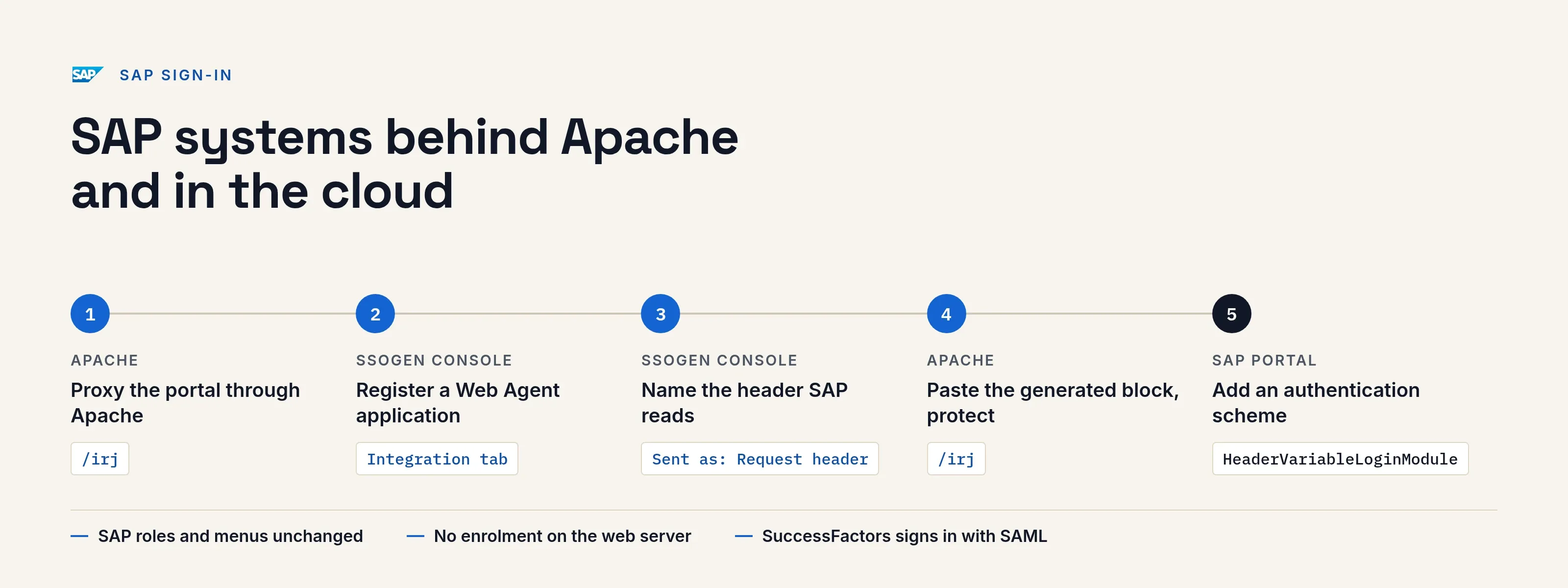
SAP systems behind Apache and in the cloud
SAP systems sign people in two ways, and SSOGEN covers both.
SAP NetWeaver Portal, Java and ABAP behind a web server. Put Apache in front of the portal and the SSOGEN Web Agent in Apache. The Web Agent sends a person who has not signed in to SSOGEN and checks the answer. It then passes the signed-in user to SAP in a request header, which SAP reads.
SAP’s own authorization is untouched. Roles, permissions and menus work as before, because SSOGEN takes over authentication only.
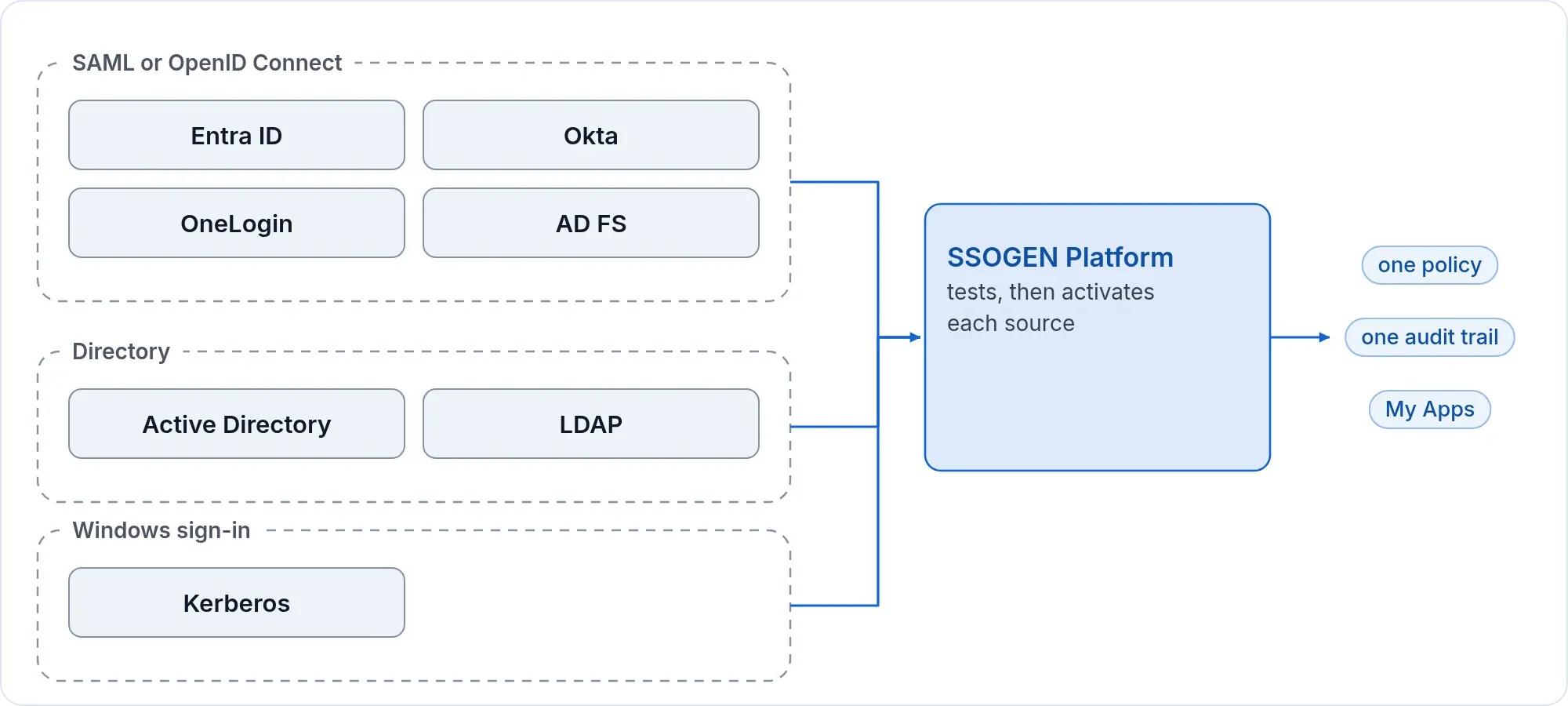
People can sign in from Active Directory, OpenLDAP or another LDAP directory, or from Windows sign-in with Kerberos. They can also come from an identity provider you already run, such as Microsoft Entra ID, Okta, OneLogin or AD FS. SSOGEN’s multi-factor options apply on top: phone approval with number matching, passkeys and codes.
What you do
- Proxy the portal through Apache. Install Apache in front of SAP and forward the portal context,
/irj, to the SAP web server. - Register the application in SSOGEN. In the Admin Console, add a Web Agent application for the portal: name, address, icon, sign-in policy and who may open it. Generate the agent key on its Integration tab and copy the generated Apache configuration.
- Name the header. In the application’s output table, add a row under Name the application sees with the header name your SAP authentication scheme reads. Set Sent as to Request header and choose the user name as its value.
- Paste and protect. Paste the generated block into the Apache virtual host for the portal and protect
/irj. Add the application’s logout path as a logout endpoint so SAP’s sign-out ends the Web Agent session. - Teach SAP to read the header. Stop the J2EE dispatcher and server services. Add an authentication scheme in the portal’s
authschemes.xmlthat reads the user from an HTTP header withHeaderVariableLoginModule, and set its logoff URL. Add the module for each application that should use it, then restart the SAP system.
Nobody on the web server needs an SSOGEN account or an enrollment command.
SAP SuccessFactors
SuccessFactors signs in with SAML through SAP Cloud Identity Services. Follow single sign-on for SAP SuccessFactors.
One person, one account
Each person keeps their own SAP user. SSOGEN passes the name; it never shares one account between people.
Route 1: Web Agent for applications behind Apache or OHS
The SSOGEN Web Agent is an Apache module for Apache 2.4, Apache 2.2 and Oracle HTTP Server. It signs the person in through SSOGEN and passes their identity to the application as configured.
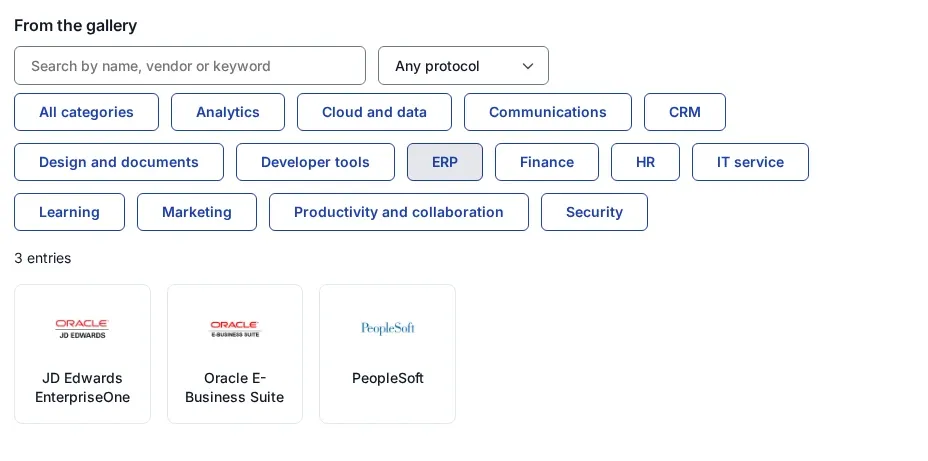
- Typical applications: Oracle E-Business Suite, PeopleSoft, JD Edwards and older internal sites.
- Oracle profile: supplies the user names Oracle applications read, such as the ones for PeopleSoft and JD Edwards.
- Spoof protection: the agent strips any identity values the browser tries to send, on every path of the site.
Make the application reachable only through the web server, and close its own port to everything else. The Oracle EBS SSO page has the Oracle details.
Route 2: App Proxy identity headers
When nothing can be installed next to the application, the App Proxy on the SSOGEN Gateway sits in front of it. After SSOGEN signs the person in, the proxy forwards the request with a fixed set of identity headers: user, email, display name, groups and assurance level.
The proxy strips any header with those names that the browser sent.
The default sign-in method for a route is Identity headers only. It fits applications that trust those headers or need no sign-in of their own. The identity aware proxy page explains the pattern.
Route 3: Form fill for a plain login page
Some applications only know a username and password form. With Form login, the App Proxy opens the application’s login page itself, fills in the credentials, submits, and hands the application’s own cookies to the browser. The person never sees the form.
You describe the form once on the route:
- the login page path and the form action
- the username and password field names
- any hidden fields to carry (up to 8)
- a success rule: a status code, a page the login leads to, or a cookie set only after a good login
You can also add texts that mean failure. Whose password is filled is a separate choice:
- Each person’s own saved password. The usual choice. SSOGEN can learn it from the person’s first sign-in and keeps it encrypted.
- A shared account for the application, stored in the secret vault and never shown again.
Some enterprise applications reject one account used by many people at once. For those, use personal passwords or one of the other routes.
Form login is built for one simple login form. For multi-step logins, forms drawn by JavaScript and CAPTCHA forms, use one of the other three routes.
If fills keep failing, the proxy pauses form login for that route for a few minutes. People manage their saved passwords under App passwords in My Account. To see how vendor app passwords differ and what they risk, read app passwords explained.
Route 4: Kerberos constrained delegation for Windows sites
For an IIS site or any application using Windows authentication, the App Proxy requests a Windows ticket on the person’s behalf and presents it to the application. The application sees each employee as their own Windows account, and nobody types a password.
The route uses constrained delegation with protocol transition, through a dedicated service account that Active Directory allows to delegate only to that application. It needs:
- the service principal name and the realm
- up to 8 domain controllers
- the service account and a
secret://reference to its keytab
The console generates four commands for a domain administrator: setspn, ktpass, and two PowerShell lines that allow delegation and protocol transition. Tickets use AES only.
SSOGEN takes each person’s Windows name from the attributes their directory sign-in provided. It never guesses from an email address, so a person without one is refused.
Kerberos runs on a gateway installed from the Enterprise Linux RPM or the container image that includes the Kerberos helper. Every gateway in the group must be current, or the route is held back.
Application Acme Finance (IIS, Windows authentication)Route host finance.acme.exampleMethod Kerberos (Windows Integrated Authentication)SPN HTTP/finance.acme.exampleRealm CORP.ACME.EXAMPLEService acct svc-edge@CORP.ACME.EXAMPLEKeytab ref secret://edge/keytabs/svc-edge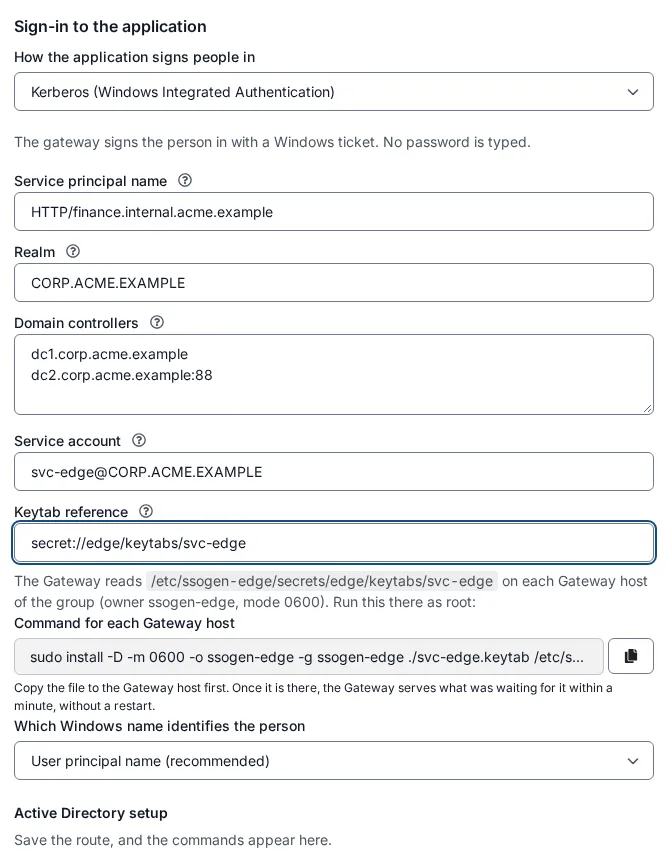
What stays the same in all four routes
Every route applies the same controls. Assignments decide who may open the application, and the sign-in policy decides how strongly they must sign in. This is where you add MFA to an application that never had it. See MFA for legacy applications.
Questions people ask
Can I add SSO to an app that has no SAML or OIDC?
Yes. Put the Web Agent or the App Proxy in front of it. SSOGEN signs the person in, and the application receives identity in a form it already reads.
Does the application need code changes?
No. The Web Agent route needs Apache configuration, and a header route needs the application set to trust the headers. Form fill and Kerberos need nothing on the application beyond the account.
What if two people share the same application login?
Use each person’s own saved password, not the shared account. The application then sees each person as themselves.
Where to go next
SSO gateway compares the gateway and agent patterns. For the category these products come from, see web access management. For free options, see open source SSO. The step-by-step guides are Kerberos constrained delegation and form fill and per-person form fill.
For users stored in a database table, see sign-in with your own user database. To weigh another way to protect these applications, see the Datawiza alternative page.