SSOGEN / Identity Aware Proxy: What It Is and How to Run One for Any App
SSOGEN
Identity Aware Proxy: What It Is and How to Run One for Any App
The SSOGEN Gateway App Proxy intercepts the request, signs the person in, checks assignment and policy, then forwards it with the person's identity attached.
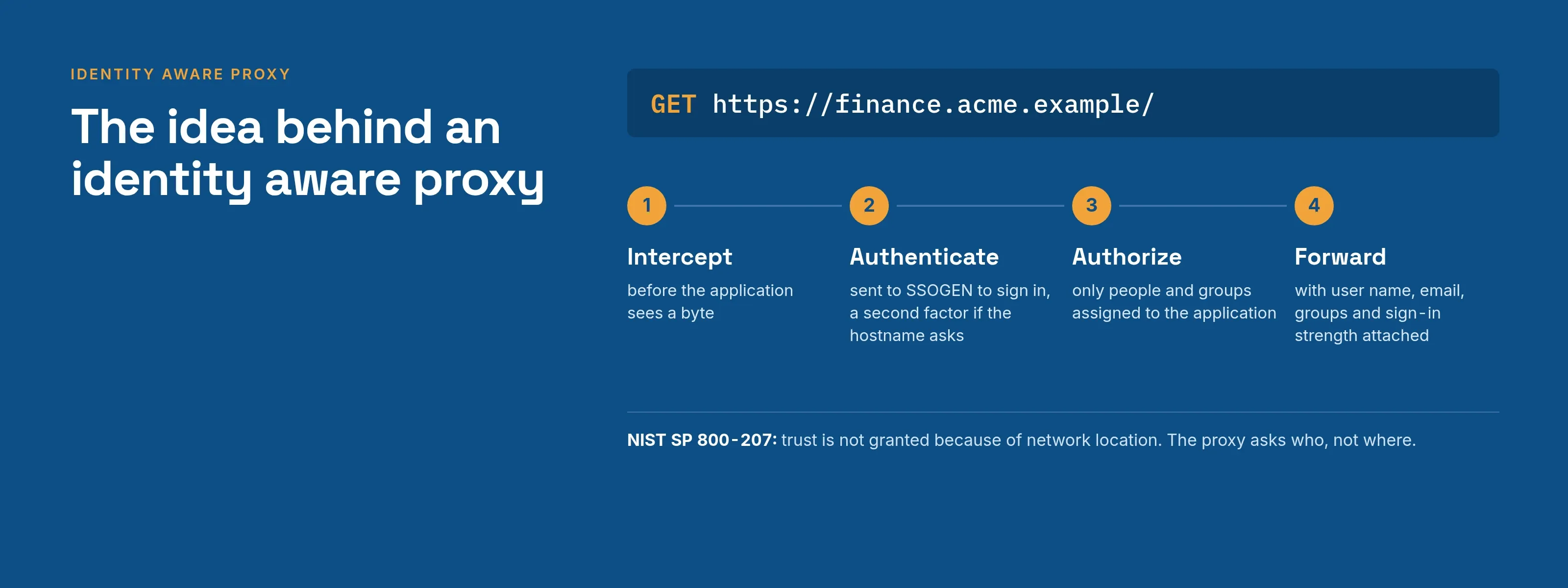
An identity aware proxy (IAP) moves the access decision from the network to the person. The proxy no longer asks whether a request came from inside the office. Before any byte reaches the application, it checks “who is this, are they assigned to this application, and did they sign in strongly enough?”
The SSOGEN Gateway App Proxy is an identity aware proxy that you run yourself, in front of any web application you host, in any network.
The best-known implementation is Google Cloud’s.
Google describes Identity-Aware Proxy as a central authorization layer for applications accessed over HTTPS, so that you use an application-level access control model instead of relying on network-level firewalls (Google Cloud, “Identity-Aware Proxy overview”, read 2026-10-08).
SSOGEN applies the same pattern to your own data centers and private networks.
The idea behind an identity aware proxy
The model rests on a principle written down in NIST’s zero trust guidance.
Defenses move from static, network-based perimeters to focus on users, assets and resources, and trust is not granted because of network location (NIST SP 800-207, Zero Trust Architecture, read 2026-10-08).
A proxy that authenticates every request is a direct way to apply that principle to web applications.
Every identity aware proxy does four things:
- Intercepts the request before the application sees it.
- Authenticates the person against an identity provider.
- Authorizes the person for this application, using assignments and policy.
- Forwards the request, usually with the verified identity attached, so the application can show the right data.
The application needs no SAML or OpenID Connect support and no agent installed beside it.
How the SSOGEN Gateway App Proxy works
The App Proxy is one of the four features of the SSOGEN Gateway, a program you run inside your network.
It receives the browser’s request, confirms that the person is signed in to SSOGEN and allowed in, and then passes the request to your application. Each part of that path is under your control:
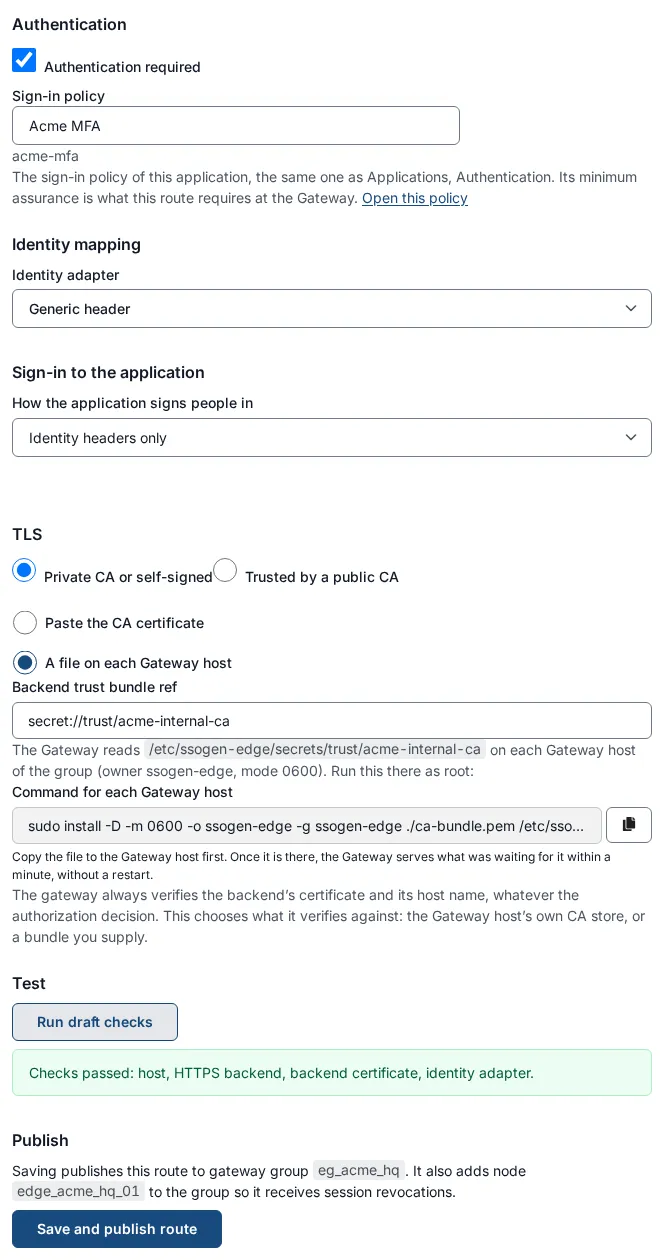
- Routes. A route connects a hostname and path to an application and its back-end servers. Hostnames are real names such as
finance.acme.example, with a TLS certificate you upload and rotate in the console. - Sign-in first. An unauthenticated browser is sent to SSOGEN to sign in. A person who is already signed in returns directly, unless the hostname’s policy asks for more, such as a second factor.
- Assignment decides. Only people and groups assigned to the application can use it. The application’s sign-in policy sets the minimum strength the route requires.
- Identity is attached. The App Proxy sends a fixed set of identity headers to the application: the person’s user name, email, display name and groups (at most 64 groups), the sign-in strength, and the application and route. Only values the App Proxy sets reach the application, so a person cannot supply their own.
- Back ends are verified. Back-end servers must use
https://, and the gateway always verifies their certificate and host name, against a private CA bundle you reference or the host’s public authorities. Up to 32 servers share the load, and health checks take an unhealthy server out of rotation. - Sticky sessions are optional, for applications that hold the session in one server’s memory.
- Policy per hostname. The same application can have an internal hostname with a lighter policy and an external one with MFA. SSOGEN saves a weaker hostname policy only when that policy denies sign-in from outside your network zones.
- Behind a load balancer. A load-balancer listener accepts connections only from your balancer, which must present a client certificate (mutual TLS). It is the only place the gateway trusts the
X-Forwarded-Forheader.
The application trusts those headers, so it must be reachable only through the gateway. Close its own port to everything else.
When the application still wants its own login
Many internal applications ignore identity headers and show their own login page. The App Proxy signs people in to those applications too, through the How the application signs people in setting:
- Identity headers only is the default.
- Form login fills the application’s login form for the person, using their own saved password or a shared account.
- Kerberos (Windows Integrated Authentication) gets a Windows ticket for the person with constrained delegation, so an IIS site sees their own Windows account.
The legacy application SSO page compares these routes.
Identity aware proxy or agent: which fits
| Situation | Use |
|---|---|
| A web application in a private network, nothing to install beside it | App Proxy on the SSOGEN Gateway |
| An application behind Apache or Oracle HTTP Server that you can add a module to | The SSOGEN Web Agent |
| An application with a SAML or OpenID Connect setting | Connect it directly, no proxy needed |
| A server, not a website, for a contractor | Remote Access on the same gateway |
Questions people ask
Is an identity aware proxy the same as a reverse proxy?
A reverse proxy forwards requests. An identity aware proxy also authenticates and authorizes the person on every request before forwarding it.
Does it replace a VPN?
For web applications, yes. Each person reaches only the applications they are assigned to, not the network. Servers reached over SSH, RDP or VNC use Remote Access, also without a VPN.
Does the application need to change?
No code change is needed. The application reads the identity headers, or the proxy signs in on the person’s behalf with form login or Kerberos.
Where does the SSOGEN App Proxy run?
In your own network, as part of the SSOGEN Gateway, in front of applications you host. SSOGEN itself can be hosted by SSOGEN or run on-premises.
Where to go next
- Related reading. SSO gateway patterns compared and policy enforcement point.
- Publish a route. Follow the App Proxy guide.
- The product. Read about the SSOGEN Gateway and single sign-on software.
- Replacing a gateway. Compare F5 APM against SSOGEN and PingAccess against SSOGEN.
Google Cloud and Identity-Aware Proxy are trademarks of their owner; SSOGEN is not affiliated with it.
To run the identity provider yourself, see self-hosted identity provider.