SSOGEN Secure Remote Access

Secure Remote Access: Clientless, No VPN

People open an approved server over SSH, RDP or VNC from a browser, the password stays in the vault, and the session ends when the approved window does.

Reach the server, not the network.

Secure remote access without a VPN: an SSH session in the browser opened through SSOGEN after an approval
One server, one window, no network opened.
Protocols
SSH, RDP and VNC
On the device
A browser, nothing to install
In your network
One Gateway
On record
Session events, not screens or keystrokes

Why it is safe to hand out

SSOGEN Remote Access gives staff, contractors and vendors secure remote access to one server at a time, through the SSOGEN Gateway that you run in your own network.

  • One resource at a time

    A person reaches the one server that was approved. There is no network-level access to misconfigure, because there is no network-level access.

  • Nobody types a password

    A resource can hold a stored account: a generated key, an uploaded key or a password. The console lets you write it and never reads it back. The person never sees it.

  • The host proves who it is

    Nothing is trusted on first use. An administrator pairs the host and compares the key or certificate that the Gateway saw. A stored account is used only with a host that has proved its identity.

  • Limits you set

    Idle timeout and maximum session length are set per resource. Clipboard text and file transfer are separate permissions, and they stay off until you grant them.

How a session opens

How a browser session to one server is openedA person in a browser opens a resource from My Apps. SSOGEN checks the sign-in and the policy, asks an approver when the resource requires it, and authorizes one session. The Gateway inside your network opens the session to the one server that was defined. The stored account stays with SSOGEN and is released to the Gateway for that session only; the person never sees it.Your networkA personin a browser, no clientopensSSOGENChecks sign-in and policyAsks an approver if requiredAuthorizes one sessionGatewayopens the sessionOne serverSSH, RDP or VNCStored accountthe person never sees itreleased for this session onlyHow a browser session to one server is openedA person in a browser opens a resource from My Apps. SSOGEN checks the sign-in and the policy, asks an approver when the resource requires it, and authorizes one session. The Gateway inside your network opens the session to the one server that was defined. The stored account stays with SSOGEN and is released to the Gateway for that session only; the person never sees it.A personin a browser, no clientopensSSOGENChecks sign-in and policyAsks an approver if requiredAuthorizes one sessionStored accountreleased for one sessionYour networkGatewayopens the sessionOne serverSSH, RDP or VNC
  1. You define a resource

    Protocol, host, who may use it, and whether an approver must agree first.

  2. The person opens it from My Apps

    SSOGEN checks the sign-in and the policy at that moment, not at some earlier login.

  3. The Gateway opens the session

    The browser never names the destination. The Gateway connects only to the host you defined.

Approval where it matters

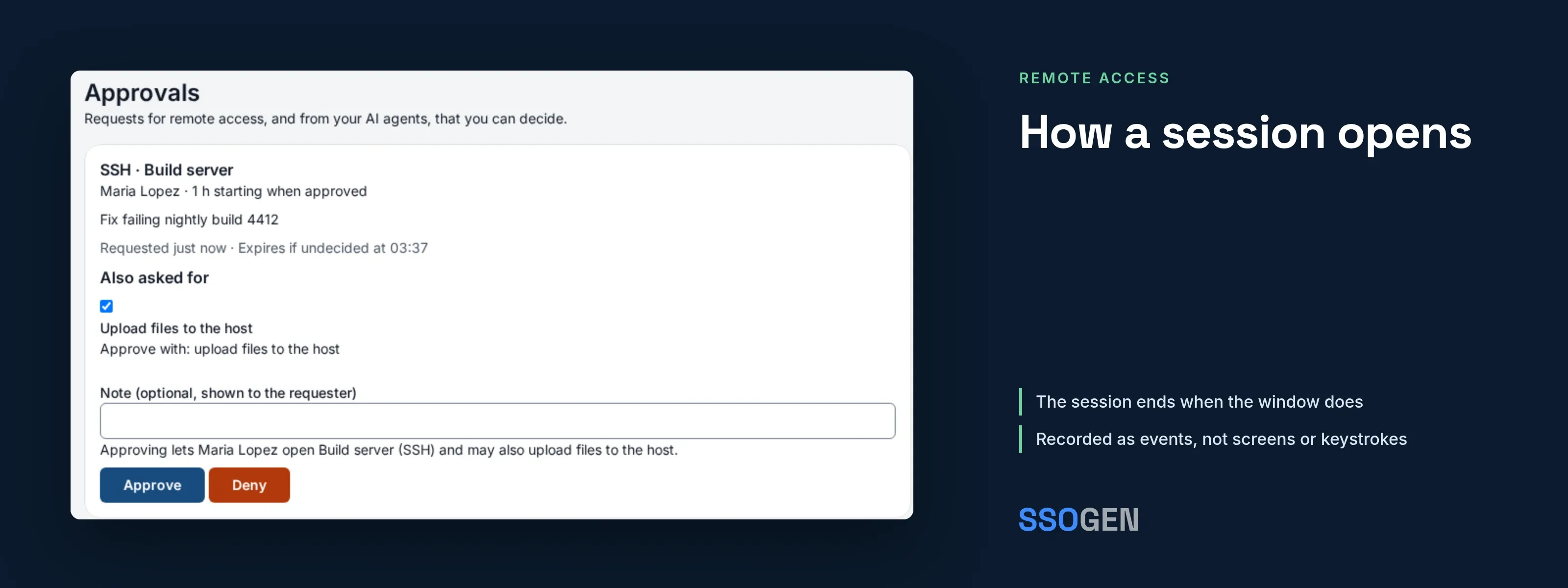
Some servers should open only when someone agrees. Mark the resource, and SSOGEN asks an approver first.

  • A reason and a duration. The person says why and for how long.
  • An approver decides. The request shows the resource, the requester, the reason and the window.
  • The window is enforced. The session ends when the approved window ends.
  • Access ends when access ends. Revoke a person or a Gateway and live sessions end.

What people and approvers see

Illustration with fictional data.

Every session has a timeline

The console shows each session as a timeline, in order. Administrators see live sessions and can end one.

  • Who, what, when, on whose approval. Access requested and decided, stored account used, host identity checked, signed in, session ended.
  • Events, not content. SSOGEN does not capture screens or keystrokes. For many teams that is a privacy feature.
  • One audit trail. Sessions sit in the same audit trail as every other SSOGEN sign-in.

Audit in SSOGEN

Illustration with fictional data.

What you run

Remote Access is managed by Super administrators. When SSOGEN hosts your organization, SSOGEN switches each feature on for you.

  • One Gateway

    A Linux host that can reach your servers. It makes outbound connections to SSOGEN.

  • A browser

    The people who use Remote Access need a browser. There is nothing to install on the laptop.

  • A connector, where needed

    Servers in a network that the Gateway cannot reach directly are served through an Outbound Connector.

How it compares

A VPN, an open-source browser gateway and SSOGEN Remote Access
VPNOpen-source browser gatewaySSOGEN Remote Access
What the person reachesThe networkOne hostOne host
Sign-in, MFA and approvalSeparate productsYou assemble themThe same policy as every other SSOGEN application
Who knows the server passwordThe personYou assemble itNobody on the person's side
AuditNetwork logsYou build itOne audit trail with the rest of SSOGEN

Common questions

Does SSOGEN record the screen or keystrokes?

No. SSOGEN keeps session events, not content. The timeline still answers who opened what, when and on whose approval.

Do people need a VPN client or an agent on the laptop?

No. A session opens in the browser. The Gateway in your network makes the connection to the server.

What about servers the Gateway cannot reach?

An Outbound Connector inside that network serves them. It connects outbound, so the network needs no inbound opening.

Can a new SSH resource be opened before its host is trusted?

No. An administrator pairs the host first, and only then can a session open. This replaces the habit of trusting a host on first use.

Does this replace a jump server?

For most teams, yes. People stop sharing a jump server account, and each session is tied to one person, one server and one approval. See how this compares with a jump box.