SSOGEN / Sign-in methods / SSO With LDAP: Sign In Against Your Directory
Integration
SSO With LDAP: Sign In Against Your Directory
SSO with LDAP in SSOGEN means people type the username and password they already use at work, and SSOGEN checks that password against your LDAP directory on every sign-in. SSOGEN keeps no copy of it.
SSO with LDAP turns the directory you already run into single sign-on. If your users are in OpenLDAP, Active Directory or another LDAP server, you need no second set of passwords and no cloud identity provider in front of the directory.
Connect the directory to SSOGEN once. The sign-in page then accepts the directory password, and one sign-in opens every application SSOGEN protects.
This page covers what the connection does, when to choose it and what to configure. The field-by-field steps are in the Connect Active Directory or LDAP guide.
What happens when someone signs in
SSOGEN does two things against the directory, in this order.
- It signs in to the directory with a service account you create, then searches the user base DN for the one entry whose username attribute equals what the person typed.
- It signs in to the directory again as that person, using the password they typed. If the directory accepts it, the sign-in succeeds.
SSOGEN never stores the password. The directory is the only place it lives, so a changed password works at the next sign-in with no sync.
A sign-in needs exactly one matching entry. Zero matches and two matches are both refused, so scope the base DN to people who may sign in.
On a first sign-in, SSOGEN creates the account with the name, email and groups the directory returned.
When LDAP is the right sign-in method
Choose the method by where your users already have an account.
| Situation | Use |
|---|---|
| People are in an LDAP directory and there is no cloud sign-in system in front of it | Directory (LDAP), this page |
| Everyone already signs in to Entra ID, Okta, Keycloak or another provider | SAML or OpenID Connect, so that system keeps checking passwords |
| Office computers joined to the domain, and you want no password prompt at all | Kerberos in addition to the directory |
| A few administrators, contractors or test accounts that are in no directory | Local accounts |
SSOGEN runs several methods at once. A common layout is the directory for staff, plus a couple of local accounts as a way back in if the directory is down.
What you configure
The Admin Console wizard under Identity, Directories has seven steps. These are the names on screen.
| Step | What you enter | Acme Corp example |
|---|---|---|
| General | Display name and a Connection ID that cannot change later | Acme directory, acme-ad |
| Connection | LDAPS or StartTLS, the directory address, the user base DN | ldaps://dc01.acme.example:636, OU=People,DC=acme,DC=example |
| Credentials | The service account’s full DN and password | CN=SSOGEN service,OU=Service,DC=acme,DC=example |
| User mapping | Username, mail, display name, first and last name attributes | userPrincipalName, mail, displayName |
| Group mapping | Group membership attribute, group ID attribute, optional group base DN | memberOf, cn |
| Test | Saves the settings as a draft | |
| Review and activate | Validate, then Test, then Activate |
The username attribute decides what people type. With userPrincipalName they type maria.lopez@acme.example. With sAMAccountName they type mlopez. OpenLDAP usually uses uid.
Encryption and the service account
SSOGEN always encrypts the directory connection; there is no plain, unencrypted LDAP option. Choose one of two:
- LDAPS encrypts from the first byte and usually runs on port 636.
- StartTLS connects on port 389 and upgrades before anything secret goes out. If the directory refuses to upgrade, SSOGEN stops and sends nothing.
The directory’s certificate must name the exact host you typed, so an IP address or a short name fails that check.
If a private certificate authority issued the certificate, add that authority once under Settings, Certificates. SSOGEN already trusts the public authorities it ships with.
The service account only reads, so a plain account is enough. Keep it out of Domain Admins and any other privileged group. Type the bind DN as a full DN, because that field rejects ACME\svc-ssogen and svc-ssogen@acme.example.
Testing before anyone depends on it
A directory moves through Draft, Validated, Tested and Active, always in that order. Test connects, sets up encryption, binds as the service account and searches the base DN. It signs nobody in.
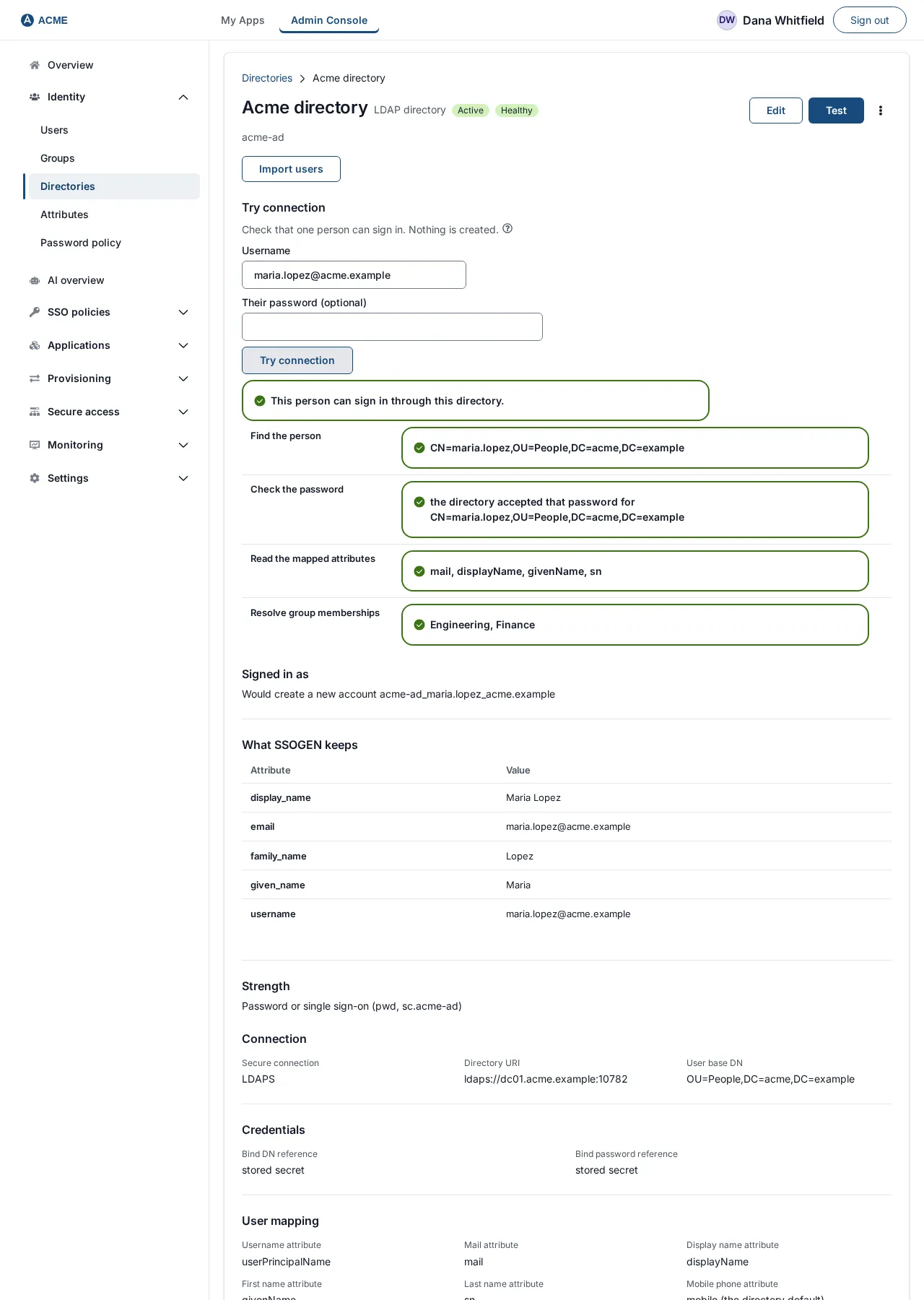
To check one real person, use Try connection on the directory’s page. It shows four steps:
- find the person
- check the password
- read the mapped attributes
- resolve group memberships
Leave the password empty and you still see every step except the password check.
If Maria Lopez is refused while Test passes, Try connection names the step that stops her, usually a username attribute that does not match what she types.
Editing a directory that already serves sign-in saves a new revision. People keep signing in on the current settings until you validate, test and activate it, so changes never interrupt sign-in.
Groups and people who leave
Directory groups become SSOGEN groups of the same name, and you assign those to applications.
- Group names. Names may use letters, digits, spaces, dots, underscores and hyphens, so a group named
Finance (EU)is skipped. - Group limit. SSOGEN reads up to 64 groups per person.
- Sign-in only adds. A sign-in only ever adds group memberships, so a partly readable directory cannot take access away during a sign-in.
Removal happens through an import, with safeguards built in:
- First import. It never disables anyone, so you can check the count against what you expect.
- Later imports. They disable people who have left.
- Safeguard. An import that would switch off more than the larger of 5 people and 10 percent halts and changes no access.
The rules are in the directory sync guide.
Questions people ask
Can LDAP be used for SSO?
Yes, with SSOGEN in front of it. LDAP checks passwords and holds people and groups; it does not sign anyone in to applications by itself. SSOGEN uses the directory for the password check, then gives one sign-in across the applications it protects.
Does SSOGEN store directory passwords?
No. Each sign-in is checked against the directory. By default SSOGEN only reads from it. A Super admin can allow password writes back to the directory, which also needs password-reset rights on the service account.
Does it work with OpenLDAP?
Yes. The guide covers OpenLDAP with inetOrgPerson entries and groupOfNames groups, found through a group base DN when the memberOf overlay is off.
Where to go next
- Full setup. Every field and message is in the full LDAP setup guide.
- Active Directory. For Active Directory specifics, see Active Directory SSO.
- A second step. To add a second step on top of the directory password, see SSO multi-factor authentication.
- All methods. Back to all sign-in methods.
- LDAP or AD. To see how an LDAP server differs from Active Directory, read LDAP vs Active Directory.