SSOGEN / Sign-in methods / Active Directory SSO: Sign In With Your AD Accounts
Integration
Active Directory SSO: Sign In With Your AD Accounts
Active Directory SSO with SSOGEN lets employees sign in with the account they already have in AD. SSOGEN reads people and groups from the domain, checks each password against a domain controller, and gives one sign-in to the applications it protects.
Active Directory SSO with SSOGEN gives employees one sign-in to every application SSOGEN protects, with the AD account they already use. Nobody moves: you connect the domain as a directory, and Active Directory remains the one place where users, groups and passwords are kept.
That one sign-in reaches SAML 2.0 and OpenID Connect applications, and Oracle E-Business Suite, PeopleSoft and JD Edwards through the SSOGEN Web Agent.
This page covers what SSOGEN reads from AD, what it does with it, and what to decide before you start. The click-by-click steps are in the Active Directory and LDAP guide.
What SSOGEN does with your domain
The connection provides three things.
- Sign-in. The person types an AD username and password on the SSOGEN sign-in page. SSOGEN finds their entry, then checks the password by signing in to the domain controller as them. No password copy is kept.
- People and groups. The first sign-in creates the account. An import can bring everyone in before they sign in, and a later import switches off people who have left.
- Group-based access. Groups from
memberOfbecome SSOGEN groups, so you assign an application to the AD groupEngineeringand membership changes in AD carry through.
If your accounts live in Microsoft Entra ID instead of an on-premises domain, you add Entra ID as a SAML or OpenID Connect provider, not as a directory.
Choose how people type their username
The Username attribute is the main decision. Active Directory offers two logon names, and SSOGEN uses whichever you pick.
| Username attribute | What people type | Notes |
|---|---|---|
userPrincipalName |
maria.lopez@acme.example |
Looks like an email address |
sAMAccountName |
mlopez |
Short, the Windows logon name |
SSOGEN always reads both of them, plus whether the account is disabled in AD, whichever attribute you map.
SSOGEN therefore always knows when an AD account is disabled.
What you prepare in Active Directory
You create one service account, for example svc-ssogen, with a long random password that does not expire.
- Read access only. For sign-in and import it needs read access only.
- Standard member. A standard Domain Users member in no privileged group is enough, because every authenticated account can read user and group entries in a default domain.
- Hardened domain. If you have hardened the domain to hide attributes, grant Read on those attributes for User objects in the people OU.
New-ADUser -Name "SSOGEN service" -SamAccountName "svc-ssogen" ` -UserPrincipalName "svc-ssogen@acme.example" ` -Path "OU=Service,DC=acme,DC=example" ` -AccountPassword (Read-Host -AsSecureString "Password") ` -PasswordNeverExpires $true -Enabled $trueThe connection must be encrypted, so the domain controller needs a server certificate.
- Issue the certificate. With Active Directory Certificate Services this normally happens through the Domain Controller Authentication template.
- Connect over LDAPS on port 636, or StartTLS on 389.
- Type the host name on the certificate, such as
ldaps://dc01.acme.example:636. - If your own certificate authority issued the certificate, add that authority under Settings, Certificates.
What you see in the Admin Console
You connect the domain from Identity, Directories, in a seven-step wizard. It ends with Validate, Test and Activate, in that order.
The directory’s page then shows its state, the connection facts and a Try connection check for any one person.
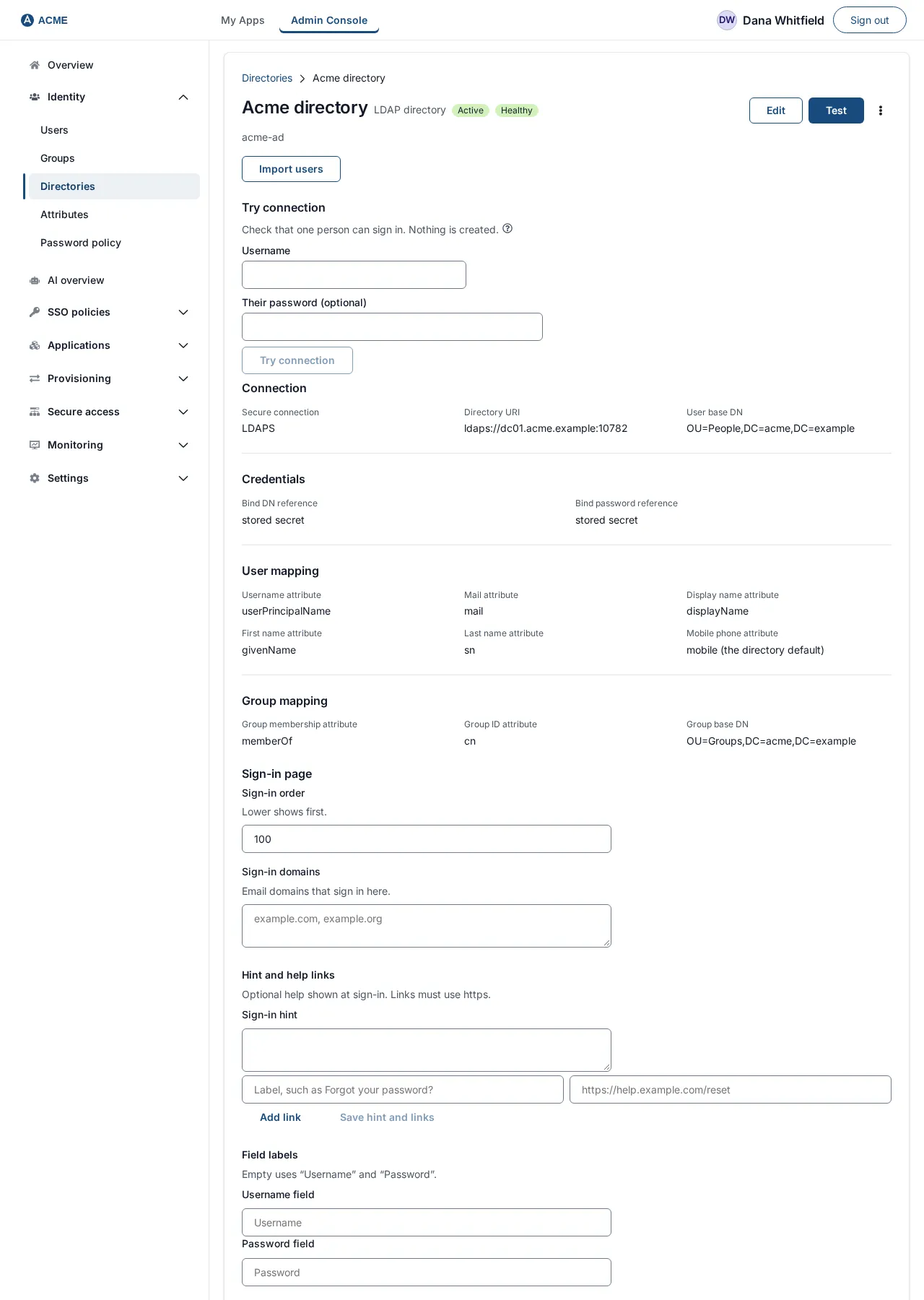
On the same page you set the sign-in domains. If you list acme.example, anyone who types an address at that domain is sent straight to this directory.
A domain can belong to only one provider, and you can list up to 20.
Keeping SSOGEN in step with AD
How each change in AD reaches SSOGEN:
| Change in Active Directory | Result in SSOGEN |
|---|---|
| Person added under the base DN | Account created at the next import or their first sign-in |
| Password changed | Works at the next sign-in, immediately |
| Person disabled or deleted | Account disabled with the reason Disabled in or Removed from the directory, sessions end; applies in an import that is allowed to retire people |
| Person moved to another OU inside the base DN | Nothing changes |
| Username really changes | Treated as one departure and one arrival, so access is reassigned |
Two details come from AD itself:
- Nested and primary groups. How
memberOfhandles them is AD’s behavior, and SSOGEN reads exactly what the domain returns; Try connection shows which groups a person gets. - Renamed groups. A group renamed in AD is a new group in SSOGEN, because groups are matched by name.
Beyond the password
The AD password can be the only step, or one of several.
- More factors. Add an authenticator app, a passkey or recovery codes with SSO multi-factor authentication.
- No password prompt. For domain-joined office computers you can remove the password prompt with Kerberos. That needs this AD connection to exist first, because the Windows account is matched to a person in the directory.
- Password write-back. SSOGEN can also write a new password back into AD. This is off by default and needs a Super admin to switch on Directory password write enabled and a delegated Reset Password right for the service account on the people OU. Many security teams decline the second part, and every other feature works without it.
Questions people ask
Can Active Directory be used for SSO?
Active Directory holds accounts and checks passwords. With SSOGEN in front of your applications, one AD sign-in opens them all, and policies decide when a second step is needed.
Is Active Directory the same as LDAP?
Active Directory speaks LDAP, and SSOGEN reads it that way. The LDAP page covers the protocol side and OpenLDAP.
Do I need AD FS?
No, not for this method. SSOGEN talks to a domain controller directly. If you already run AD FS and want to keep it, add it as a SAML provider instead.
Where to go next
- Setup. Start with the Active Directory and LDAP setup guide, then read how directory sync treats leavers.
- Other methods. They are listed under sign-in methods.
- LDAP. Active Directory speaks LDAP but is more than an LDAP server. The LDAP vs Active Directory guide explains how.
- Certificate. The LDAPS port and certificate checklist lists what the certificate needs.