SSOGEN / Single sign-on for Snowflake with SSOGEN
SSOGEN
Single sign-on for Snowflake with SSOGEN
You run one CREATE SECURITY INTEGRATION statement as ACCOUNTADMIN, match people on LOGIN_NAME and keep one administrator on a password.
The example account URL is https://acme-prod.snowflakecomputing.com; SSOGEN runs at https://acme.ssogen.ai.
What you need
- A Snowflake user who can use the ACCOUNTADMIN role, signed in with a password.
- A Snowflake user for every person whose
LOGIN_NAMEequals their email address in SSOGEN. - At least one account administrator who keeps a Snowflake password.
- An SSOGEN administrator who can save SAML applications (see Add a SAML application in SSOGEN).
Decide which account URL people use. Snowflake accepts several forms; the one you register in SSOGEN must be the one in the integration. The examples use the account-name form https://<orgname>-<account_name>.snowflakecomputing.com.
Step 1. In SSOGEN: add Snowflake
Follow Add a SAML application in SSOGEN with the gallery card Snowflake and these values:
| SSOGEN field | Value for Snowflake |
|---|---|
| Service provider entity ID | https://acme-prod.snowflakecomputing.com |
| Assertion consumer service URL | https://acme-prod.snowflakecomputing.com/fed/login |
| Identify the person by | email — mail address |
| Launch URL (https) | https://acme-prod.snowflakecomputing.com |
Snowflake asks for the email name ID format by default, which matches email. Assign the person who will run the first sign-in. On the Integration tab copy the Signing certificate row with Copy: Snowflake wants the base64 text on one line, without the BEGIN and END lines.
Step 2. In Snowflake
-
In a SQL worksheet, run
USE ROLE ACCOUNTADMIN;. -
Check the login names, and fix any that differ from the email in SSOGEN:
SHOW USERS;ALTER USER emily_johnson SET LOGIN_NAME = 'emily.johnson@acme.example';An SSO user must not have
MUST_CHANGE_PASSWORD = TRUE, and an expired Snowflake password blocks SSO even though it is not used. -
Create the integration:
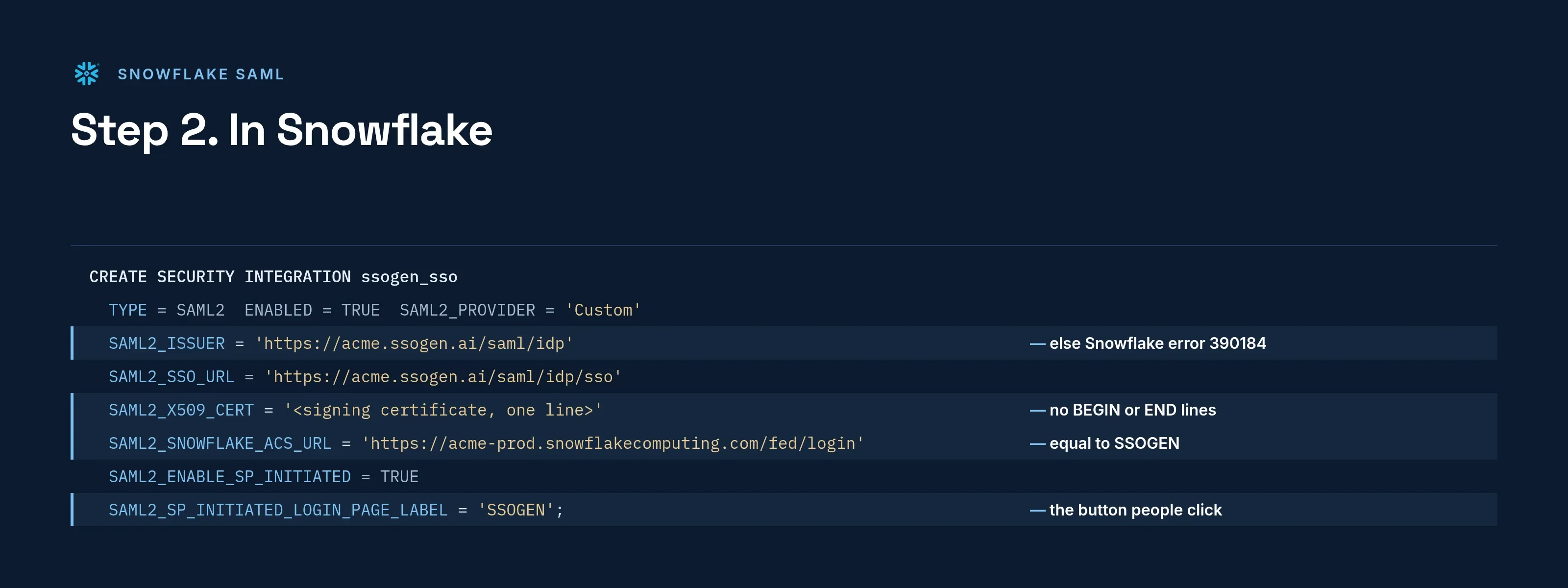
CREATE SECURITY INTEGRATION ssogen_ssoTYPE = SAML2ENABLED = TRUESAML2_ISSUER = 'https://acme.ssogen.ai/saml/idp'SAML2_SSO_URL = 'https://acme.ssogen.ai/saml/idp/sso'SAML2_PROVIDER = 'Custom'SAML2_X509_CERT = '<the copied signing certificate, one line>'SAML2_SNOWFLAKE_ISSUER_URL = 'https://acme-prod.snowflakecomputing.com'SAML2_SNOWFLAKE_ACS_URL = 'https://acme-prod.snowflakecomputing.com/fed/login'SAML2_ENABLE_SP_INITIATED = TRUESAML2_SP_INITIATED_LOGIN_PAGE_LABEL = 'SSOGEN';If Snowflake does not accept the issuer or ACS URL for this account, the statement fails and lists the values it accepts.
-
Check what was stored with
DESC SECURITY INTEGRATION ssogen_sso;.SAML2_SNOWFLAKE_ACS_URLandSAML2_SNOWFLAKE_ISSUER_URLmust equal the values in SSOGEN.
The login page now shows a button with the label SSOGEN. When the test works, Snowflake can send every browser straight to SSOGEN with ALTER ACCOUNT SET LOGIN_IDP_REDIRECT = ( DEFAULT = ssogen_sso );, and an authentication policy can require SAML for everyone except the administrator who keeps a password.
When SSOGEN’s signing certificate changes, run ALTER SECURITY INTEGRATION ssogen_sso SET SAML2_X509_CERT = '<new certificate, one line>';.
Step 3. People and a sign-in test
- Assign the people or groups who use Snowflake on the application’s Assignments tab in SSOGEN.
- In a private browser window open
https://acme-prod.snowflakecomputing.com, select the SSOGEN button and sign in at SSOGEN. Snowflake opens as the user whose login name equals the email SSOGEN sent.
Creating the integration changes nothing for password users. Keep the administrator’s password session open until the test has passed.
Signing in
People select Snowflake in My Apps, or open the account URL and select SSOGEN. They see SSOGEN’s sign-in page only if they have no SSOGEN session yet. Drivers and tools that use authenticator=externalbrowser open the same sign-in in a browser.
Troubleshooting
On failure Snowflake shows “SAML response is invalid or matching user is not found. Contact your local system administrator.” with an ID in brackets. A role with the MONITOR privilege reads the reason with SELECT JSON_EXTRACT_PATH_TEXT(SYSTEM$GET_LOGIN_FAILURE_DETAILS('<id>'), 'errorCode');.
| Code | Cause |
|---|---|
| No ID in the message | No user has a LOGIN_NAME equal to the email SSOGEN sent. Check with SHOW USERS;. |
390165 SAML_RESPONSE_INVALID_SIGNATURE |
SAML2_X509_CERT is not SSOGEN’s current certificate. |
390168 SAML_RESPONSE_INVALID_DESTINATION |
The ACS URL in SSOGEN uses another account URL form than SAML2_SNOWFLAKE_ACS_URL. |
390169 SAML_RESPONSE_INVALID_AUDIENCE |
The entity ID in SSOGEN is not SAML2_SNOWFLAKE_ISSUER_URL. |
390184 SAML_RESPONSE_INVALID_ISSUER |
SAML2_ISSUER is not https://acme.ssogen.ai/saml/idp. |